데이터 분석(SQL) 4일차 - mysql 사용
1. 조회한 데이터에 아무 값이 없을 경우
1) 없는 값을 제외해주기
📌 MySQL에서는 사용할 수 없는 값(null이 아님)을 연산에서 0으로 간주함
📌 데이터 값이 null이여야 계산식에서 제외 시켜줌!
예) rating에 Not given이라 입력된 값을 null로 수정 후 평균 구함
select restaurant_name,
      avg(rating) average_of_rating,
      avg(if(rating<>'Not given', rating, null)) average_of_rating2 from food_orders
group by 1
2) 다른 값을 대신 사용하기
📌 데이터 분석 시에 평균값 혹은 중앙값 등 대표값을 이용하여 대체해주고도 한다.
- 다른 값으로 변경하고 싶을 때, 다음 두 문법 사용 가능
- 다른 값이 있을 때 조건문 이용하기 : if(rating>=1, rating, 대체값)
- null 값일 때 : coalesce(age, 대체값)
2. 데이터가 상식적이지 않은 값을 가지고 있는 경우
📌 예) 음식 주문한 고객의 나이가 93세 또는 2세일 경우, 결제 일자가 1970대일 경우
1) 조건문으로 값의 범위를 지정해 주기
📌 조건문으로 가장 큰 값, 가장 작은 값의 범위를 지정해 주기
(상식적인 수준 안에서의 범위로 지정)
예) 나이의 범위를 지정해준다.
select customer_id, name, email, gendor, age,
       case when age<15 then 15
           when age>80 then 80
           else age end "범위를  지정해준 age"
from customers
3. Pivot table(피벗 테이블) 만들기
1) pivot table 구조
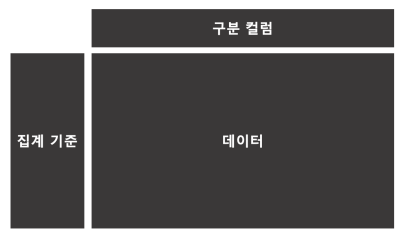
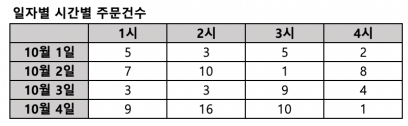
✔️ pivot table 이란: 2개 이상의 기준으로 데이터를 집계할 때, 보기 쉽게 배열하여 보여주는 테이블
✔️ pivot table 기본 구조
 - 예)
- 예)
2) pivot table 구조 만들기
💡 꼭 max()안에서 작성하기, 한 열마다 max 써주기
-
예1)
select restaurant_name,
      max(if(hh='15', cnt_order, 0)) "15",
      max(if(hh='16', cnt_order, 0)) "16",
      max(if(hh='17', cnt_order, 0)) "17",
      max(if(hh='18', cnt_order, 0)) "18",
      max(if(hh='19', cnt_order, 0)) "19",
      max(if(hh='20', cnt_order, 0)) "20"
from
(
select a.restaurant_name,
      substring(b.time, 1, 2) hh,
      count(1) cnt_order
from food_orders a inner join payments b on a.order_id=b.order_id where substring(b.time, 1, 2) between 15 and 20
group by 1, 2 ) a
group by 1 order by 7 desc
- 예2) 성별, 연령별 주문건수 Pivot Table 뷰 만들기 (나이는 10~59세 사이, 연령 순으로 내림차순
 select age,
       max(if(gender='male', order_count, 0)) male,
       max(if(gender='female', order_count, 0)) female
from
(
select b.gender,
       case when age between 10 and 19 then 10
            when age between 20 and 29 then 20
            when age between 30 and 39 then 30
            when age between 40 and 49 then 40
            when age between 50 and 59 then 50 end age,
       count(1) order_count
from food_orders a inner join customers b on a.customer_id=b.customer_id where b.age between 10 and 59
group by 1, 2 ) t
group by 1 order by age
4. Window Function - Rank, Sum 등
📌 Window Function은 각 행의 관계를 정의하기 위한 함수로 그룹 내의 연산을 쉽게 만들어 준다.
1) Window Function의 기본 구조
window_function(argument) over (partition by 그룹 기준 컬럼 order by 정렬 기준)
-
window_function : 기능 명을 사용 (sum, avg 와 같이 기능명이 있습니다)
-
argument : 함수에 따라 작성하거나 생략함
-
partition by : 그룹을 나누기 위한 기준, group by 절과 유사함
-
order by : window function 을 적용할 때 정렬 할 컬럼 기준을 적어준다.
1-1) Rank - window 함수 사용 법
📌 N 번째까지의 대상을 조회하고 싶을 때, Rank (특정 기준으로 순위를 매겨주는 기능)
-
예1) 음식 타입별로 주문 건수가 가장 많은 상점 3개씩 조회하기
select cuisine_type, # 3. 3위까지 조회하고, 음식 타입별, 순위별로 정렬
      restaurant_name,
      order_count,
      rn "순위"
from
( # 2.Rank 함수 적용
select cuisine_type,
      restaurant_name,
      rank() over (partition by cuisine_type order by order_count desc) rn,        	   order_count
from
( # 1.음식 타입별, 음식점별 주문 건수 집계
select cuisine_type, restaurant_name, count(1) order_count
from food_orders
group by 1, 2
) a
) b
where rn<=3
order by 1, 4
1-2) sum - window 함수 사용 법
📌 Sum 은 앞서 배운 합계를 구하는 기능과 동일
📌 다만, 누적합이 필요하거나 카테고리별 합계컬럼와 원본 컬럼을 함께 이용할 때 유용하게 사용할 수 있다.
-
예2) 전체에서 차지하는 비율, 누적합을 구할 때, Sum
select cuisine_type, # 2. 카테고리별 합, 카테고리별 누적합 구하기
      restaurant_name,
      order_count,
      sum(order_count) over (partition by cuisine_type) sum_cuisine_type,        		   sum(order_count) over (partition by cuisine_type order by order_count, restau
from
( # 1. 음식 타입별, 음식점별 주문 건수 집계
select cuisine_type, restaurant_name, count(1) order_count
from food_orders
group by 1, 2
) a
5. 날짜 포맷과 조건까지 한번에! (포맷 함수)
1) 날짜 데이터의 이해
📌 날짜 데이터가 문자타입 또는 숫자타입으로 되어 있을 수 있다.
📌 년, 월, 일, 시, 분, 초 등의 값을 모두 갖고 있으며 목적에 따라 ‘월ʼ, ‘주ʼ, ‘일ʼ 등으로 포맷을 변경할 수도 있다.
2) 날짜 타입으로 변경
yyyy-mm-dd 형식의 컬럼을 date type 으로 변경하기
- 문자 또는 숫자 형태로 되어 있는 날짜를 날짜 타입(date)로 변경 [date 함수 사용]
select date(date) date_type,
	    date
from payments
3) 년, 월, 일, 주로 각각 조회
년: Y(4자리), y(2자리)
월: M, m
일: d, e
요일: w
- 날짜 예)
select date(date) date_type, date_format(date(date), '%Y') "년", date_format(date(date), '%m') "월", date_format(date(date), '%d') "일", date_format(date(date), '%w') "요일" from payments - 문제 1
- 년도, 월을 포함하여 데이터 가공하기select date_format(date(date), '%Y') y, date_format(date(date), '%m') m, order_id from food_orders a inner join payments b on a.order_id=b.order_id - 문제 2
- 년도, 월별 주문건수 구하기select date_format(date(date), '%Y') y, date_format(date(date), '%m') m, count(1) order_count from food_orders a inner join payments b on a.order_id=b.order_id group by 1, 2 - 문제 3
- 3월 조건으로 지정하고, 년도별로 정렬하기select date_format(date(date), '%Y') y, date_format(date(date), '%m') m, count(1) order_count from food_orders a inner join payments b on a.order_id=b.order_id where date_format(date(date), '%m')='03' group by 1, 2 order by 1