파이썬 복습 (by 문제 풀이, 출처 : 프로그래머스)
숫자 문자열과 영단어
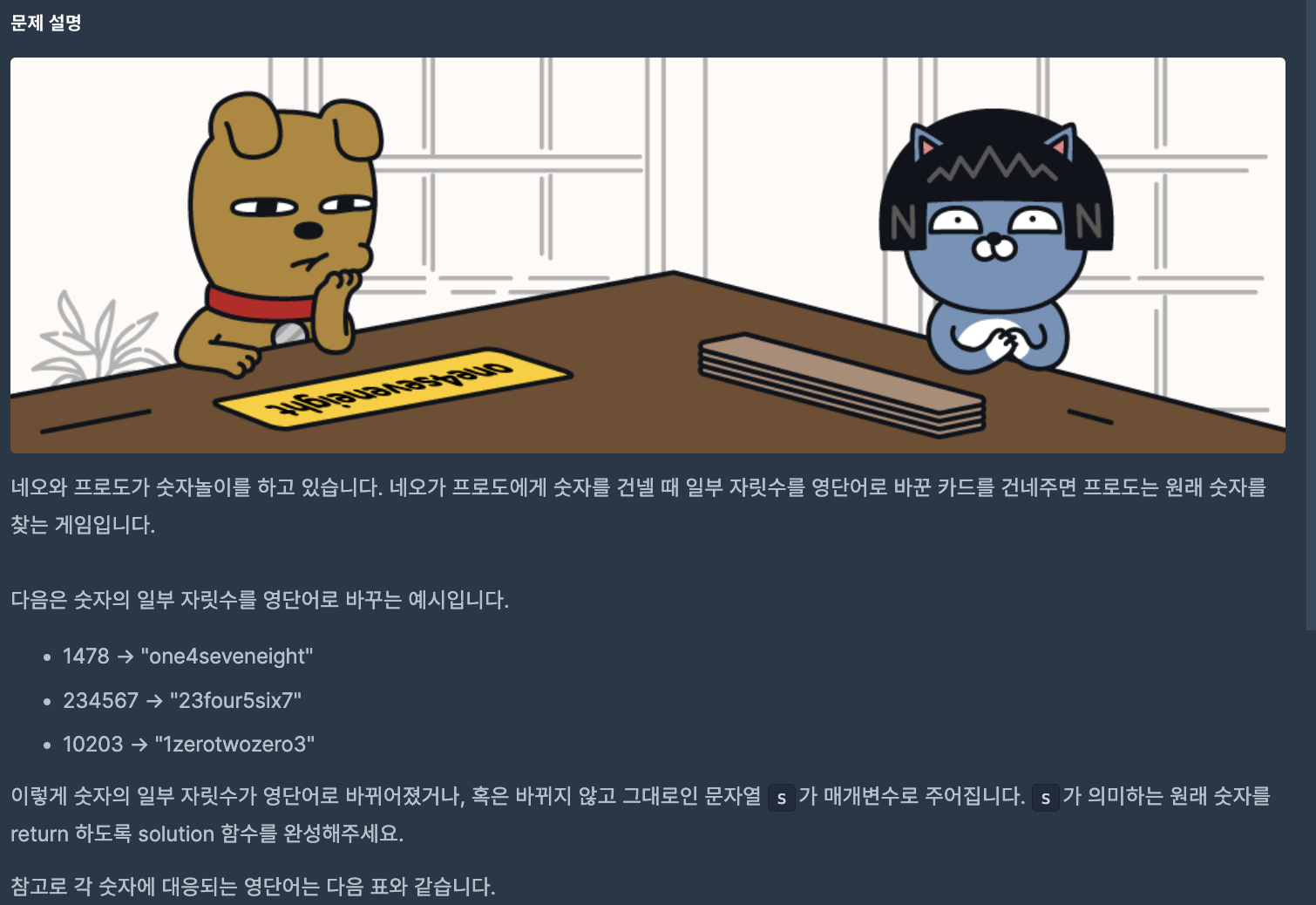
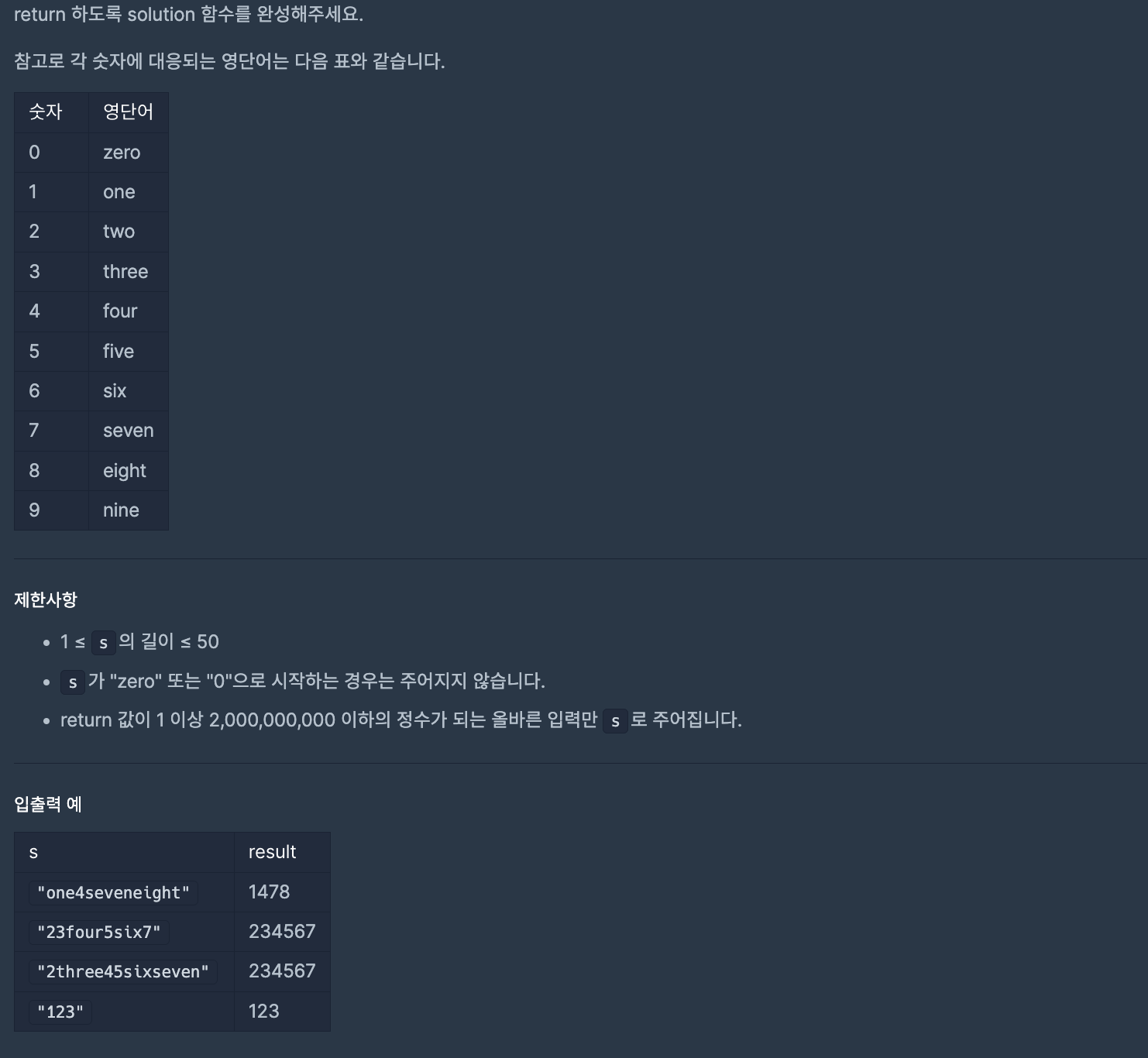
🧚
가장 먼저 만든 것은 진짜 숫자와 영문 숫자를 담은 딕셔너리이다. key와 value 접근을 통해 숫자 변환을 할 예정이기 때문이다.
First attempt
하지만 문자열을 어떻게 o이 아닌 one을 유효한 문자열로 인식하고 나누지? 에 대한 고민이 이어졌다.
- 때문에 문자열 한 개씩 접근하며 숫자가 아닌 문자일 경우에는 문자열이 더 더해갈 수 있는 경우라 판단해서 문자열을 추가할 수 있게 해놨다.
- 그 다음으로는 유효한 문자 즉, one 같이 딕셔너리에 선언된 key의 경우에는 value값을 가져와야 하기 때문에 in을 사용해 존재하는 if 문에 걸리도록 만들었다.
mapped = {"zero" : "0", "one" : "1", "two" : "2", "three" : "3", "four" : "4", "five" : "5", "six" : "6", "seven" : "7", "eight" : "8", "nine" : "9"}

def solution(s):
    answer = ""

    str_tmp = ""
    for i in range(len(s)):
        if str_tmp in mapped.keys():
            answer += mapped[str_tmp]
            str_tmp = ""

        if s[i].isnumeric():
            answer += s[i]
            str_tmp = ""
        else:
            str_tmp += s[i]
    if str_tmp != "":
        answer += mapped[str_tmp]

    return int(answer)
Bad
- 근데 해당 코드에서는 마지막 문자열을 숫자로 바꿔주는 작업을 해줬어야 할 뿐만 아니라
- 숫자로 변환 작업을 거친다면 문자열을 바꿔주는 작업을 해줘야 한다.
- 즉 숫자로 바꿔주는 작업을 문자열마다 해야 한다는 번거로움이 있다는 것이다.
테스트는 통과했지만 뭔가 찝찝해서 다른 사람들은 어떻게 풀었는지 확인해봤는데
- 딕셔너리 생성과 key에 문자열, value에는 정수형을 넣는 것은 동일하다
- 딕셔너리의 특성상 .items()를 하면 key와 value 모두 갖고 올 수 있는데 이를 이용했다.
- 무엇보다 가장 차이점은 딕셔너리만 도는데도 불구하고 replace() 내장 함수를 이용해서 불필요한 if문을 삭제할 수 있었다는 점이다.
- 즉, 딕셔너리의 key 값 중에 문자열이 포함되어 있다면 해당 문자열이 이어져있어도, 같은 숫자를 뜻하는 문자열이 반복적으로 존재하여도, 숫자로 대체 가능하다는 것이다.
(문자열 안에 존재하기만 한다면 특정 문자열로 바꿔주는 기능을 replace가 해주는 것이다.) - 또한 바꿀 필요가 없는, 이미 숫자형인 문자열은 그대로 숫자로 표현 가능하다는 것이다.
python의 replace()
replace() 함수는 파이썬의 문자열(String) 메서드로, 문자열 내에서 특정 부분 문자열을 다른 문자열로 대체하는 기능을 제공합니다.
📌
def solution(s):

    num = {'zero':0, 'one':1, 'two':2, 'three':3,
            'four':4, 'five':5, 'six':6, 'seven':7,
            'eight':8, 'nine':9}

    for word, num in num.items():
        s = s.replace(word, str(num))

    return int(s)
가장 많이 받은 선물
허허 작년에 카카오 인턴 코테 지원했을 때 못 풀었던 문제이다
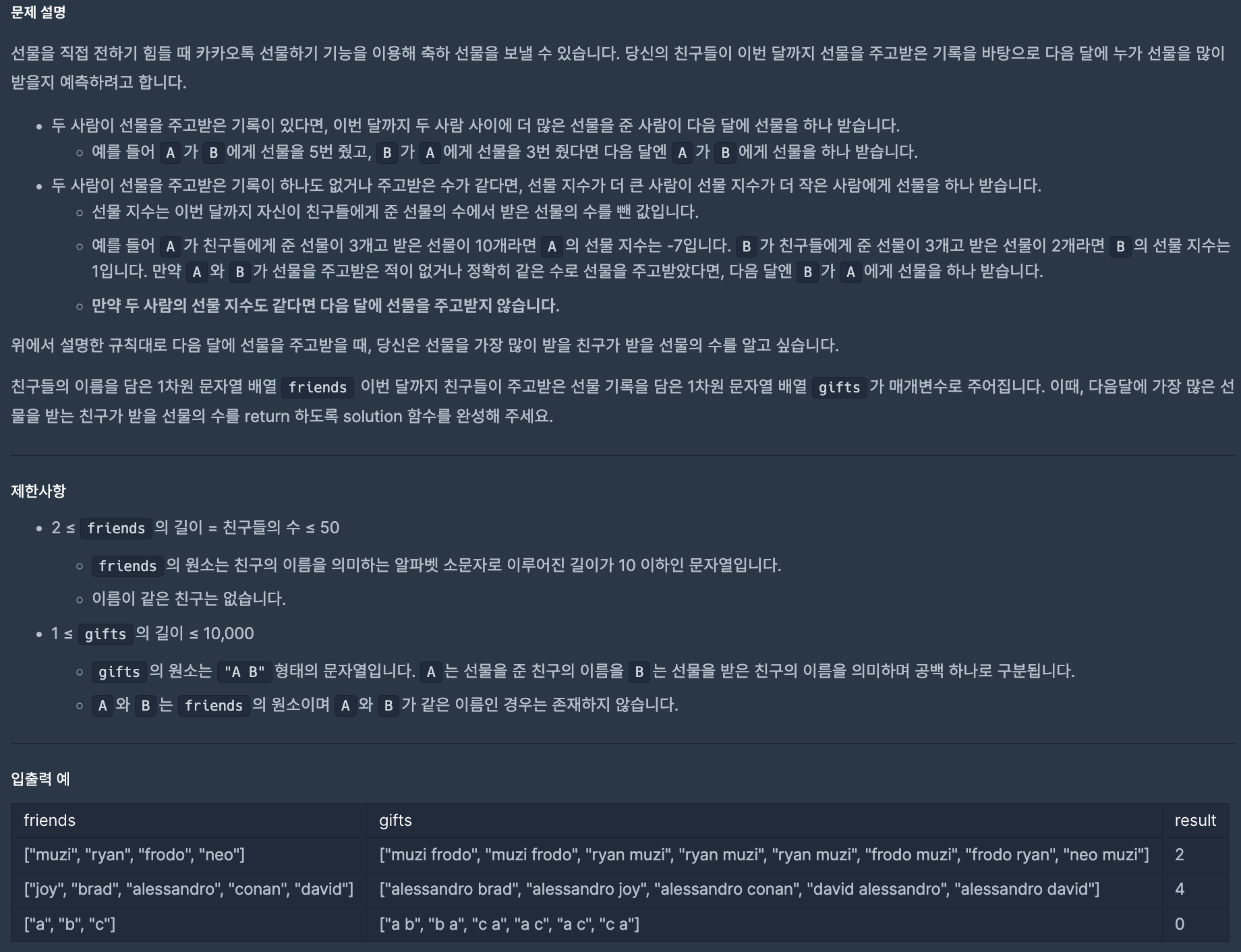
🧚
1. 조건 파악
-
제시된 첫번째 조건에 따르면 주고 받은 선물 기록에 따라 더 많이 준 사람에게 선물을 하나 주어야 한다.
-> 주고 받은 기록은 문자열 그 자체로 딕셔너리에 저장하는 작업이 필요했다. (gift_between) -
제시된 두번째 조건에 따르면 같을 경우에는 "선물 지수"라는 별도의 지표가 있어야 함을 파악했다.
- 이 또한 친구들에 따라 값을 부여해야 하는 값이기 때문에 딕셔너리가 필요했다. (gift_score)
- 주의해야 할 점은 선물지수도 같다면 어떠한 선물도 주고 받지 않는다는 것이다.
2. 예시 분석
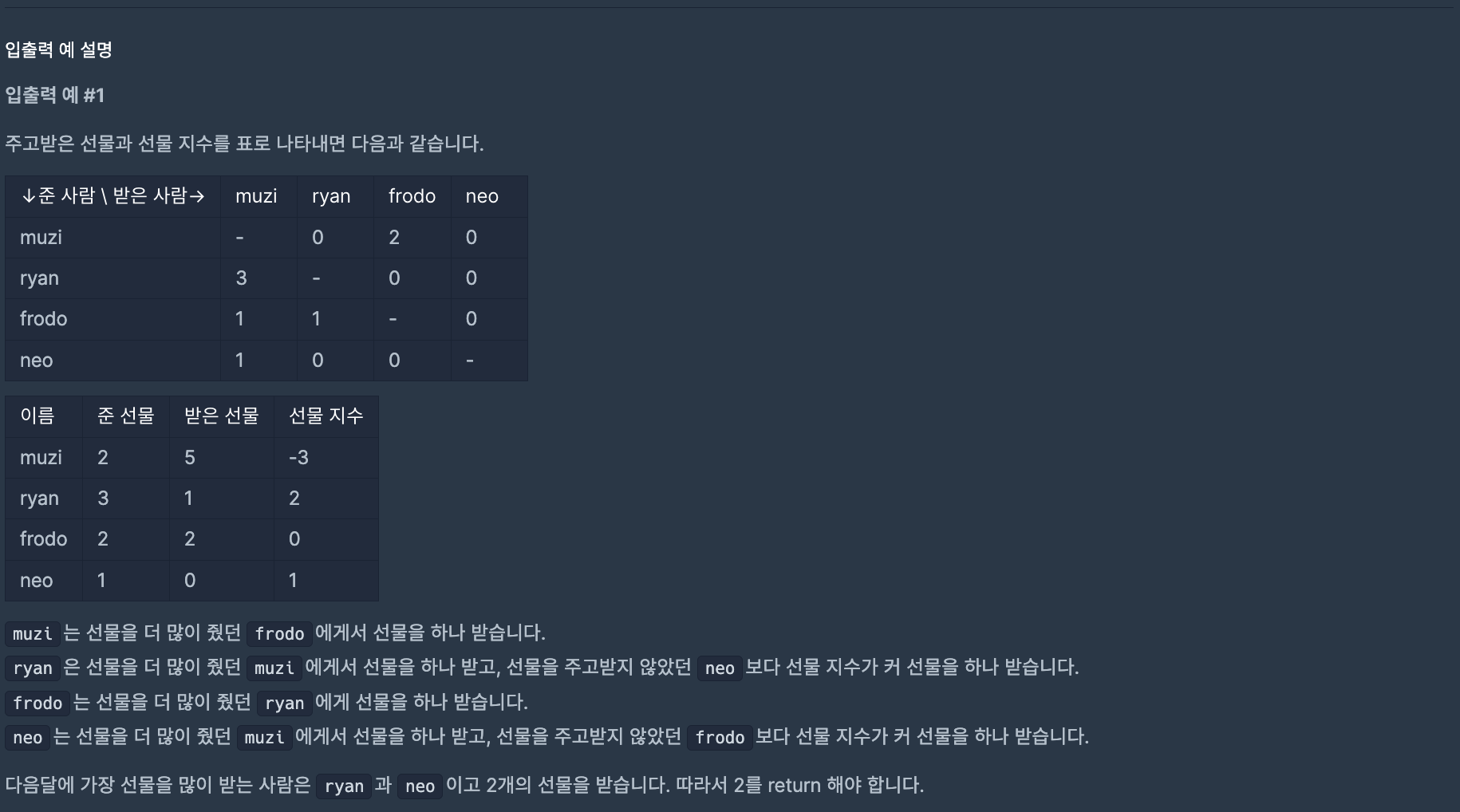
- 첨부한 두 번째 사진처럼 주고 받은 선물과 선물 지수를 표로 나타내는 작업을 수작업으로 해주면서 필요한 딕셔너리 / 배열을 파악하고자 했다.
- 주고받은 선물의 갯수를 세는 딕셔너리가 필요했다. (이미 존재하는 gift_between 이용)
- 딕셔너리 형태에서는 겹치는 관계는 존재하기 때문에 return 할 for 문을 만들 때에는- 딕셔너리를 짝수로 만들었음을 이용해 odd/even 성질을 이용해 시간 복잡도를 반으로 낮추고자 했다.
했던 실수들
- 변수이름을 기억 못해 key를 넣어야 하는 곳에 value 변수를 넣었다. 변수이름의 중요성을 느꼈다.
- 문제가 길어서 해석하는데 꽤 걸렸는데 예시부터 먼저 들이받는 나쁜 습관이 있는데 조건 -> 예시 파악으로 루틴을 잡아야겠다.
📌
Raw Code
def solution(friends, gifts):
    answer = {}

    gift_between = {}
    gift_score = {}
    answer

    for friend in friends:
        gift_score[friend] = 0
        answer[friend] = 0

    for i in range(len(friends)-1):
        for j in range(i+1, len(friends)):
            one_name = friends[i] + " " + friends[j]
            r_one_name = friends[j] + " " + friends[i]

            gift_between[one_name] = 0
            gift_between[r_one_name] = 0

    for gift in gifts:

        # 주고 받은 선물 점수
        gift_between[gift] += 1

        raw = list(gift.split())

        give = raw[0]
        receive = raw[1]

        # 선물 점수
        gift_score[give] += 1
        gift_score[receive] -= 1

    cnt = 0
    for double, point in gift_between.items():
        cnt += 1

        if cnt % 2 == 0:
            continue
        raw = list(double.split())

        give = raw[0]
        receive = raw[1]

        r_raw = receive + " " + give
        r_raw_point = gift_between[r_raw]


        if point > r_raw_point:
            answer[give] += 1
        elif point < r_raw_point:
            answer[receive] += 1
        else:
            g_gift_score = gift_score[give]
            r_gift_score = gift_score[receive]

            if g_gift_score > r_gift_score:
                answer[give] += 1
            elif r_gift_score > g_gift_score:
                answer[receive] += 1
            else:
                continue

    return max(answer.values())
📌
Moduled Code
gift_between = {}
gift_score = {}
answer = {}

def give_final_score(gift_between, gift_score, answer):

    cnt = 0
    for double, point in gift_between.items():
        cnt += 1

        if cnt % 2 == 0:
            continue
        raw = list(double.split())

        give = raw[0]
        receive = raw[1]

        r_raw = receive + " " + give
        r_raw_point = gift_between[r_raw]


        if point > r_raw_point:
            answer[give] += 1
        elif point < r_raw_point:
            answer[receive] += 1
        else:
            g_gift_score = gift_score[give]
            r_gift_score = gift_score[receive]

            if g_gift_score > r_gift_score:
                answer[give] += 1
            elif r_gift_score > g_gift_score:
                answer[receive] += 1
            else:
                continue


def give_gift_score(gifts, gift_between, gift_score):
    for gift in gifts:

        # 주고 받은 선물 점수
        gift_between[gift] += 1

        raw = list(gift.split())

        give = raw[0]
        receive = raw[1]

        # 선물 점수
        gift_score[give] += 1
        gift_score[receive] -= 1

def init_gift_between(friends, gift_between):

    for i in range(len(friends)-1):
        for j in range(i+1, len(friends)):
            one_name = friends[i] + " " + friends[j]
            r_one_name = friends[j] + " " + friends[i]

            gift_between[one_name] = 0
            gift_between[r_one_name] = 0


def init_friends(friends):
    for friend in friends:
        gift_score[friend] = 0
        answer[friend] = 0


def solution(friends, gifts):

    init_friends(friends)
    init_gift_between(friends, gift_between)

    give_gift_score(gifts, gift_between, gift_score)
    give_final_score(gift_between, gift_score, answer)

    return max(answer.values())
파이썬 라이브러리 복습 - numpy
NumPy에서 가장 기본적인 데이터 구조는 배열이다.
NumPy 배열은 동일한 타입의 데이터를 담는 다차원 배열임.
Numpy 배열은 ndarray 클래스를 사용해서 생성할 수 있음.
NumPy 배열 생성
import numpy as np

# 1차원 배열 생성
a = np.array([1, 2, 3])

# 2차원 배열 생성
b = np.array([[1, 2, 3], [4, 5, 6]])

# 3차원 배열 생성
c = np.array([[[1, 2], [3, 4]], [[5, 6], [7, 8]]])

'''
# np 구조
[1 2 3]
[[1 2 3]
 [4 5 6]]
[[[1 2]
  [3 4]]

 [[5 6]
  [7 8]]]

 # list 구조
 [1, 2, 3, 4]

 '''

 # 배열의 크기 확인 : 배열.shape
 # (최대 차원에서의 배열의 크기, 차등 차원에서의 원소의 갯수, ...)
 # 즉 3차원 배열이 존재한다면 (3차원의 원소의 갯수, 2차원의 원소의 갯수, 1차원의 원소의 갯수)

print(a.shape)  # (3,)
print(b.shape)  # (2, 3)
print(c.shape)  # (2, 2, 2)
NumPy 연산
NumPy 배열은 다른 배열 또는 스칼라와의 연산을 지원함. NumPy 배열의 연산은 배열의 원소별로 이루어짐
a = np.array([1, 2, 3])
b = np.array([4, 5, 6])

# 원소별 덧셈
c = a + b  # [5, 7, 9]

# 원소별 곱셈
d = a * b  # [4, 10, 18]

# 스칼라와의 연산
e = a + 1  # [2, 3, 4]


a = np.array([1, 2, 3])

# 합계
b = np.sum(a)  # 6

# 평균
c = np.mean(a)  # 2.0

# 최소값
d = np.min(a)  # 1

# 최대값
e = np.max(a) # 3- NumPy 배열의 인덱싱과 슬라이싱은 Python 리스트의 인덱싱과 슬라이싱과 매우 유사함. NumPy 배열의 인덱싱과 슬라이싱을 사용하여 배열의 일부를 선택할 수 있음
- 다차원 NumPy 배열에서는 각 차원의 인덱스를 콤마로 구분하여 인덱싱할 수 있음
a = np.array([1, 2, 3, 4, 5])

# 인덱싱
b = a[0]  # 1
c = a[2]  # 3

# 슬라이싱
d = a[1:4]  # [2, 3, 4]
e = a[:3]   # [1, 2, 3]
f = a[3:]   # [4, 5]

a = np.array([[1, 2, 3], [4, 5, 6]])

# 인덱싱 : [차원, 인덱스]
b = a[0, 0]  # 1
c = a[1, 2]  # 6

# 슬라이싱 : [차원, 슬라이싱]
d = a[0, 1:3]  # [2, 3]
e = a[:, 1]    # [2, 5]
f = a[:, :2]   # [[1, 2], [4, 5]]
Numpy 배열 형태 변경 : reshape
- 조건 : reshape의 튜플의 형태가 최종 배열 갯수여야 함
a = np.array([[1, 2], [3, 4], [5, 6]])

# 배열의 형태 변경
b = a.reshape((2, 3))  # [[1, 2, 3], [4, 5, 6]]

# 배열 전치
c = a.T  # [[1, 3, 5], [2, 4, 6]]
NumPy 배열 병합과 분리
1. concatenate()
- 다차원 Numpy 배열을 병합하는 방법
- 병합할 배열을 첫 번째 인자로 전달하며, 두 개 이상의 배열을 병합할 경우에는 튜플 형태로 전달함
- axis 인자를 사용하여 병합할 방향을 지정할 수 있음 (0이 행 방향, 1이 열 방향)
a = np.array([[1, 2], [3, 4]])
b = np.array([[5, 6]])

# 배열 병합
c = np.concatenate((a, b), axis=0)  # [[1, 2], [3, 4], [5, 6]]

# 행 방향대로 배열을 병합함
2. 배열 분리
- 다차원 NumPy 배열을 분리하는 방법은 split() 함수를 사용
- split() 함수는 분리할 배열과 분리할 인덱스를 전달하며, 분리할 인덱스는 분리될 배열의 첫 번째 차원을 따라 지정함
- split() 함수는 분리된 배열을 튜플 형태로 반환함
a = np.array([[1, 2, 3], [4, 5, 6]])

# 배열 분리
# a 배열의 첫 번째 행을 기준으로 배열을 분리
b, c = np.split(a, [1], axis=0)  # [[1, 2, 3]], [[4, 5, 6]]
NumPy 주요 함수
NumPy는 배열의 계산과 관련된 다양한 함수를 제공함
- np.zeros() : 모든 원소가 0인 배열을 생성
- np.zeros((2, 3)) : 0 으로 채워진 크기가 2 X 3 인 배열을 생성 - np.ones() : 모든 원소가 1인 배열을 생성
- np.ones((2, 4)) : 1 로 채워진 크기가 2 X 4 인 배열을 생성 - np.arange() : 범위 내의 일정 간격을 가진 배열을 생성
- np.arange(1, 10, 2) : 1에서 10까지이고 간격이 2인 배열을 생성, 10은 당근 포함 X - np.linspace() : 범위 내에서 균등 간격으로 원하는 개수의 배열을 생성
- np.linspace(0, 1, 5) : 0에서 1까지이고 원하는 개수가 5개인 배열을 생성 - np.random.random() : 0 부터 1 사이의 난수를 가지는 배열을 생성
- np.random.random((3, 3)) : 0과 1사이의 균등 분포, 3x3인 배열 - np.random.randn() : 평균이 0이고 표준 편차가 1인 정규 분포를 따르는 난수를 가지는 배열을 생성
- np.random.randn(2, 4) : 평균이 0이고 표준편차가 1, 2x4인 배열
NumPy 수학함수
- sum() : 배열 전체 합
- mean() : 배열 평균
- cumsum() : 배열 누적 합
- cumprod() : 배열 누적 곱
- std() : 표준편차
- var() : 분산
- min() : 최소값
- max() : 최대값
- argmin() : 최소 원소의 색인 값
- argmax() : 최대 원소의 색인 값
파이썬 라이브러리 복습 - Pandas
Pandas는 파이썬 데이터 분석 라이브러리 중 하나로, 데이터 조작, 정제, 분석, 시각화 등을 위한 다양한 기능을 제공함
판다스는 시리즈와 데이터프레임이라는 자료형을 이용하여 데이터를 처리함
데이터 객체
DataFrame
DataFrame 객체는 행과 열로 이루어진 2차원 데이터를 다루기 위한 객체임
열은 각각의 변수를 나타내고, 행은 각각의 관측치를 나타냄
- 리스트를 사용해 행별로 값들을 생성해 DataFrame 객체를 생성하거나
- 딕셔너리를 사용해 열별로 값들을 생성해 DataFrame 객체를 생성하거나
- csv/excel 파일을 사용하여 DataFrame 객체를 생성할 수 있음
# 리스트를 사용하여 DataFrame 객체 생성하기
import pandas as pd

data = [['A', 1], ['B', 2], ['C', 3]]
df = pd.DataFrame(data, columns=['col1', 'col2'])
print(df)
# 출력 결과
#   col1  col2
# 0    A     1
# 1    B     2
# 2    C     3

# 딕셔너리를 사용하여 DataFrame 객체 생성하기
data = {'col1': ['A', 'B', 'C'], 'col2': [1, 2, 3]}
df = pd.DataFrame(data)
print(df)
# 출력 결과
#   col1  col2
# 0    A     1
# 1    B     2
# 2    C     3

# CSV 파일을 사용하여 DataFrame 객체 생성하기
df = pd.read_csv('data.csv')
df = pd.DataFrame(df)
print(df)
선택하기
- 행을 선택하고 싶다면? df.loc[]
- 열을 선택하고 싶다면? df["열 이름"]
# 열 선택하기
df['col1']
df[['col1', 'col2']]

# 행 선택하기
df.loc[0]
df.loc[[0, 1, 2]]
조작하기
- DataFrame 객체에서는 데이터를 추가, 삭제, 수정하는 등 다양한 조작을 수행할 수 있음
# 열 추가하기
df['col3'] = [4, 5, 6]

# 열 삭제하기
# 원본 객체를 직접 수정한다는 의미의 inplace=True
df.drop('col3', axis=1, inplace=True)

# 행 추가하기
df.loc[3] = ['D', 4, 5]

# 행 삭제하기
df.drop(3, inplace=True)

# 열 이름 변경하기
df.rename(columns={'col1': 'new_col1'}, inplace=True)
Series 객체
Series 객체는 인덱스와 값으로 이루어진 1차원 데이터를 다루기 위한 객체임
Series 객체는 DataFrame 객체에서 열을 선택하여 추출할 수 있음
- 인덱스는 데이터 프레임의 맨 왼쪽에 위치하는 구별자임
# 리스트를 사용하여 Series 객체 생성하기
import pandas as pd

data = [1, 2, 3]
s = pd.Series(data, index=['a', 'b', 'c'])
print(s)
# 출력 결과
# a    1
# b    2
# c    3
# dtype: int64

# 딕셔너리를 사용하여 Series 객체 생성하기
data = {'a': 1, 'b': 2, 'c': 3}
s = pd.Series(data)
print(s)
# 출력 결과
# a    1
# b    2
# c    3
# dtype: int64
데이터 살펴보기
DataFrame 정보 확인하기
- df.info()
DataFrame 일부 데이터 보기 - df.head(), n으로 보고자 하는 행의 갯수를 입력할 수 있음
DataFrame 요약 통계량 보기 - df.describe(), 각 열의 개수, 평균, 표준편차, 최소값, 25%, 중앙값, 75%, 최대값 확인 가능
데이터 선택하기
열 선택하기
- df["열 이름"]
여러 개의 열을 선택하기
- df[["열 이름1", "열 이름2", ...]
행 선택하기
- df.loc["행 이름" 혹은 인덱스]
여러 개의 행을 선택하기
- df.loc[["행 이름", "행 이름", ....]]
데이터 필터링하기
df[조건식]
df[논리연산자]
df[df["열 이름"].isin([확인할 배열])]
데이터 그룹화하기
- 특정한 열을 기준으로 데이터를 그룹화할 수 있음
df.groupby("열 이름")
# 국가별 금메달 수의 합계 구하기
df[df['Medal'] == 'Gold'].groupby('NOC')['Medal'].count()- 그룹화된 데이터에 대해 적용할 수 있는 집계 함수는 다양함
데이터 정렬하기
DataFrame에서는 특정한 열을 기준으로 데이터를 정렬할 수 있음
- 기본적으로 오름차순 정렬, 내림차순으로 정렬하려면 ascending=False 옵션을 추가함
# 오름차순으로 정렬하기
df.sort_values('열 이름')

# 내림차순으로 정렬하기
df.sort_values('열 이름', ascending=False)
인덱스 할당 : df.set_index('인덱스로 지정해줄 열 이름', inplace=True)
Pandas 심화
Pandas에서 groupby는 데이터를 그룹화하고 그룹화된 데이터에 대한 연산을 수행하는데 매우 유용한 기능임
import pandas as pd
import numpy as np

data = {'학년': ['1학년', '1학년', '2학년', '2학년', '3학년', '3학년', '3학년'],
        '성별': ['남', '여', '남', '여', '남', '여', '여'],
        '영어 성적': [80, 90, 70, 60, 85, 95, 75]}
df = pd.DataFrame(data)


# 같은 학년끼리 그룹화 진행
grouped = df.groupby('학년')

# 그룹화가 진행된 DataFrame에서 연산을 진행함
result = grouped['영어 성적'].agg(['mean', 'min', 'max', 'count'])
print(result)
그룹화된 데이터를 시각화
import matplotlib.pyplot as plt
import warnings

%matplotlib inline

# 지역을 기준으로 그룹화 진행 후 그룹별 sum된 인구 정보를 시각화 데이터(막대 바 그래프)로 표시함
grouped = df.groupby('Location')
result = grouped['Population'].sum()
result.plot(kind='bar')
plt.show()
그룹화된 데이터의 피벗 테이블 생성
data = {'국가': ['한국', '한국', '미국', '미국', '일본', '일본', '한국', '미국', '일본'],
        '성별': ['남', '여', '남', '여', '남', '여', '남', '여', '남'],
        '키': [170, 160, 180, 170, 165, 155, 175, 185, 175],
        '몸무게': [70, 60, 80, 65, 70, 50, 75, 85, 70]}
df = pd.DataFrame(data)

# 국가 > 성별로 데이터를 그룹화하고, 이에 대한 키와 몸무게에 대한 값들은 평균 값을 구한 뒤, 피벗 테이블로 생성함
table = pd.pivot_table(df, index=['국가', '성별'], values=['키', '몸무게'], aggfunc=np.mean)
print(table)