📚 오늘은….
프로젝트 도전 기능을 구현하였다.
- 추가 UI + 다양한 아이템 구현
- 1인칭 시점과 3인칭 시점
- 움직이는 플랫폼 구현
- 벽 타기 및 매달리기
💡프로젝트 진행
도전 기능 구현
추가 UI (난이도 : ★★☆☆☆)
- 점프나 대쉬 등 특정 행동 시 소모되는 스태미나를 표시하는 바 구현
- 이 외에도 다양한 정보를 표시하는 UI 추가 구현
- UICondotion과 PlayerCondition 에 스테미나 관련된 코드를 작성
- 스테미나에 대한 액션을 위한 StaminaAction 스크립터블 오브젝트 스크립트 작성
[CreateAssetMenu(menuName ="Items/Actions/Stamina")]
public class StaminaAction : ScriptableObject, IItemAction
{
    public int healStaminaAmount;
    public void Execute(Player player)
    {
        player.condition.AddStamona(healStaminaAmount);
    }
}- ItemData와 위 스크립터블오브젝트 바탕으로 아이템 데이터 생성
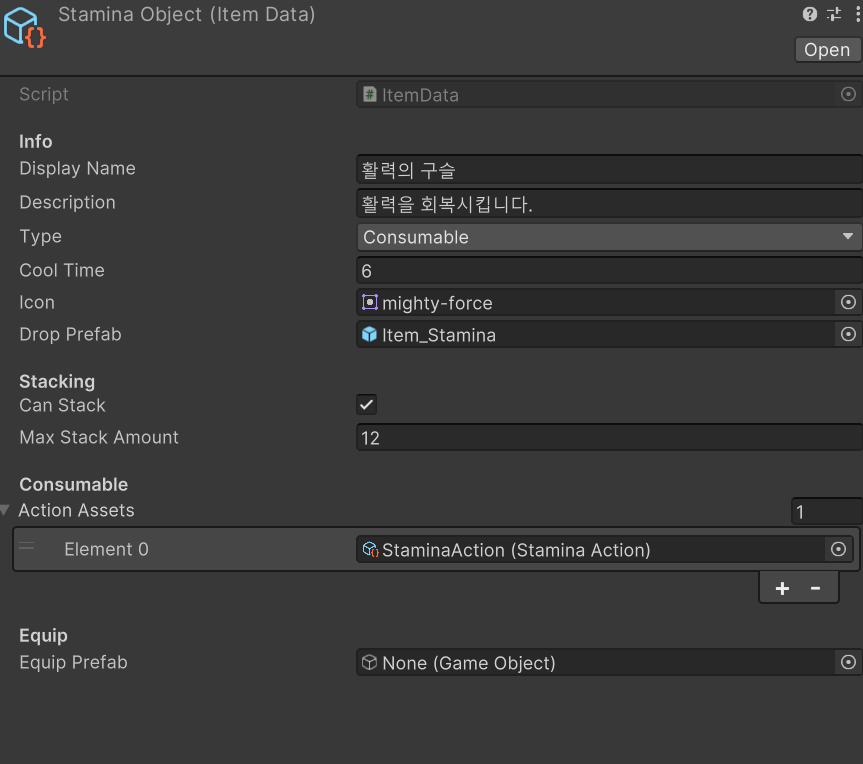
- 데이터 생성 후 기존 회복구슬을 복제하고 Unpack하여 프리팹 생성
- 끝
3인칭 시점 (난이도 : ★★★☆☆)
- 기존 강의의 1인칭 시점을 3인칭 시점으로 변경하는 연습
- 3인칭 카메라 시점을 설정하고 플레이어를 따라다니도록 설정
- 위 기능은 처음부터 구현해버림
- 그래서 v입력 시 1인칭과 3인칭을 전환하는 기능으로 구현
-
PlayerController에 아래 코드 추가
private bool isFirstPerson = false; // 시점 위치 [SerializeField] private Vector3 thirdPersonOffset = new Vector3(0, 2, -4); [SerializeField] private Vector3 firstPersonOffset = new Vector3(0, 1.6f, 0.2f); -
카메라 전환 함수 추가
private void SwitchView() { isFirstPerson = !isFirstPerson; Vector3 targetOffset = isFirstPerson ? firstPersonOffset : thirdPersonOffset; playerCamera.transform.localPosition = targetOffset; } -
InputSystem에 액션 추가 후 리스너 연결 및 핸들러 함수 구현
playerInput.actions["ViewToggle"].started += OnViewToggle;

private void OnViewToggle(InputAction.CallbackContext ctx)
{
    SwitchView();
}
-
움직이는 플랫폼 구현 (난이도 : ★★★☆☆)
- 시간에 따라 정해진 구역을 움직이는 발판 구현
- 플레이어가 발판 위에서 이동할 때 자연스럽게 따라가도록 설정
-
3D 오브젝트 - Cube 생성 후 알맞게 설정
-
MovePlatform 스크립트 작성
using System.Collections; using System.Collections.Generic; using TMPro; using UnityEngine; public class MovePlatform : MonoBehaviour { [SerializeField] private float moveSpeed; [SerializeField] private float moveDistance; [SerializeField] private float waitTime; [SerializeField] private LayerMask playerLayer; private bool isMovingRight; private Rigidbody rb; private Vector3 startPos; private Vector3 endPos; private HashSet<Transform> playerOnPlatform = new HashSet<Transform>(); [SerializeField] private TextMeshPro Right; [SerializeField] private TextMeshPro Left; private void Start() { rb = GetComponent<Rigidbody>(); startPos = transform.position; endPos = transform.position; isMovingRight = true; Right.enabled = true; Left.enabled = false; StartCoroutine(MovingPlatform()); } void FixedUpdate() { Vector3 delta = transform.position - endPos; endPos = transform.position; foreach(Transform t in playerOnPlatform) { t.position += delta; } } private IEnumerator MovingPlatform() { while(true) { //2초 대기 yield return new WaitForSeconds(waitTime); //도착지 계산 Vector3 targetPos = CalculateDistance(startPos, moveDistance); //이동 while (Vector3.Distance(transform.position, targetPos) > 0.01f) { Vector3 newPos = Vector3.MoveTowards(transform.position, targetPos, moveSpeed *Time.fixedDeltaTime); rb.MovePosition(newPos); yield return new WaitForFixedUpdate(); } //도착지 위치 고정 rb.MovePosition(targetPos); //방향전환 isMovingRight = !isMovingRight; DirectionTextConversion(); startPos = targetPos; } } private Vector3 CalculateDistance(Vector3 startPos, float moveDistance) { return startPos + (isMovingRight ? Vector3.right : Vector3.left) * moveDistance; } private void DirectionTextConversion() { Right.enabled = !Right.enabled; Left.enabled = !Left.enabled; } private void OnTriggerEnter(Collider other) { if(((1<<other.gameObject.layer) & playerLayer) != 0) { playerOnPlatform.Add(other.transform); } } private void OnTriggerExit(Collider other) { if (((1 << other.gameObject.layer) & playerLayer) != 0) { playerOnPlatform.Remove(other.transform); } } } -
인스펙터 설정
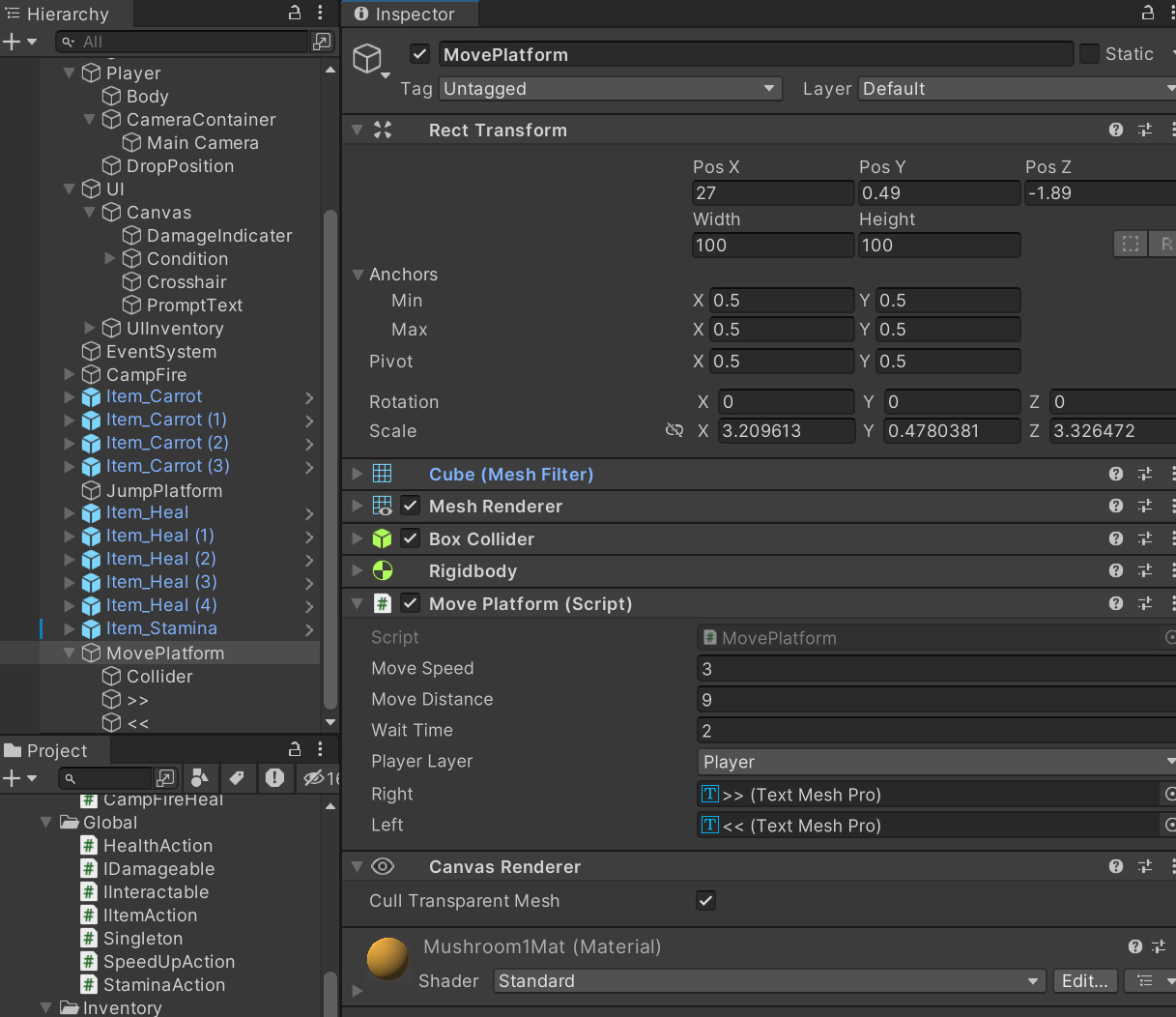
벽 타기 및 매달리기 (난이도 : ★★★★☆)
- 캐릭터가 벽에 붙어 타고 오르거나 매달릴 수 있는 시스템 구현.
- Raycast와 ForceMode를 함께 사용해 벽에 닿았을 때 적절한 물리적 반응을 구현
-
벽을 탈 수 있는 오브젝트 생성
-
해당 오브젝트에 추가할 ClimbingPlatform 스크립트 작성
public class ClimbingPlatform : MonoBehaviour, IInteractable { public string GetInteractPrompt() { string str = $"벽타기 : F"; return str; } public void OnInteract() { GameObject.FindWithTag("Player").GetComponent<PlayerController>().EnterClimbMode(); } } -
PlayerController, PlayrerInteraction 스크립트 수정
public class PlayerInteraction : MonoBehaviour
{
    //생략..
    public LayerMask layerMask1; //추가

    //생략..

    private void Awake()
    {
        playerInput = GetComponent<PlayerInput>();
        cam = Camera.main;

    }
    private void OnEnable()
    {
        playerInput.actions["Interaction"].started += OnInteractInput;
    }
    private void OnDisable()
    {
       playerInput.actions["Interaction"].started -= OnInteractInput;
    }

    // Update is called once per frame
    void Update()
    {
         //상호작용 레이캐스트
         InteractRay();
    }
    private void InteractRay()
    {
        PlayerController c = PlayerManager.Instance.Player.controller;
        if (Time.time - lastCheckTime > checkRate)
        {
            lastCheckTime = Time.time;

            Vector3 originBottom = transform.position + Vector3.down * 0.5f;

            Ray ray = cam.ScreenPointToRay(new Vector3(Screen.width / 2, Screen.height / 2));
            Ray ray1 = new Ray(originBottom,transform.forward);

            RaycastHit hit;
            RaycastHit hit1;

            if (Physics.Raycast(ray, out hit, maxCheckDistance, layerMask))
            {
                if (hit.collider.gameObject != curInteractGameObject)
                {
                    curInteractGameObject = hit.collider.gameObject;
                    curInteractable = hit.collider.GetComponent<IInteractable>();
                    SetPromptText();
                }
            }
            else if (Physics.Raycast(ray1, out hit1, 0.8f, layerMask1) && !c.isClimbing)
            {
                ClimbingPlatform climbTarget = hit1.collider.GetComponent<ClimbingPlatform>();
                if (climbTarget != null)
                {
                    curInteractGameObject = hit1.collider.gameObject;
                    curInteractable = hit1.collider.GetComponent<IInteractable>();
                    SetPromptText();
                }
            }
            else
            {
                curInteractGameObject = null;
                curInteractable = null;
                promptText.gameObject.SetActive(false);
            }
        }
    }

    private void SetPromptText()
    {
        promptText.gameObject.SetActive(true);
        promptText.text = curInteractable.GetInteractPrompt();
    }

    public void OnInteractInput(InputAction.CallbackContext context)
    {
        PlayerController c = PlayerManager.Instance.Player.controller;
        if (curInteractable != null)
        {
            curInteractable.OnInteract();
            curInteractGameObject = null;
            curInteractable = null;
            promptText.gameObject.SetActive(false);
        }
        if (curInteractable != null && c.isClimbing)
        {
            c.ToggleClimbMode();
            curInteractGameObject = null;
            curInteractable = null;
            promptText.gameObject.SetActive(false);
            return;
        }
    }

}
public class PlayerController : MonoBehaviour { //생략... [Header("벽타기")] public bool isClimbing = false; [SerializeField] private float climbingSpeed; [SerializeField] private LayerMask climbable; //생략... private void FixedUpdate() { //추가된 코드 if (isClimbing) ClimbMove(); else Move(); } private void LateUpdate() { if (canLook) CameraLook(); } // Move 입력 처리 private void OnMove(InputAction.CallbackContext ctx) { if (ctx.phase == InputActionPhase.Performed) curMovementInput = ctx.ReadValue<Vector2>(); else if (ctx.phase == InputActionPhase.Canceled) curMovementInput = Vector2.zero; } //생략... private void Move() { Vector3 dir = (transform.forward * curMovementInput.y + transform.right * curMovementInput.x) * movSpeed; dir.y = rb.velocity.y; rb.velocity = dir; } private void ClimbMove() { Vector3 dir = new Vector3(curMovementInput.x, curMovementInput.y, 0); rb.velocity = dir * climbingSpeed; // 바닥 근처에서 벽 감지 안 되면 자동 해제 Vector3 bottom = transform.position + Vector3.down * 0.9f; if (!Physics.Raycast(bottom, transform.forward, 1f, climbable)) { ExitClimbMode(); } } public void EnterClimbMode() { isClimbing = true; rb.useGravity = false; } public void ExitClimbMode() { isClimbing = false; rb.useGravity = true; } //생략... public void ToggleClimbMode() { if (isClimbing) ExitClimbMode(); else EnterClimbMode(); } }
다양한 아이템 구현 (난이도 : ★★★★☆)
- 추가적으로 아이템을 구현해봅니다.
- 예) 스피드 부스트(Speed Boost): 플레이어의 이동 속도를 일정 시간 동안 증가시킴.
더블 점프(Double Jump): 일정 시간 동안 두 번 점프할 수 있게 함.
무적(Invincibility): 일정 시간 동안 적의 공격을 받지 않도록 함. - 이미 필수 구현에서 회복아이템, 활력아이템 등 만들었으므로 패스
💭오늘의 회고
- 팀원에게 InputSystem behaviour 방식 구현에서
좀 더 효율적인 방식을 피드백 받았다. - 프로그래밍에 있어서 나는 사파인 것 같다
천천히, 꾸준하게, 끝까지