📚 오늘은….
개인 프로젝트 과제 중 필수 기능을 구현하였다.
💡프로젝트 진행 과정
체력바UI 구현
- UI 캔버스에 체력바를 추가하고 플레이어의 체력을 나타내도록 설정. 플레이어의 체력이 변할 때마다 UI 갱신.
- 캔버스 UI 오브젝트 생성
- 아래에 체력 UI 오브젝트를 넣을 Condition 빈 오브젝트 생성
- 아래에 health 오브젝트를 생성하고
- Icon과 체력바를 보여줄 Image 오브젝트 생성 후 알맞게 설정
- 스크립트 작성
- PlayerCondition, UICondition, Condition
- DamageIndicater 오브젝트와 스크립트 추가
추가적으로 구현한 것
CampFire : 체력 감소 테스트를 위해
CampFire_HealArea : 모닥불 주변에 있으면 체력 회복 테스트
동적 환경 조사 &아이템 데이터 구현
- Raycast를 통해 플레이어가 조사하는 오브젝트의 정보를 UI에 표시.
- 예) 플레이어가 바라보는 오브젝트의 이름, 설명 등을 화면에 표시.
- 플레이어 오브젝트에 추가할 PlayerInteraction 스크립트 작성
- 상호작용할 아이템 구현
- 아이템 데이터(스크립터블오브젝트)
- 아이템 오브젝트에 들어갈 ItemObject 스크립트
- 아이템 프리팹 구현
- 동적 환경 조사로 표시할 UI 구현
점프대 구현
- 점프대
Rigidbody ForceMode(난이도 : ★★★☆☆)- 캐릭터가 밟을 때 위로 높이 튀어 오르는 점프대 구현
- OnCollisionEnter 트리거를 사용해 캐릭터가 점프대에 닿았을 때 ForceMode.Impulse를 사용해 순간적인 힘을 가함.
- 점프대 오브젝트 생성
- 스크립트 작성
using System.Collections;
using System.Collections.Generic;
using UnityEngine;

public class JumpCube : MonoBehaviour
{
    [SerializeField]
    private float force;

    private void OnCollisionEnter(Collision collision)
    {
        collision.rigidbody.AddForce(Vector3.up * force, ForceMode.Impulse);
    }

}
아이템 사용 기능 구현 (+인벤토리 구현)
- 특정 아이템 사용 후 효과가 일정 시간 동안 지속되는 시스템 구현
- 예) 아이템 사용 후 일정 시간 동안 스피드 부스트
데이터 구조는 다음과 같이 구성하였다.
public enum ItemType
{
    Resource,
    Equipable,
    Consumable
}

[CreateAssetMenu(fileName = "Item", menuName = "New Item")]
public class ItemData : ScriptableObject
{
    [Header("Info")]
    public string displayName;
    public string description;
    public ItemType type;
    public float coolTime;
    public Sprite icon;
    public GameObject dropPrefab;


    [Header("Stacking")]
    public bool canStack;
    public int maxStackAmount;

    [Header("Consumable")]
    // 인스펙터에서 드래그 앤 드랍할 수 있도록 ScriptableObject 리스트로 선언
    public List<ScriptableObject> actionAssets;
    // 런타임에는 IItemAction 리스트로 캐스팅
    public IEnumerable<IItemAction> GetActions() =>
        actionAssets.OfType<IItemAction>();

    [Header("Equip")]
    public GameObject equipPrefab;

}
//-----------------------------------------------------------------------
public interface IItemAction
{
   void Execute(Player player);
}
//-----------------------------------------------------------------------
[CreateAssetMenu(menuName = "Items/Actions/SpeedUp")]
public class SpeedUpAction : ScriptableObject, IItemAction
{
    [Header("버프 강도")]
    public float speedIncrease;
    [Header("지속 시간(초)")]
    public float duration;

    public void Execute(Player player)
    {
        player.controller.ApplySpeedUp(speedIncrease, duration);
    }
}
//-----------------------------------------------------------------------
[CreateAssetMenu(menuName = "Items/Actions/Health")]
public class HealthAction : ScriptableObject, IItemAction
{
		[Header("회복 수치")]
    public int healAmount;
    public void Execute(Player player)
    {
        player.condition.Heal(healAmount);
    }
}
당근을 먹고 일정시간동안 스피드가 증가하는 기능을 추가해보자.
아이템 오브젝트와 상호작용(F) 를 하면,
플레이어 오브젝트에 있는 PlayerIntercation 스크립트에서
현재 상호작용 중인 오브젝트의 OnInteract() 메서드를 호출하고
상호작용 UI를 초기화 한다.
OnInteract() 은 IInteractable인터페이스를 상속받은 ItemObject 스크립트에 로직을 실행시킨다.
public class ItemObject : MonoBehaviour, IInteractable
{
    public ItemData ItemData;

    public string GetInteractPrompt()
    {
        string str = $"{ItemData.displayName}\n{ItemData.description}";
        return str;
    }

    public void OnInteract()
    {
        var player = PlayerManager.Instance.Player;
        player.AddItem(ItemData);
        Destroy(gameObject);
    }

}
플레이어에게 상호작용한 아이템을 넣고, 게임 씬 필드에 있는 오브젝트를 삭제한다.
public class Player : MonoBehaviour
{
	  //생략
    public Action<ItemData> addItem;

    public Transform dropPosition;

    private void Awake()
    {
			//생략
    }
    public void AddItem(ItemData data)
    {
        addItem?.Invoke(data);
    }

}
델리게이트를 활용하여 ItemData 타입 객체를 받아서
이 델리게이트에 미리 구독해둔 SlotsUI.OnItemAdded(ItemData)가 실행된다.
using System.Collections;
using System.Collections.Generic;
using UnityEngine;
using UnityEngine.InputSystem;

public class SlotsUI : MonoBehaviour
{
    [Header("UI 슬롯 4개를 할당")]
    public List<ItemSlot> slots;
		//addItem 구독
    void OnEnable()
    {
        if (PlayerManager.Instance?.Player != null)
            PlayerManager.Instance.Player.addItem += OnItemAdded;
    }

    void OnDisable()
    {
        if (PlayerManager.Instance?.Player != null)
            PlayerManager.Instance.Player.addItem -= OnItemAdded;
    }

    // 아이템 획득 시
    private void OnItemAdded(ItemData data)
    {
        foreach (var slot in slots)
        {
            if (!slot.IsEmpty
                && slot.itemData == data
                && data.canStack)
            {
                slot.AddStack(1);
                return;
            }
        }

        // 2) 아니면 빈 슬롯을 찾아 새로 추가
        foreach (var slot in slots)
        {
            if (slot.IsEmpty)
            {
                slot.AddItem(data);
                return;
            }
        }
    }

    void Update()
    {
        // 1~4번 키 입력 처리
        for (int i = 0; i < slots.Count; i++)
        {
            if (Keyboard.current[(Key)((int)Key.Digit1 + i)].wasPressedThisFrame)
                slots[i].Use();
        }
    }
}
SlotsUI.cs에서 슬록에 획득한 아이템을 추가한다.
스택이 가능하고 같은 데이터 슬롯이 있으면 기존 아이템슬롯의 갯수를 늘리고
아니면 빈 슬롯에 추가한다.
여기서 추가하는것은 아니고, 아래 스크립트의 추가해주는 메서드를 호출한다.
using System.Collections;
using System.Collections.Generic;
using TMPro;
using UnityEngine;
using UnityEngine.UI;

public class ItemSlot : MonoBehaviour
{
    [Header("UI 컴포넌트")]
    public Image iconImage;
    public TextMeshProUGUI countText;
    public Image cooldownOverlay;

    // 내부 보관용

    public ItemData itemData;
    public int stackCount;
    private bool isOnCooldown;
    public bool IsEmpty => itemData == null;

    // 슬롯에 아이템 추가
    public void AddItem(ItemData data)
    {
        if (isOnCooldown)
        {
            itemData = data;
            stackCount += 1;     // 이미 Clear 후 stackCount는 0이므로 +1
            iconImage.enabled = true;
            countText.enabled = true;
            countText.text = stackCount.ToString();
            return;
        }

        itemData = data;
        stackCount = 1;
        iconImage.sprite = data.icon;
        iconImage.enabled = true;
        countText.enabled = true;
        countText.text = stackCount.ToString();

        // overlay, 쿨다운 플래그 초기화
        cooldownOverlay.enabled = false;
        isOnCooldown = false;
    }
    public void AddStack(int a)
    {
        stackCount += a;
        countText.text = stackCount.ToString();

        cooldownOverlay.enabled = false;

    }

    // 아이템 사용 시
    public void Use()
    {
        if (isOnCooldown == false && itemData != null)
        {
            if (itemData == null) return;
            foreach (var action in itemData.GetActions())
                action.Execute(PlayerManager.Instance.Player);

            StartCoroutine(CooldownCoroutine(itemData.coolTime));

            // 스택 처리
            stackCount--;
            if (stackCount <= 0) Clear();
            else countText.text = stackCount.ToString();


        }
        else
        {
            Debug.Log("쿨타임 중");
        }
    }

    private IEnumerator CooldownCoroutine(float cooldown)
    {
        isOnCooldown = true;
        cooldownOverlay.enabled = true;

        // Overlay 세팅: 시계반대뱡향으로 쿨타임 표시
        cooldownOverlay.type = Image.Type.Filled;
        cooldownOverlay.fillMethod = Image.FillMethod.Radial360;
        cooldownOverlay.fillOrigin = (int)Image.Origin360.Bottom;

        float elapsed = 0f;
        while (elapsed < cooldown)
        {
            elapsed += Time.deltaTime;
            cooldownOverlay.fillAmount = 1f - Mathf.Clamp01(elapsed / cooldown);
            yield return null;
        }

        // 쿨다운 끝
        cooldownOverlay.enabled = false;
        isOnCooldown = false;


				//아이템을 다 사용했다면 슬롯 초기화
        if(stackCount <=0)
            Clear();
    }

    // 슬롯 초기화
    private void Clear()
    {
        itemData = null;
        iconImage.enabled = false;
        countText.enabled = false;
    }

}
슬롯에 대한 아이템 추가 또는 스택 증가를 여기서 처리한다.
아이템 사용은 위의 SlotUI에서 키 1~4의 입력을 통해
해당 슬롯번호에 있는 아이템을 사용한다.
여기서 아이템 사용에 따른 로직은
IItemAction인터페이스를 상속받는 스크립터블 오브젝트로 만들어서
작용하는 효과에 따라 구분하여 만들었고
public interface IItemAction
{
   void Execute(Player player);
}
//---------------------------------
[CreateAssetMenu(menuName = "Items/Actions/SpeedUp")]
public class SpeedUpAction : ScriptableObject, IItemAction
{
    [Header("버프 강도")]
    public float speedIncrease;
    [Header("지속 시간(초)")]
    public float duration;

    public void Execute(Player player)
    {
        player.controller.ApplySpeedUp(speedIncrease, duration);
    }
}

//--------------------------------------------------------
[CreateAssetMenu(menuName = "Items/Actions/Health")]
public class HealthAction : ScriptableObject, IItemAction
{
    public int healAmount;
    public void Execute(Player player)
    {
        player.condition.Heal(healAmount);
    }
}
이를 아이템 스크립터블오브젝트 데이터에 추가하였다.
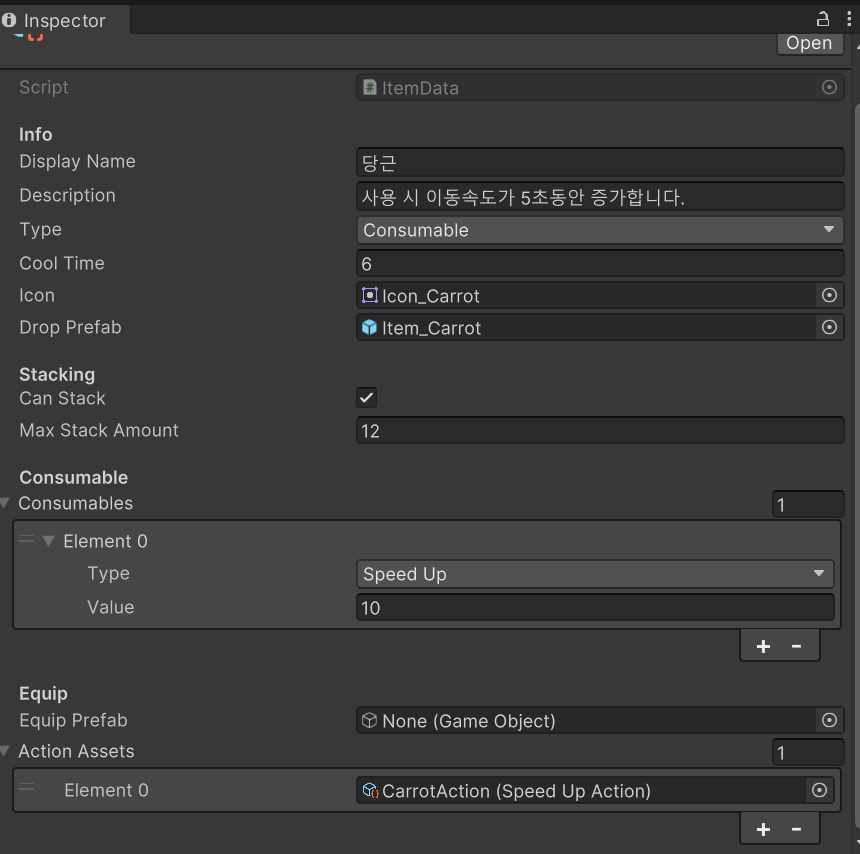
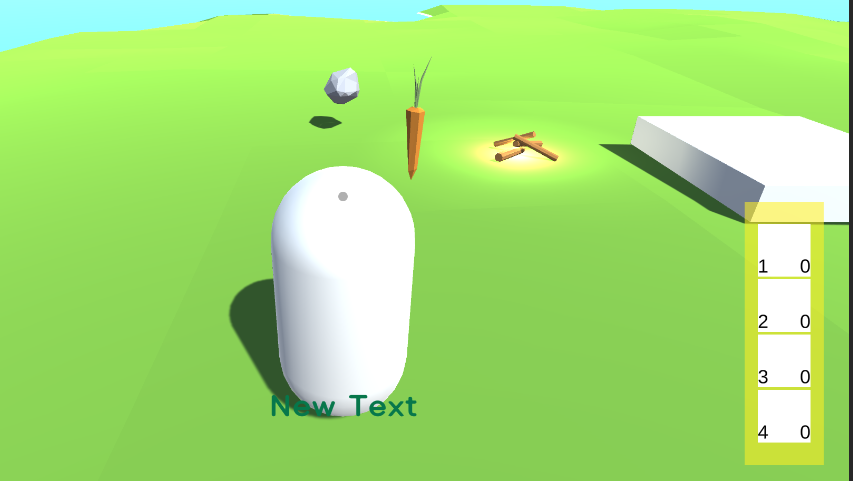
속도를 올려주는 아이템을 사용하면,
Use()메소드에서
foreach (var action in itemData.GetActions()) //아이템 데이터에 있는 해당 액션의 로직을 가진 메서드 호출 action.Execute(PlayerManager.Instance.Player);
위 코드를 통해 아이템 데이터에 넣어두었던 CarrotAction(Speed Up Action)에 접근하여
Execute()메서드를 호출한다.
Execute()내부에 있는 코드 player.controller.ApplySpeedUp(speedIncrease, duration); 를 호출하게 된고
PlayerController 스크립트에 아래 로직이 실행된다.
public void ApplySpeedUp(float a,float d)
{
    StartCoroutine(SpeedUpCoroutine(a,d));
}
private IEnumerator SpeedUpCoroutine(float a,float d)
{
    movSpeed += a;
    yield return  new WaitForSeconds(d);
    movSpeed -= a;
}
이렇게 일정 시간 속도를 올려주는 아이템을 구현하였다.
회복 아이템의 경우 PlayerCondition에 접근하여 Heal() 메소드를 호출하는 방식이다.
해결해야되는 문제발생!
상황 : 2가지 아이템을 하나씩만 남은 상황에서, 동시에 사용하고 바로 같은 2가지 아이템을 습득하면, 아이콘이 바꾸어져있음
1번에 스피드, 2번에 체력회복이 있다고 가정하면
동시 사용 후
체력회복, 스피드 순으로 습득하면
1번에 스피드 아이콘이지만 효과는 체력회복
2번에 체력회복아이콘이지만 효과는 스피드로 된다.
해결 :
 //기존 ItemSlot 중 일부
    // 슬롯에 아이템 추가
    public void AddItem(ItemData data)
    {
        if (isOnCooldown)
        {
            itemData = data;
            stackCount += 1;     // 이미 Clear 후 stackCount는 0이므로 +1
            iconImage.enabled = true;
            countText.enabled = true;
            countText.text = stackCount.ToString();
            return;
        }

        itemData = data;
        stackCount = 1;
        iconImage.sprite = data.icon;
        iconImage.enabled = true;
        countText.enabled = true;
        countText.text = stackCount.ToString();

        // overlay, 쿨다운 플래그 초기화
        ~~cooldownOverlay.enabled = false;~~
        ~~isOnCooldown = false;~~
    }
    public void AddStack(int a)
    {
        stackCount += a;
        countText.text = stackCount.ToString();

        ~~cooldownOverlay.enabled = false;~~
    }

    // 아이템 사용 시
    public void Use()
    {
        if (isOnCooldown == false && itemData != null)
        {
            if (itemData == null) return;
            foreach (var action in itemData.GetActions())
                action.Execute(PlayerManager.Instance.Player);

            StartCoroutine(CooldownCoroutine(itemData.coolTime));

            // 스택 처리
            ~~stackCount--;~~
            ~~if (stackCount <= 0) Clear();~~
            ~~else countText.text = stackCount.ToString();~~
        }
        else
        {
            Debug.Log("쿨타임 중");
        }
    }

    private IEnumerator CooldownCoroutine(float cooldown)
    {
        isOnCooldown = true;
        cooldownOverlay.enabled = true;

	      //추가된 코드
	      stackCount -= 1;
				countText.text = stackCount.ToString();

        // Overlay 세팅: 시계반대뱡향으로 쿨타임 표시
        cooldownOverlay.type = Image.Type.Filled;
        cooldownOverlay.fillMethod = Image.FillMethod.Radial360;
        cooldownOverlay.fillOrigin = (int)Image.Origin360.Bottom;

        float elapsed = 0f;
        while (elapsed < cooldown)
        {
            elapsed += Time.deltaTime;
            cooldownOverlay.fillAmount = 1f - Mathf.Clamp01(elapsed / cooldown);
            yield return null;
        }

        // 쿨다운 끝
        cooldownOverlay.enabled = false;
        isOnCooldown = false;


				//아이템을 다 사용했다면 슬롯 초기화
        if(stackCount <=0)
            Clear();
}- 1개 남은 아이템 사용 시 쿨타임이 될 때까지 0개로 유지
- 쿨타임이 끝난 후 슬롯 청소
- 쿨타임 중에 같은 아이템을 습득하면 순서에 상관없이 같은 종류의 아이템으로 추가됨