UI
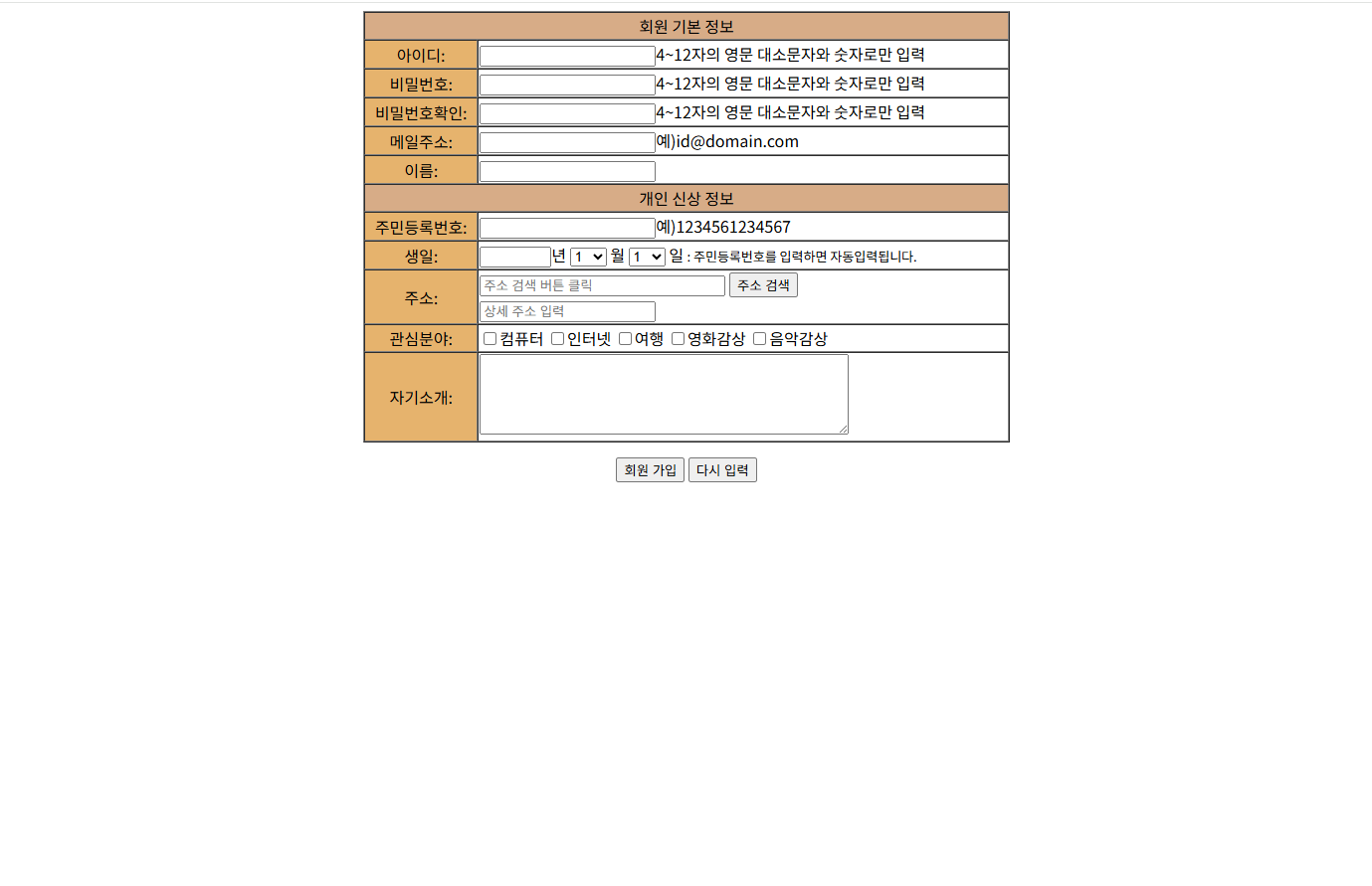
소스 코드
회원가입.html
<!DOCTYPE html>
<html lang="en">
<head>
    <title>HTML 과제</title>
    <meta charset="UTF-8">
    <meta name="viewport" content="width=device-width, initial-scale=1.0">
    <meta name="Author" content="김희곤">
    <meta name="Author-Date" content="2025.08.12">
    <meta name="Email" content="gmlrhs01312@naver.com">
    <meta name="Status" content="Draft">
    <meta name="Revison" content="1.0">
    <meta name="Description" content="META 태그 활용법">
    <script src="https://t1.daumcdn.net/mapjsapi/bundle/postcode/prod/postcode.v2.js"></script>
    <script src="회원가입.js"></script>
</head>
<body align="center">
    <audio autoplay loop hidden>
        <source src="sound.mp3" type="audio/mpeg">
    </audio>
    <form id="signupForm">
    <table align="center" border="1" cellspacing="0" width="650">
        <tr align="center">
            <td colspan="2" bgcolor="#D7AC87">
                회원 기본 정보
            </td>
        </tr>
        <tr>
            <td align="center" bgcolor="#E6B36D">아이디:</td>
            <td align="left"><input type="text" id="userId">4~12자의 영문 대소문자와 숫자로만 입력</td>
        </tr>
        <tr>
            <td align="center" bgcolor="#E6B36D">비밀번호:</td>
            <td align="left"><input type="password" id="password">4~12자의 영문 대소문자와 숫자로만 입력</td>
        </tr>
        <tr>
            <td align="center" bgcolor="#E6B36D">비밀번호확인:</td>
            <td align="left"><input type="password" id="passwordCheck">4~12자의 영문 대소문자와 숫자로만 입력</td>
        </tr>
        <tr>
            <td align="center" bgcolor="#E6B36D">메일주소:</td>
            <td align="left"><input type="text" id="email">예)id@domain.com</td>
        </tr>
        <tr>
            <td align="center" bgcolor="#E6B36D">이름:</td>
            <td align="left"><input type="text" id="name"></td>
        </tr>
        <tr align="center">
            <td colspan="2" bgcolor="#D7AC87">개인 신상 정보</td>
        </tr>
        <tr>
            <td bgcolor="#E6B36D">주민등록번호:</td>
            <td align="left"><input type="text" id="residentNumber">예)1234561234567</td>
        </tr>
        <tr>
            <td bgcolor="#E6B36D">생일:</td>
            <td align="left"><input type="text" size = "5" id="year">년
                <select>
                    <option>1</option>
                    <option>2</option>
                    <option>3</option>
                    <option>4</option>
                    <option>5</option>
                    <option>6</option>
                    <option>7</option>
                    <option>8</option>
                    <option>9</option>
                    <option>10</option>
                    <option>11</option>
                    <option>12</option>
                </select>
                월
                <select>
                    <option>1</option>
                    <option>2</option>
                    <option>3</option>
                    <option>4</option>
                    <option>5</option>
                    <option>6</option>
                    <option>7</option>
                    <option>8</option>
                    <option>9</option>
                    <option>10</option>
                    <option>11</option>
                    <option>12</option>
                    <option>13</option>
                    <option>14</option>
                    <option>15</option>
                    <option>16</option>
                    <option>17</option>
                    <option>18</option>
                    <option>19</option>
                    <option>20</option>
                    <option>21</option>
                    <option>22</option>
                    <option>23</option>
                    <option>24</option>
                    <option>25</option>
                    <option>26</option>
                    <option>27</option>
                    <option>28</option>
                    <option>29</option>
                    <option>30</option>
                    <option>31</option>
                </select>
                일
                <a style="font-size:small;">:  주민등록번호를 입력하면 자동입력됩니다.</a>
            </td>
        </tr>
        <tr>
            <td align="center" bgcolor="#E6B36D">주소:</td>
            <td align="left">
                <input type="text" id="address" size="30" placeholder="주소 검색 버튼 클릭" readonly>
                <input type="button" onclick="findAddress()" value="주소 검색"> <br>
                <input type="text" id="detailAddress" placeholder="상세 주소 입력">
            </td>
        </tr>
        <tr>
            <td align="center" bgcolor="#E6B36D">관심분야:</td>
            <td align="left" id="interest">
                <input type="checkbox">컴퓨터
                <input type="checkbox">인터넷
                <input type="checkbox">여행
                <input type="checkbox">영화감상
                <input type="checkbox">음악감상
            </td>
        </tr>
        <tr>
            <td align="center" bgcolor="#E6B36D">자기소개:</td>
            <td align="left">
                <textarea cols="50" rows="5" id="introduce">
                </textarea>
            </td>
        </tr>
    </table>

    <button type="submit" style="margin-top:15px;">회원 가입</button>
    <button type="reset" style="margin-top:15px;">다시 입력</button>

    </form>
</body>
</html>
회원가입.js
//id 유효성검사
function checkId() {

    var userId = document.getElementById("userId").value.trim();
    const idRegex = /^[a-zA-Z0-9]{4,12}$/;

    if(!idRegex.test(userId)) {
        alert("아이디 입력 형식 오류");
        return false;
    }
    return true;
}

//password 유효성검사
function checkPassword() {

    var password = document.getElementById("password").value.trim();
    var userId = document.getElementById("userId").value.trim();
    const pwRegex = /^[a-zA-Z0-9]{4,12}$/;

    if (checkPassword.alertShown) return false;

    if (!pwRegex.test(password)) {
        alert("다른 비밀번호를 사용하세요.");
        checkPassword.alertShown = true;
        return false;
    }

    if (password === userId) {
        alert("아이디와 비밀번호는 같을 수 없습니다.");
        checkPassword.alertShown = true;
        return false;
    }
    checkPassword.alertShown = false;
    return true;
}

//password확인 유효성검사
function checkPassword2() {

    var password = document.getElementById("password").value.trim();
    var password2 = document.getElementById("passwordCheck").value.trim();

    if (password2 !== password) {
        alert("비밀번호와 비밀번호확인이 서로 다릅니다.");
        return false;
    }
    return true;
}

//메일주소 유효성검사
function checkEmail() {

    var email = document.getElementById("email").value.trim();
    const emailRegex = /^[^\s@]+@[^\s@]+\.[^\s@]+$/;

    if(!emailRegex.test(email)) {
        alert("메일 주소 형식이 정해져 있습니다. ");
        return false;
    }
    return true;
}

//주민등록번호 유효성 검사 및 생일 자동 입력
function checkResidentNum() {

    var residentNumber = document.getElementById("residentNumber").value.trim();
    const pwRegex = /^[0-9]{13}$/;

    if(!pwRegex.test(residentNumber)) {
        alert("주민등록번호는 13자리를 입력해야 합니다.");
        return false;
    }

    let sum = 0;
    const multipliers = [2, 3, 4, 5, 6, 7, 8, 9, 2, 3, 4, 5];

    for (let i = 0; i<12; i++) {
        sum += parseInt(residentNumber.charAt(i)) * multipliers[i];
    }

    const calculatedVerifyNum = (11 - (sum % 11)) % 10;

    if(calculatedVerifyNum !== parseInt(residentNumber.charAt(12))) {
        alert("유효하지 않은 주민등록번호입니다.");
        return false;
    }

    //주민등록번호에서 생년월일 추출
    var yearPrefix = (residentNumber.charAt(7) === "1" || residentNumber.charAt(7) === "2") ? "19" : "20";
    var year = yearPrefix + residentNumber.substring(0, 2);
    var month = residentNumber.substring(2, 4);
    var day = residentNumber.substring(4, 6);

    //생년월일 자동으로 채우기
    document.getElementById("year").value = year; //년
    document.querySelectorAll("td select")[0].value = parseInt(month, 10); //월
    document.querySelectorAll("td select")[1].value = parseInt(day, 10);   //일

    return true;
}

//주소 입력
function findAddress() {
    new daum.Postcode({
        oncomplete: function(data) {
            var addr = '';
            var extraAddr = '';

            if (data.userSelectedType === 'R') {
                addr = data.roadAddress;
            } else {
                addr = data.jibunAddress;
            }

            document.getElementById('address').value = addr;
            document.getElementById('detailAddress').value = extraAddr;

        }
    }).open();
}

//주소랑 상세주소 입력 유효성검사
function checkAddress() {
    var address = document.getElementById("address").value.trim();
    var address2 = document.getElementById("detailAddress").value.trim();

    const addRegex = /^.{1,}$/;

    if(!addRegex.test(address) || !addRegex.test(address2)) {
        alert("주소와 상세주소를 입력하세요.");
        return false;
    }
    return true;
}

//관심분야 유효성검사
function checkInterest() {
    var interests = document.querySelectorAll("#interest input[type='checkbox']");
    let checked = false;
    interests.forEach(cb => {
        if (cb.checked) checked = true;
    });

    if (!checked) {
        alert("관심분야를 한 가지 이상 선택해야 합니다.");
        return false;
    }
    return true;
}

//자기소개 유효성검사
function checkIntroduce() {
    var introduce = document.getElementById("introduce").value.trim();
    var introRegex = /^.{20,}$/;

    if(!introRegex.test(introduce)) {
        alert("자기소개는 20글자 이상은 입력해주세요.");
        return false;
    }
    return true;
}

//회원가입 버튼 이벤트 (유효성 검사)
document.addEventListener("DOMContentLoaded", () => {
    const form = document.getElementById("signupForm");

    form.addEventListener("submit", (e) => {
        if (!checkId() || !checkPassword() || !checkPassword2() || !checkEmail()
         || !checkResidentNum() || !checkAddress() ||!checkInterest() ||!checkIntroduce() ) {
            e.preventDefault();
        }
    });
});

❤️