이번 포스팅에는 ROS1 Noetic을 Ubuntu 20.04 LTS에 설치하는 방법에 대해서 알아보자.
💡 Ubuntu 20.04 LTS는 WSL2로 사용하거나, 혹은 Ubuntu 싱글 부팅을 하는 것 어느 쪽이든 무방하다. 본인은 WSL2와 Ubuntu 싱글 부팅 모두 사용해보았고, 이상이 없다.
참고 링크는 이곳이다.
https://wiki.ros.org/noetic/Installation/Ubuntu
https://cafe.naver.com/openrt/25288
1. 설치
1.1 sources.list 셋업하기
sudo sh -c 'echo "deb http://packages.ros.org/ros/ubuntu $(lsb_release -sc) main" > /etc/apt/sources.list.d/ros-latest.list'1.2 key 셋업하기
sudo apt install curl # if you haven't already installed curl
curl -s https://raw.githubusercontent.com/ros/rosdistro/master/ros.asc | sudo apt-key add -
1.3 설치하기
sudo apt update
sudo apt install ros-noetic-desktop-full
1.4 환경 세팅하기
nano ~/.bashrc # if you don't have nano, just take "sudo apt intsall nano"

그리고 가장 밑으로 내려가
source /opt/ros/noetic/setup.bash
위 문장을 복붙하여 추가하고 저장하고 닫기
1.5 빌드 패키지들 설치하기
sudo apt install python3-rosdep python3-rosinstall python3-rosinstall-generator python3-wstool build-essential
sudo rosdep init
rosdep update
1.6 유용한 패키지들 설치하기
$ sudo apt update && sudo apt install -y \
  build-essential \
  cmake \
  git \
  libbullet-dev \
  python3-colcon-common-extensions \
  python3-flake8 \
  python3-pip \
  python3-pytest-cov \
  python3-rosdep \
  python3-setuptools \
  python3-vcstool \
  wget
$ python3 -m pip install -U \
argcomplete \
flake8-blind-except \
flake8-builtins \
flake8-class-newline \
flake8-comprehensions \
flake8-deprecated \
flake8-docstrings \
flake8-import-order \
flake8-quotes \
pytest-repeat \
pytest-rerunfailures \
pytest
$ sudo apt install --no-install-recommends -y \
libasio-dev \
libtinyxml2-dev \
libcunit1-dev2. IDE 연동하기
ROS에서 사용하는 IDE로는 VScode, Vim, QtCreator 등이 있다. 이중에서 가장 널리 사용되는 IDE로는 VScode가 있다. 이런 VScode에 설치를 추천하는 Extension들로는 다음과 같다.
1. C/C++
2. CMake
3. CMake Tools
4. Python
5. ROS
6. URDF
7. Colcon Tasks
8. XML Tools
9. YAML
10. Markdown All in One
3. 제대로 설치했는지 확인해보기
우분투 터미널, 혹은 WSL2 터미널을 열어서 다음과 같이 입력한다.
$ roscore💡 roscore가 무엇을 의미하는지는 추후 공부하게 될 것이다.
그 다음에 다음과 같이 입력한다.
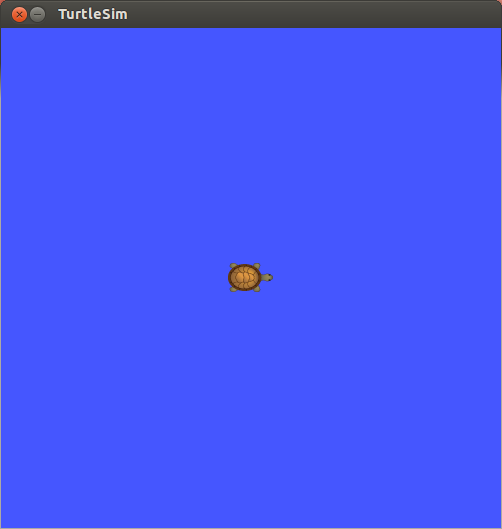
$ rosrun turtlesim turtlesim_node💡 rosrun, node의 의미 역시 추후 공부할 것이다.
이런 이미지와 비슷한 창이 출력되면, ROS Noetic이 제대로 설치가 되었다는 뜻이다.

로봇, 드론, SLAM, 제어 공학 초보