
▣ 예제 107. HWM 위에 데이터를 넣을 때 병렬로 작업하면 더 빠르게 데이터를 입력할 수 있다.
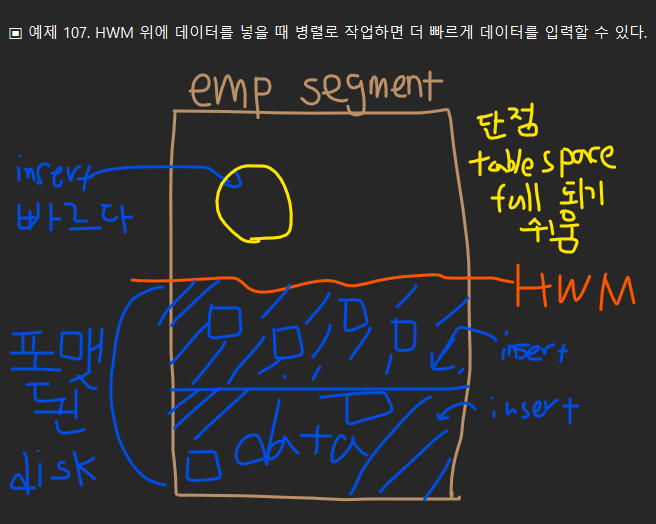
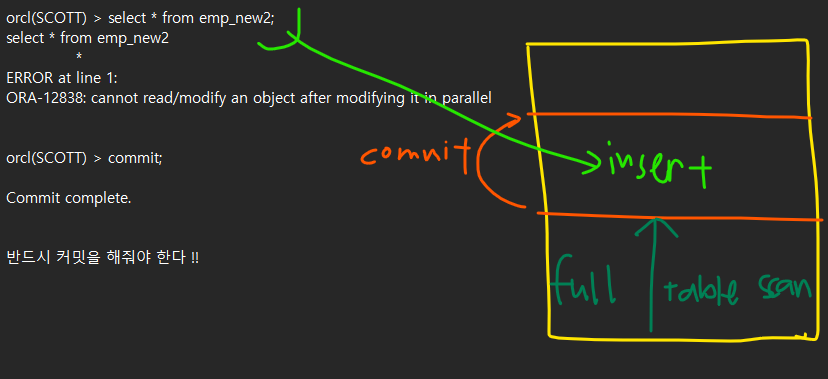
emp segment 에 HWM 가 있음
HWM 밑에는 포맨된 디스크가 있고 인서트 할 때 시간이 걸림
HWM 위에는 포맷되지 않은 디스크가 있고 인서트가 빠름 대신 단점으로 테이블 스페이스가 full 되기 쉽다
이 때 병렬로 작업하면 속도가 더 빨라진다.
■ 실습 : HWM 위에 병렬로 데이터 입력하기
#1. orcl 쪽에 scott 유져로 접속합니다.
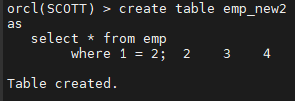
#2. emp 테이블과 구조가 똑같은 emp_new2 라는 테이블을 생성합니다.
create table emp_new2
as
select * from emp
where 1 = 2;
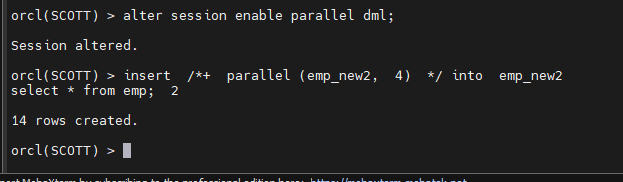
#3. emp 테이블의 데이터를 emp_new2 테이블에 병렬로 입력합니다.
alter session enable parallel dml;
<- 이거 반드시 !!!
insert /+ parallel (emp_new2, 4) / into emp_new2
select * from emp;
HWM 위로 올라가면 에러가 난다
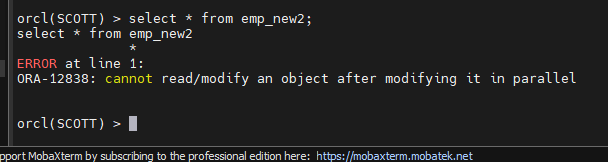
commit 해야 에러가 안난다
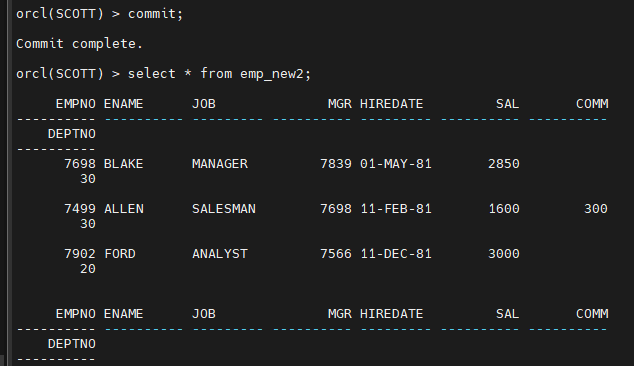
문제1. sh 계정으로 접속해서 sales 테이블의 구조로 sales_new 테이블을 생성하고
sales 테이블을 sales_new 테이블에 입력하는데 direct load insert 방법으로 입력하시오 병렬로 입력하시오
병렬도는 최대 cpu_count*2 만큼 줄 수 있다.
orcl(SH) > show parameter cpu_count
NAME TYPE VALUE
cpu_count integer 4
create table sales_new
as
select * from sales
where 1 = 2;
alter session enable parallel dml;
insert /+ parallel (sales_new, 8) / into sales_new
select * from sales;
정리 : high water mark 위에 입력을 하는 힌트 2가지
- append 힌트 --- > 하나의 프로세서가 insert 를 수행
- parallel 힌트 --- > 여러개의 프로세서가 insert 를 수행
insert /+ parallel( 테이블 명, 병렬도) / into 테이블 명
select * from 가져올 데이터가 있는 테이블 명;
orcl(SH) > show parameter cpu_count -- > 나온 숫자
insert /+ parallel (sales_new, 8) / into sales_new
select * from sales;
-- > 8 개의 프로세서가 insert 를 수행합니다
이렇게 크게 주는 것은 dba 만 하고 다른 운영자들은 작게 주라고 해야한다.
dba 가 운영자들이 병렬 힌트 사용을 자제하게끔 관리감독을 해야한다.
병렬힌트를 사용하려면 오라클이 enterprise edition 이어야합니다.
select * from v$version;
회사에서 병렬쿼리를 써도 되는지 옵션을 구입했는지 확인하고 사용해야 합니다.
orcl(SH) > select * from v$version;
Oracle Database 11g Enterprise Edition Release 11.2.0.1.0 - Production
PL/SQL Release 11.2.0.1.0 - Production
CORE    11.2.0.1.0      Production
TNS for Linux: Version 11.2.0.1.0 - Production
NLSRTL Version 11.2.0.1.0 - Production
※ direct load insert 의 특징 및 장단점
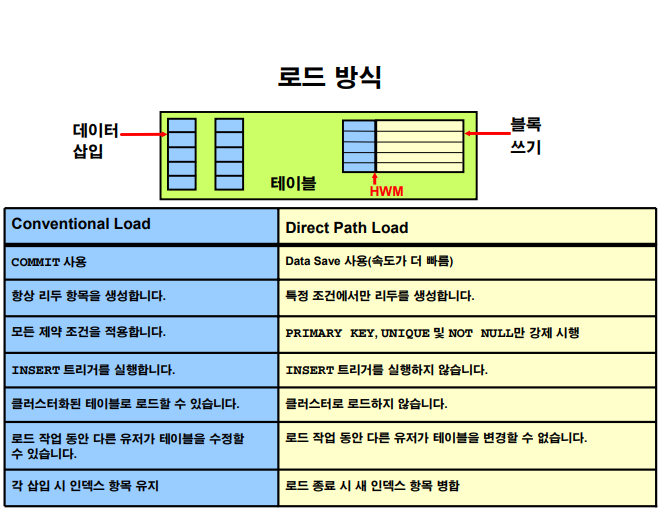
-장점 : 속도가 빠르다
-단점 : 낭비되는 저장공간이 생긴다 ( 즉 저장공간이 더 많이 소요된다)
※ 더 빨리 insert 를 하기 위해서 현업에서 사용하는 팁
insert /+ parallel( 테이블 명, 병렬도) / into 테이블 명
nologging
select * from 가져올 데이터가 있는 테이블 명;
nologging 을 사용하면 더 빨리 데이터를 insert 할 수 있다
insert 할 때 발생하는 로그 정보를 생성하지 않겠다는 뜻
나중에 db 장애가 났을 때 (disk 가 깨지는 등) 이 insert 문장은 복구를 할 수 없다.
▣ 예제 108. 대용량 csv 파일을 오라클 데이터 베이스로 로드할 때는 SQL*Loader 를 쓰세요
-
오라클의 데이터 이행 3가지 툴
- direct load insert : 서브쿼리를 사용한 insert
- direct path insert : SQL*Loader
- export / import : 덤프 파일 또는 펌프 파일 생성해서 이행
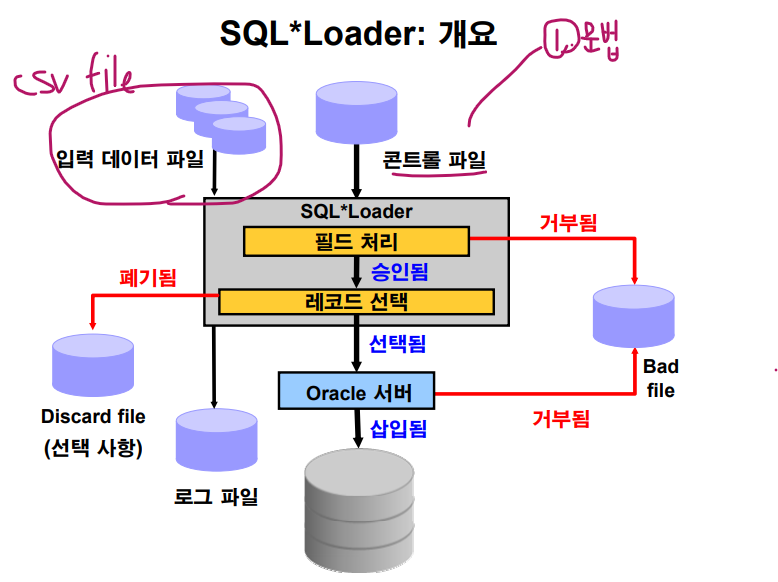
data file --- > csv 파일
control file --->> sql loader 용 control file 로 csv 파일의 문법이 들어있는 파일
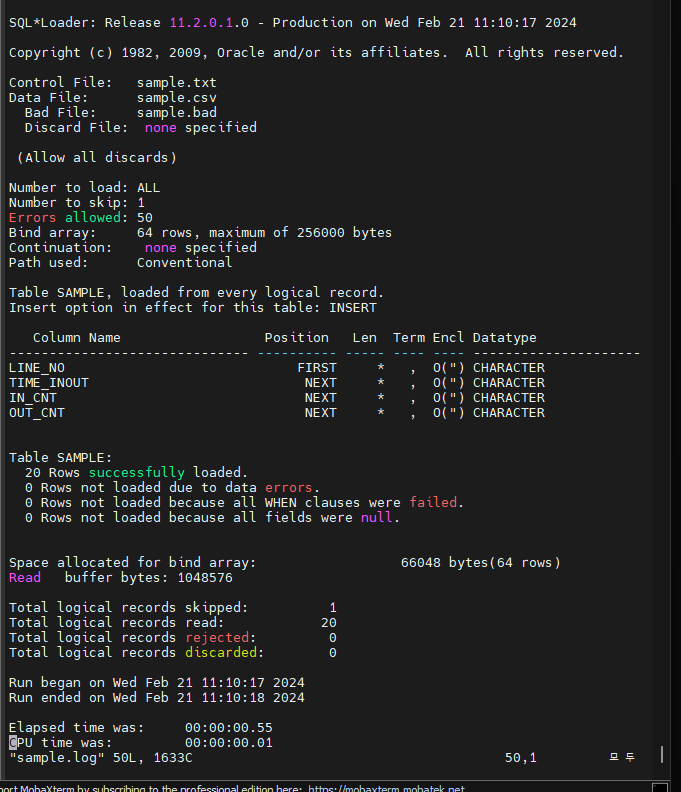
discard file ----> 입력 거부된 data ( 문법은 맞는데 테이블에 제약이 있어서)
bad file ----> 입력 거부된 data ( 문법과 맞지 않아서)
log file ----> 입력하면서 발생한 작업 이력 데이터
■ 실습 순서
#1. sample.csv 를 준비합니다.
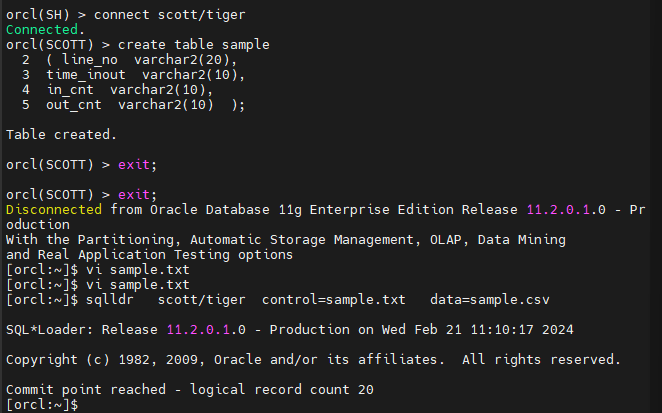
#2. orcl 의 scott 유져에서 sample 테이블을 생성합니다.
orcl(SH) > connect scott/tiger
Connected.
orcl(SCOTT) > create table sample
2 ( line_no varchar2(20),
3 time_inout varchar2(10),
4 in_cnt varchar2(10),
5 out_cnt varchar2(10) );
Table created.
#3. sample.csv 를 리눅스에 /home/oracle 밑에 올립니다.
#4. 데이터 입력 문법이 들어있는 control file 을 생성합니다.
$ vi sample.txt
options(skip=1)
load data
infile '/home/oracle/sample.csv'
into table sample
fields terminated by ','
optionally enclosed by '"'
(line_no, time_inout, in_cnt, out_cnt)
~
~
#5. sqlloader 를 이용해서 데이터를 이행합니다.
$ sqlldr scott/tiger control=sample.txt data=sample.csv
SQL*Loader: Release 11.2.0.1.0 - Production on Wed Feb 21 11:10:17 2024
Copyright (c) 1982, 2009, Oracle and/or its affiliates. All rights reserved.
Commit point reached - logical record count 20
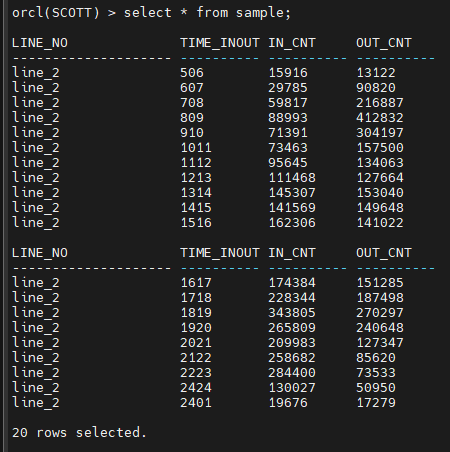
#6. 데이터가 잘 들어 갔는지 확인합니다.
orcl(SCOTT) > select * from sample;
[orcl:~]$ vi sample.log
orcl(SCOTT) > select * from dept100;
문제2. scott 계정에서 sales100 테이블을 생성하고 sales.csv 파일을 sqlloader 로 입력하시오
create table sales100
as
select * from sh.sales
where 1 = 2 ;
파일 모바텀에 업로드 후 생성하기
$ vi sales100.txt
options(skip=1)
load data
infile '/home/oracle/sales.csv'
into table sales100
fields terminated by ','
optionally enclosed by '"'
(prod_id, cust_id, time_id date 'YYYY/MM/DD HH24:MI:SS',
channel_id, promo_id, quantity_sold, amount_sold)
sqlldr 이용해서 데이터 로드 하기
$ sqlldr scott/tiger control=sales100.txt data=sales.csv
vi sales100.log
#2. HWM 위로 데이터를 입력 합니다.
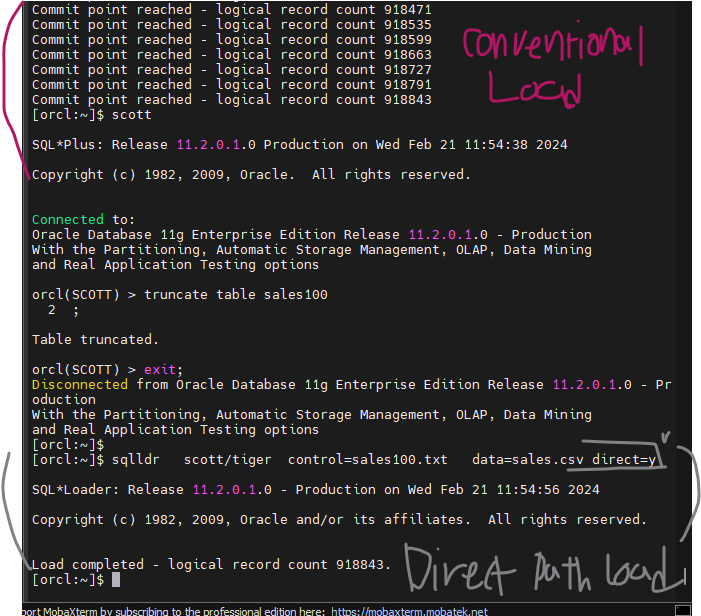
$ sqlldr scott/tiger control=sales100.txt data=sales.csv direct=y
☞ direct 옵션
- y : direct path load 방식으로 load 한다. (HWM 위로 입력)
- n : conventional load 방식으로 load 한다. (HWM 아래에 입력)
문제 3. emp 테이블을 emp.csv 로 생성하시오
테이블을 csv 로 생성하기
-- Set up the environment
SET ECHO OFF
SET TERMOUT OFF
SET FEEDBACK OFF
SET HEADING OFF
-- Remove extra spaces
SET PAGESIZE 0
SET LINESIZE 1000
SET TRIMSPOOL ON
-- Set the column separator and the text qualifier
SET COLSEP ','
SET SQLFORMAT "csv"
-- Start spooling the output to a file
SPOOL /home/oracle/emp.csv
-- Query to export the data
SELECT /csv/ * FROM emp;
-- Stop spooling
SPOOL OFF
-- Reset environment
SET TERMOUT ON
SET FEEDBACK ON
SET HEADING ON
SET PAGESIZE 14
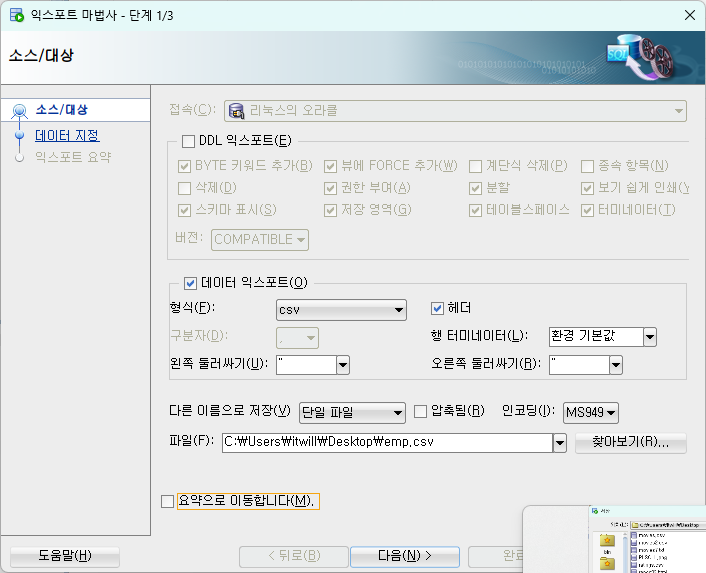
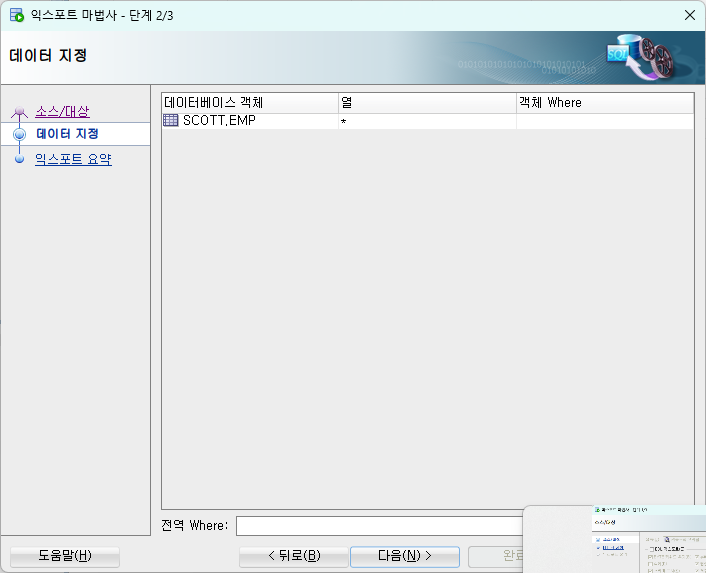
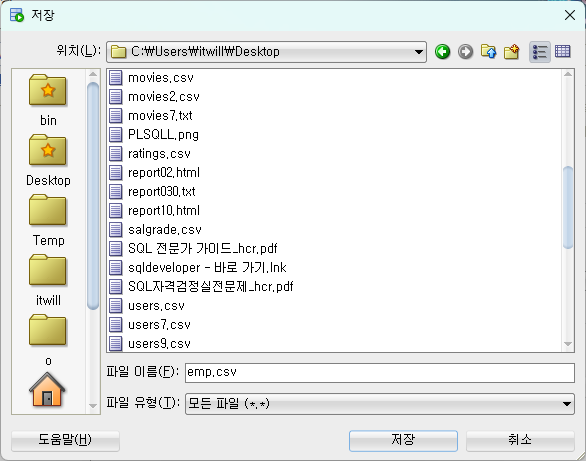
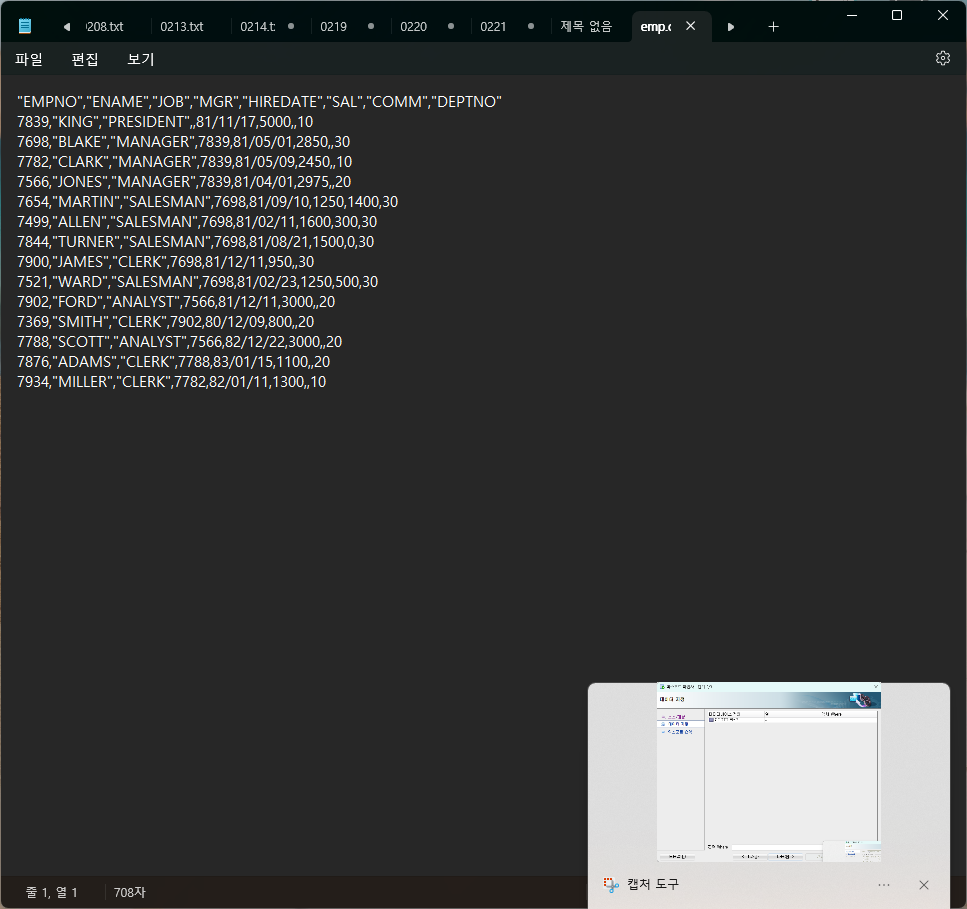
문제5. sqldeveloper 를 이용해서 hr 계정의 employees 테이블을 employees.csv 로 생성하시오 !
-- Set up the environment
SET ECHO OFF
SET TERMOUT OFF
SET FEEDBACK OFF
SET HEADING OFF
-- Remove extra spaces
SET PAGESIZE 0
SET LINESIZE 1000
SET TRIMSPOOL ON
-- Set the column separator and the text qualifier
SET COLSEP ','
SET SQLFORMAT "csv"
-- Start spooling the output to a file
SPOOL /home/oracle/employees.csv
-- Query to export the data
SELECT /csv/ * FROM emp;
-- Stop spooling
SPOOL OFF
-- Reset environment
SET TERMOUT ON
SET FEEDBACK ON
SET HEADING ON
SET PAGESIZE 14
※ data 이행 3가지
- 서브쿼리를 사용한 insert
- SQL*loader
- export / import ----- 이수자 평가 이걸로 할것임 !!!
▣ 예제 110. export / import 이용해서 데이터 이행을 할 줄 알아야 해요
- export / import 방법 4가지
- table level : 특정 테이블만 export / import 수행하기
- user level : scott 같이 유져가 가지고 있는 모든 객체를 전부 export / import ( 가장 많이 씀 )
- tablespace level : tablespace 의 데이터를 통채로 export / import
- database level : database 를 통채로 export / import
■ 실습1. 테이블 레벨로 export / import 하는 실습
#1. orcl 쪽의 환경으로 export
. oraenv
#2. scott 계정의 emp 테이블을 export 하시오 !
exp scott/tiger tables=emp file=emp.dmp
ls -l emp.dmp
문제1. dept 테이블을 dept.dmp 로 export 하시오
exp scott/tiger tables=dept file=dept.dmp
문제2. scott 계정으로 접속해서 emp 와 dept 를 drop 하시오
orcl(SCOTT) > drop table emp;
Table dropped.
orcl(SCOTT) > drop table dept;
Table dropped.
orcl(SCOTT) > purge recyclebin;
Recyclebin purged.
---> 플래시백 못해 !!!!
문제 3. emp.dmp 덤프파일을 가지고 다시 db에 import 하시오 !
$ imp scott/tiger tables=emp file=emp.dmp
Export file created by EXPORT:V11.02.00 via conventional path
import done in US7ASCII character set and AL16UTF16 NCHAR character set
import server uses AL32UTF8 character set (possible charset conversion)
. importing SCOTT's objects into SCOTT
. importing SCOTT's objects into SCOTT
. . importing table "EMP" 14 rows imported
문제 4. dept.dmp 를 imp dept 복구하시오
imp scott/tiger tables=dept file=dept.dmp
문제 5. sh 계정의 sales100 테이블을 sales100.dmp 로 export 하시오
exp sh/tiger tables=sales100 file=sales100.dmp feedback=10
설명 : feedback=10 을 쓰면 100건 export 할 때마다 점(.) 하나를 찍습니다.
Export done in US7ASCII character set and AL16UTF16 NCHAR character set
server uses AL32UTF8 character set (possible charset conversion)
About to export specified tables via Conventional Path ...
. . exporting table SALES100 918843 rows exported
Export terminated successfully without warnings.
문제 6. sales100.dmp 를 가지고
prod 데이터 베이스의 scott 계정에 sales100 테이블을 improt 하시오 !
PROD(SCOTT) > select count() from sales100;
select count() from sales100
*
ERROR at line 1:
ORA-00942: table or view does not exist
imp scott/tiger tables=sales100 file=sales100.dmp fromuser=sh touser=scott
이수자평가
Warning: the objects were exported by SH, not by you
import done in US7ASCII character set and AL16UTF16 NCHAR character set
. importing SH's objects into SCOTT
. . importing table "SALES100" 918843 rows imported
Import terminated successfully without warnings.
[PROD:~]$
문제7. orcl 쪽의 sh 계정의 products 테이블을 export 해서 prod 쪽의 scott 계정에 import 하시오 !!
exp sh/tiger tables=products file=products.dmp
imp scott/tiger tables=products file=products.dmp fromuser=sh touser=scott
IMP-00017: following statement failed with ORACLE error 1917:
"GRANT SELECT ON "PRODUCTS" TO "BI""
테이블을 하나씩 export 해서 다른 db로 하나씩 import 하게 되면
지금 방금 본 에러 처럼 bi 의 어느 테이블이 없다고 에러가 발생하는 경우가 있습니다
그래서 제일 좋은 방법이 tablespace 레벨로 한번에 왕창 넘기는것 입니다.
예제 111. 유져 레벨로 export / import 할 줄 알아야 해요
#1. orcl 쪽의 scott 계정의 모든 테이블들을 export
orcl>
$ exp scott/tiger owner=scott file=scott.dmp
※ 현업에서는 위의 작업을 하면 scott.dmp 의 파일이 굉장히 크다
그래서 리눅스 os 의 여유공간이 부족하면 안되니까 반드시 df -h 를 수행하여 여유공간이 있는지 확인해봐야 한다.
[orcl:~]$ df -h
Filesystem Size Used Avail Use% Mounted on /dev/mapper/VolGroup00-LogVol00
190G 51G 130G 28% //dev/sda1 99M 18M 76M 20% /boot
tmpfs 1.8G 438M 1.4G 25% /dev/shm
Share 238G 76G 162G 32% /media/sf_Share
#2. prod 쪽에 scott2 라는 유져 생성
PROD(SYS) > create user scott3 identified by tiger;
User created.
PROD(SYS) > grant resource, connect to scott3;
Grant succeeded.
#3. orcl 에서 생성한 scott.dmp 를 PROD 의 scott3 에 import
[PROD:~]$
imp system/oracle file=scott.dmp fromuser=scott touser=scott3
import 하다 보면 자주 생기는 문제
- import 하려는 db 의 테이블 스페이스의 공간이 부족할 때 (처음부터 다시 해야함 ㅠ)
먼저 scott3 user 의 default tablespace 가 무엇인지 확인한 후 그 테이블 스페이스의 여유공간을 확인 한다.
- undo 테이블 스페이스의 공간도 넉넉해야 import 가 수월하게 잘 됩니다.
문제1. orcl 쪽의 scott 계정의 테이블의 개수와 테이블의 데이터의 건수와 PROD 쪽의 scott3 계정의 테이블의 개수와 데이터의 건수가
서로 일치하는지 확인 하시오
orcl(scott) PROD(scott3)
#1. orcl 쪽에 scott 계정으로 접속해서 유져 레벨로 통계정보를 수집합니다
orcl(SCOTT) >
exec dbms_stats.gather_schema_stats('SCOTT');
#2. user_tables 를 조회해서 테이블 이름과 num_rows 를 조회합니다.
select table_name, num_rows
from user_tables;
#3. PROD 쪽에 scott3 계정으로 접속해서 유져 레벨로 통계정보를 수집합니다.
PROD(SCOTT3) > exec dbms_stats.gather_schema_stats('SCOTT3');
PL/SQL procedure successfully completed.
#4. user_tables 를 조회해서 테이블 이름과 num_rows 를 조회합니다.
select table_name, num_rows
from user_tables;
db link 로 join 해서 비교
마이너스로 빼던지 ~
#5. scott3 쪽에서 db link 생성하는데 orcl db 의 scott 의 테이블을 엑세스 할 수 있는 db 링크 생성
PROD(SYS) > grant create public database link to scott3;
Grant succeeded.
PROD(SYS) > grant drop public database link to scott3;
Grant succeeded.
PROD(SYS) > connect scott3/tiger
Connected.
create public database link orcl_scott_link
connect to scott
identified by tiger
using '192.168.19.43:1521/orcl.us.oracle.com';
PROD(SCOTT3) > select * from dept@orcl_scott_link;
DEPTNO DNAME            LOC

    10 ACCOUNTING       NEW YORK
    20 RESEARCH            DALLAS
    30 SALES                  CHICAGO
    40 OPERATIONS         BOSTON
PROD(SCOTT3) > select table_name, num_rows
2 from user_tables@orcl_scott_link
3 minus select table_name, num_rows from user_tables;
TABLE_NAME NUM_ROWS
BONUS 0
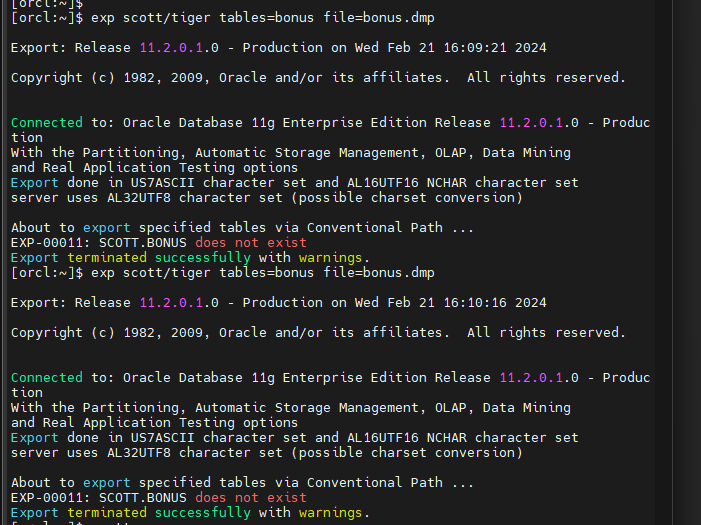
문제2. 유져 레벨로 넘어오지 않은 테이블 BONUS 을 따로 테이블 레벨로 옮겨 export 해서 넘기시오 !!!
exp scott/tiger tables=bonus file=bonus.dmp
-
CREATE TABLE "SCOTT"."BONUS"
( ENAME VARCHAR2(10),
JOB VARCHAR2(9),
SAL NUMBER,
COMM NUMBER
) ;
현재 테이블 스페이스 유져스가 없어
PROD(SCOTT3) > connect / as sysdba
Connected.
PROD(SYS) > select tablespace_name from dba_tablespaces;
TABLESPACE_NAME
없잖아 !!!
테이블 스페이스가 달라서 안넘어 온 애들은
따로 그냥 구조만 만들어주고
CREATE TABLE "SCOTT3"."BONUS"
( ENAME VARCHAR2(10),
JOB VARCHAR2(9),
SAL NUMBER,
COMM NUMBER
) ;
통계정보 수집 하고
PROD(SCOTT3) > exec dbms_stats.gather_schema_stats('SCOTT3');
PL/SQL procedure successfully completed.
검색해보면
select table_name, num_rows
from user_tables@orcl_scott_link
minus select table_name, num_rows from user_tables;
no rows selected
타다 ~!~!~!
마지막 문제
이수자평가 제출용 1번
여러분들 영문 이름 db 에 king 이라는 유져를 생성하고 orcl 쪽의 scott 계정의 모든 테이블들을 jhs 디비의 king 유져에
전부 이행 하시오 !
orcl>
$ exp scott/tiger owner=scott file=scott.dmp
orcl(SCOTT) 과 [jhs:~]$
jhs(SYS) >
create user king identified by king;
User created.
jhs(SYS) > grant resource, connect to king;
orcl 쪽의 scott 계정의 모든 테이블
jhs(SYS) > grant dba to scott;
#3. orcl 에서 생성한 scott.dmp 를 jhs 의 scott3 에 import
[jhs:~]$
imp scott/tiger file=scott.dmp fromuser=scott touser=king
imp system/oracle_4U file=scott.dmp fromuser=scott touser=king
jhs(SYS) >
exec dbms_stats.gather_schema_stats('KING');
orcl(SCOTT) >
exec dbms_stats.gather_schema_stats('SCOTT');
create public database link jhs_king_link
connect to scott
identified by tiger
using '192.168.19.43:1521/orcl.us.oracle.com';
jhs(KING) >
select * from dept@jhs_king_link;
jhs(KING) >
select table_name, num_rows
from user_tables@jhs_king_link
minus select table_name, num_rows from user_tables;
TABLE_NAME NUM_ROWS
BONUS 0
--
CREATE TABLE "KING"."BONUS"
( ENAME VARCHAR2(10),
JOB VARCHAR2(9),
SAL NUMBER,
COMM NUMBER
) ;
jhs(SYS) > select table_name, num_rows
from user_tables;
jhs(KING) >
select table_name, num_rows
from user_tables@jhs_king_link
minus select table_name, num_rows from user_tables;
select table_name, num_rows
from user_tables@jhs_king_link
minus select table_name, num_rows from user_tables;
