Udemy Labs - Certified Kubernetes Application Developer - Labs - Validating and Mutating Admission Controllers 오답노트
Kubernetes
1
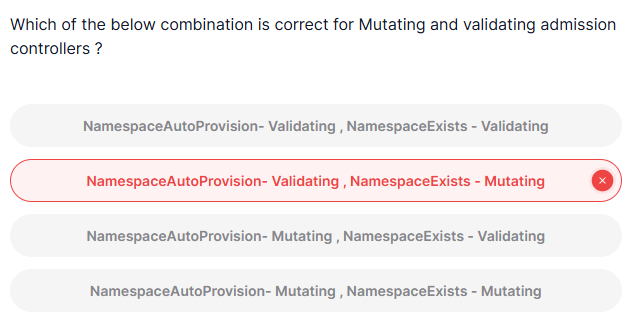
Which of the below combination is correct for Mutating and validating admission controllers ?
정답
namespaceautoprovision - mutating, namespaceexists - validating
풀이
Mutating Admission Controllers: 클러스터에 대한 리소스 요청을 변경하거나 수정하는 역할 -> 요청된 리소스에 대해 변경 작업을 할 수 있는 admission controller- 예시) PVC와 같은 리소스가 특정 네임스페이스를 지정하지 않으면, 자동으로 해당 네임스페이스를 생성하거나 지정 -> 요청된 리소스를 변경하는 작업을 하므로 Mutating Admission Controller
Validating Admission Controllers: 클러스터에 대한 리소스 요청이 유효한지 확인하는 역할 -> 리소스가 유효한지 검증하지만 실제로 리소스를 변경하지는 않음- 예시) 요청된 리소스가 유효한 네임스페이스에 존재하는지 확인 -> 만약 요청된 네임스페이스가 존재하지 않으면 요청을 거부 -> 리소스를 변경하지 않기 때문에 Validating Admission Controller
NamespaceAutoProvision: 네임스페이스가 없는 경우 이를 자동으로 생성하는 동작을 하므로 요청을 수정(mutate)하는 역할 -> Mutating Admission ControllerNamespaceExists: 리소스 요청이 유효한 네임스페이스에서 이루어졌는지 단지 검증만 수행, 리소스를 변경 X -> Validating Admission Controller
2
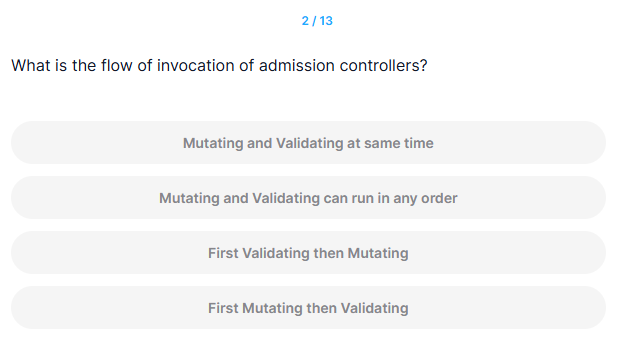
What is the flow of invocation of admission controllers?
정답
First Mutating then Validating
풀이
Mutating Admission Controller는 리소스를 수정하는 작업을 먼저 해야 하므로, Validating Admission Controller가 그 후에 요청을 검증하는 순서로 실행
11
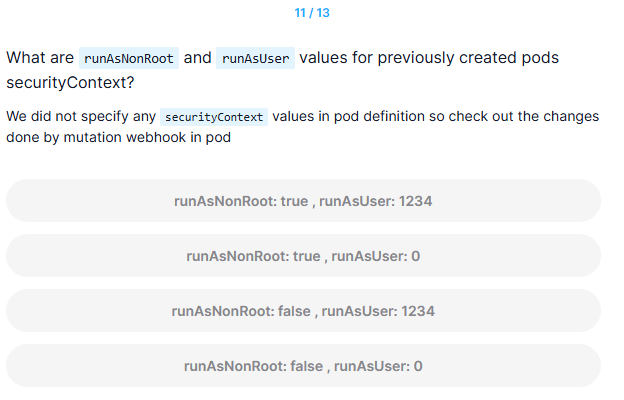
What are runAsNonRoot and runAsUser values for previously created pods securityContext?
We did not specify any securityContext values in pod definition so check out the changes done by mutation webhook in pod
정답
runAsNonRoot: true, runAsUser: 1234
풀이
runAsNonRoot: true: 보안 상의 이유로 root 권한을 사용하지 않도록 기본값으로 설정runAsUser: 1234: runAsNonRoot가 true로 설정되면, 웹훅은 기본 사용자 ID 1234로 설정하여 root 권한을 방지
13
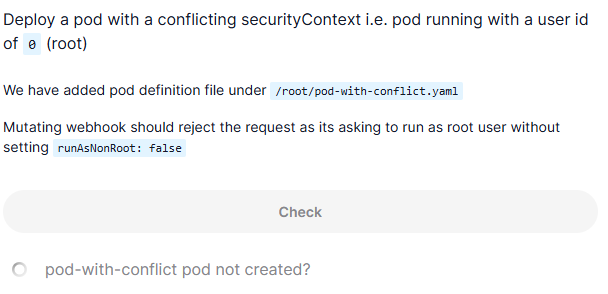
Deploy a pod with a conflicting securityContext i.e. pod running with a user id of 0 (root)
We have added pod definition file under /root/pod-with-conflict.yaml
Mutating webhook should reject the request as its asking to run as root user without setting runAsNonRoot: false
풀이
controlplane ~ ➜  cat /root/pod-with-conflict.yaml
# A pod with a conflicting securityContext setting: it has to run as a non-root
# user, but we explicitly request a user id of 0 (root).
# Without the webhook, the pod could be created, but would be unable to launch
# due to an unenforceable security context leading to it being stuck in a
# 'CreateContainerConfigError' status. With the webhook, the creation of
# the pod is outright rejected.
apiVersion: v1
kind: Pod
metadata:
  name: pod-with-conflict
  labels:
    app: pod-with-conflict
spec:
  restartPolicy: OnFailure
  securityContext:
    runAsNonRoot: true
    runAsUser: 0
  containers:
    - name: busybox
      image: busybox
      command: ["sh", "-c", "echo I am running as user $(id -u)"]

controlplane ~ ➜  kubectl apply -f /root/pod-with-conflict.yaml
Error from server: error when creating "/root/pod-with-conflict.yaml": admission webhook "webhook-server.webhook-demo.svc" denied the request: runAsNonRoot specified, but runAsUser set to 0 (the root user)- Pod 정의 파일(/root/pod-with-conflict.yaml)이 user ID 0 (root)로 실행하려는 설정을 포함
- Mutating webhook은 기본적으로 Pod이 root 사용자로 실행되지 않도록 보안을 강화하려는 역할 -> 이를 위해 runAsNonRoot 값이 true로 자동 설정되며, root 권한으로 실행되는 경우 이를 거부
- securityContext에서 runAsUser 값이 0 (root)로 설정된 경우, 이는 root 사용자로 Pod을 실행하려는 요청
- 그러나, 웹훅은 runAsNonRoot가 true로 설정된 상태에서 root 사용자로 실행하려는 요청을 거부해야 함 -> runAsNonRoot는 true로 설정되어 있으므로, runAsUser가 0 (root)으로 설정된 요청을 거부 -> 이는 보안상 위험을 방지하기 위한 설정
- runAsNonRoot specified: runAsNonRoot가 true로 설정되어 있기 때문에, root 권한으로 실행되지 않도록 요구
- runAsUser set to 0 (the root user): 그러나 요청은 root 사용자(UID 0)로 실행하려고 시도
- 결과적으로, 요청이 거부 -> runAsNonRoot가 true로 설정되어 있기 때문에, root 사용자로 실행하려는 시도가 차단된 것
- 만약 root 권한으로 실행하려면 securityContext에 runAsNonRoot: false를 명시적으로 설정해야 함