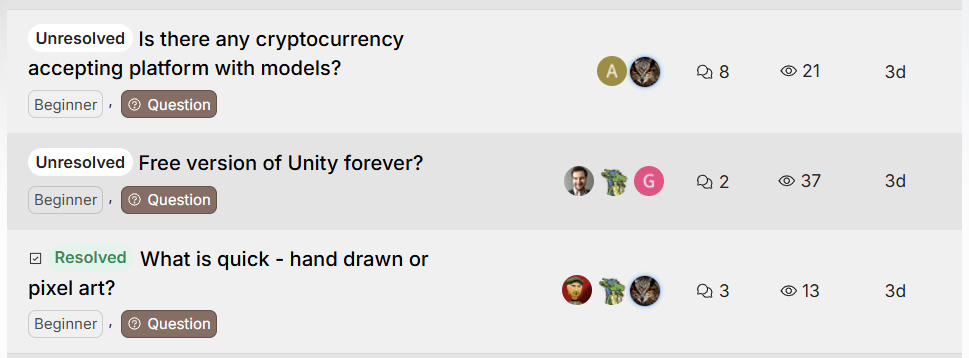
목표
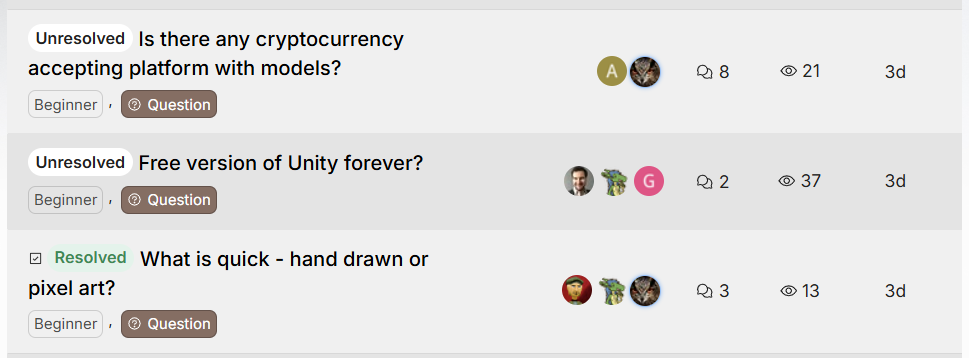
참여 인원이 제한적인 스터디 게시판에 알맞은 UI를 검색하다가 Unity 포럼을 찾게 되었고,
게시판의 글 목록에서 참여자 정보(작성자, 댓글 작성자)를 표시하는 UI를 Supabase와 Tanstack Query를 활용하여 구현해 보려고 합니다.
구현
방법 1
posts 테이블에 int2[] 타입의 participants 컬럼을 추가하고, supabase의 trigger 기능을 이용하여 comments 테이블에 데이터가 추가될 때마다 participants 업데이트 하기.
query 1
posts테이블에 데이터가 추가될 때 작성자의 id를participants배열에 추가합니다.
create or replace function set_author_as_participant()
returns trigger as $$
begin
  -- participants 필드에 작성자 user_id만 포함시켜 초기화
  NEW.participants := array[NEW.user_id];
  return NEW;
end;
$$ language plpgsql;

create trigger trigger_set_author_as_participant
before insert on posts
for each row
execute function set_author_as_participant();
query 2
-
comments테이블에 데이터가 추가되면,posts테이블의 해당 게시글participants에 comment 작성자의 id 추가합니다. -
comment 작성자가 이미 댓글을 단 상태이면,
participants에 추가하지 않습니다. -
after insert에 실행되는 트리거이기 때문에 추가된 데이터를 나타내는
NEW를 사용했고,remaining_count는 최소 1개 이상이 됩니다.
drop trigger trigger_add_participant_on_comment on comments;

create or replace function add_participant_on_comment()
returns trigger as $$
declare
  remaining_count int;
begin
  -- 같은 user_id로 남아있는 comment 수 확인
  select count(*) into remaining_count
  from comments
  where post_id = NEW.post_id
    and user_id = NEW.user_id;

  -- 이 댓글 포함해서 1개일 때
  if remaining_count = 1 then
    update posts
    set participants = array(
      select distinct unnest(participants || NEW.user_id)
    )
    where id = NEW.post_id;
  end if;

  return new;
end;
$$ language plpgsql;

-- 트리거 생성
create trigger trigger_add_participant_on_comment
after insert on comments
for each row
execute function add_participant_on_comment();
query 3
-
comments테이블에서 데이터가 삭제됐을 때participants에서 댓글 작성자의 id를 제거합니다. -
remaining_count로 같은 게시글에 유저가 작성한 다른 댓글이 있는지 검사합니다. -
author_id로 작성한 유저가 게시글 작성자인지 검사합니다. (글 작성자는participants의 첫 번째 원소입니다.)
drop trigger trigger_remove_participant_on_comment_delete on comments;

create or replace function remove_participant_on_comment_delete()
returns trigger as $$
declare
  remaining_count int;
  author_id smallint;
begin
  -- 같은 user_id로 남아있는 comment 수 확인
  select count(*) into remaining_count
  from comments
  where post_id = OLD.post_id
    and user_id = OLD.user_id;

  select participants[1] into author_id
  from posts
  where id = OLD.post_id;

  -- 같은 user_id로 작성된 댓글이 없고, user_id가 작성자가 아닐 때 participants 배열에서 제거
  if remaining_count = 0 and OLD.user_id != author_id then
    update posts
    set participants = array_remove(participants, OLD.user_id)
    where id = OLD.post_id;
  end if;

  return old;
end;
$$ language plpgsql;

create trigger trigger_remove_participant_on_comment_delete
after delete on comments
for each row
execute function remove_participant_on_comment_delete();
완성
-
comments테이블의 데이터 추가/제거에 따라posts테이블의participants배열의 push, pop 동작이 정상적으로 실행되었습니다. -
supabase 환경에서
participants가 string 배열처럼 보여도, 실제로는 PostgreSQL에 의해 int2(smallInt) 배열로 관리됩니다.
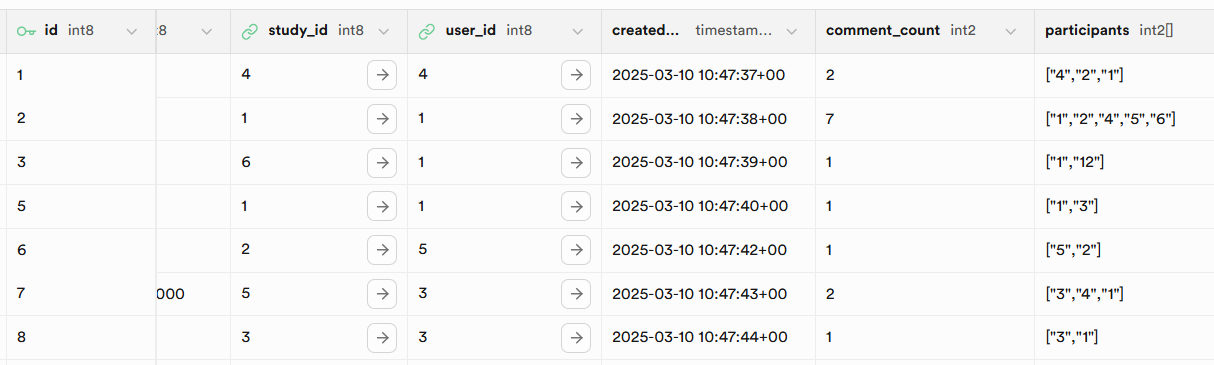
다음의 과정을 통해 posts 테이블의 participants 배열을 이용해 참여자 UI를 구현할 수 있었습니다.
Board.jsx에서posts테이블의 데이터 조회 후, 게시글 목록을 렌더합니다.BoradListItem.jsx에서 post data를 props로 받아participants배열을 확인합니다.BoardListItem.jsx에서in을 사용한 쿼리 API를 호출하여 각 참여자에 대한 유저 id와 닉네임, 프로필 이미지를 획득하여 map 합니다.

문제점
위의 방법은 Board.jsx에서 posts 데이터를 조회하고, 게시글 목록 하나를 나타내는 컴포넌트인 BoardItem.jsx에서 다시 users 데이터를 조회합니다.
이는 곧 게시글이 n개 있다면 users API 호출도 n번 한다는 말이므로, 게시글이 많이질수록 큰 성능 이슈를 불러올 수 있습니다.

리팩토링
1. BoardListItem 컴포넌트에서 비즈니스 로직 제거
컨테이너 컴포넌트
- 상태 관리와 비즈니스 로직만 담당합니다.
- 상태값을 Props로 하위 컴포넌트에 전달하고, 상태를 수정할 수 있는 콜백 함수를 전달합니다.
- 하위에 표현 컴포넌트를 포함하여, 이 컴포넌트들이 UI를 렌더링할 때 필요한 데이터와 동작을 제공합니다.
표현 컴포넌트
- 상태를 관리하지 않고, 부모 컴포넌트로부터 전달받은 Props를 기반으로 UI만 렌더링합니다.
- UI를 반환하는 기능에만 집중하므로 구현이 단순해지고, 재사용성이 높아집니다.
Board는 컨테이너 컴포넌트, BoradListItem은 표현 컴포넌트에 해당하므로 Board에서 API 호출을 모두 마친 후 BoradListItem에 props로 전달하는 방법을 사용해야 합니다.
2. posts의 participants 컬럼을 중간 테이블로 분리 (정규화)
posts의 participants 배열에 저장된 user id 값들에 users 테이블을 join하여 연결된 데이터를 가져오는 쿼리는 Supabase 클라이언트에 존재하지 않습니다. (View 또는 RPC 함수를 PostgreSQL 쿼리로 만들어야 한다고 합니다.)
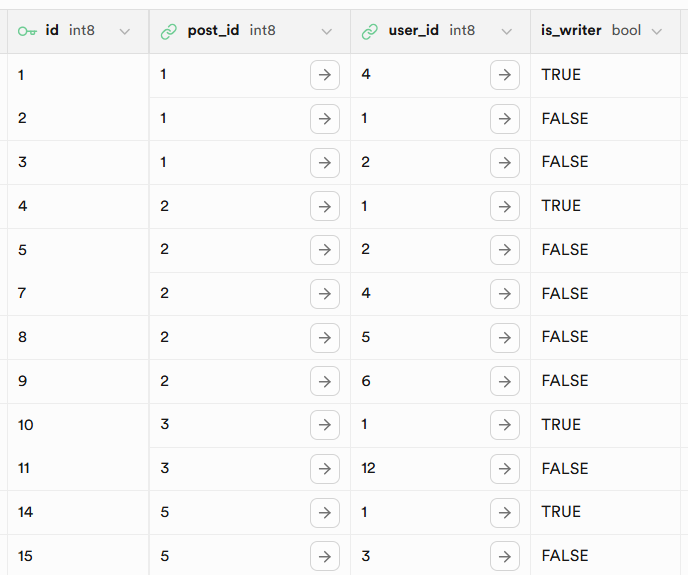
따라서 post_participants라는 새로운 테이블을 만들어 특정 post의 참여자 정보를 저장하고, posts ,comments 테이블에 사용되던 트리거들을 그에 맞게 마이그레이션하기로 결정했습니다.
post_participants
3. posts에 post_participants와 users를 join해서 데이터 불러오기
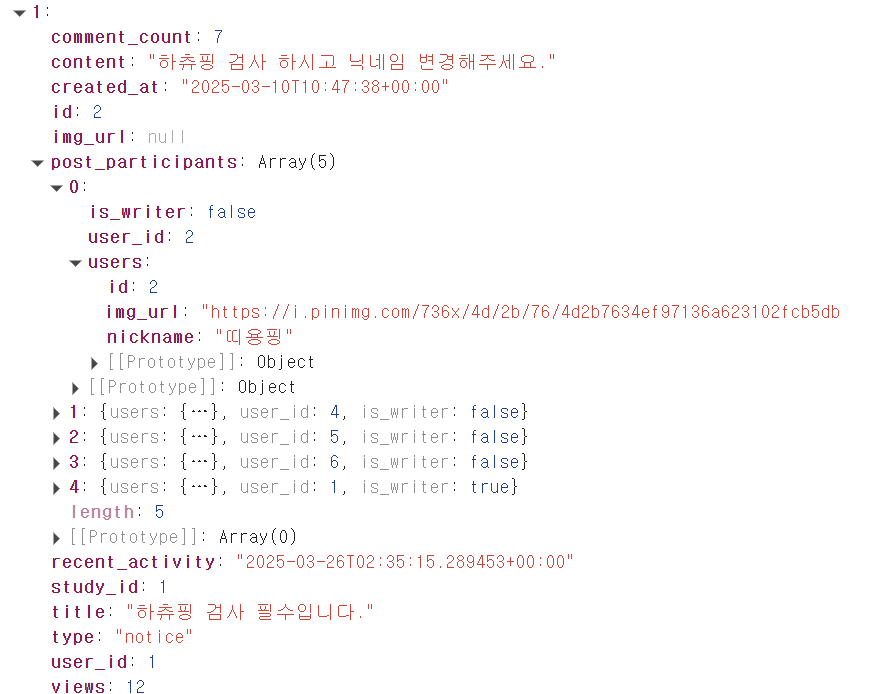
이제 supabase 쿼리 api를 사용해 원하는 데이터를 불러오면 됩니다.
import supabase from '@libs/supabase';

export const getPostListByType = (studyId, type) => {
  return supabase
    .from('posts')
    .select(
      `*,
       post_participants (
        user_id,
        is_writer,
        users (
          id,
          nickname,
          img_url
        )
      )
      `,
    )
    .eq('type', type)
    .eq('study_id', studyId);
};
4. 화면에 렌더하기
BoardListItem.jsx
const participantList =
    postData &&
    postData.post_participants.slice(0, 4).map((participant, index) => {
      return (
        <img
          key={participant.users.id}
          title={participant.users.nickname}
          className={`size-7 object-cover rounded-full ${index !== 0 ? '-ml-2' : ''}`}
          src={
            participant.users.img_url
              ? participant.users.img_url
              : defaultProfile
          }
        />
      );
    });

const remainingCount = postData && postData.post_participants.length - 4;Board에서 postData를 props로 받아, map을 이용해 참여자 정보를 jsx 배열로 변환합니다.
5. 완성
화면 스크린샷

네트워크 요청

로직을 상위 컴포넌트인 Board로 옮긴 후 props로 전달하는 방식을 사용하여 API 요청이 기존 1+n회에서 1회로 줄어든 것을 확인할 수 있습니다.