https://github.com/Unity-Technologies/ml-agents/blob/release_18_docs/docs/Readme.md
Installation
시작이 반이다..... 집에가기전에 이거까진 하고 가자
Unity 2019.4 설치
마침 사용중이던 버전을 그대로 활용
(기존 사용중이던 버전이 14f1인데, clone하고 요구하는 버전이 25f1이더라)
Python 3.9.5 설치
마찬가지로 사용중이던 버전을 그대로 활요
ml-agents 클론하기
git clone --branch release_18 https://github.com/Unity-Technologies/ml-agents.gitml-agents 패키지 설치하기
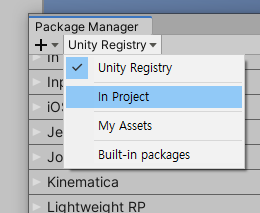
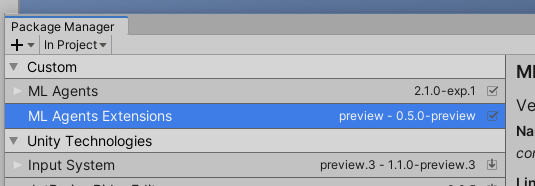
Package Manager를 통해서 설치 진행
본 테스트에서는 이미 설치된 내용을 클론받아 실행시켜서 그런지, documentation처럼 설치가 진행되진 않았고, Unity Registry에서 In Project에서 확인했을때 이미 설치된걸 볼 수 있었음
Pytorch 1.7.1 설치
기존에 활용하던 가상환경에 pytorch만 설치 진행
pip3 install torch~=1.7.1 -f https://download.pytorch.org/whl/torch_stable.html(윈도우의 경우) VC++ 재배포 설치해야된다고 함. visualstudio 설치된 PC라 이건 스킵했음
Note that on Windows, you may also need Microsoft's Visual C++ Redistributable if you don't have it already. See the PyTorch installation guide for more installation options and versions.하세요mlagents 0.27.0 설치
python -m pip install mlagents==0.27.0설치가 무사 완료되면 help로 설치가 제대로 된건지 체크
mlagents-learn --help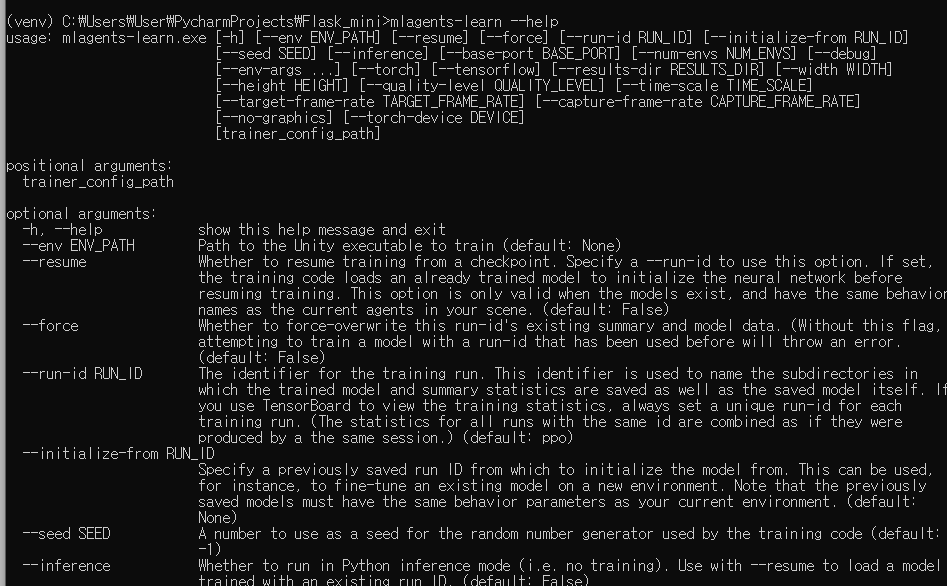
여까지 하면 설치작업은 완료.
다음은 Getting Started
실연 그것은 아픔
한달에 하나씩 포스팅이라도 하는게 다행이긴한건가