
행 인덱스 재배열
print(df)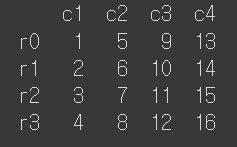
a_dict = {
    "c1": [1,2,3,4],
    "c2": [5,6,7,8],
    "c3": [9,10,11,12],
    "c4": [13,14,15,16]
}
df = pd.DataFrame(a_dict, index =['r0','r1','r2','r3']) #<<<row 값 설정 추가
print(df)
| c1 | c2 | c3 | c4 | |
|---|---|---|---|---|
| r0 | 1 | 5 | 9 | 13 |
| r1 | 2 | 6 | 10 | 14 |
| r2 | 3 | 7 | 11 | 15 |
| r3 | 4 | 8 | 12 | 16 |
새로운 데이터프레임 반환
df1 = df.reindex(['r1','r3','r0','r2']) #<<<홀수, 짝수 배열
print(df1)| c1 | c2 | c3 | c4 | |
|---|---|---|---|---|
| r1 | 2 | 6 | 10 | 14 |
| r3 | 4 | 8 | 12 | 16 |
| r0 | 1 | 5 | 9 | 13 |
| r2 | 3 | 7 | 11 | 15 |
inplace = True>> 변경된 데이터로 뒤집어 쓰겠다!
새로운 행 인덱스(정의하지 않은 값)를 추가하면 해당 값은 NaN으로 채워짐
df2 =  df.reindex(['r0','r1','r2','r3','r4','r5'])
print(df2)| c1 | c2 | c3 | c4 | |
|---|---|---|---|---|
| r0 | 1 | 5 | 9 | 13 |
| r1 | 2 | 6 | 10 | 14 |
| r2 | 3 | 7 | 11 | 15 |
| r3 | 4 | 8 | 12 | 16 |
| r4 | NaN | NaN | NaN | NaN |
| r5 | NaN | NaN | NaN | NaN |
df3 =  df.reindex(['r0','r1','r2','r3','r4','r5'], fill_value= 0)
print(df3)| c1 | c2 | c3 | c4 | |
|---|---|---|---|---|
| r0 | 1 | 5 | 9 | 13 |
| r1 | 2 | 6 | 10 | 14 |
| r2 | 3 | 7 | 11 | 15 |
| r3 | 4 | 8 | 12 | 16 |
| r4 | 0 | 0 | 0 | 0 |
| r5 | 0 | 0 | 0 | 0 |
이 경우 원본 변경 지원 안함(error)
df.reindex(['r0','r1','r2','r3','r4','r5'], inplace = True)
print(df) # 변경 후
행 인덱스 초기화
- 기존 행 인덱스 => 열
- 행 인덱스는 정수
열 이름이 index로 자동으로 만들어짐
df4 = df.reset_index()
print(df4)| index | c1 | c2 | c3 | c4 | |
|---|---|---|---|---|---|
| 0 | r0 | 1 | 5 | 9 | 13 |
| 1 | r1 | 2 | 6 | 10 | 14 |
| 2 | r2 | 3 | 7 | 11 | 15 |
| 3 | r3 | 4 | 8 | 12 | 16 |
원본 변경
df.reset_index(inplace = True)
행 인덱스 기준 정렬
다시 딕셔너리 생성(원본 변경했으니까)
행 인덱스가 내림차순 정렬 = r3 ~ r0
새로운 데이터프레임 반환
기본값=> True이므로 ascending= False (ascending을 하지마라, 내림차순)
df1 = df.sort_index(ascending= False)
print(df1) | c1 | c2 | c3 | c4 | |
|---|---|---|---|---|
| r3 | 4 | 8 | 12 | 16 |
| r2 | 3 | 7 | 11 | 15 |
| r1 | 2 | 6 | 10 | 14 |
| r0 | 1 | 5 | 9 | 13 |
원본 변경
df.sort_index(ascending= False, inplace = True) #ascending을 하지마라, 내림차순
행 인덱스가 오름차순 정렬 = r0 ~ r3
#기본값이 ascending = True이므로 생략 가능
df.sort_index(inplace = True)
#df.sort_index(ascending= True, inplace = True)
열 기준 정렬
- 내림차순
print(df) - 새로운 데이터프레임으로 반환
df1 = df.sort_values('c1', ascending = False)원본 변경
#내림차순
df.sort_values('c1', ascending = False, inplace = True)
산술 연산
시리즈&숫자
import pandas as pd
#error 대부분 라이브러리 불러오지 않아서 생김,,
✍ 입력
딕셔너리를 시리즈로 변환
student1 = pd.Series({"국어": 80,
                      "영어": 50,
                      "수학": 90
                      })
print(student1)
#딕셔너리의 키 = 시리즈의 인덱스
#딕셔너리의 값 = 시리즈의 값
💻 출력
국어 80
영어 50
수학 90
dtype: int64
✍ 입력
student1_edit = student1 +10
print(student1_edit)
print(type(student1_edit))
#숫자 더해도 여전히 시리즈!
💻 출력
국어 90
영어 60
수학 100
dtype: int64
<class 'pandas.core.series.Series'>
시리즈&시리즈
딕셔너리를 시리즈로 변환
student1 = pd.Series({"국어": 80,
"영어": 50,
"수학": 90
})
student2 = pd.Series({"영어": 90,
"수학": 20,
"국어": 90
})
print(student1);print(student2)
국어 80
영어 50
수학 90
dtype: int64
영어 90
수학 20
국어 90
dtype: int64
✍ 입력
#사칙연산
plus = student1 + student2
minus= student1 - student2
mul = student1 * student2
div = student1 / student2
print(plus);print(minus);print(mul);print(div)
💻 출력
국어    170
수학    110
영어    140
dtype: int64
국어   -10
수학    70
영어   -40
dtype: int64
국어    7200
수학    1800
영어    4500
dtype: int64
국어    0.888889
수학    4.500000
영어    0.555556
dtype: float64
데이터프레임
✍ 입력
df = pd.DataFrame([plus, minus, mul, div],
                  index = ['더하기', '빼기', '곱하기', '나누기'])
print(df)
💻 출력
| 국어 | 수학 | 영어 | |
|---|---|---|---|
| 더하기 | 170.000000 | 110.0 | 140.000000 |
| 빼기 | -10.000000 | 70.0 | -40.000000 |
| 곱하기 | 7200.000000 | 1800.0 | 4500.000000 |
| 나누기 | 0.888889 | 4.5 | 0.555556 |
# 행과 열 바꾸기
print(df.T) # T = transpose
print(df.transpose()) 같음| 더하기 | 빼기 | 곱하기 | |
|---|---|---|---|
| 국어 | 170.0 | -10.0 | 7200.0 |
| 수학 | 110.0 | 70.0 | 1800.0 |
| 영어 | 140.0 | -40.0 | 4500.0 |
####대응되는 인덱스가 있는데, 그 값이 NaN인 경우
####대응되는 인덱스가 없는 경우
import numpy as np
# 딕셔너리를 시리즈로 변환
student1 = pd.Series({"국어": 80,
                      "영어": 50,
                      "수학": 90
                       })
student2 = pd.Series({"영어": 90,
                      "국어": np.nan
                       })
#사칙연산
plus = student1 + student2
minus= student1 - student2
mul = student1 * student2
div = student1 / student2
# 데이터프레임
df = pd.DataFrame([plus, minus, mul, div],
index = ['더하기', '빼기', '곱하기', '나누기'])
print(df)| 국어 | 수학 | 영어 | |
|---|---|---|---|
| 더하기 | NaN | NaN | 140.000000 |
| 빼기 | NaN | NaN | -40.000000 |
| 곱하기 | NaN | NaN | 4500.000000 |
| 나누기 | NaN | NaN | 0.555556 |
###nan으로 바뀌는 것을 막는 방법
import numpy as np
# 딕셔너리를 시리즈로 변환
student1 = pd.Series({"국어": np.nan,
                      "영어": 50,
                      "수학": 90
                       })
student2 = pd.Series({"영어": 90,
                      "국어": 80
                       })
#사칙연산 => 연산 메소드
plus = student1.add(student2, fill_value=0)
minus = student1.sub(student2, fill_value=0)
mul = student1.mul(student2, fill_value=0)
div = student1.div(student2, fill_value=0)
# 데이터프레임
df = pd.DataFrame([plus, minus, mul, div],
index = ['더하기', '빼기', '곱하기', '나누기'])
print(df)
#계산 결과 국어 앞에 있는 값이 0, 수학 뒤에 있는 값 0| 국어 | 수학 | 영어 | |
|---|---|---|---|
| 더하기 | 80.0 | 90.0 | 140.000000 |
| 빼기 | -80.0 | 90.0 | -40.000000 |
| 곱하기 | 0.0 | 0.0 | 4500.000000 |
| 나누기 | 0.0 | inf | 0.555556 |
###데이터 프레임 & 숫자
import seaborn as sns
# 타이타닉 데이터 불러오기(라이브러리 내장 데이터)
titanic = sns.load_dataset('titanic')
# 데이터 앞부분 보기 = 기본값이 5개의 행
titanic.head()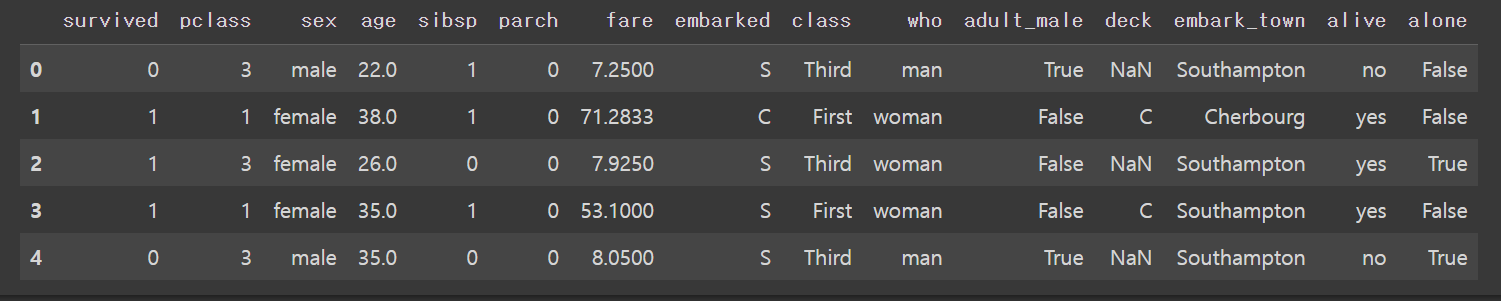
titanic.head(10)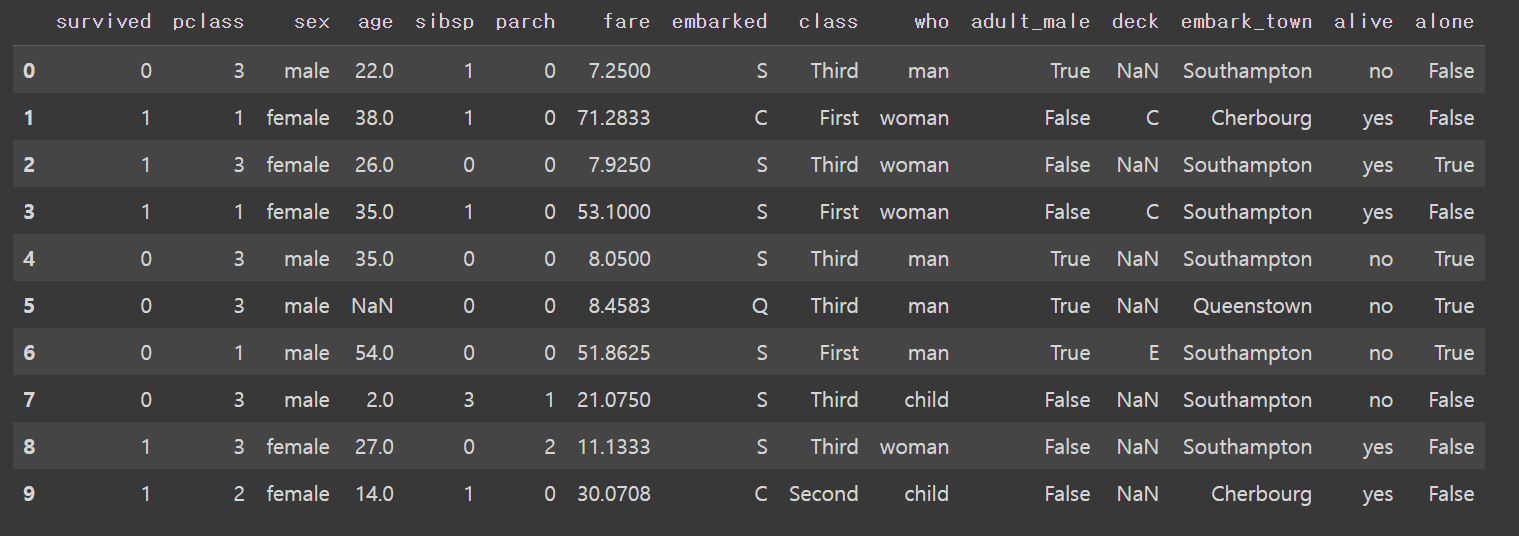
# age, fare 열을 추출 & 모든 행과 age, fare 열 2개
df = titanic.loc[:,['age','fare']]
df.head()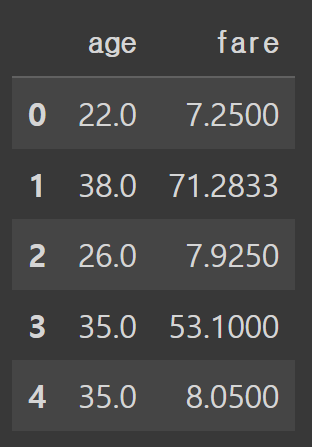
plus = df + 5
print(plus)
print(type(plus))| 국어 | 수학 | 영어 | |
|---|---|---|---|
| 더하기 | 85.0 | 95.0 | 145.000000 |
| 빼기 | -75.0 | 95.0 | -35.000000 |
| 곱하기 | 5.0 | 5.0 | 4505.000000 |
| 나누기 | 5.0 | inf | 5.555556 |
<class 'pandas.core.frame.DataFrame'>
# 데이터프레임과 데이터프레임을 이용해서 빼기
minus = plus - df
print(minus)| 국어 | 수학 | 영어 | |
|---|---|---|---|
| 더하기 | 5.0 | 5.0 | 5.0 |
| 빼기 | 5.0 | 5.0 | 5.0 |
| 곱하기 | 5.0 | 5.0 | 5.0 |
| 나누기 | 5.0 | NaN | 5.0 |
데이터 입출력
외부파일 불러오기
csv
#csv 파일 불러오기
#파일 경로, 파일 이름, 파일 확장자
df = pd.read_csv('/content/drive/MyDrive/hana1/Data/read_csv_sample.csv')
print(df)| c0 | c1 | c2 | c3 | |
|---|---|---|---|---|
| 0 | 0 | 1 | 4 | 7 |
| 1 | 1 | 2 | 5 | 8 |
| 2 | 2 | 3 | 6 | 9 |
# 기본값이 header = 0 => 원래 데이터에 첫 번째 행이 열 이름인 경우에 보통 쓰는 방법
df1 = pd.read_csv('/content/drive/MyDrive/hana1/Data/read_csv_sample.csv', header = 0)
print(df1)| c0 | c1 | c2 | c3 | |
|---|---|---|---|---|
| 0 | 0 | 1 | 4 | 7 |
| 1 | 1 | 2 | 5 | 8 |
| 2 | 2 | 3 | 6 | 9 |
# 두 번째 행을 열 이름으로 설정
df2 = pd.read_csv('/content/drive/MyDrive/hana1/Data/read_csv_sample.csv', header = 1)
print(df2)| 0 | 1 | 4 | 7 | |
|---|---|---|---|---|
| 0 | 1 | 2 | 5 | 8 |
| 1 | 2 | 3 | 6 | 9 |
# 원래 데이터에 열 이름 없이 전부 데이터로 구성된 경우
df3 = pd.read_csv('/content/drive/MyDrive/hana1/Data/read_csv_sample.csv', header = None)
print(df3)| 0 | 1 | 2 | 3 | |
|---|---|---|---|---|
| 0 | c0 | c1 | c2 | c3 |
| 1 | 0 | 1 | 4 | 7 |
| 2 | 1 | 2 | 5 | 8 |
| 3 | 2 | 3 | 6 | 9 |
# 행 인덱스
df4 = pd.read_csv('/content/drive/MyDrive/hana1/Data/read_csv_sample.csv')
print(df4)| c0 | c1 | c2 | c3 | |
|---|---|---|---|---|
| 0 | 0 | 1 | 4 | 7 |
| 1 | 1 | 2 | 5 | 8 |
| 2 | 2 | 3 | 6 | 9 |
# 기본값이 index_col = None, 행 인덱스가 기본값 (정수형 위치 인덱스)
df5 = pd.read_csv('/content/drive/MyDrive/hana1/Data/read_csv_sample.csv', index_col = None)
print(df5)| c0 | c1 | c2 | c3 | |
|---|---|---|---|---|
| 0 | 0 | 1 | 4 | 7 |
| 1 | 1 | 2 | 5 | 8 |
| 2 | 2 | 3 | 6 | 9 |
# 특정 열을 행 인덱스로 설정
df6 = pd.read_csv('/content/drive/MyDrive/hana1/Data/read_csv_sample.csv', index_col = 'c0')
print(df6)| c1 | c2 | c3 | |
|---|---|---|---|
| c0 | |||
| 0 | 1 | 4 | 7 |
| 1 | 2 | 5 | 8 |
| 2 | 3 | 6 | 9 |
excel
read_excel 판다스 공식 문서 참고할 것! https://pandas.pydata.org/docs/reference/api/pandas.read_excel.html
pd.read_excel('/content/drive/MyDrive/hana1/Data/남북한발전전력량.xlsx', engine = 'openpyxl')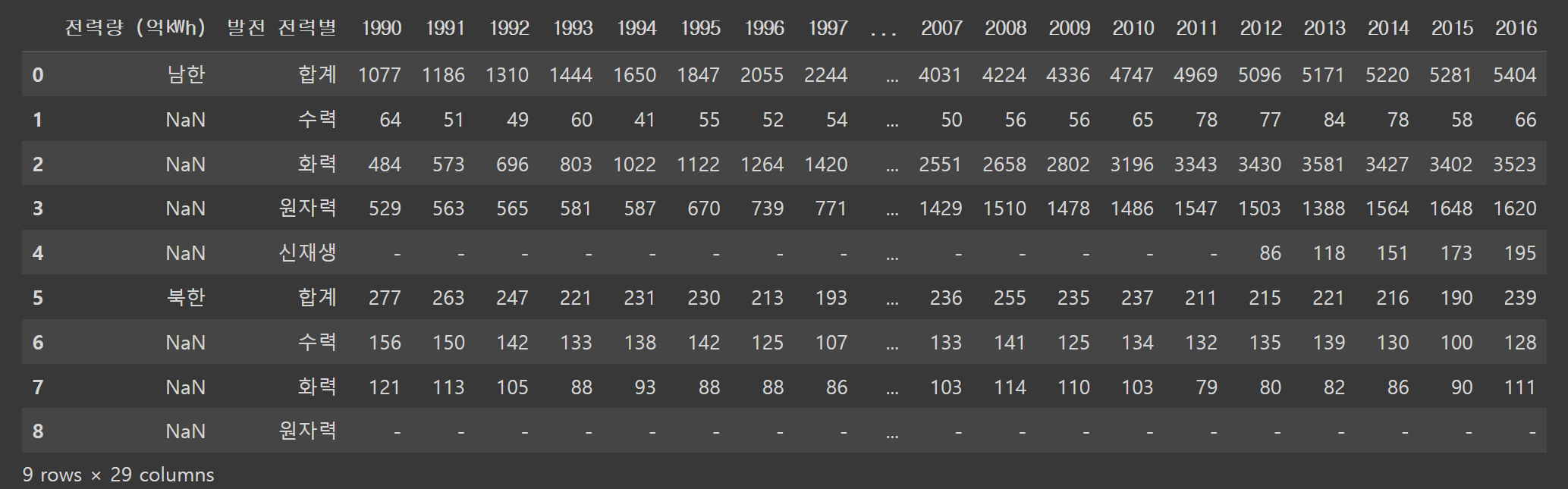
#csv 파일 불러오기
#파일 경로, 파일 이름, 파일 확장자
#engine = None 기본값
df = pd.read_excel('/content/drive/MyDrive/hana1/Data/남북한발전전력량.xlsx', engine = 'openpyxl')
print(df)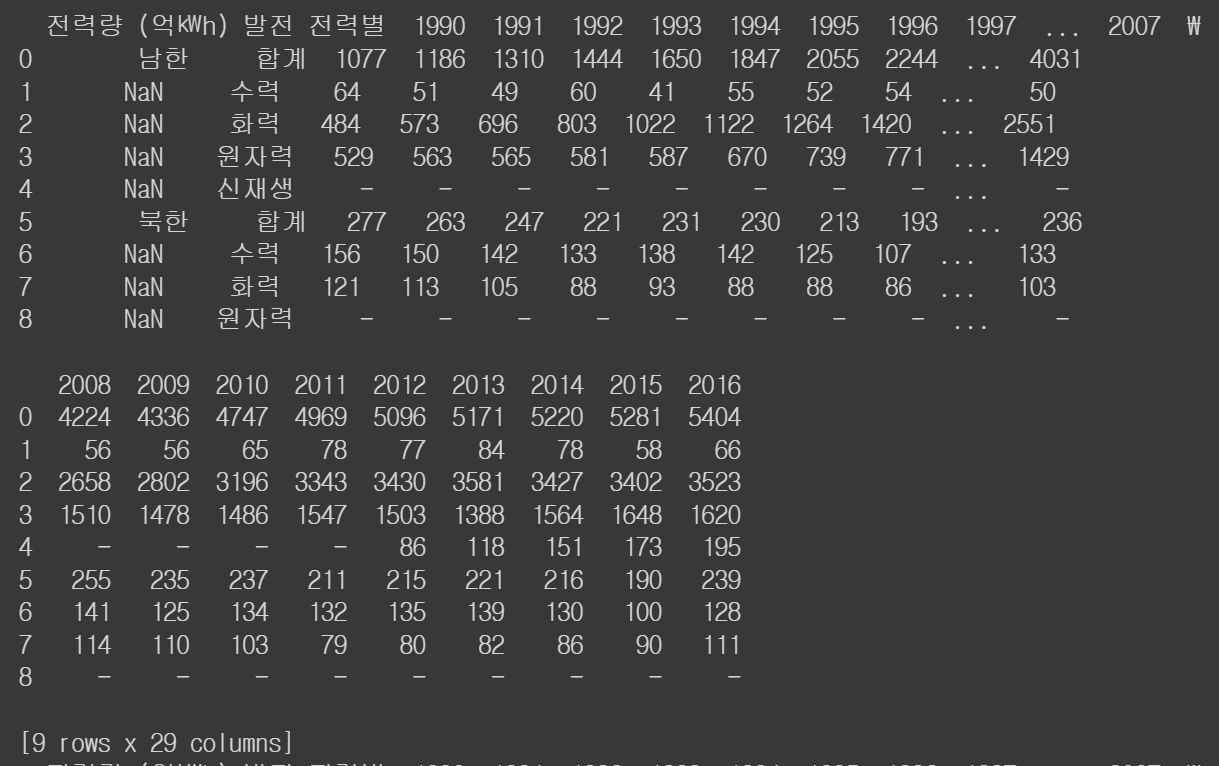
# 기본값이 header = 0 => 원래 데이터에 첫 번째 행이 열 이름인 경우에 보통 쓰는 방법
df1 = pd.read_excel('/content/drive/MyDrive/hana1/Data/남북한발전전력량.xlsx', engine = 'openpyxl', header = 0)
print(df1)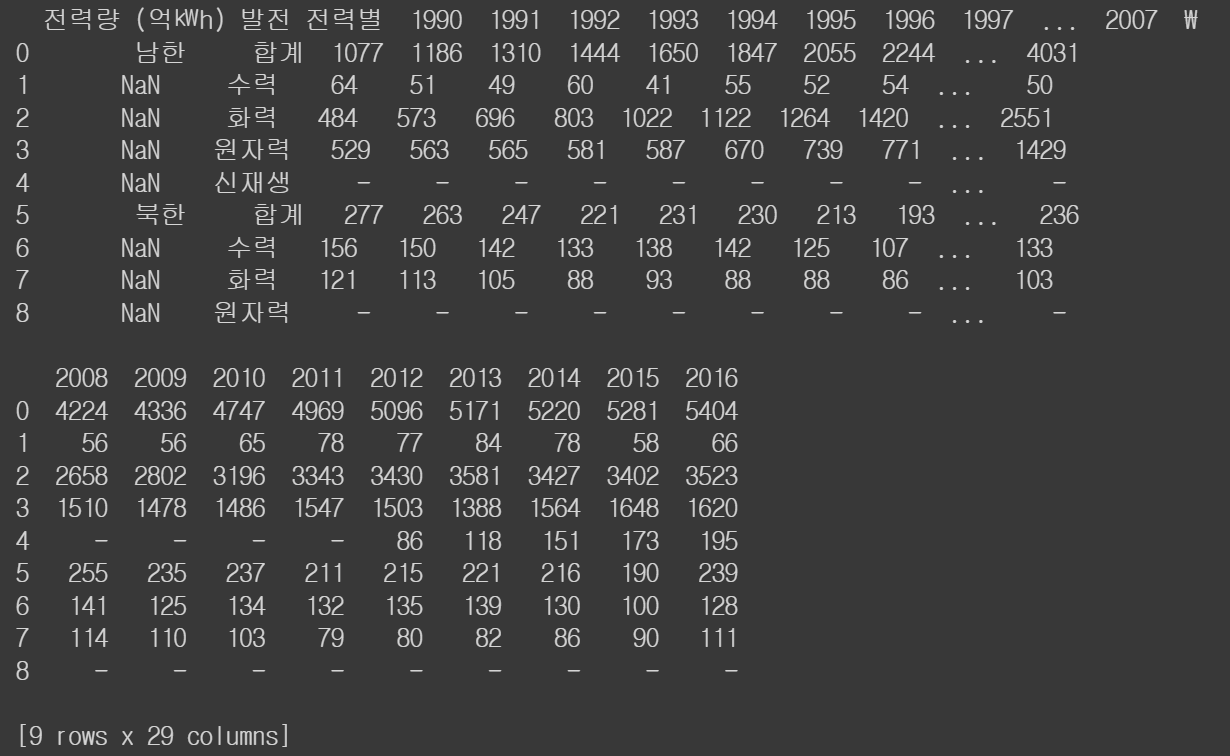
# 두 번째 행을 열 이름으로 설정
df2 = pd.read_excel('/content/drive/MyDrive/hana1/Data/남북한발전전력량.xlsx', engine = 'openpyxl', header = 1)
print(df2)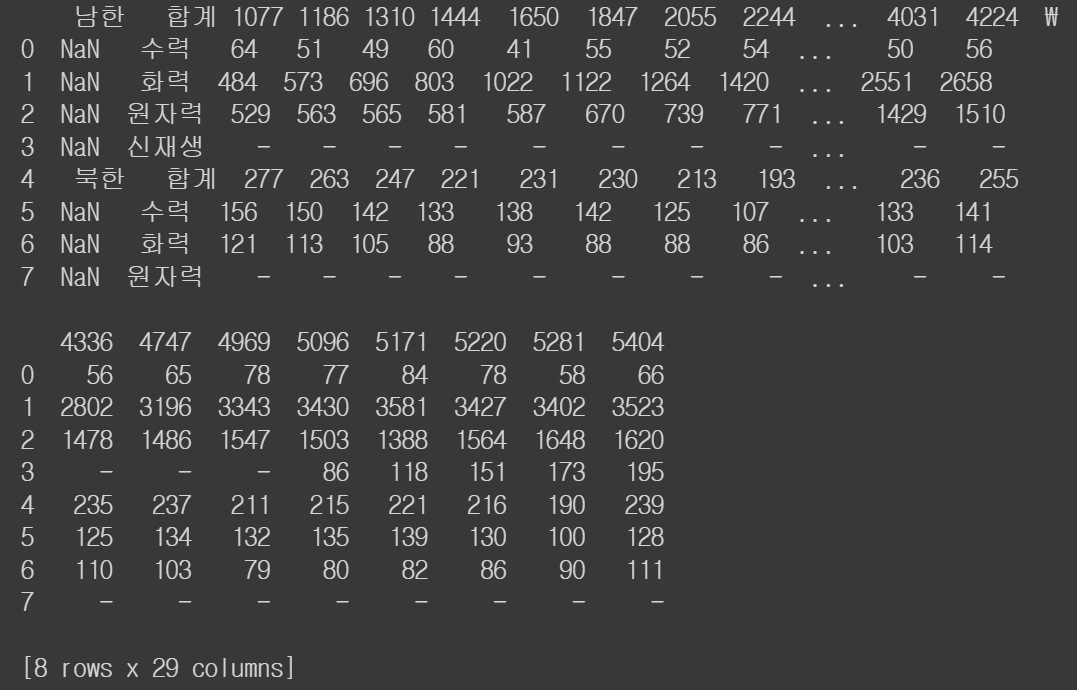
# 원래 데이터에 열 이름 없이 전부 데이터로 구성된 경우
df3 = pd.read_excel('/content/drive/MyDrive/hana1/Data/남북한발전전력량.xlsx', engine = 'openpyxl', header = None)
print(df3)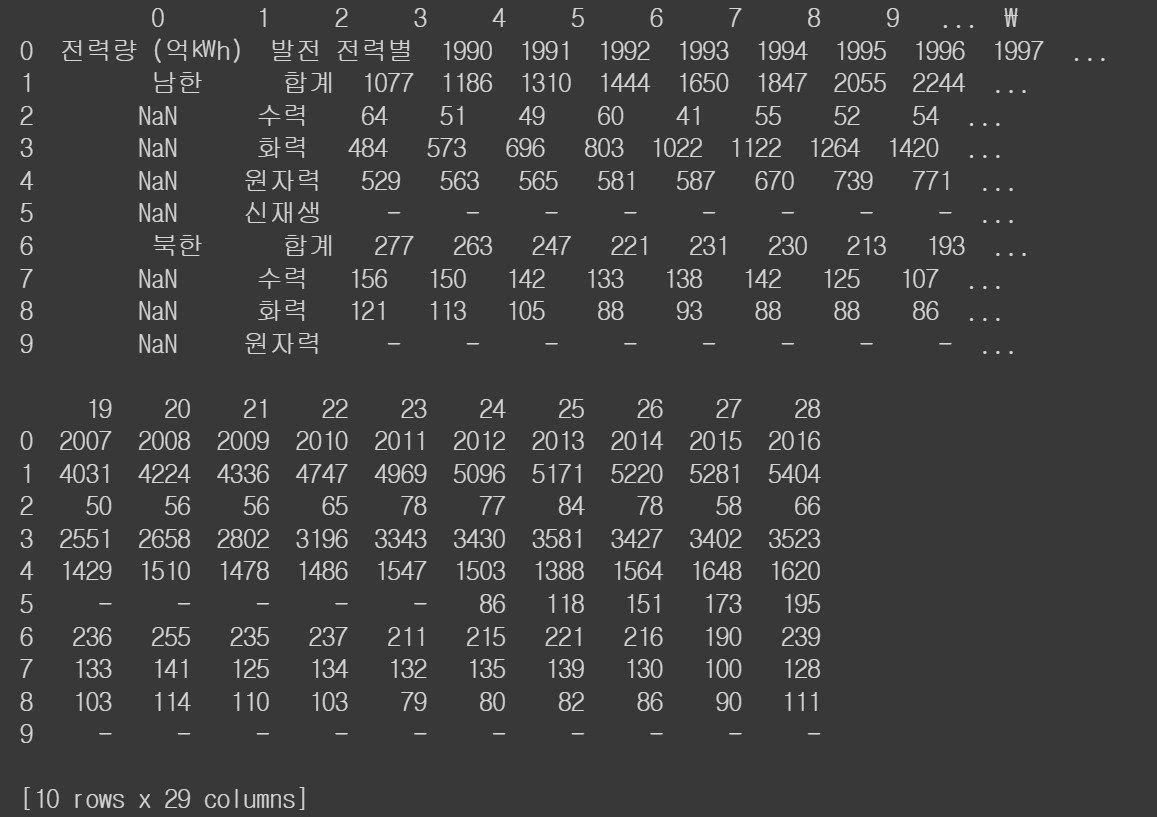
# 행 인덱스
df4 = pd.read_excel('/content/drive/MyDrive/hana1/Data/남북한발전전력량.xlsx', engine = 'openpyxl')
print(df4)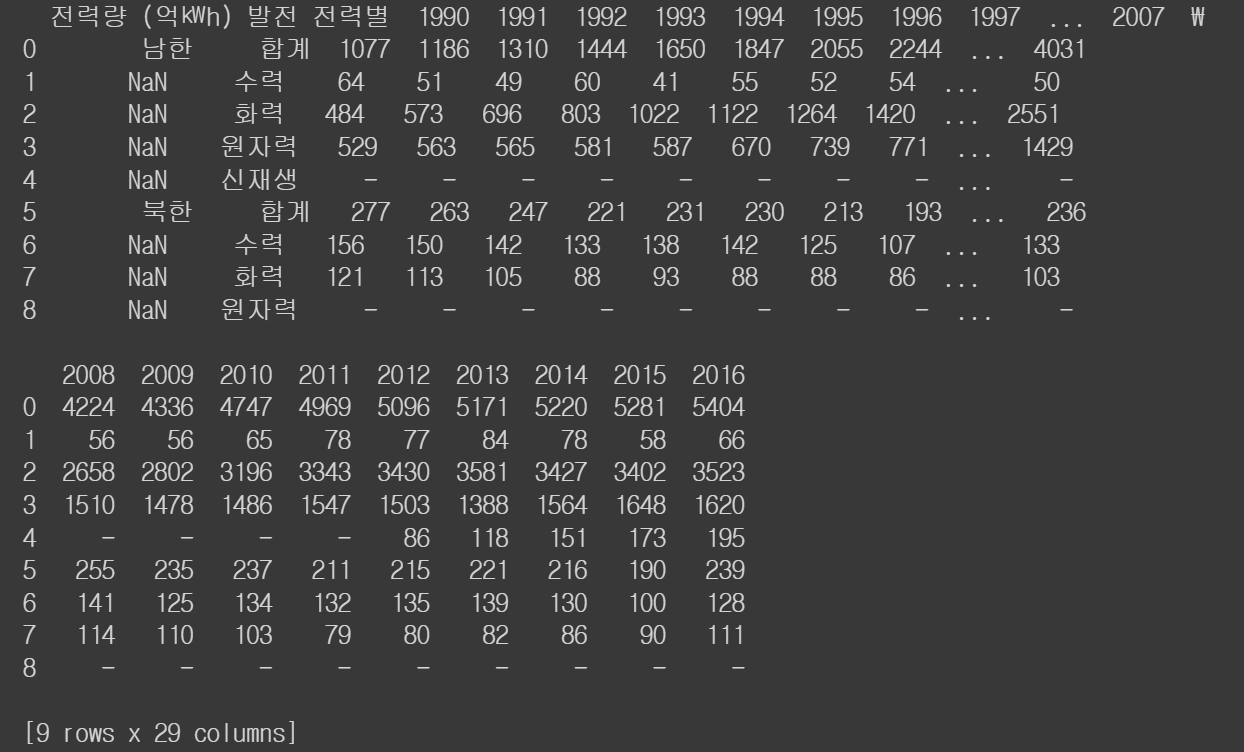
# 기본값이 index_col = None, 행 인덱스가 기본값 (정수형 위치 인덱스)
df5 = pd.read_excel('/content/drive/MyDrive/hana1/Data/남북한발전전력량.xlsx', engine = 'openpyxl', index_col = None)
print(df5)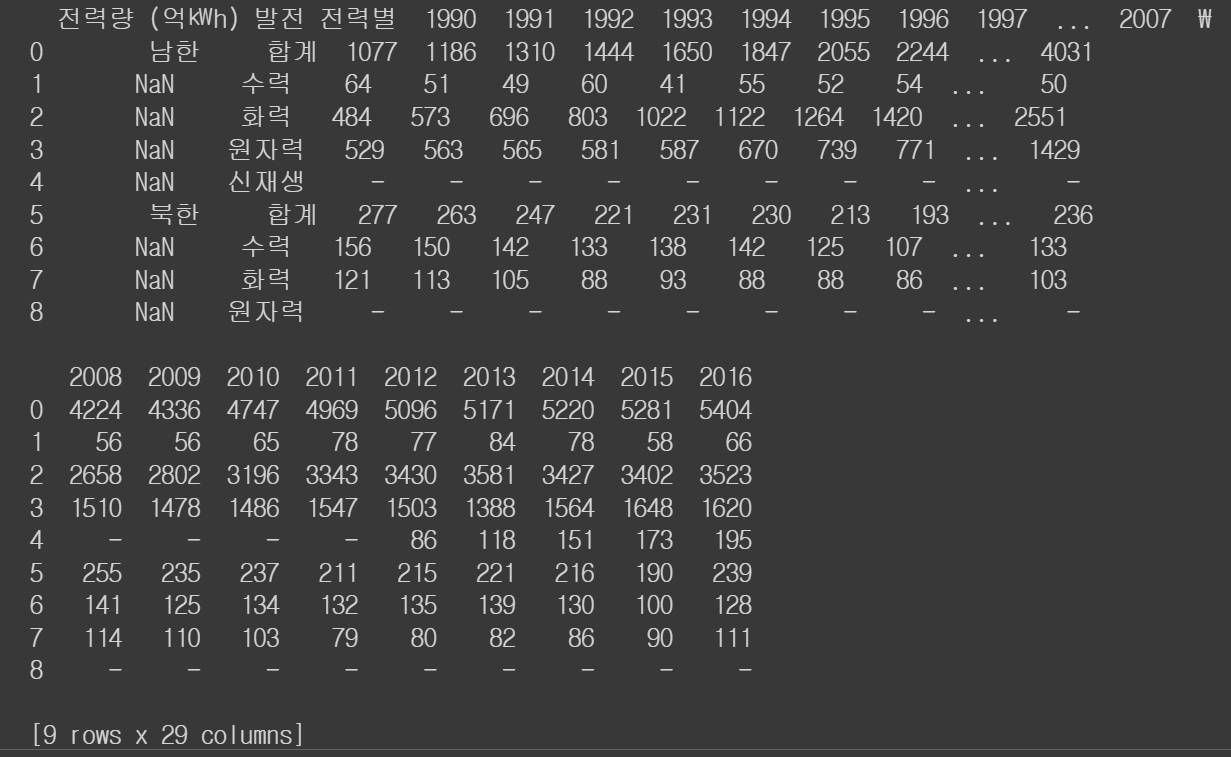
# 특정 열을 행 인덱스로 설정
df6 = pd.read_excel('/content/drive/MyDrive/hana1/Data/남북한발전전력량.xlsx', engine = 'openpyxl', index_col = '1990')
print(df6)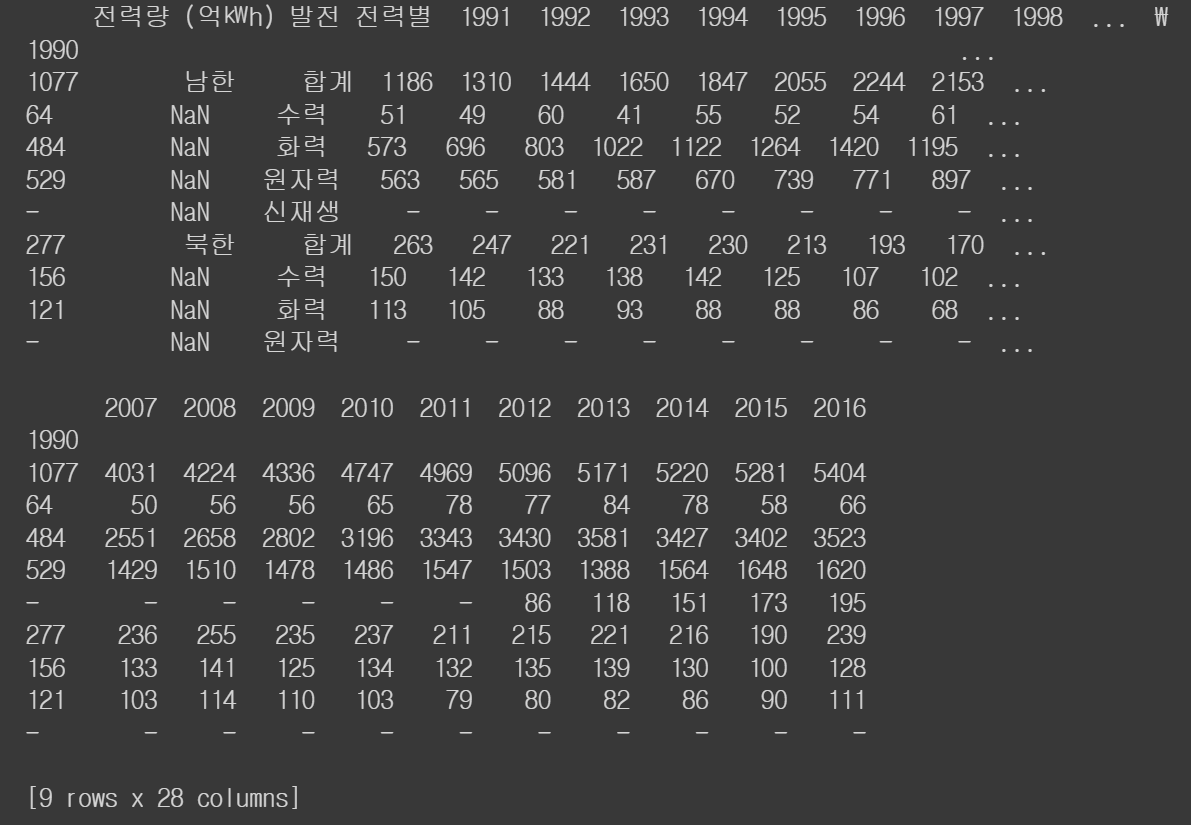
json
df = pd.read_json('/content/drive/MyDrive/hana1/Data/read_json_sample.json')
print(df)
print(df.index)| name | year | developer | opensource |
|---|---|---|---|
| pandas | 2008 | Wes Mckinneye | True |
| NumPy | 2006 | Travis Oliphant | True |
| matplotlib | 2003 | John D. Hunter | True |
Index(['pandas', 'NumPy', 'matplotlib'], dtype='object')
저장하기
mid_term = {"name": ['Bae', 'Shin', 'Park'],
            "sql": [90, 80, 70],
            "python": [50, 70, 90],
            "stat": [100, 60, 80]}
df = pd.DataFrame(mid_term)
print(df)| name | sql | python | stat |
|---|---|---|---|
| 0 | Bae | 90 | 50 |
| 1 | Shin | 80 | 70 |
| 2 | Park | 70 | 90 |
# 이름 열을 행 인덱스로 설정
df.set_index('name', inplace = True)
print(df)| sql | python | stat | |
|---|---|---|---|
| name | |||
| Bae | 90 | 50 | 100 |
| Shin | 80 | 70 | 60 |
| Park | 70 | 90 | 80 |
# csv로 저장 (기본경로 = ./ = content/)
df.to_csv('./df_csv.csv')
# excel 로 저장 (기본경로 = ./ = content/)
df.to_excel('./df_excel.xlsx')
# json로 저장 (기본경로 = ./ = content/)
df.to_json('./df_json.json')
#  여러 개의 데이터 프레임을 하나의 엑셀 파일로 저장
print(df)| sql | python | stat | |
|---|---|---|---|
| name | |||
| Bae | 90 | 50 | 100 |
| Shin | 80 | 70 | 60 |
| Park | 70 | 90 | 80 |
df1 = df.reset_index()
print(df1)| name | sql | python | stat | |
|---|---|---|---|---|
| 0 | Bae | 90 | 50 | 100 |
| 1 | Shin | 80 | 70 | 60 |
| 2 | Park | 70 | 90 | 80 |
#엑셀 파일 = 워크북
# 시트 = 워크 시트
wb = pd.ExcelWriter('./wb_excel.xlsx')
df.to_excel(wb, sheet_name = 'df1')
df1.to_excel(wb, sheet_name = 'df2')
wb.save()<ipython-input-46-7eff56e5f69b>:6: FutureWarning: save is not part of the public API, usage can give unexpected results and will be removed in a future version
wb.save()웹에서 가져오기
HTML
#라이브러리 불러오기
import pandas as pd
url = '/content/drive/MyDrive/hana1/Data/sample.html'
df = pd.read_html(url)
#print(df)
print(len(df)) # 2개의 테이블
for i in range(len(df)):
print("table{}".format(i+1))
print(df[i])2
table1
| Unnamed | 0 | c0 | c1 | c2 | c3 |
|---|---|---|---|---|---|
| 0 | 0 | 0 | 1 | 4 | 7 |
| 1 | 1 | 1 | 2 | 5 | 8 |
| 2 | 2 | 2 | 3 | 6 | 9 |
table2
| name | year | developer | opensource | |
|---|---|---|---|---|
| 0 | NumPy | 2006 | Travis Oliphant | True |
| 1 | matplotlib | 2003 | John D. Hunter | True |
| 2 | pandas | 2008 | Wes Mckinneye | True |
table1 = df[0]
table2 = df[1]
print(table1);print(table2)| Unnamed | 0 | c0 | c1 | c2 | c3 |
|---|---|---|---|---|---|
| 0 | 0 | 0 | 1 | 4 | 7 |
| 1 | 1 | 1 | 2 | 5 | 8 |
| 2 | 2 | 2 | 3 | 6 | 9 |
| name | year | developer | opensource | |
|---|---|---|---|---|
| 0 | NumPy | 2006 | Travis Oliphant | True |
| 1 | matplotlib | 2003 | John D. Hunter | True |
| 2 | pandas | 2008 | Wes Mckinneye | True |
웹 스크래핑
# 라이브러리 불러오기
from bs4 import BeautifulSoup
import requests
import re
import pandas as pd
url = 'https://en.wikipedia.org/w/index.php?title=List_of_American_exchange-traded_funds&oldid=948664741'
resp = requests.get(url)
soup = BeautifulSoup(resp.text, 'lxml')
print(soup)rows = soup.select('div > ul > li') # 내가 원하는 데이터 찾기
print(rows)etf = {}
for row in rows:
# 주식 상품 이름, 주식 시장 이름, 티커(약자 like AAPL)
#iShares Russell 1000 Growth Index (NYSE Arca|IWF)
# ^ = 문자열의 맨 처음과 매치 <=> $ = 문자열의 맨 끝과 매치
# . = 줄 바꿈 \n를 제외한 모든 문자열과 매치
# * = 앞에 있는 문자가 0부터 무한대로 매치
# findall = 정규표현식으로 매치되는 모든 문자열을 리스트 형태로 반환
# ^(.*) \ (NYSE 정규 표현식
etf_name = re.findall("^(.*) \(NYSE", row.text) # 처음부터 _(NYSE 까지의 문자열
etf_market = re.findall("\((.*)\|", row.text) # (~ I의 문자열
etf_ticker = re.findall("\|(.*)\)", row.text) # I~ )의 문자열
# 세 개의 데이터가 모두 있는 경우
if (len(etf_name)>0) & (len(etf_market)>0) & (len(etf_ticker)>0):
etf[etf_ticker[0]] = [ etf_market[0], etf_name[0]]
# 리스트 첫 번째꺼이기 때문에 0 을 씀
#len 개수 세는 것
df = pd.DataFrame(etf)
print(df)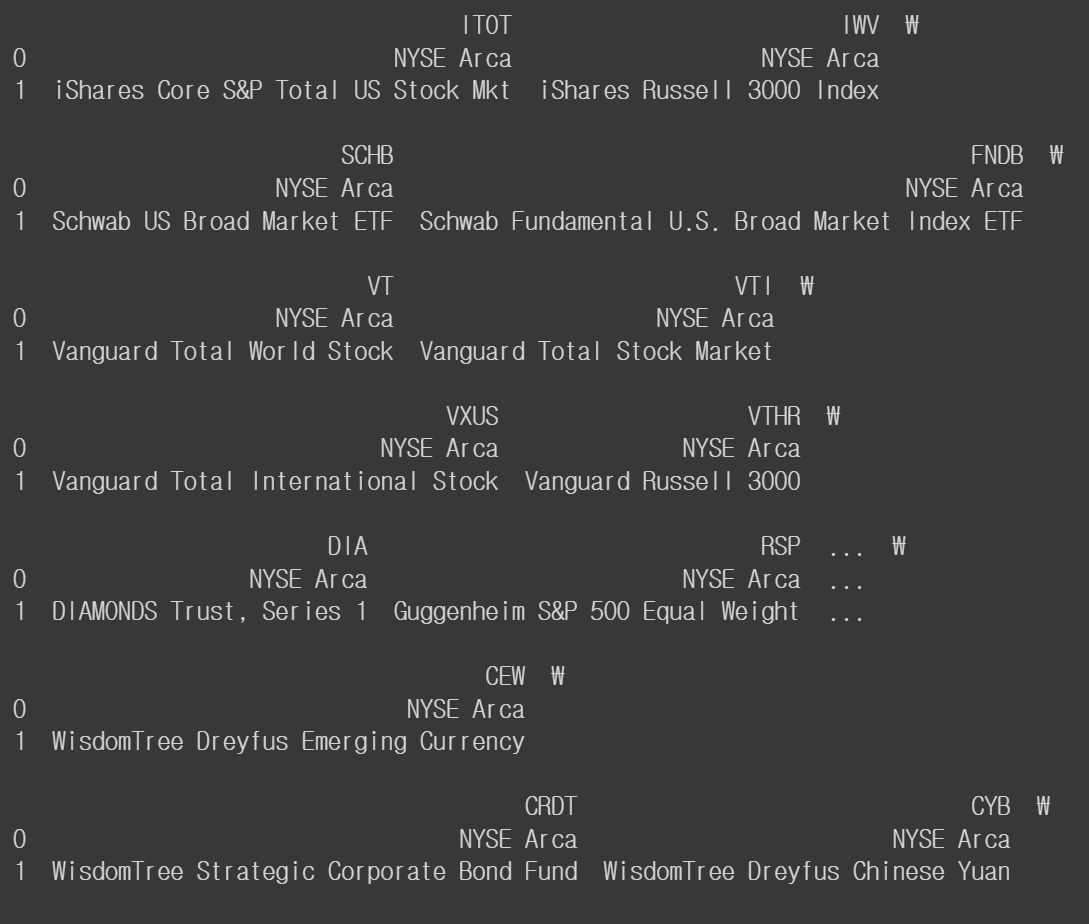
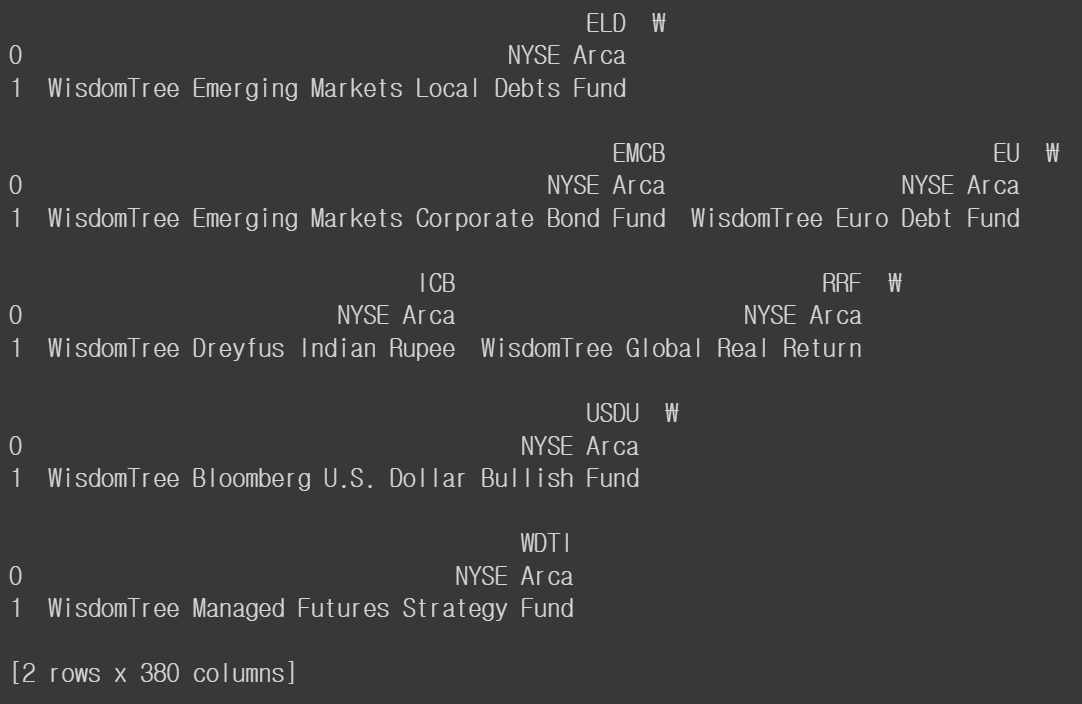
print(df.T)
print(df.transpose())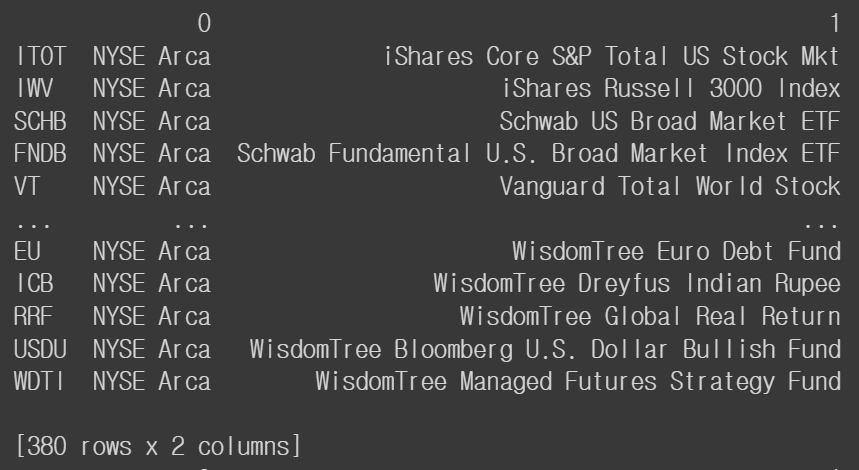
import re
string = "Vanguard S&P Small-Cap 600 (NYSE Arca|VIOO)"
# 역슬래시 바로 뒤에 문자가 있어야 함
print(re.findall('^(.*)\(NYSE', string))
# print(re.findall('^(.*)\ (NYSE', string))
print(re.findall('^(.*) \(NYSE', string))
print(re.findall('\((.*)\|', string))
print(re.findall('\|(.*)\)', string))
['Vanguard S&P Small-Cap 600 ']['Vanguard S&P Small-Cap 600']
['NYSE Arca']['VIOO']
과제
1) 파이썬 알고리즘 과제, 3주 정도 시간을 들여서 레포트 작성
왜 이렇게 생각했는지 코드 작성
1.homework 코드짜는 것
2.쪽지시험 별안간 갑자기 볼거야,,, 과목은 배운 것까지
20문제,,,,,,개념 관련 단답형 물어보는거 객관식
학교에서 봤던 시험과 유사,,
ex. 다음 중 파이썬의 기본 자료형이 아닌 것은
리스트, 문자열, 숫자, 불
2) 머신러닝 모델 쪽으로