Day5. String Methods - Invalid Tweets
Probelem
Table: Tweets
| Column Name | Type |
|---|---|
| tweet_id | int |
| content | varchar |
tweet_id is the primary key (column with unique values) for this table.
This table contains all the tweets in a social media app.
Write a solution to find the IDs of the invalid tweets. The tweet is invalid if the number of characters used in the content of the tweet is strictly greater than 15.
Return the result table in any order.
The result format is in the following example.
Example 1:
Input:
Tweets table:
| tweet_id | content |
|---|---|
| 1 | Vote for Biden |
| 2 | Let us make America great again! |
Output:
| tweet_id |
|---|
| 2 |
Explanation:
Tweet 1 has length = 14. It is a valid tweet.
Tweet 2 has length = 32. It is an invalid tweet.
Solution
# my solution
import pandas as pd

def invalid_tweets(tweets: pd.DataFrame) -> pd.DataFrame:
    n = []
    for i in tweets['content']:
        n.append(len(i))
    tweets['length'] = n
    return tweets[tweets['length'] > 15][['tweet_id']]
# check result
data = [[1, 'Vote for Biden'], [2, 'Let us make America great again!']]
Tweets = pd.DataFrame(data, columns=['tweet_id', 'content']).astype({'tweet_id':'Int64', 'content':'object'})
invalid_tweets(Tweets)
# other solutions [1] [2]

# 1.
import pandas as pd

def invalid_tweets(tweets: pd.DataFrame) -> pd.DataFrame:
    # Filter rows where the length of 'content' is strictly greater than 15
    invalid_tweets_df = tweets[tweets['content'].str.len() > 15]

    # Select only the 'tweet_id' column from the invalid tweets DataFrame
    result_df = invalid_tweets_df[['tweet_id']]

    return result_df

# 2.
import pandas as pd

def invalid_tweets(tweets: pd.DataFrame) -> pd.DataFrame:
    return tweets[
        tweets['content'].str.len() > 15
    ][['tweet_id']]
Learn new method
If you check the other solution, you could find One thing is different from my solution. I use for loop to count the number of characters in the string. But, they use str method. So, today I learn about str method through Pandas API reference. [3]
Pandas.Series.str
Series.str() is Vectorized string functions for Series and Index. Let's look into some example.
s = pd.Series(["A_Str_Series"])
s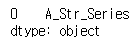
s.str.split("_")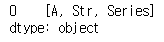
s.str.len()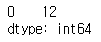
If you check above results, str method is useful, when it is used with the other method. It makes method apply componentwise.
reference
Problem
leetcode - 30 Days of Pandas / Invalid Tweets [0]
other solutions
other solutions 1. [1]
Pandas API reference
pandas.Series.str — pandas 2.0.3 documentation [3]