server.js
const express = require('express');
const path = require('path');
const mysql = require('mysql2');
const cors = require('cors'); // CORS 패키지 추가

const app = express();

app.use(cors()); // CORS 미들웨어 사용

// 데이터베이스 연결 설정
const connection = mysql.createConnection({
    host: 'localhost',
    user: 'root',
    port: 4306,
    password: '',
    database: 'kiosk'
});

// 데이터베이스 연결 확인
connection.connect((err) => {
    if (err) {
        console.error('MySQL 연결 실패:', err);
        return;
    }
    console.log('MySQL 연결 성공');
});

// 모든 테이블의 데이터 가져오기
const getAllData = (callback) => {
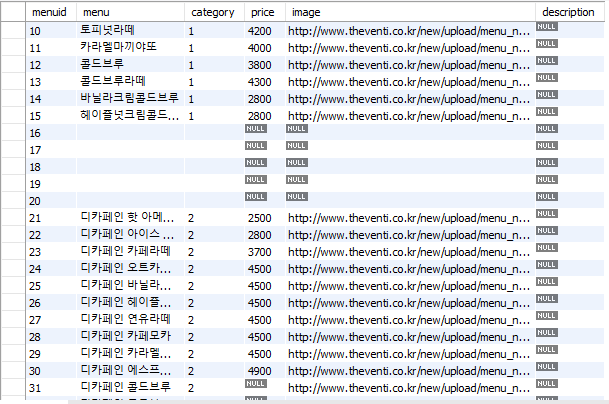
    const query = `SELECT menuid, menu, category, price, image, description FROM menu`;

    connection.execute(query, (err, data) => {
        if (err) {
            callback(err);
            return;
        }
        callback(null, data);
    });
};

// 기본 라우트
app.get('/', (req, res) => {
    getAllData((err, results) => {
        if (err) {
            console.error('MySQL 쿼리 실행 실패:', err);
            return res.status(500).send('Internal Server Error');
        }
        res.json({ menuItems: results });
    });
});

// 카테고리 별 메뉴 아이템 가져오기
app.get('/category', (req, res) => {
    const category = req.query.category;

    if (!category) {
        return res.status(400).send('Invalid category');
    }

    const query = `SELECT menuid, menu, category, price, image, description FROM menu WHERE category = ?`;

    connection.execute(query, [category], (err, results) => {
        if (err) {
            console.error(`MySQL 쿼리 실행 실패 (category: ${category}):`, err);
            return res.status(500).send('Internal Server Error');
        }

        res.json(results);
    });
});

// 서버 시작
app.listen(4000, () => {
    console.log('서버 실행 중: http://localhost:4000');
});
Main content Vue
<template>
  <div>
    <header>
      <div id="TopText">여기에는 음성과 함께 간략하게 자막으로 나오게 됩니다.</div>
    </header>

    <div id="content">
      <div id="sidebar">
        <div v-for="item in sidebarItems" :key="item.category" @click="fetchCategory(item.category)">
          {{ item.name }}
        </div>
      </div>
    </div>

    <div>
      <div id="menus">
        <div v-for="menu in menus" :key="menu.menuid">
          <div class="menu-item" @click="selectMenu(menu)">
            <img :src="menu.image" :alt="menu.menu">
            <h3>{{ menu.menu }}</h3>
            <h4>{{ menu.price }}원</h4>
            <p>{{ menu.description }}</p>
          </div>
        </div>
      </div>
    </div>

    <footer>
      <div class="option">
        <div class="choice">선택 메뉴
          <div id="list">
            <div class="menu-choice" v-for="(selected, index) in selectedMenus" :key="selected.menuid">
              <img :src="selected.image" :alt="selected.menu">
              <button @click="removeMenu(index)">삭제</button>
            </div>
          </div>
        </div>
        <button class="btn1" @click="handlePayment">결제하기</button>
      </div>
    </footer>
  </div>
</template>

<script>
import axios from 'axios';

export default {
  data() {
    return {
      sidebarItems: [
        { name: '커피', category: '1' },
        { name: '디카페인', category: '2' },
        { name: '아이스 블렌디드', category: '3' },
        { name: '주스에이드', category: '4' },
        { name: '버블티', category: '5' },
        { name: '베버리지', category: '6' }
      ],
      menus: [],
      selectedMenus: []
    };
  },
  methods: {
    fetchCategory(category) {
      console.log(`Fetching category: ${category}`);
      axios.get(`http://localhost:4000/category?category=${category}`)
        .then(response => {
          console.log('Response data:', response.data);
          this.menus = response.data;
        })
        .catch(error => {
          console.error('카테고리 데이터 가져오기 오류:', error);
        });
    },
    selectMenu(menu) {
      if (!this.selectedMenus.some(selected => selected.menuid === menu.menuid)) {
        this.selectedMenus.push(menu);
      }
    },
    removeMenu(index) {
      this.selectedMenus.splice(index, 1);
    },
    handlePayment() {
      alert('결제 완료');
      // 결제 처리 로직 추가 가능
    }
  },
  created() {
    this.fetchCategory('coffee');
  }
};
</script>

<style scoped>
header {
  background-color: gray;
  background-size: cover;
  background-repeat: no-repeat;
  height: 300px;
  margin: 0 auto;
  width: 1250px;
  display: flex;
  justify-content: center;
  align-items: center;
  text-align: center;
}

#TopText {
  padding: 100px;
  color: black;
  font-size: 25pt;
  text-align: center;
  justify-content: center;
}

#content {
  display: flex;
  justify-content: center;
  width: 1250px;
  margin: 0 auto;
}

#sidebar {
  display: flex;
  flex-wrap: wrap;
}

#sidebar > div {
  border: 2px solid gray;
  width: 200px;
  height: 40px;
  text-align: center;
  font-size: 20pt;
  font-weight: bold;
  border-radius: 25px;
  margin: 10px;
  cursor: pointer;
  padding: 20px;
}

#menus {
  margin: 0 auto;
  width: 1250px;
  display: flex;
  flex-wrap: wrap;
  justify-content: center;
  align-items: center;
}

#menus > div {
  flex: 1 0 33%;
  display: flex;
  justify-content: space-around;
}

#menus .menu-item {
  width: 400px;
  height: 450px;
  border: 1px solid gray;
  display: flex;
  flex-direction: column;
  align-items: center;
  justify-content: center;
  border-radius: 10px;
}

#menus .menu-item:hover {
  background-color: #dfdfdf;
}

#menus .menu-item > img {
  height: 300px;
  margin-bottom: 30px;
}

#menus .menu-item > h3 {
  font-size: 30pt;
  margin: 0px;
}

#menus .menu-item > h4 {
  font-size: 26pt;
  margin: 0px;
}

footer {
  background-color: #e6e9e8;
  position: fixed;
  bottom: 0;
  width: 1250px;
  left: 50%;
  transform: translateX(-50%);
}

.option {
  display: flex;
  flex-direction: row;
  justify-content: space-between;
}

.choice {
  font-size: 20pt;
  font-weight: bold;
  margin-top: 10px;
  margin-left: 10px;
  display: flex;
}

.btn1 {
  background-color: black;
  color: white;
  font-size: 25pt;
  border-radius: 10px;
  width: 200px;
  height: 250px;
}

.menu-choice {
  background-color: #f6f5f5;
  height: 200px;
  width: 200px;
  margin-top: 20px;
  margin-right: 10px;
  margin-left: 10px;
  display: flex;
  justify-content: center;
  align-items: center;
  flex-direction: column;
}

#list {
  margin-right: 10px;
  display: flex;
  flex-direction: row;
}

.menu-choice > img {
  height: 150px;
  margin-bottom: 10px;
}

.menu-choice > button {
  background-color: black;
  color: white;
  border: none;
  border-radius: 5px;
  padding: 5px 10px;
  cursor: pointer;
}
</style>
orderpage vue
<template>
    <div class="container">
      <div class="logo">
        kiospeaking
      </div>
      <div class="button-container">
        <button class="order-button" @click="goToMainContent">주문하기</button>
      </div>
    </div>
  </template>

  <script>
  export default {
    name: 'OrderPage',
    methods: {
      goToMainContent() {
        this.$router.push('/main');
      }
    }
  };
  </script>

  <style scoped>
  body {
    margin: 0;
    font-family: Arial, sans-serif;
    background-color: #F5F2EC;
    display: flex;
    justify-content: center;
    align-items: center;
    height: 100vh;
  }
  .container {
    text-align: center;
    width: 100%;
  }
  .logo {
    background-color: #F5F2EC;
    color: #D3CFC8;
    padding: 400px;
    font-size: 100px;

    border-bottom: 1px solid #D3CFC8;
  }
  .button-container {
    background-color: #FFFFFF;
    padding: 50px 0;
  }
  .order-button {
    background-color: #3E3E3E;
    color: white;
    border: none;
    border-radius: 8px;
    padding: 40px 70px;
    font-size: 24px;
    cursor: pointer;
  }
  .order-button:hover {
    background-color: #5C5C5C;
  }
  </style>
app.vue
<template>
  <router-view></router-view>
</template>

<script>
export default {
  name: 'App'
};
</script>

<style>
#app {
  font-family: Avenir, Helvetica, Arial, sans-serif;
  -webkit-font-smoothing: antialiased;
  -moz-osx-font-smoothing: grayscale;
  text-align: center;
  color: #2c3e50;
  margin-top: 60px;
}
</style>

안녕하세요. 배운 것을 메모하는 velog입니다.