TBEG Introduction - Template Based Excel Report Generator (Kotlin/Java)
🇰🇷 한국어 버전
Still crafting Excel reports cell by cell with POI?
If you've ever built Excel reports in a JVM environment, you know the pain of Apache POI.
// Using Apache POI directly...
val workbook = XSSFWorkbook()
val sheet = workbook.createSheet("Employee Status")
val headerRow = sheet.createRow(0)
headerRow.createCell(0).setCellValue("Name")
headerRow.createCell(1).setCellValue("Position")
headerRow.createCell(2).setCellValue("Salary")

employees.forEachIndexed { index, emp ->
    val row = sheet.createRow(index + 1)
    row.createCell(0).setCellValue(emp.name)
    row.createCell(1).setCellValue(emp.position)
    row.createCell(2).setCellValue(emp.salary.toDouble())
}

// Column widths, styles, formulas, charts... it never ends
One header, one cell, one style at a time... hundreds of lines for a single report.
Add charts, conditional formatting, formulas, and images on top? The code spirals out of control.
TBEG (Template Based Excel Generator) solves this problem at its root.
What is TBEG?
A JVM library that generates reports by binding data to Excel templates.
The core idea is simple:
1. A designer (or you) designs the report layout directly in Excel
2. Place ${variableName} markers where data should go
3. In your code, just pass the data
4. TBEG combines template + data to produce the final report
// Using TBEG - this is all you need to do
val data = mapOf(
    "title" to "Employee Status",
    "employees" to employeeList
)

ExcelGenerator().use { generator ->
    val bytes = generator.generate(template, data)
    File("output.xlsx").writeBytes(bytes)
}
Formatting, charts, formulas, and conditional formatting are all managed in the template. Your code focuses solely on data binding.
Design Philosophy
We don't reinvent what Excel already provides — we use it as-is.
- Aggregation with Excel's
=SUM()formula, averages with=AVERAGE() - Conditional highlighting with conditional formatting
- Visualization with charts
Use the familiar Excel features as they are.
TBEG adds dynamic data binding on top, and automatically adjusts these features to work as intended even when data expands.
At a Glance
Template
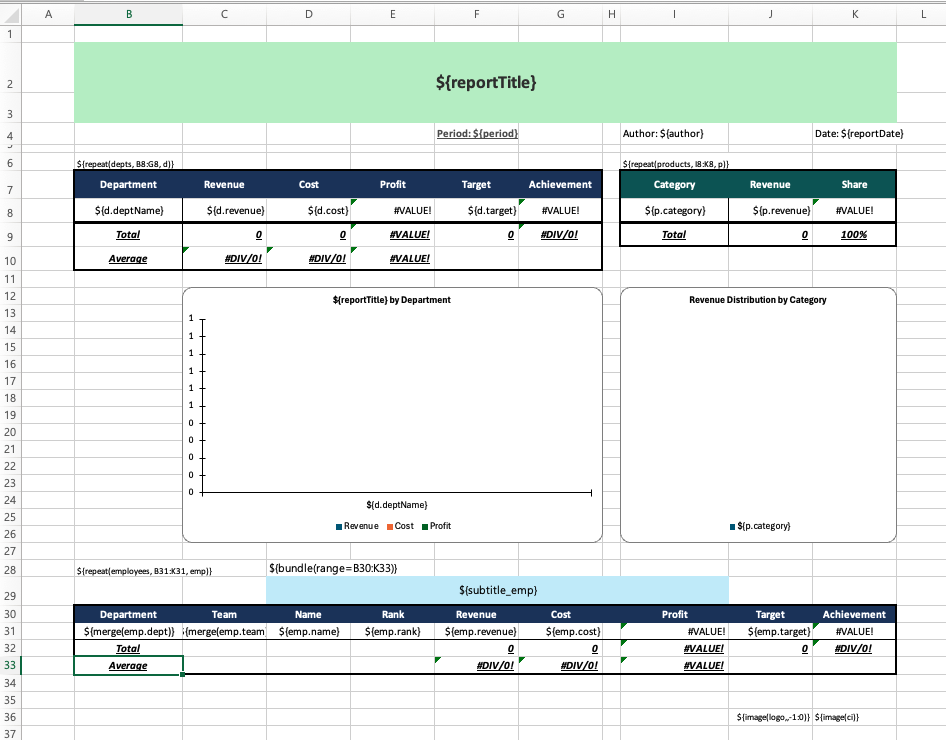
Code
val data = simpleDataProvider {
    value("reportTitle", "Q1 2026 Sales Performance Report")
    value("period", "Jan 2026 ~ Mar 2026")
    value("author", "Yongho Hwang")
    value("reportDate", LocalDate.now().toString())
    image("logo", logoBytes)
    imageUrl("ci", "https://example.com/ci.png")  // URL supported
    items("depts") { deptList.iterator() }
    items("products") { productList.iterator() }
    items("employees") { employeeList.iterator() }
}

ExcelGenerator().use { generator ->
    generator.generateToFile(template, data, outputDir, "quarterly_report")
}
Result
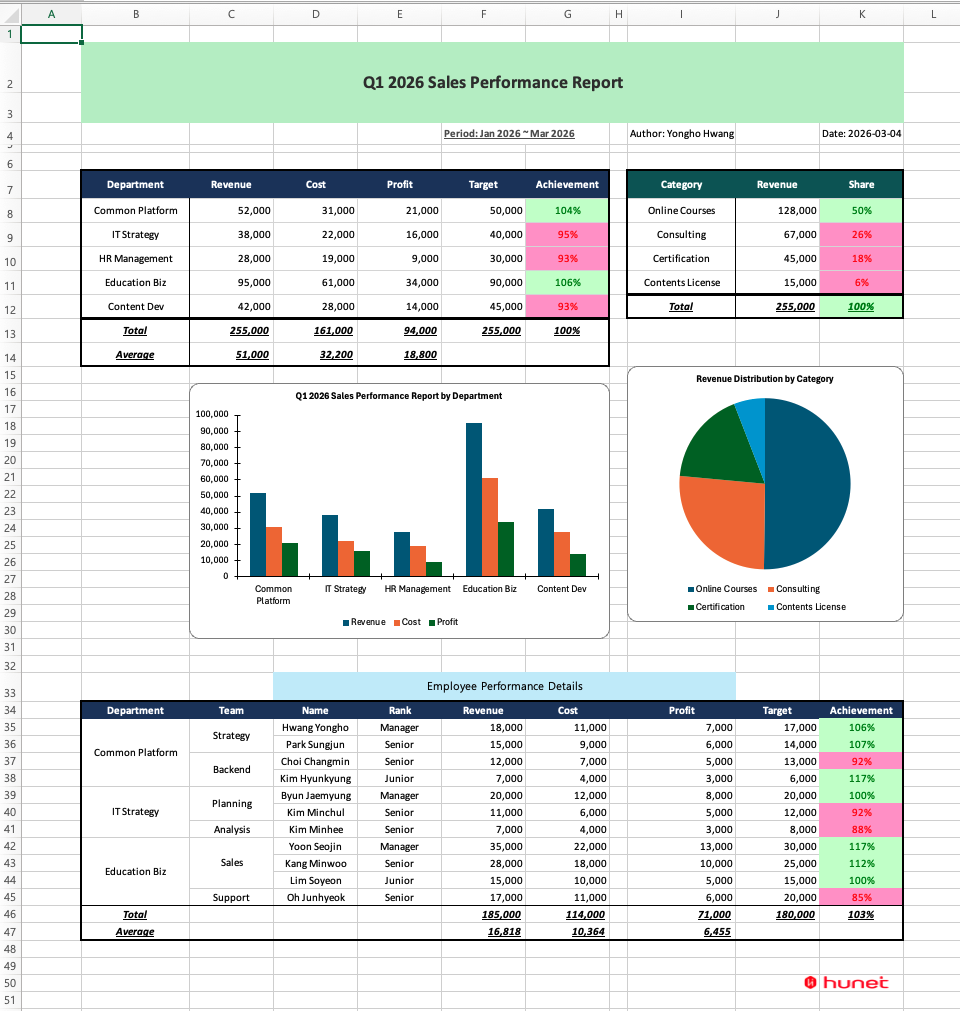
Variable substitution, image insertion, repeat data expansion, automatic cell merge, formula range adjustment, conditional formatting duplication, and chart data reflection - TBEG handles all of this automatically.
Key Features
| Feature | Description |
|---|---|
| Template-based generation | Generate reports by binding data to Excel templates |
| Repeat data processing | Expand list data into rows/columns with ${repeat(...)} syntax |
| Variable substitution | Bind values to cells, charts, shapes, headers/footers, formula arguments. |
| Image insertion | Insert dynamic images via byte arrays or URLs |
| Automatic cell merge | Auto-merge consecutive cells with the same value in repeat data |
| Bundle | Group multiple elements into a single unit that moves together |
| Selective field visibility | Restrict visibility of specific fields based on conditions. Choose between DELETE or DIM modes |
| Formula auto-adjustment | Automatically update formula ranges (SUM, AVERAGE, etc.) on data expansion |
| Automatic conditional formatting | Automatically apply original conditional formatting to repeated rows |
| Automatic data validation expansion | Automatically apply original data validation (dropdowns, etc.) to repeated rows |
| Chart/pivot table auto-reflection | Automatically reflect expanded data ranges in charts. Pivot table source range auto-adjustment |
| File encryption | Set open password for generated Excel files |
| Document metadata | Set document properties such as title, author, keywords, etc. |
| Large-scale processing | Reliably process over 1 million rows with low CPU utilization |
| Asynchronous processing | Process large data in the background |
| Lazy loading | Memory-efficient data processing via DataProvider |
| Spring Boot support | Easy integration with auto-configuration |
Template Syntax Preview
| Syntax | Description | Example |
|---|---|---|
| ${variableName} | Variable substitution | ${title} |
| ${object.field} | Repeat item field | ${emp.name} |
| ${repeat(collection, range, object)} | Repeat processing | ${repeat(items, A2:C2, item)} |
| ${image(name)} | Image insertion | ${image(logo)} |
| ${merge(object.field)} | Automatic cell merge | ${merge(emp.dept)} |
| ${bundle(range)} | Bundle | ${bundle(A5:H12)} |
| ${hideable(object.field, range, mode)} | Selective field visibility | ${hideable(emp.salary, C1:C3, DIM)} |
Performance
TBEG internally generates data using streaming, producing 1 million rows in about 3.2 seconds while using around 9% of system CPU. Both rendering and post-processing operate in streaming mode, using a constant memory buffer regardless of data size.
| Data Size | Time | CPU Usage |
|---|---|---|
| 1,000 rows | 13ms | 25.0% |
| 10,000 rows | 47ms | 17.4% |
| 30,000 rows | 117ms | 13.8% |
| 100,000 rows | 354ms | 11.6% |
| 1,000,000 rows | 3,203ms | 9.0% |
Comparison with Other Libraries (100,000 rows)
| Library | Time |
|---|---|
| TBEG | 0.35s |
| JXLS (STREAMING_ON) | 0.73s |
| (ref.) JXLS (STREAMING_OFF) | 2.63s |
The direct comparison target is JXLS STREAMING_ON, which shares the same output conditions. STREAMING_OFF (full in-memory mode) is a reference figure.
Most Common Use Case: Excel Download API
In practice, TBEG is most frequently used for Excel download features in web applications.
@GetMapping("/api/reports/download")
fun downloadReport(response: HttpServletResponse) {
    val data = reportService.getReportData()
    val template = resourceLoader.getResource("classpath:templates/report.xlsx")

    response.contentType = "application/vnd.openxmlformats-officedocument.spreadsheetml.sheet"
    response.setHeader("Content-Disposition", "attachment; filename=report.xlsx")

    excelGenerator.generate(template.inputStream, data)
        .let { response.outputStream.write(it) }
}
Admin page list exports, settlement report downloads, monthly report generation -
set up one template and this is all the code you need.
When to Use TBEG
✅ Generating standardized reports/statements
✅ Filling data into Excel forms provided by a designer
✅ Reports requiring complex formatting (conditional formatting, charts)
✅ Processing large datasets with tens to hundreds of thousands of rows
✅ Tables where the number of rows or columns changes with the data
✅ Implementing Excel download APIs in Spring Boot environments
❌ Reading/parsing Excel files (TBEG is generation-only)
Getting Started
Add Dependency
// build.gradle.kts
dependencies {
    implementation("io.github.jogakdal:tbeg:1.2.5")
}
// Gradle (Groovy DSL)
dependencies {
implementation 'io.github.jogakdal:tbeg:1.2.5'
}<!-- Maven -->
<dependency>
<groupId>io.github.jogakdal</groupId>
<artifactId>tbeg</artifactId>
<version>1.2.5</version>
</dependency>The version above is as of this writing. Check the latest version on Maven Central.
Quick Start (Kotlin)
import io.github.jogakdal.tbeg.ExcelGenerator
import java.io.File

data class Employee(val name: String, val position: String, val salary: Int)

fun main() {
    val data = mapOf(
        "title" to "Employee Status",
        "employees" to listOf(
            Employee("Yongho Hwang", "Director", 8000),
            Employee("Yongho Han", "Manager", 6500)
        )
    )

    ExcelGenerator().use { generator ->
        val template = File("template.xlsx").inputStream()
        val bytes = generator.generate(template, data)
        File("output.xlsx").writeBytes(bytes)
    }
}
Quick Start (Java)
import io.github.jogakdal.tbeg.ExcelGenerator;
import java.io.*;
import java.nio.file.*;
import java.util.*;

public class Example {
    public static void main(String[] args) throws Exception {
        var data = Map.<String, Object>of(
            "title", "Employee Status",
            "employees", List.of(
                Map.of("name", "Yongho Hwang", "position", "Director", "salary", 8000),
                Map.of("name", "Yongho Han", "position", "Manager", "salary", 6500)
            )
        );

        try (var generator = new ExcelGenerator()) {
            byte[] bytes = generator.generate(
                new FileInputStream("template.xlsx"), data);
            Files.write(Path.of("output.xlsx"), bytes);
        }
    }
}
Learn More
This is the first post in the TBEG series. In the next post, we'll walk through creating a template and binding data step by step.
GitHub: jogakdal/data-processors-with-excel
Maven Central: tbeg
📖 Documentation