🇰🇷 한국어 버전
In Part 1, we explored what TBEG is. In this post, we'll write actual code and experience TBEG's core features hands-on.
Step 1. Add Dependency
// build.gradle.kts
dependencies {
    implementation("io.github.jogakdal:tbeg:1.2.5")
}// build.gradle
dependencies {
implementation 'io.github.jogakdal:tbeg:1.2.5'
}<!-- pom.xml -->
<dependency>
<groupId>io.github.jogakdal</groupId>
<artifactId>tbeg</artifactId>
<version>1.2.5</version>
</dependency>The version above is as of this writing. Check the latest version on Maven Central.
Step 2. Simplest Example - Variable Substitution
Create a Template
Open Excel and enter the following:
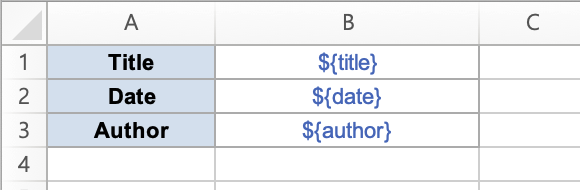
${...} is TBEG's variable marker. The values passed from code will fill these placeholders.
Write the Code
import io.github.jogakdal.tbeg.ExcelGenerator
import java.io.File
import java.time.LocalDate

fun main() {
    val data = mapOf(
        "title" to "Monthly Report",
        "date" to LocalDate.now().toString(),
        "author" to "Yongho Hwang"
    )

    ExcelGenerator().use { generator ->
        val template = File("template.xlsx").inputStream()
        val bytes = generator.generate(template, data)
        File("output.xlsx").writeBytes(bytes)
    }
}
Result
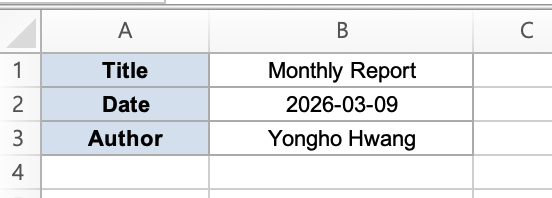
That's it. Open output.xlsx and you'll find "Monthly Report" where ${title} was, and today's date where ${date} was.
Java CodeCore pattern:
ExcelGenerator().use { ... }→ read template → pass data → get byte array. This pattern is the same in every example that follows.
import io.github.jogakdal.tbeg.ExcelGenerator;
import java.io.*;
import java.time.LocalDate;
import java.util.*;

public class QuickStart {
    public static void main(String[] args) throws Exception {
        Map<String, Object> data = new HashMap<>();
        data.put("title", "Monthly Report");
        data.put("date", LocalDate.now().toString());
        data.put("author", "Yongho Hwang");

        try (ExcelGenerator generator = new ExcelGenerator();
             InputStream template = new FileInputStream("template.xlsx")) {
            byte[] bytes = generator.generate(template, data);
            try (FileOutputStream output = new FileOutputStream("output.xlsx")) {
                output.write(bytes);
            }
        }
    }
}
Step 3. Repeating List Data - repeat
This is the most commonly used feature in practice. Use it whenever you need to expand a list into rows - employee lists, order histories, sales data, etc.
Template

- Row 1:
${repeat(employees, A3:C3, emp)}- "For each item in the employees collection, name it emp and repeat the A3:C3 range" - Row 2: Header (outside the repeat range, stays as-is)
- Row 3: Repeat range - emp's fields are filled into each row
Code
data class Employee(val name: String, val position: String, val salary: Int)

fun main() {
    val data = mapOf(
        "employees" to listOf(
            Employee("Yongho Hwang", "Director", 8000),
            Employee("Yongho Han", "Manager", 6500),
            Employee("Yongho Hong", "Assistant Manager", 4500),
            Employee("Yongho Kim", "Staff", 3500)
        )
    )

    ExcelGenerator().use { generator ->
        val bytes = generator.generate(File("template.xlsx").inputStream(), data)
        File("output.xlsx").writeBytes(bytes)
    }
}
Result
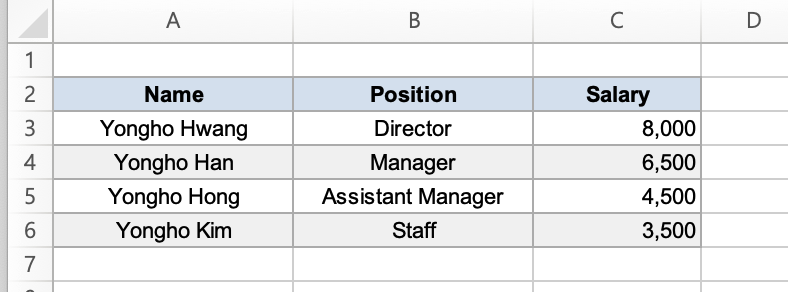
4 rows of data expanded into 4 rows. If there were formulas (like =SUM()), their ranges would be automatically adjusted.
Step 4. DataProvider - Structured Data Delivery
You can simply use a Map, but for advanced features like images or lazy loading, it's recommended to use DataProvider.
Kotlin DSL
import io.github.jogakdal.tbeg.simpleDataProvider

val provider = simpleDataProvider {
    // Simple variables
    value("title", "Employee Status")
    value("date", LocalDate.now().toString())

    // Collection (eager loading)
    items("employees", employeeList)

    // Collection (lazy loading) - called when data is needed
    items("bigData") {
        repository.streamAll().iterator()
    }

    // Images
    image("logo", logoBytes)
    imageUrl("banner", "https://example.com/banner.png")
}

ExcelGenerator().use { generator ->
    val bytes = generator.generate(template, provider)
}
Java Builder
import io.github.jogakdal.tbeg.SimpleDataProvider;

SimpleDataProvider provider = SimpleDataProvider.builder()
    .value("title", "Employee Status")
    .value("date", LocalDate.now().toString())
    .items("employees", employeeList)
    .itemsFromSupplier("bigData", () -> repository.streamAll().iterator())
    .image("logo", logoBytes)
.build();| Approach | Advantages | Best For |
|---|---|---|
| Map | Simple, less code | Small data, simple reports |
| DataProvider | Lazy loading, images, metadata | Large data, images, production |
In production, you'll almost always use DataProvider.
Step 5. Image Insertion
Place a ${image(logo)} marker in the template and an image will be inserted at that cell position.
val provider = simpleDataProvider {
    value("company", "TBEG Inc.")

    // From file
    image("logo", File("logo.png").readBytes())

    // From URL (automatically downloaded during rendering)
    imageUrl("banner", "https://example.com/banner.png")
}
Images can be provided as byte arrays or URLs. The URL approach requires no separate download code - it's handled automatically during rendering.
Step 6. File Saving Options
Instead of getting a byte array, you can save directly to a file.
ExcelGenerator().use { generator ->
    val path = generator.generateToFile(
        template = template,
        dataProvider = SimpleDataProvider.of(data),
        outputDir = Path.of("./output"),
        baseFileName = "report"
    )
    // Result: ./output/report_20260115_143052.xlsx
}
A timestamp is automatically appended to prevent filename collisions.
Putting It All Together
1. Design a template in Excel (freely use formatting, charts, formulas, etc.)
2. Place ${variableName} markers where data should go
3. Use ${repeat(collection, range, variable)} for list data
4. Pass only the data from code
5. TBEG combines them → final Excel generated
Formatting, charts, conditional formatting, and formulas are all managed in the template.
Your code focuses solely on data binding.
Next Up
In the next post, we'll master TBEG's template syntax. We'll cover the various options of repeat (DOWN/RIGHT directions, nested repeats), automatic cell merge (merge), bundle (bundle), empty collection handling, and more.
Links
- GitHub: jogakdal/data-processors-with-excel
- Maven Central: TBEG
📖 Documentation