- 푸시 알림이 아니라, 웹 페이지 내 단순 알림에 대한 구현 방법을 기록한다
- notifications 테이블을 생성하여 알림의 정보를 쌓는다
- 프론트에서는 해당 테이블에 새로운 데이터가 추가되었는지 여부를 구독하여 알림 데이터를 업데이트한다
notifications 테이블의 구조
| 컬럼명 | 설명 | 타입 |
|---|---|---|
| id | primary key | number |
| user_id | 알림을 받는 대상 | uuid |
| actor_id | 행위를 발생시킨 대상, 시스템 알림이라면 null | uuid (null) |
| type | 행위의 종류 | text |
| context | 행위의 대상 | jsonb |
| create_at | 행위 발생 일시 | timestamp |
| is_read | 알림 읽음 여부 | boolean |
알림을 쌓는 방식
- 프론트가 요청을 보낼 때 직접 notifications에 insert 하는 것이 아니라, DB의 트리거를 활용
트리거?
- DB 이벤트 발생 시 자동으로 실행되는 함수
- comment insert 시 발생하는 트리거
create or replace function public.notify_on_comment_insert()
returns trigger
language plpgsql
security definer
as $$
declare
  v_post_author_id uuid;
  v_parent_author_id uuid;
begin
  -- 글 작성자 조회
  select author_id
    into v_post_author_id
  from public.post
  where id = new.post_id;

  -- 1) 글쓴이에게 알림 (자기 자신 제외)
  if v_post_author_id is not null and v_post_author_id <> new.author_id then
    insert into public.notifications (user_id, actor_id, type, context)
    values (
      v_post_author_id,
      new.author_id,
      'comment',
      jsonb_build_object(
        'postId', new.post_id,
        'commentId', new.id,
        'parentCommentId', new.parent_comment_id,
        'rootCommentId', new.root_comment_id
      )
    );
  end if;

  -- 2) 대댓글이면 부모 댓글 작성자에게도 알림 (자기 자신/중복 제외)
  if new.parent_comment_id is not null then
    select author_id
      into v_parent_author_id
    from public.comment
    where id = new.parent_comment_id;

    if v_parent_author_id is not null
       and v_parent_author_id <> new.author_id
       and v_parent_author_id <> v_post_author_id then
      insert into public.notifications (user_id, actor_id, type, context)
      values (
        v_parent_author_id,
        new.author_id,
        'comment_reply',
        jsonb_build_object(
          'postId', new.post_id,
          'commentId', new.id,
          'parentCommentId', new.parent_comment_id,
          'rootCommentId', new.root_comment_id
        )
      );
    end if;
  end if;

  return new;
end;
$$;

drop trigger if exists trg_notify_on_comment_insert on public.comment;

create trigger trg_notify_on_comment_insert
after insert on public.comment
for each row
execute function public.notify_on_comment_insert();
알림을 전달하는 방식
- Supabse Realtime 사용
- Supbase Realtime을 통해 DB에서 일어나는 변경 사항을 감지할 수 있도록 클라이언트 사이드에서 이벤트 등록
Realtime?
- Supabase에서 제공하는 기능으로, DB의 변경사항을 WebSocket으로 프론트엔드에 실시간으로 전달해주는 시스템
[프론트]
   ↑ WebSocket
[Realtime 서버]
   ↑ DB 변경 스트림
[Postgres]- 프론트는 Realtime 서버에 WebSocket 연결
- Realtime 서버는 Postgres의 변경 로그를 구독
- Postgres에서 insert/update/delete 발생
- Realtime 서버가 그걸 프론트에 push
publication
- Postgres(DB)에게 테이블에 변경사항이 생기면 외부로 내보낼 것을 인지시켜야 함
- 따라서 publication이라는 개념이 등장: 여기에 해당하는 테이블의 변경사항을 외부에 공개하겠다는 것
- Supabase는 publication을
supabase_realtime라는 이름으로 만들어 관리함 supabase_realtime에 테이블을 등록해야만 DB의 변경사항을 감지하게 됨- 등록 방법
alter publication supabase_realtime
add table public.notifications;
클라이언트에서 이벤트를 구독하는 방법
- notifications 테이블에 insert가 일어났을 때 발생하는 이벤트를 구독
const subscribeNotificationInserts = ({
  userId,
  onInsert,
}: {
  userId: string;
  onInsert: (row: NotificationEntity) => void;
}) => {
  const channel = supabase
    .channel(`notifications:${userId}`) // 구독 채널 생성
    .on(
      "postgres_changes",
      {
        event: "INSERT",
        schema: "public",
        table: "notifications",
        filter: `user_id=eq.${userId}`,
      }, // 구독할 이벤트의 종류에 대한 설정 (여기서는 notifications
      (payload) => {
        onInsert(payload.new as NotificationEntity); // 실제 이벤트 발생 시 실행할 콜백 함수
      }
    )
    .subscribe((status) => {
      console.log("[realtime] status:", status); // 구독 성공 여부 로깅
    });

  return () => {
    supabase.removeChannel(channel); // unmount 시 연결 채널 제거
  };
};
실제 컴포넌트 상에서의 사용 예시
- 이벤트 수신 시 notification.count에 담겨 있던 알림 뱃지 숫자를 1 증가시킴
useEffect(() => {
    if (session?.user.id) {
      const unsubscribe = subscribeNotificationInserts({
        userId: session.user.id,
        onInsert: () => {
          queryClient.setQueryData(
            QUERY_KEYS.notification.count(session.user.id),
            (old: number) => old + 1 // 이벤트 수신 시 notification count를 하나 증가
          );
        },
      });

      return () => unsubscribe();
    }
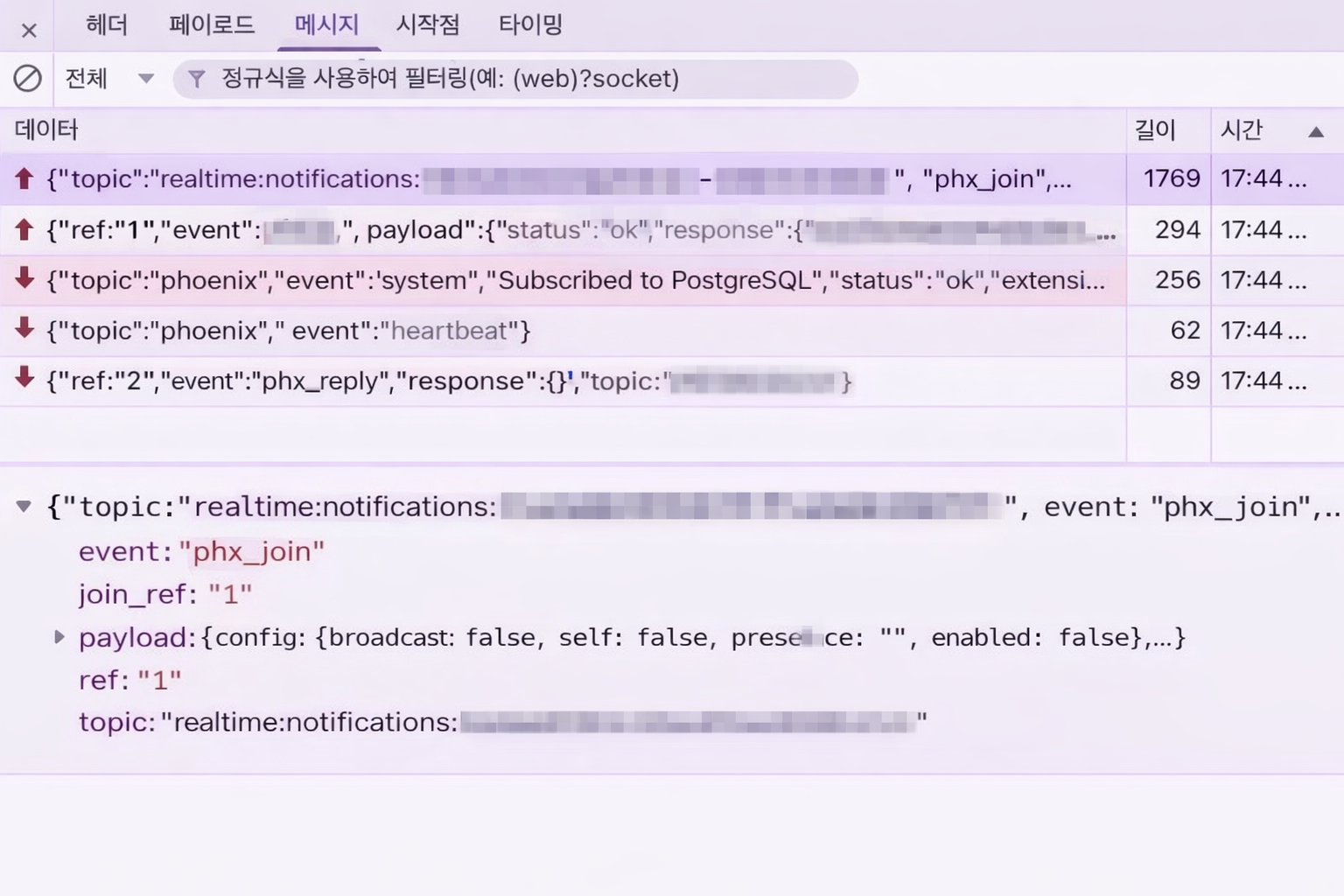
}, [session?.user.id]);- 실제로 아래 사진과 같이 코드 상에서 정의한 채널 이름으로 socket이 열리고 메시지를 수신하고 있는 것 확인 가능

세상에서 가장 부지런한 사람이 되고 싶은 게으름뱅이