[MMTA] Implementing News Headline Analysis Model Through Transformer pt.1
Multi-modal Trading AI Agent
News Headline Analysis:
1. Preparing Model
I plan to use a BERT-based Transformer model for this task.
# Create Transformer Layer
class MultiHeadSelfAttention(Layer):
    def __init__(self, embed_dim, num_heads = 8):
        super(MultiHeadSelfAttention, self).__init__()
        self.embed_dim = embed_dim
        self.num_heads = num_heads
        self.projection_dim = embed_dim // num_heads
        self.query_dense = Dense(embed_dim)
        self.key_dense = Dense(embed_dim)
        self.value_dense = Dense(embed_dim)
        self.combine_heads = Dense(embed_dim)

    def attention(self, query, key, value):
        score = tf.matmul(query, key, transpose_b = True)
        dim_key = tf.cast(tf.shape(key)[-1], tf.float32)
        scaled_score = score / tf.math.sqrt(dim_key)
        weights = tf.nn.softmax(scaled_score, axis = -1)
        output = tf.matmul(weights, value)
        return output, weights

    def split_heads(self, x, batch_size):
        x = tf.reshape(x, (batch_size, -1, self.num_heads, self.projection_dim))
        return tf.transpose(x, perm=[0, 2, 1, 3])

    def call(self, inputs):
        batch_size = tf.shape(inputs)[0]
        query = self.query_dense(inputs)
        key = self.key_dense(inputs)
        value = self.value_dense(inputs)
        query = self.split_heads(query, batch_size)
        key = self.split_heads(key, batch_size)
        value = self.split_heads(value, batch_size)
        attention, _ = self.attention(query, key, value)
        attention = tf.transpose(attention, perm=[0, 2, 1, 3])
        concat_attention = tf.reshape(attention, (batch_size, -1, self.embed_dim))
        output = self.combine_heads(concat_attention)
        return output

class TransformerBlock(Layer):
    def __init__(self, embed_dim, num_heads, ff_dim, rate = 0.1):
        super(TransformerBlock, self).__init__()
        self.att = MultiHeadSelfAttention(embed_dim, num_heads)
        self.ffn = tf.keras.Sequential([
            Dense(ff_dim, activation="relu"),
            Dense(embed_dim),
        ])

        self.layernorm1 = LayerNormalization(epsilon = 1e-6)
        self.layernorm2 = LayerNormalization(epsilon = 1e-6)
        self.dropout1 = Dropout(rate)
        self.dropout2 = Dropout(rate)


    def call(self, inputs, training):
        attn_output = self.att(inputs)
        attn_output = self.dropout1(attn_output, training=training)
        out1 = self.layernorm1(inputs + attn_output)
        ffn_output = self.ffn(out1)
        ffn_output = self.dropout2(ffn_output, training=training)
        return self.layernorm2(out1 + ffn_output)

class TransformerEncoder(Layer):
    def __init__(self, num_layers, embed_dim, num_heads, ff_dim, rate = 0.1):
        super(TransformerEncoder, self).__init__()
        self.num_layers = num_layers
        self.embed_dim = embed_dim
        self.enc_layers = [TransformerBlock(embed_dim, num_heads, ff_dim, rate) for _ in range(num_layers)]
        self.dropout = Dropout(rate)

    def call(self, inputs, training=False):
        x = inputs
        for i in range(self.num_layers):
            x = self.enc_layers[i](x, training=training)
        return x
# Structure and compile model
max_len = 50
vocab_size = 20000
num_layers = 4
embed_dim = 128
num_heads = 8
ff_dim = 512
input_layer = Input(shape=(max_len,))
x = Embedding(input_dim=vocab_size, output_dim=embed_dim)(input_layer)
x = TransformerEncoder(num_layers, embed_dim, num_heads, ff_dim)(x)
x = Dropout(0.3)(x)
x = GlobalAveragePooling1D()(x)
x = Dropout(0.3)(x)
x = Dense(64, activation="relu", kernel_regularizer=regularizers.l2(0.01))(x)
output_layer = Dense(3, activation="softmax")(x)
model = Model(inputs = input_layer, outputs = output_layer)
model.compile(optimizer = "adam", loss = "sparse_categorical_crossentropy", metrics=["accuracy"])2. Preparing Dataset
# Get the dataset
# The input is string of news headline and output is the corresponding sentiment
sentiment_raw = pd.read_csv(os.path.join("sentiment_dataset", "all-data.csv"), encoding='latin1', header = None)
sentiment_raw.columns = ["Output", "Input"]
sentiment_dataset = sentiment_raw[["Input", "Output"]]

X, y = sentiment_dataset['Input'], sentiment_dataset['Output']

# Encode Target
le = LabelEncoder()
y_encoded = le.fit_transform(y)

# Encode Input
tokenizer = Tokenizer(num_words=20000, oov_token="<OOV>")
tokenizer.fit_on_texts(X)
sequences = tokenizer.texts_to_sequences(X)
X_seq = pad_sequences(sequences, maxlen=50, padding="post")

# Split the dataset
X_train, X_test, y_train, y_test = train_test_split(
    X_seq, y_encoded, test_size=0.2, random_state=42
)

X_train, X_val, y_train, y_val = train_test_split(
    X_train, y_train, test_size=0.2, random_state=42
)
3. Train
As I am working on a laptop, to be as efficient as possible, I used EarlyStopping Callback
earlyStopping_callback = EarlyStopping(
    monitor="val_accuracy",
    min_delta=0.005,
    patience=5,
    verbose=0,
    mode="auto",
    baseline=None,
    restore_best_weights=True,
)
history = model.fit(
X_train,
y_train,
validation_data=(X_val, y_val),
epochs=20,
batch_size=32,
verbose=1,
callbacks=[earlyStopping_callback]
)4. Visualize
def predict(text):
    if isinstance(text, str):
        text = [text]

    # Tokenize the input
    seq = tokenizer.texts_to_sequences(text)
    padded = pad_sequences(seq, maxlen=50, padding="post")

    # Get the Prediction & the Confidence
    pred = model(tf.convert_to_tensor(padded), training=False)
    pred_class = np.argmax(pred, axis=1)

    probabilities = tf.nn.softmax(pred, axis=-1)
    confidence_scores = np.max(probabilities, axis=-1)

    sentiment = le.inverse_transform(pred_class)
    return sentiment[0], confidence_scores[0]

def predict_and_print(text):
    new_texts = [text]
    result, probabilitiy = predict(new_texts)
    print(f"The headline, \"{new_texts[0]}\" is:\n - {result}\n - {probabilitiy * 100:.2f}%")
Skewed Data
When testing the method with different headlines, most predictions were “Neutral” unless the headline included obvious words such as “bad” / “good”, “decrease” / “increase”.
For example, when I tested the model with the input “CEO of the company was found dead in his apartment,” it classified it as “Neutral” with a confidence of 54%. When I tested the model with the input “Apple introduced an Iphone that outperformed its competitors,” it also classified it as “Neutral” with a confidence of 48%.
The reason behind this was because most of the entries in the dataset were “Neutral”.
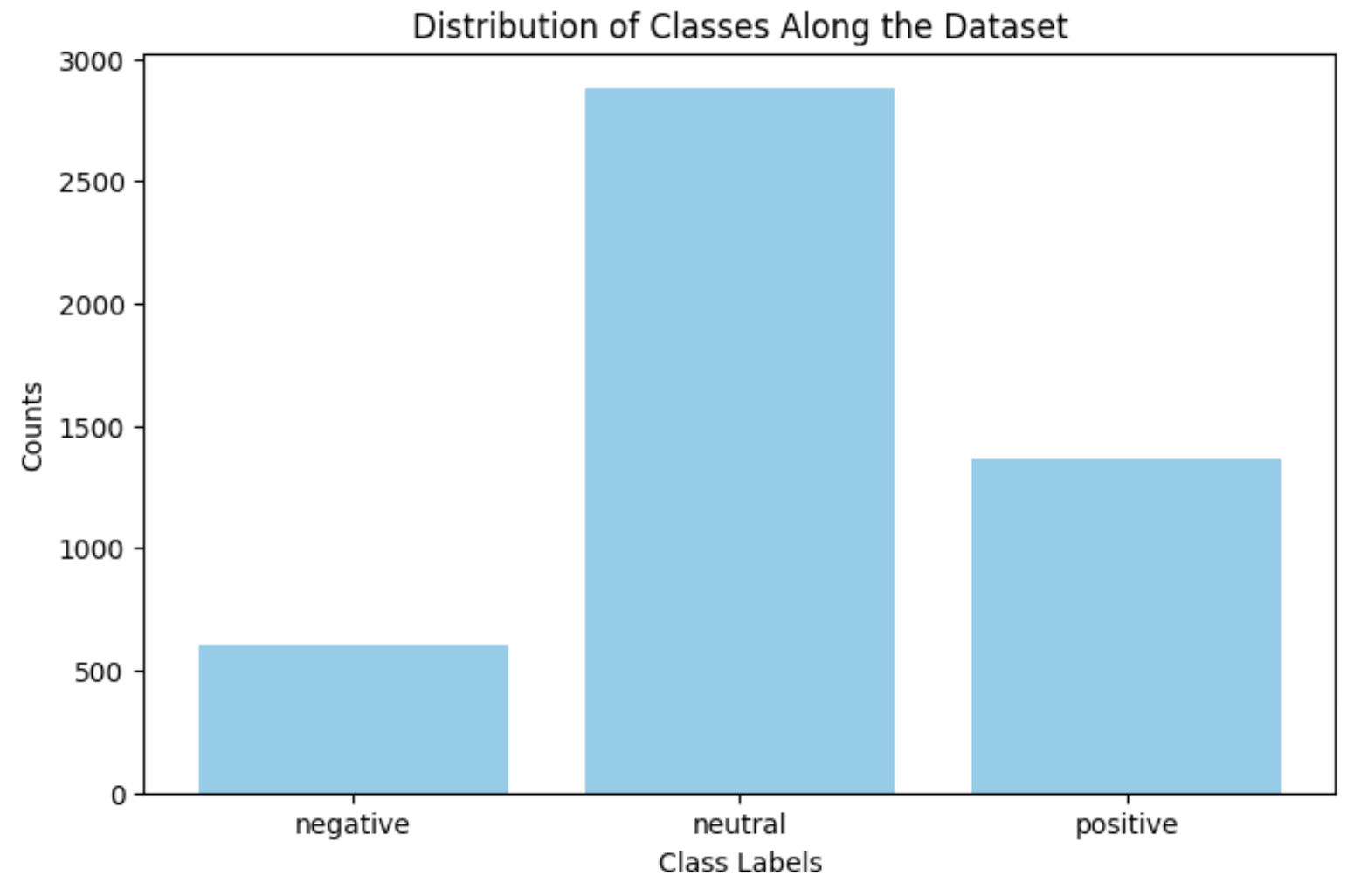
To address this problem, I first tried undersampling the dataset such that each classes have the same data entries as the one with the least.
sentiment_raw = pd.read_csv(os.path.join("sentiment_dataset", "all-data.csv"), encoding='latin1', header = None)
sentiment_raw.columns = ["Output", "Input"]
sentiment_dataset = sentiment_raw[["Input", "Output"]]

df_0 = sentiment_dataset[sentiment_dataset["Output"] == "negative"]
df_1 = sentiment_dataset[sentiment_dataset["Output"] == "neutral"]
df_2 = sentiment_dataset[sentiment_dataset["Output"] == "positive"]

min_label = min(len(df_0), len(df_1), len(df_2))
df_0_downsampled = resample(df_0, replace=False, n_samples=min_label, random_state=42)
df_1_downsampled = resample(df_1, replace=False, n_samples=min_label, random_state=42)
df_2_downsampled = resample(df_2, replace=False, n_samples=min_label, random_state=42)

sentiment_dataset_balanced = pd.concat([df_0_downsampled, df_1_downsampled, df_2_downsampled])

X, y = sentiment_dataset_balanced['Input'], sentiment_dataset_balanced['Output']

X_train, X_test, y_train, y_test = train_test_split(
    X_seq, y_encoded, test_size=0.1, random_state=42
)

X_train, X_val, y_train, y_val = train_test_split(
    X_train, y_train, test_size=0.2, random_state=42
)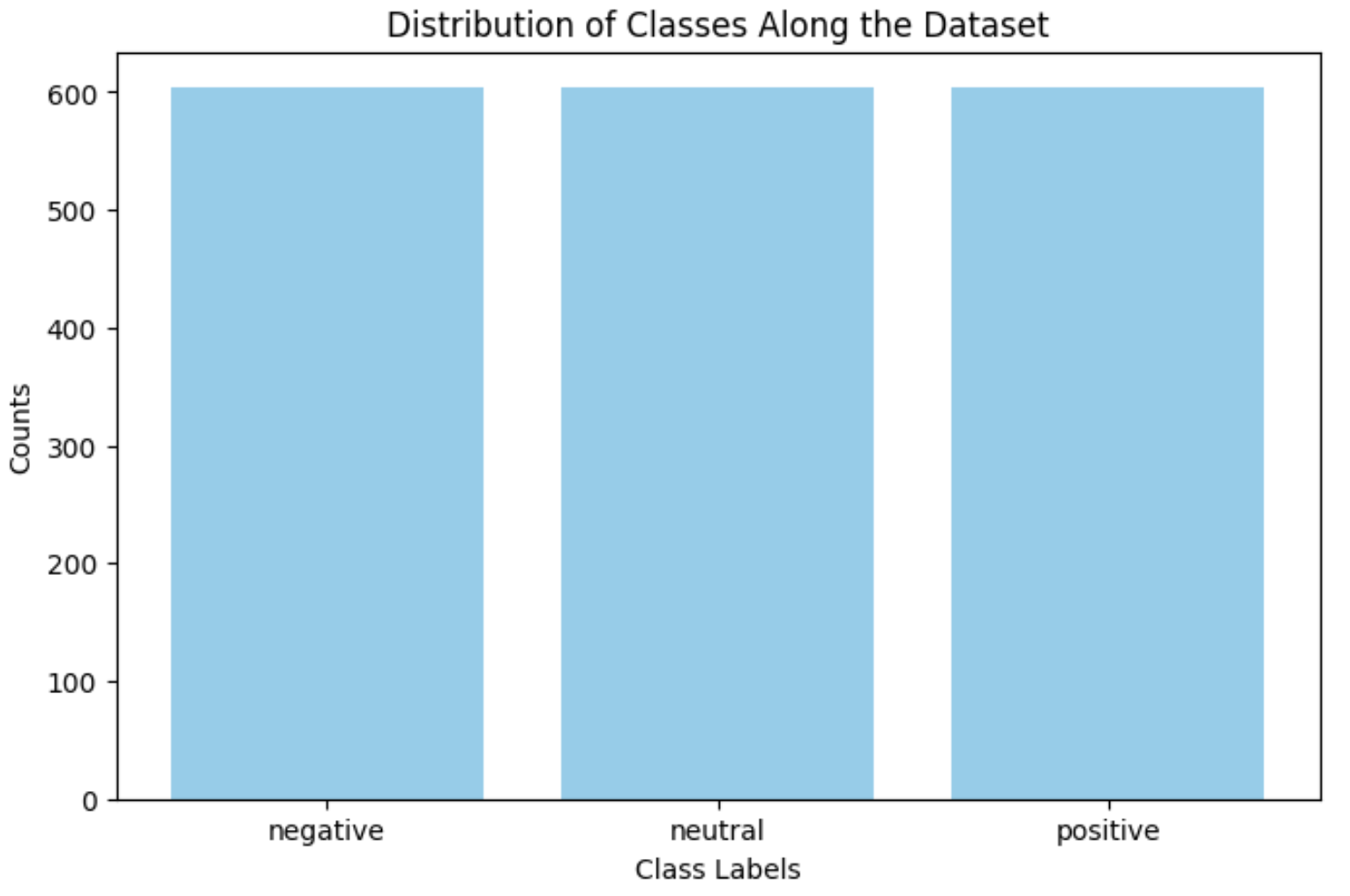
However, even though the dataset was not skewed anymore, the overall accuracy was 64.28%, which is still low.
I plan on taking two approaches to address the problem.
- Masked Language Modeling
- Data Augmentation
Since I trained my model straight away, the dataset was not enough for the model to learn the context. I will be pre-training the model through Masked language Modeling, then train the model with the sentiment dataset.
After recording its performance, I plan to practice data augmentation using nlpaug library.