> html 줄 바꿈, 들여쓰기
HTML Highlighter에서 줄 바꿈은 간단하다. 자식 노드가 존재하고 그 노드가 tag라면 줄 바꿈을 해주면 된다. 들여쓰기가 까다롭다. 우선 자식 노드가 tag라면 들여쓰기를 하는데 이때 tabStack을 1씩 증가하고 그만큼 들여쓰기를 해준다.
닫는 태그의 경우 자식 노드의 들여쓰기와 구분해 주어야 했다. MyTab과 ChildrenTab로 나누었다. 또한 자식 노드가 존재하되 텍스트 노드만 있을 경우엔 들여쓰기를 적용하지 않았다. 마지막으로 부모 노드가 html인 경우 자식은 들여쓰기 하지 않도록 해주었다.
const ElementNode = ({ name, attribs, children, tabStack }: { name: string, attribs: Object, children?: ChildNode[], tabStack: number }) => {
  const MyTab = <span>{'\u00A0\u00A0'.repeat(tabStack - 1)}</span>;
  const ChildrenTab = <span>{'\u00A0\u00A0'.repeat(name !== 'html' ? tabStack++ : tabStack - 1)}</span>;
  let hasTag = false;

  return (
    <>
      <OpeningTag name={name} />
      <Attribs attribs={attribs} />
      {children && (
        <>
          {children.map((item, i) => {
            const isTag = item instanceof Element;
            if (isTag && !hasTag) hasTag = true;
            return isTag ? (
              <div key={i}>{ChildrenTab}{getHighlightedNode(item, tabStack)}</div>
            ) : (
              <span key={i}>{getHighlightedNode(item, tabStack)}</span>
            );
          })}
          {hasTag && MyTab}<ClosingTag name={name} />
        </>
      )}
    </>
  );
}

const getHighlightedNode = (item: ChildNode, tabStack: number = 1) => {
  if (item instanceof ProcessingInstruction) {
    return <DOCTYPE />
  }

  if (item instanceof Text) {
    return <TextNode data={item.data} />
  }

  if (item instanceof Element) {
    return <ElementNode name={item.name} attribs={item.attribs} children={item?.children} tabStack={tabStack} />
  }

  return <span>Error</span>
}
(솔직히 코드가 많이 더럽다고 생각한다... 들여쓰기가 너무 햇갈렸다.)
> CSS Highlighter를 찾아서
어디서 많이 본 듯한 제목. HTML Highlighter와 마찬가지로 다시 한 번 라이브러리를 찾아 해맸다. 우선 문자열의 css를 선택자와 속성을 가지는 객체로는 분리하였으니, 선택자를 각 요소로 분리하거나 아예 하이라이트 시켜주는 라이브러리가 필요했다.
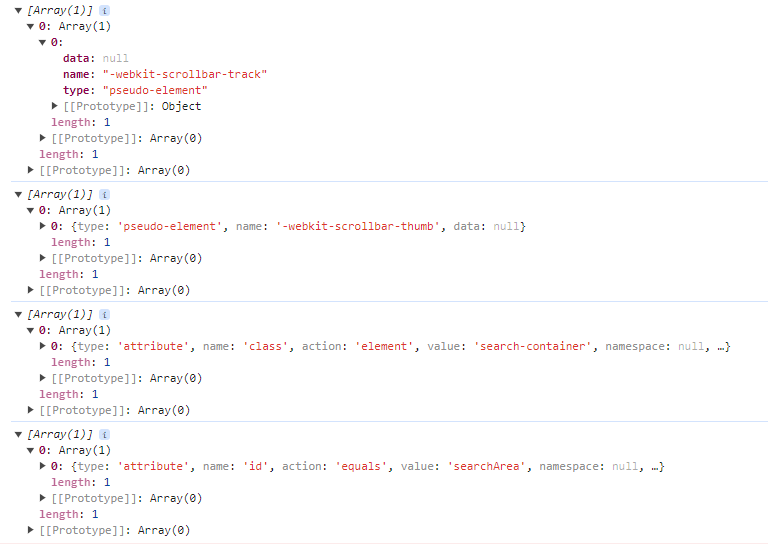
위는 css-what이라는 라이브러리를 사용한 결과다. 나름 선택자를 잘 분리해 주었다. type과 name 등의 속성으로 구분히 명확했으며 가상 선택자와 같은 형태 또한 잘 구분해 주었다.

하지만 이런 괴랄한 선택자의 경우는 구분은 커녕 아예 건너뛰고 말았다. 띄워쓰기나 >, 그리고 속성 선택자 등 세밀하게 구분해 주는 라이브러리는 많지 않았다. 아예 하이라이트까지 시켜주는 Prismjs나 highlight 또한 마찬가지였다.
결과는 역시 예상했던 그 엔딩이었다.
> 또 다시 직접 구현...
우선 선택자부터 구분했다. 우선 선택자 타입을 나누고 그에 맞는 색을 지정했다.
export type SelectorType = 'element' | 'idAndClass' | 'attrib' | 'pseudo'
							| 'key' | 'value' | 'combinator';

const color: Record<SelectorType, string> = {
    'key': 'text-sky-300',
    'value': 'text-orange-400',
    'attrib': 'text-gold',
    'pseudo': 'text-sky-200',
    'idAndClass': 'text-light-gold',
    'element': 'text-blue-400',
    'combinator': 'text-white',
  }
그 후 정규 표현식으로 공백, >, #, ., :, [, ], (, ), =, +, ~, | 을 기준으로 토큰을 나누었다.
const reg = /(\>|#|\[|\]|\(|\)|\.|\+|~|\||=|:|::|\s|[^\s\>\#\[\]\(\)\.\+\~\|\=::]+)/g;만약 *>.tabulator .tabulator-tableholder>div>span #btnSearch[div|=dd]::-webkit-scrollbar 라는 어마어마한 선택자를 정규식을 활용하여 구분하면 아래와 같은 결과가 나온다.
['*', '>', '.', 'tabulator', ' ', '.', 'tabulator-tableholder', '>', 'div', '>', 'span', ' ',
'#', 'btnSearch', '[', 'div', '|', '=', 'dd', ']', ':', ':', '-webkit-scrollbar']
이제 각 토큰을 순회하며 구분자를 만나면 타입을 저장하고 다음 구분자를 만나기 전까지는 토큰들의 색을 저장한 타입의 색으로 지정해준다.
const getHighlightedSeletor = (selector: string): ReactNode[] => {
  const color: Record<SelectorType, string> = {
    'key': 'text-sky-300',
    'value': 'text-orange-400',
    'attrib': 'text-gold',
    'pseudo': 'text-sky-200',
    'idAndClass': 'text-light-gold',
    'element': 'text-blue-400',
    'combinator': 'text-white',
  }

  const reg = /(\>|#|\[|\]|\(|\)|\.|\+|~|\||=|:|::|\s|[^\s\>\#\[\]\(\)\.\+\~\|\=::]+)/g;
  const tokens = selector.match(reg);
  const highlightedSelector: ReactNode[] = [];

  let type: SelectorType | null = 'element';

  tokens?.forEach((token, i) => {
    if (token === ' ' || token === '>' || token === '|' || token === '+' || token === '~') {
      type = null;
      return highlightedSelector.push(<span key={i} className={color.combinator}>{token}</span>);
    }

    if (token === '[' || token === '(') {
      type = 'key';
      return highlightedSelector.push(<span key={i} className={color.attrib}>{token}</span>);
    }

    if (token === '=') {
      type = 'value';
      return highlightedSelector.push(<span key={i}  className={color.combinator}>{token}</span>);
    }

    if (token === ']' || token === ')') {
      type = null;
      return highlightedSelector.push(<span key={i} className={color.attrib}>{token}</span>);
    }

    if (type === 'key') {
      type = null;
      return highlightedSelector.push(<span key={i} className={color.key}>{token}</span>);
    }

    if (type === 'value') {
      type = null;
      return highlightedSelector.push(<span key={i} className={color.value}>{token}</span>);
    }

    if (token === ':') {
      type = 'pseudo';
      return highlightedSelector.push(<span key={i} className={color.pseudo}>{token}</span>);
    }

    if (token === '#' || token === '.') {
      type = 'idAndClass';
      return highlightedSelector.push(<span key={i} className={color.idAndClass}>{token}</span>);
    }

    highlightedSelector.push(<span key={i} className={type ? color[type] : color.element}>{token}</span>);
  });

  return highlightedSelector;
}
(↑전체 코드)
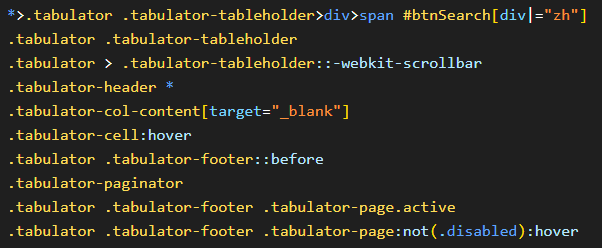
(↑결과물. 이 정도면 나쁘지 않다.)
> 선택자 다음은 속성 영역
속성은 선택자보다 간단했다. 문자와 숫자, 그리고 몇가지 기호를 기준으로만 구분해주면 된다.
export type AttribValueType = 'string' | 'number' | 'pseudo' | 'attrib' | 'important' | 'annotation';

const getHighlightedAttributes = (attributes: { [key: string]: string | string[] }): ReactNode[] => {
  const highlightedAttributed: ReactNode[] = [];
  const attribKeyColor: string = 'text-sky-200';
  const attribValueColor: Record<AttribValueType, string> = {
    'string': 'text-orange-400',
    'number': 'text-grass',
    'pseudo': 'text-sky-200',
    'attrib': 'text-pink',
    'important': 'text-blue-400',
    'annotation': 'text-pink'
  }

  const reg = /(!important|\(|\)|\[|\]|@|:|\s|[^\s@:!()\[\]]+)/g;

  Object.entries(attributes).map(([key, value], i) => {
    // cssToJson는 parse 시 returnd으로 attributes를 던지는데 string[] 타입도 있다고 한다.
    // 이 경우 일단 string으로 통일해주고 진행
    if (Array.isArray(value)) {
      value = value.join(' ');
    }
    const tokens = value.match(reg);
    const highlightedAttribValue: ReactNode[] = [];
    let type: AttribValueType | null = null;

    tokens?.forEach((token, i) => {
      if (token === ' ') {
        type = null;
        return highlightedAttribValue.push(<span key={i}>{token}</span>);
      }
      if (token === '@') {
        type = 'annotation';
        return highlightedAttribValue.push(<span key={i} className={attribValueColor.annotation}>{token}</span>);
      }
      if (token === ':') {
        type = 'pseudo';
        return highlightedAttribValue.push(<span key={i} className={attribValueColor.pseudo}>{token}</span>);
      }
      if (token === '(' || token === ')' || token === '[' || token === ']') {
        type = null;
        return highlightedAttribValue.push(<span key={i} className={attribValueColor.attrib}>{token}</span>);
      }
      if (token === '!important') {
        type = null;
        return highlightedAttribValue.push(<span key={i} className={attribValueColor.important}>{token}</span>);
      }
      if (!type && !isNaN(Number(token[0]))) {
        type = 'number';
        return highlightedAttribValue.push(<span key={i} className={attribValueColor.number}>{token}</span>);
      }
      if (!type && typeof token[0] === 'string') {
        type = 'string';
        return highlightedAttribValue.push(<span key={i} className={attribValueColor.string}>{token}</span>);
      }
    });

    highlightedAttributed.push(
      <div key={i}>
        {'\u00A0\u00A0'}
        <span className={attribKeyColor}>{key}</span>
        <span className='text-white'>{`: `}</span>
        {highlightedAttribValue}
        <span className='text-white'>;</span>
      </div>
    );
  });
  return highlightedAttributed;
}

export default function CSSHighlighter(parsedCSSObj: CSSNode): ReactNode {
  return (
    Object.entries(parsedCSSObj.children).map(([selector, children], i) => {
      return (
        <div key={i}>
          {getHighlightedSeletor(selector)}
          {` `}<span className='text-gold'>{`{`}</span>
          {getHighlightedAttributes(children.attributes)}
          <span className='text-gold'>{`}`}</span>
        </div>
      );
    })
  );
}
최종 결과물은 아래와 같다.
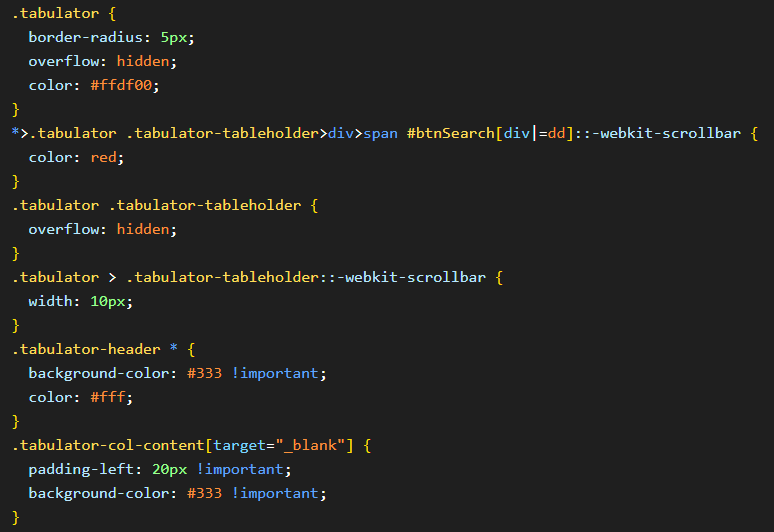
(↑실제 화면 출력 결과)
> 끝
사실 뒤늦게 알게 된 사실이지만 두 가지 문제가 존재한다. 첫째는 @media 와 같이 중괄호 안에 중괄호가 있을 경우는 변환이 제대로 이루어지지 않는다. 어쩌면 내가 모르는 다른 css 키워드들도 비슷한 문제가 발생할 수 있다. 둘째로 주석이 나타나지 않는다. 그렇다고 모든 주석이 나타나지 않는 것도 아니다. { 옆에 주석을 달면 이 주석은 cssToJson이 인식하여 값을 나타낸다. 우선 가야 할 길이 멀기에 이 문제는 추후에 수정하도록 하자.