1) tf에 포함된 keras로 rnn을 구현하는 2가지 방법
tf에 포함된 keras로 rnn을 구현하는 2가지 방법이 있다.
- rnn, lstm, gru 등 특정 셀을 선언하고 이를 루프하는 코드를 활용하는 방법
- 셀과 rnn을 결합한 api를 활용하는 방법
import tensorflow as tf
from tensorflow import keras
from tensorflow.keras import layers

# rnn, lstm, gru 등 특정 셀을 선언하고 이를 루프하는 코드를 활용하는 방법
cell = layers.SimpleRNNCell(units=hidden_size)
rnn = layers.RNN(cell, return_sequences=True, return_state=True)
outputs, states = rnn(x_data)

# 셀과 rnn을 결합한 api를 활용하는 방법
rnn = layers.SimpleRNN(units=hidden_size, return_sequences=True, return_state=True)
outputs, states = rnn(x_data)
위 두 방법은 동일하므로, 목적이나 환경에 따라 선택하면 된다.
2) 구현 예제 1 - One cell RNN
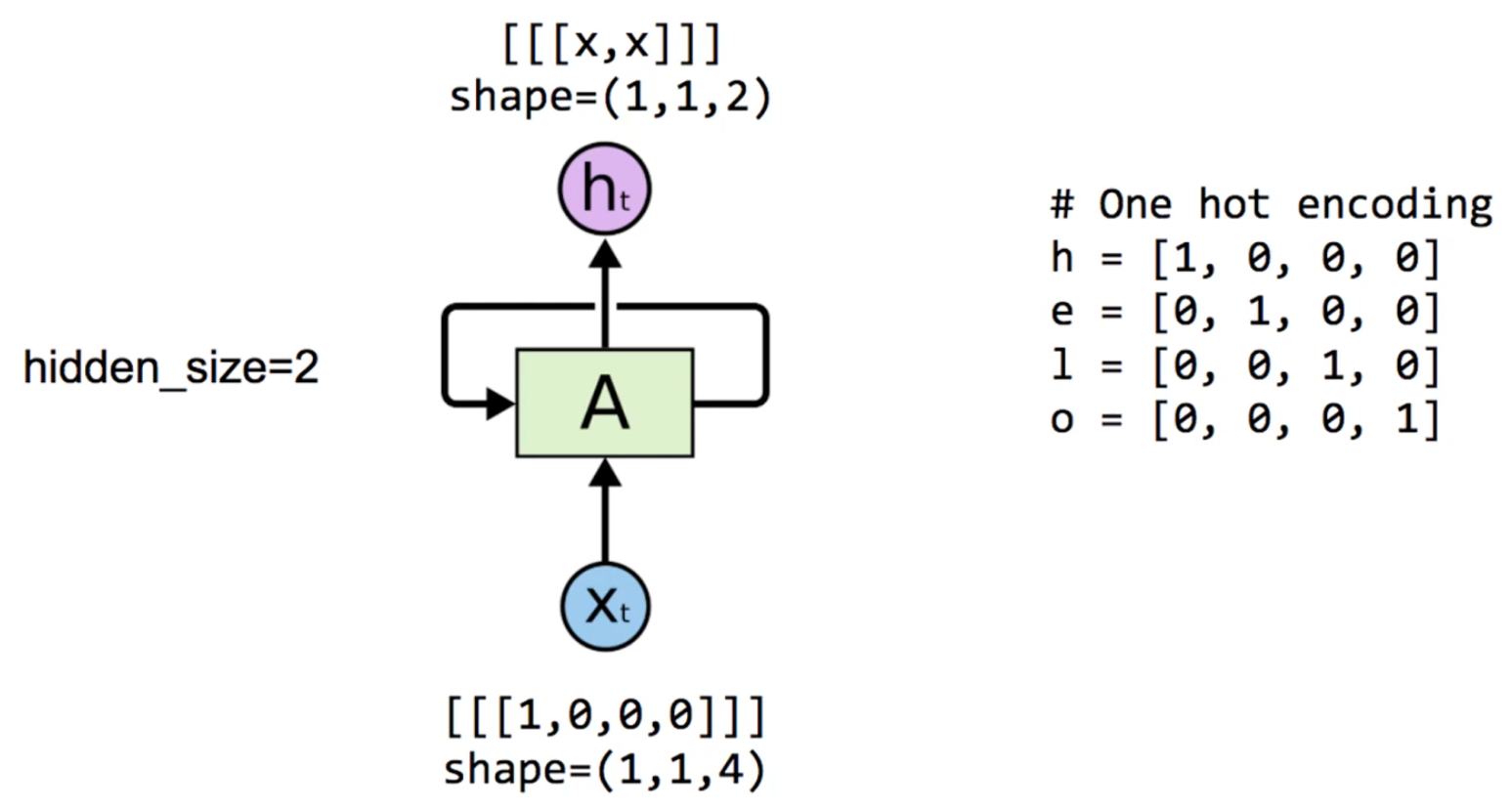
2-1) 예제 데이터
=> 각 알파벳이 one-hot vector로 표현되어 있다.
이때 input의 shape가 처럼 표현되어 있는데, 이는 텐서플로우에서 RNN이 입력받는 데이터는 (batch_size, sequence_length, input_dim)으로 전처리 되어야 함을 의미한다.
- batch_size: 한 번에 처리하는 시퀀스 개수
- sequence_length: 한 시퀀스 안의 타임스텝 개수(예: 문장 길이, 시간 구간 길이)
- input_dim: 각 타임스텝에서의 입력 벡터 크기(예: 단어 임베딩 차원, 센서 피처 수)
또 hidden_size를 2로 설정했으므로, output의 shape가 (1, 1, 2)로 변화하였다.
2-2) 구현 코드
# setup
import numpy as np
import tensorflow as tf
from tensorflow import keras
from tensorflow.keras import layers

print(tf.__version__)

# One hot encoding for each char in 'hello'
h = [1, 0, 0, 0]
e = [0, 1, 0, 0]
l = [0, 0, 1, 0]
o = [0, 0, 0, 1]

# One cell RNN input_dim (4) -> output_dim (2)
# one-hot 벡터를 RNN이 처리할 수 있도록 전처리한다.
x_data = np.array([[h]], dtype=np.float32)

# hidden size가 2인 rnn 생성
hidden_size = 2
cell = layers.SimpleRNNCell(units=hidden_size)
rnn = layers.RNN(cell, return_sequences=True, return_state=True)
outputs, states = rnn(x_data)  # 전처리 데이터를 RNN에 전달

# equivalent to above
# rnn = layers.SimpleRNN(units=hidden_size, return_sequences=True,
#                        return_state=True)
# outputs, states = rnn(x_data)

print('x_data: {}, shape: {}'.format(x_data, x_data.shape))
print('outputs: {}, shape: {}'.format(outputs, outputs.shape))
print('states: {}, shape: {}'.format(states, states.shape))
2-3) 결과
=> 결과
x_data: [[[1. 0. 0. 0.]]], shape: (1, 1, 4)
outputs: [[[0.32261637 0.5036928 ]]], shape: (1, 1, 2)
states: [[0.32261637 0.5036928 ]], shape: (1, 2)
이때 outputs와 state에는 같은 숫자 값이 저장되어 있지만 shape이 다른데, 이는 output 변수는 전체 시퀀스에 해당하는 hidden state 값들을 가지고 있고, state 변수는 시퀀스의 마지막 hidden state 값만 가지고 있기 때문이다.
현재 예제에는 h 하나만 전달하였으므로 시퀀스가 1인 데이터이다.
3) 구현 예제 2 - Seq가 1이 아닌 RNN
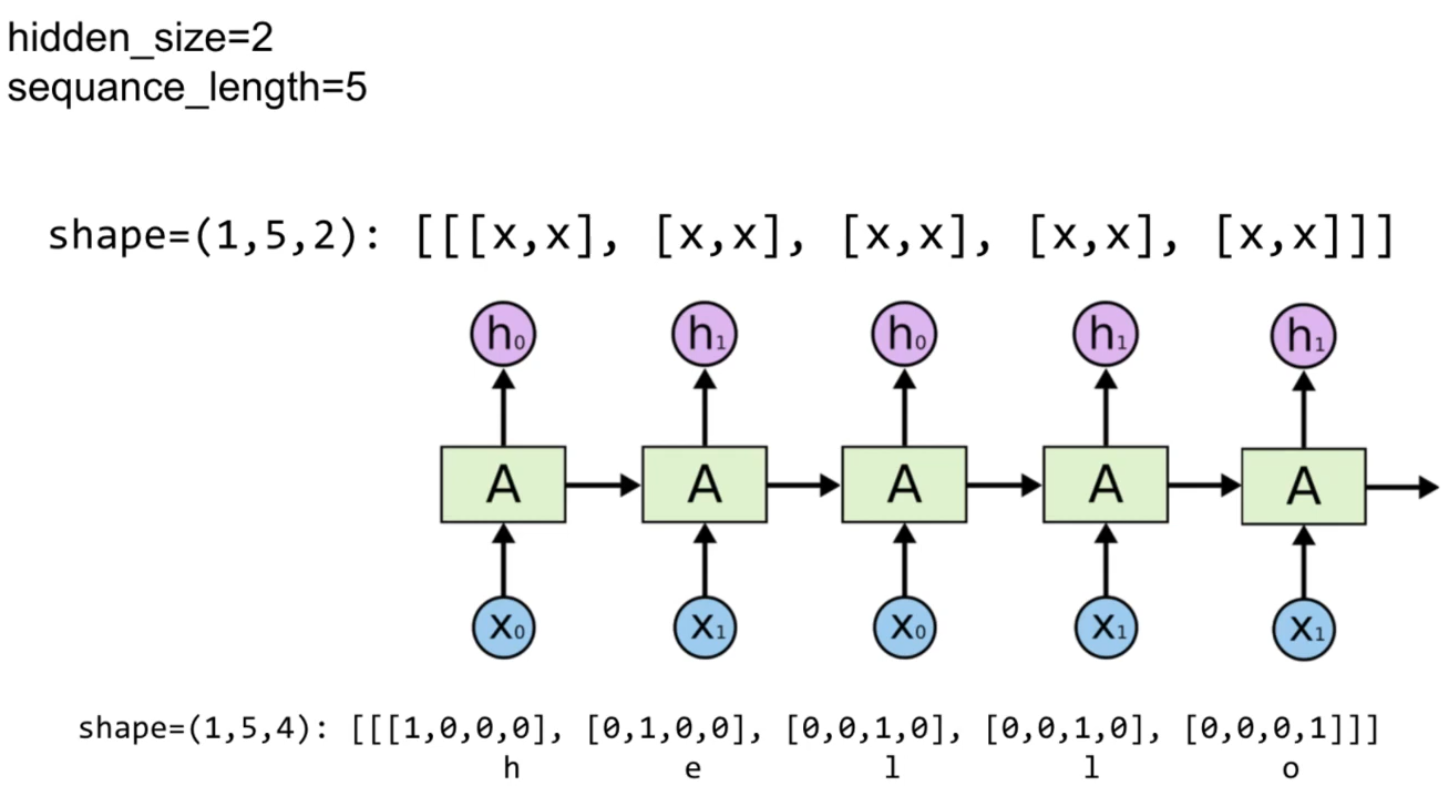
3-1) 예제 데이터
h, e, l, o 등이 one-hot vector로 주어지고, rnn이 hello라는 알파벳의 시퀀스를 전달받아 결과를 출력하고 있다.
3-2) 구현 코드
import numpy as np
from tensorflow.keras import layers

h = [1, 0, 0, 0]
e = [0, 1, 0, 0]
l = [0, 0, 1, 0]
o = [0, 0, 0, 1]

# One cell RNN input_dim (4) -> output_dim (2), sequence: 5
# 각각의 알파벳에 해당하는 one hot vector를 기반으로 시퀀스로 만들고, rnn이 처리할 수 있도록 전처리
x_data = np.array([[h, e, l, l, o]], dtype=np.float32)

hidden_size = 2
rnn = layers.SimpleRNN(units=2, return_sequences=True, return_state=True)
outputs, states = rnn(x_data)

print('x_data: {}, shape: {} \n'.format(x_data, x_data.shape))
print('outputs: {}, shape: {} \n'.format(outputs, outputs.shape))
print('states: {}, shape: {}'.format(states, states.shape))
3-3) 결과
=> 결과
x_data: [[
[1. 0. 0. 0.][0. 1. 0. 0.]
[0. 0. 1. 0.][0. 0. 1. 0.]
[0. 0. 0. 1.]
]], shape: (1, 5, 4)
outputs: [[[ 0.36337885 0.73452437][ 0.23541063 -0.28505793]
[-0.19638212 -0.54805404][-0.589804 -0.65221256]
[-0.8427679 0.19108507]]], shape: (1, 5, 2)
states: [[-0.8427679 0.19108507]], shape: (1, 2)
output 변수는 전체 시퀀스에 대한 hidden state 값을 가지고 있고 특히 state 변수는 시퀀스의 마지막 hidden state 값을 갖고 있기 때문에 output 변수의 마지막 hidden state와 동일한 값을 가지고 있다.
4) 구현 예제 3 - Batching Input
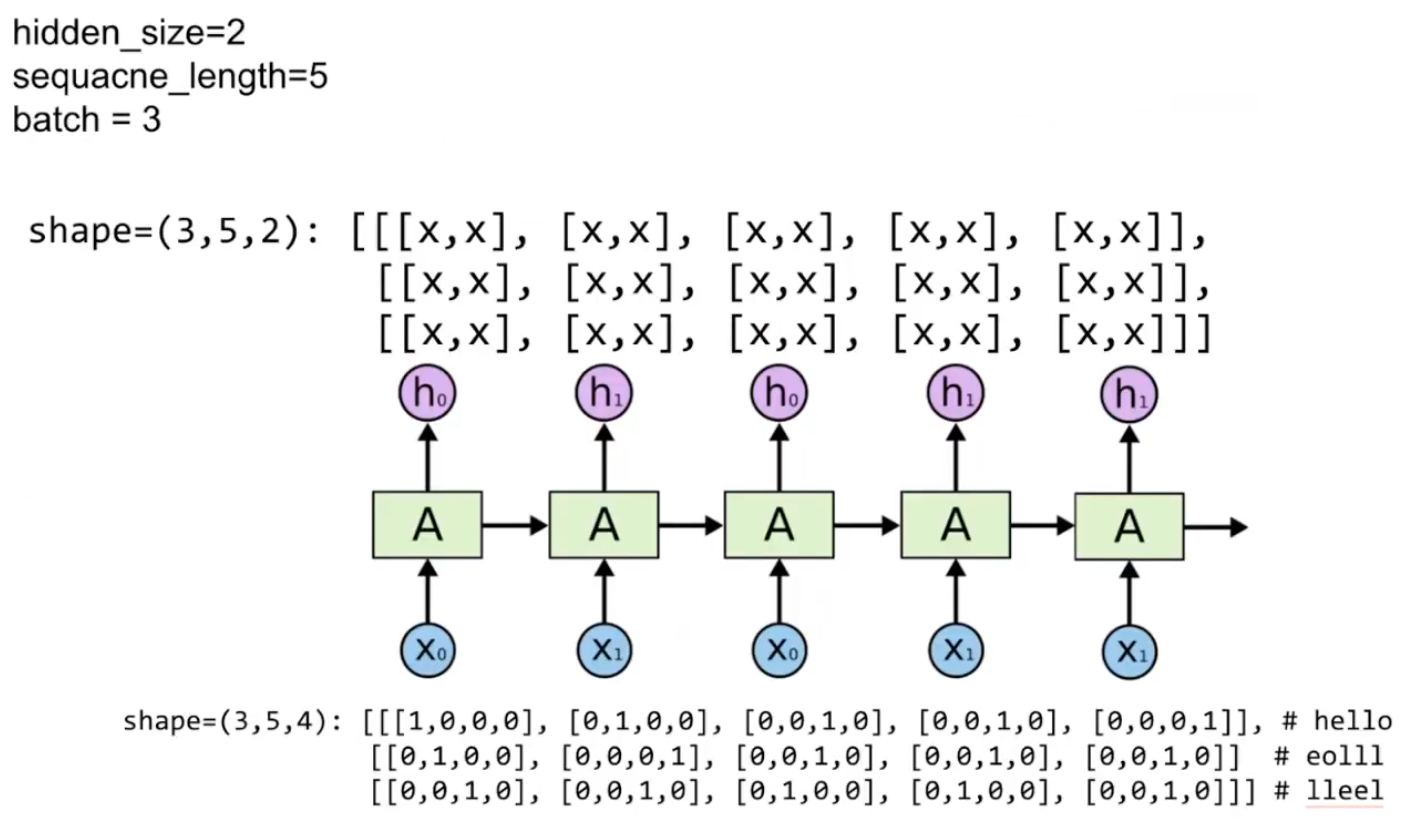
4-1) 예제 데이터
shape=(3,5,4): [[[1,0,0,0], [0,1,0,0], [0,0,1,0], [0,0,1,0], [0,0,0,1]], # hello
[[0,1,0,0], [0,0,0,1], [0,0,1,0], [0,0,1,0], [0,0,1,0]] # eolll
[[0,0,1,0], [0,0,1,0], [0,1,0,0], [0,1,0,0], [0,0,1,0]]] # lleel
4-2) 구현 코드
import numpy as np
from tensorflow.keras import layers

h = [1, 0, 0, 0]
e = [0, 1, 0, 0]
l = [0, 0, 1, 0]
o = [0, 0, 0, 1]

# One cell RNN input_dim (4) -> output_dim (2), sequence: 5, batch 3
# 3 batches 'hello', 'eolll', 'lleel'
x_data = np.array([[h, e, l, l, o],
                   [e, o, l, l, l],
                   [l, l, e, e, l]], dtype=np.float32)

hidden_size = 2
rnn = layers.SimpleRNN(units=2, return_sequences=True, return_state=True)
outputs, states = rnn(x_data)

print('x_data: {}, shape: {} \n'.format(x_data, x_data.shape))
print('outputs: {}, shape: {} \n'.format(outputs, outputs.shape))
print('states: {}, shape: {}'.format(states, states.shape))
4-3) 결과
=> 결과
x_data: [[[1. 0. 0. 0.]
 [0. 1. 0. 0.]
 [0. 0. 1. 0.]
 [0. 0. 1. 0.]
 [0. 0. 0. 1.]]

[[0. 1. 0. 0.]
 [0. 0. 0. 1.]
 [0. 0. 1. 0.]
 [0. 0. 1. 0.]
 [0. 0. 1. 0.]]

[[0. 0. 1. 0.]
 [0. 0. 1. 0.]
 [0. 1. 0. 0.]
 [0. 1. 0. 0.]
 [0. 0. 1. 0.]]], shape: (3, 5, 4)

outputs: [[[-0.56743866 -0.23173441]
 [ 0.8334968   0.30382484]
 [-0.93795335 -0.53330624]
 [-0.0874121   0.45240858]
 [-0.52966034 -0.5007928 ]]

[[ 0.58572567  0.00302648]
 [-0.8668559  -0.19943324]
 [-0.10968345  0.14605513]
 [-0.6695559  -0.29440066]
 [-0.30860662  0.20964848]]

[[-0.73496014 -0.17280702]
 [-0.23251031  0.10149368]
 [ 0.723902   -0.06399264]
 [-0.0544093  -0.03742061]
 [-0.7118617  -0.12900047]]], shape: (3, 5, 2)

states: [[-0.52966034 -0.5007928 ]
[-0.30860662  0.20964848]
[-0.7118617  -0.12900047]], shape: (3, 2)
output 변수는 미니배치를 구성하고 있는 각각의 데이터의 전체 시퀀스에 해당하는 hidden state를 가지고 있고, state 변수는 미니배치를 구성하고 있는 각각의 데이터 시퀀스의 마지막 hidden state 값을 가지고 있다.
모두를 위한 딥러닝 강좌 2
https://www.youtube.com/watch?v=7eldOrjQVi0&list=PLQ28Nx3M4Jrguyuwg4xe9d9t2XE639e5C
