오늘 한 일
오늘 너무 집중이 안 되고, 너무 피곤한 나머지 팀원들에게 양해를 구해서
좀 많이 쉬었습니다.
잘 의미있게 쉬는것도 개발을 하는데 도움이 될 수 있습니다!
그래도 오늘 뭘 했는지 간단하게 알려드리겠습니다.
추가 및 수정사항
월드맵에 플레이어 아이콘 추가 (나중에 플레이어 얼굴부분 잘라서 추가예정)
Bar길이 수정
플레이어 Status.cs을 데이터테이블에 연결해서 Json으로 변환
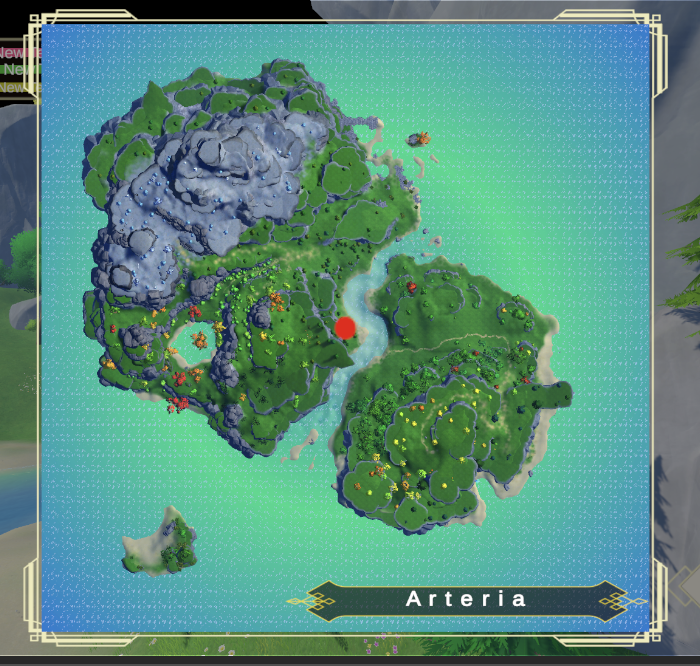
현재 [M] 키를 누를시에 저렇게 월드맵과 지역 이름이 뜨게 했습니다.
플레이어 위치값을 받아오면서 그대로 적용만 시키면 간단합니다.
2.플레이어 스텟 Json
{
  "Items": [
    {
      "level": 1,
      "MaxHP": 100,
      "Attack": 10,
      "Stamina": 100,
      "RequiredExp": 0
    },
    Level에 필요한 데이터 Json을 변환시켜주었습니다.


    using System;
using System.Collections.Generic;
using UnityEngine;

[Serializable]
public class level_Data_Table
{
    /// <summary>
    /// Level
    /// </summary>
    public int level;

    /// <summary>
    /// Max HP
    /// </summary>
    public int MaxHP;

    /// <summary>
    /// Attack
    /// </summary>
    public int Attack;

    /// <summary>
    /// Stamina
    /// </summary>
    public int Stamina;

    /// <summary>
    /// Required Exp (다음 레벨까지)
    /// </summary>
    public int RequiredExp;
}

public class Level_Data_Loader
{
    public List<level_Data_Table> ItemsList { get; private set; }
    public Dictionary<int, level_Data_Table> ItemsDict { get; private set; }

    public Level_Data_Loader(string path = "JSON/level_Data_Table")
    {
        TextAsset json = Resources.Load<TextAsset>(path);

        if (json == null)
        {
            Debug.LogError($"Level_Data_Table JSON not found : {path}");
            return;
        }

        ItemsList = JsonUtility.FromJson<Wrapper>(json.text).Items;
        Debug.Log($"[LevelData] Loaded Count : {ItemsList.Count}");
        ItemsDict = new Dictionary<int, level_Data_Table>();

        foreach (var item in ItemsList)
        {
            ItemsDict.Add(item.level, item);
        }
    }

    [Serializable]
    private class Wrapper
    {
        public List<level_Data_Table> Items;
    }

    /// <summary>
    /// 레벨로 데이터 가져오기
    /// </summary>
    public level_Data_Table GetByLevel(int level)
    {
        if (ItemsDict.ContainsKey(level))
            return ItemsDict[level];

        return null;
    }
}
//Level_Data_Table.cs를 만들어 레벨 데이터를 가져오는 .cs도 만들어주었습니다.

using UnityEngine;

public class PlayerStat : MonoBehaviour
{
    [Header("UI")]
    [SerializeField] private PlayerUIStatus ui;

    [Header("Level")]
    public int level = 1;
    public float currentExp = 0f;

    [Header("Stats")]
    public float maxStamina;
    public float currentStamina;

    public float maxExp; // 다음 레벨 필요 경험치

    private CharacterBase character;
    private Level_Data_Loader levelTable;

    private void Awake()
    {
        character = GetComponent<CharacterBase>();
        levelTable = new Level_Data_Loader();
    }

    private void Start()
    {
        ApplyLevelData();
        UpdateAllUI();
    }

    // =======================
    // 레벨 데이터 적용
    // =======================
    private void ApplyLevelData()
    {
        var data = levelTable.GetByLevel(level);
        if (data == null)
        {
            Debug.LogWarning($"Level data not found : {level}");
            return;
        }

        Debug.Log($"[PlayerStat] Apply Level {level} | HP:{data.MaxHP} | Stamina:{data.Stamina}");

        // HP
        character.maxHp = data.MaxHP;
        character.currentHp = character.maxHp;

        // Stamina
        maxStamina = data.Stamina;
        currentStamina = maxStamina;

        // EXP
        var nextLevel = levelTable.GetByLevel(level + 1);
        maxExp = nextLevel != null ? nextLevel.RequiredExp : 0;
    }

    // =======================
    // 경험치 추가
    // =======================
    public void AddExp(float amount)
    {
        if (maxExp <= 0) return; // MaxLevel

        currentExp += amount;

        if (currentExp >= maxExp)
        {
            currentExp -= maxExp;
            LevelUp();
        }

        UpdateExpUI();
    }

    private void LevelUp()
    {
        level++;
        ApplyLevelData();
        character.currentHp = character.maxHp;

        UpdateAllUI();

        Debug.Log($"LEVEL UP → {level}");
    }

    // =======================
    // UI
    // =======================
    private void UpdateAllUI()
    {
        ui.UpdateHp(character.currentHp, character.maxHp);
        ui.UpdateStamina(currentStamina, maxStamina);
        ui.UpdateExp(currentExp, maxExp);
        ui.UpdateLevel(level);
    }

    private void UpdateExpUI()
    {
        ui.UpdateExp(currentExp, maxExp);
        ui.UpdateLevel(level);
    }
}

//마지막으로 플레이어 스텟에 진짜로 적용을 위해 .cs를 만들어주면 완성입니다
아이디어 뱅크