- 클렌징
- 토큰화
- Stop word
- Stemming
- Lemmatization
클렌징
분석에 방해가 되는 불필요한 문자, 기호등을 제거하는 작업
ex) HTML, XML 태그 제거
어휘 사전 구축
# 토큰화(max_df) N개 보다 큰 단어 수 무시
vect = CountVectorizer(tokenizer=tokenizer.morphs, max_df=10)
vectors = vect.fit_transform(df['document'])
model = RandomForestClassifier(random_state=2022)
cross_val_score(model, vectors, df['label'], scoring='accuracy', cv=5).mean()
# 토큰화(min_df) N개 보다 작은 단어 수 무시
vect = CountVectorizer(tokenizer=tokenizer.morphs, min_df=2)
vectors = vect.fit_transform(df['document'])
model = RandomForestClassifier(random_state=2022)
cross_val_score(model, vectors, df['label'], scoring='accuracy', cv=5).mean()
토큰화시 최대, 최소의 N개의 개수에 따라 모델 성능이 달라짐
Stop word(불용어)
text = '함께 탐험하며 성장하는 AI 학교 AIFFEL'
stop_words = ['에서','해요']

vect = CountVectorizer(stop_words=stop_words)
words = tokenizer.morphs(text)

vect.fit(words)
vect.vocabulary_
문법(띄어 쓰기)
!pip install git+https://github.com/haven-jeon/PyKoSpacing.git
from pykospacing import Spacing
spacing = Spacing()

text = "함께탐험하며성장하는AI학교아이펠"
spacing_test = spacing(text)
print(text)
print(spacing_test)
함께 탐험하며 성장하는 AI 학교 AIFFEL
반복되는 글자 정리
!pip install soynlpfrom soynlp.normalizer import *
emoticon_normalize('하하하하ㅋㅋㅋㅋㅋㅠㅠㅠㅠㅠㅠ', num_repeats=3)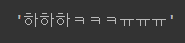
문법(맞춤법)
!pip install git+https://github.com/ssut/py-hanspell.gitfrom hanspell import spell_checker
text = '알파고 이전, 2015년부터 만들 어진 최초의AI 커뮤니티 모두의연구소.학연, 지연, 모두연이라는 말이나올만큼 AI의 보금자리로서 중요한 역할을 하고있는 모두의연구소에서 만들었습니다. AI기술을 커뮤니티로 배우는 유일 한 기관 아이펠과 함께 밝은 미래를 만들어보세요.'
result = spell_checker.check(text)
result.as_dict()수정된 문장
result.checked토큰화
문장 토큰화
문서에서 문장을 분리
sent_tokenize
문장의 마지막을 뜻하는 기호에 따라 분리하는 것이 일반적
from nltk import sent_tokenize
import nltk

nltk.download('punkt_tab')

# 샘플 텍스트
text_sample = 'The Matrix is everywhere its all around us, here even in this room. \
               You can see it out your window or on your television. \
               You feel it when you go to work, or go to church or pay your taxes.'

sentences = sent_tokenize(text=text_sample)

print(type(sentences), len(sentences))
print(sentences)

3개의 문장으로 분리됨
단어 토큰화
문장에서 단어를 분리
word_tokenize
단어의 순서가 중요하지 않은 경우 문장으로 분리 하지 않고 바로 단어 토큰화 사용 가능
from nltk import word_tokenize

sentence = "The Matrix is everywhere its all around us, here even in this room."
words = word_tokenize(sentence)
print(type(words), len(words))
print(words)
예제
from nltk import word_tokenize, sent_tokenize

def tokenize_text(text):

    sentences = sent_tokenize(text)
    word_tokens = [word_tokenize(sentence) for sentence in sentences]
    return word_tokens

word_tokens = tokenize_text(text_sample)
print(type(word_tokens),len(word_tokens))
print(word_tokens)
문장 토큰화 진행 후 단어 토큰화 진행
번외(Okt)
import konlpy
from konlpy.tag import Okt

tokenizer = Okt()
text = "함께 탐험하며 성장하는 AI 학교 AIFFEL"

tokenizer.morphs(text)
# 토큰화 명사
tokenizer.nouns(text)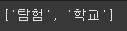
# 토큰화 품사
tokenizer.pos(text)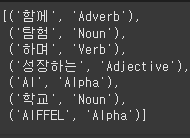
n-gram
문장을 단어별로 토큰화 할 경우 문맥적인 의미가 퇴색되기에 n-gram을 사용
ex) Agent Smith knocks the door
(Agent, smith) / (Smith, knocks)..
Stop Word
분석에 큰 의미가 없는 단어(is, the, a..)를 제거
import nltk
nltk.download('stopwords')
print('영어 stop words 갯수:',len(nltk.corpus.stopwords.words('english')))
print(nltk.corpus.stopwords.words('english')[:20])
Stop word를 이용한 필터링
import nltk

stopwords = nltk.corpus.stopwords.words('english')
all_tokens = []

for sentence in word_tokens:
    filtered_words=[]

    for word in sentence:
        word = word.lower()
        if word not in stopwords:
            filtered_words.append(word)
    all_tokens.append(filtered_words)

print(all_tokens)
3개의 문장에서 Stop word가 제거된 모습
Stemming
문법적, 의미적으로 변하는 단어의 원형을 찾음
원래 단어에서 일부 철자가 훼손된 단어를 추출하는 경향이 존재
from nltk.stem import LancasterStemmer
stemmer = LancasterStemmer()

print(stemmer.stem('working'),stemmer.stem('works'),stemmer.stem('worked'))
print(stemmer.stem('amusing'),stemmer.stem('amuses'),stemmer.stem('amused'))
print(stemmer.stem('happier'),stemmer.stem('happiest'))
print(stemmer.stem('fancier'),stemmer.stem('fanciest'))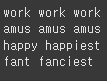
work의 경우 단순한 형태의 변환(진행, 과거..) 인식이 잘됨
amuse의 경우 훼손되었다고 가정하여 amus로 인식
happy, fancy의 경우도 마찬가지
Lemmatization
문법적인 요소와 의미적인 부분을 감안하여 정확한 철자로 된 단어를 찾아줌
Stemming보다 성능이 뛰어나나 그만큼 시간이 오래 걸림
from nltk.stem import WordNetLemmatizer
import nltk
nltk.download('wordnet')

lemma = WordNetLemmatizer()
print(lemma.lemmatize('amusing','v'),lemma.lemmatize('amuses','v'),lemma.lemmatize('amused','v'))
print(lemma.lemmatize('happier','a'),lemma.lemmatize('happiest','a'))
print(lemma.lemmatize('fancier','a'),lemma.lemmatize('fanciest','a'))
동사의 경우 'v'
형용사의 경우 'a'