프로젝트 - HSV객체 검출
from pathlib import Path
import cv2
import matplotlib.pyplot as plt
import numpy as np

lower_orange = (5, 100, 100)    # OpenCV HSV 기준 주황 (H: 0~179)
upper_orange = (25, 255, 255)

# 스크립트 위치 기준 경로 (실행 위치와 무관)
img_path = Path(__file__).resolve().parent / "test2.jpg"
if not img_path.exists():
    raise FileNotFoundError(f"{img_path}를 찾을 수 없음")

# cv2.imread는 Windows 한글 경로를 못 읽으므로 imdecode 사용 (BGR로 읽음)
img = cv2.imdecode(np.fromfile(img_path, dtype=np.uint8), cv2.IMREAD_COLOR)
if img is None:
    raise ValueError(f"{img_path}를 이미지로 읽을 수 없음")

img_hsv = cv2.cvtColor(img, cv2.COLOR_BGR2HSV)
img_mask = cv2.inRange(img_hsv, lower_orange, upper_orange)

# 마스크의 작은 점 노이즈 제거
kernel = np.ones((3, 3), np.uint8)
img_mask = cv2.morphologyEx(img_mask, cv2.MORPH_OPEN, kernel)

img_result = cv2.bitwise_and(img, img, mask=img_mask)

# 원본 / 마스크 / 결과 비교 (표시할 때만 RGB로)
fig, axes = plt.subplots(1, 3, figsize=(12, 4))
axes[0].imshow(cv2.cvtColor(img, cv2.COLOR_BGR2RGB))
axes[0].set_title("Original")
axes[1].imshow(img_mask, cmap="gray")
axes[1].set_title("Mask")
axes[2].imshow(cv2.cvtColor(img_result, cv2.COLOR_BGR2RGB))
axes[2].set_title("Result")
for ax in axes:
    ax.axis("off")
plt.tight_layout()
plt.show()
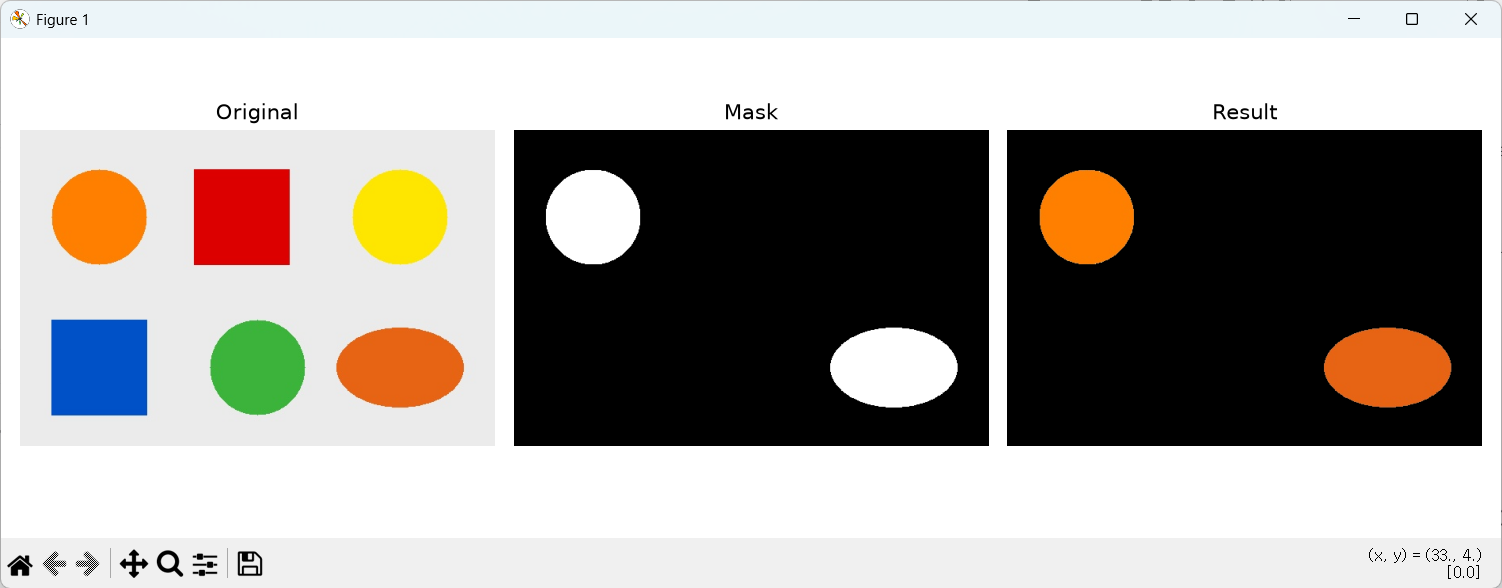
오렌지색을 검출하도록 코드 작성
import cv2
import numpy as np

# HSV 범위 (OpenCV의 H는 0~179, 파랑은 약 100~130)
LOWER_BLUE = np.array([90, 80, 40])
UPPER_BLUE = np.array([135, 255, 255])
MIN_AREA = 500  # 너무 작은 노이즈 무시

cap = cv2.VideoCapture(0, cv2.CAP_DSHOW)
if not cap.isOpened():
    raise SystemExit("웹캠을 열 수 없습니다.")

kernel = np.ones((5, 5), np.uint8)

while True:
    ret, frame = cap.read()
    if not ret:
        break

    blurred = cv2.GaussianBlur(frame, (7, 7), 0)
    hsv = cv2.cvtColor(blurred, cv2.COLOR_BGR2HSV)
    mask = cv2.inRange(hsv, LOWER_BLUE, UPPER_BLUE)
    mask = cv2.morphologyEx(mask, cv2.MORPH_OPEN, kernel)
    mask = cv2.morphologyEx(mask, cv2.MORPH_CLOSE, kernel)

    contours, _ = cv2.findContours(mask, cv2.RETR_EXTERNAL, cv2.CHAIN_APPROX_SIMPLE)
    for c in contours:
        if cv2.contourArea(c) < MIN_AREA:
            continue
        x, y, w, h = cv2.boundingRect(c)
        cv2.rectangle(frame, (x, y), (x + w, y + h), (255, 0, 0), 2)
        cv2.putText(frame, "Blue", (x, y - 8), cv2.FONT_HERSHEY_SIMPLEX, 0.7, (255, 0, 0), 2)

    result = cv2.bitwise_and(frame, frame, mask=mask)
    cv2.imshow("Blue Detection", frame)
    cv2.imshow("Mask", mask)
    cv2.imshow("Result", result)

    if cv2.waitKey(1) & 0xFF in (ord("q"), 27):
        break

cap.release()
cv2.destroyAllWindows()
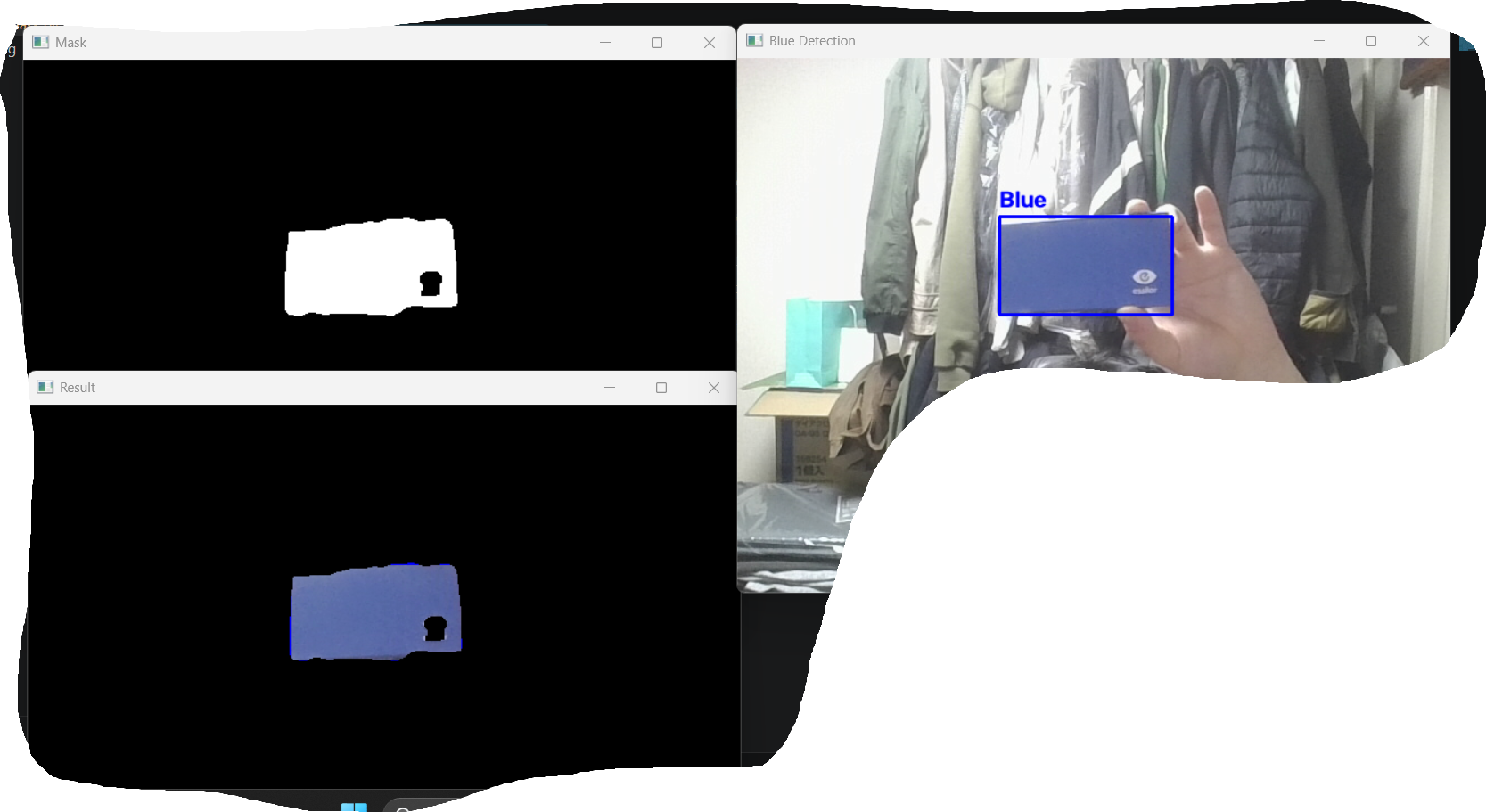
웹캠의 실시간 영상을 받아와 파란색만 검출하고 contour 윤곽선 검출 및 blue라벨 추가
안녕하세요.