Spring AI를 이용해 RAG+LLM 챗봇을 만들었습니다.
Spring AI를 통해 다양한 모델들을 편리하게 사용할 수 있었습니다.
그 중 google cloud에서 무료로 300$ 크레딧을 제공하기에 Google의 모델을 사용하기로 했습니다.
Chat Model, Embedding Model 모두 Google VertexAI를 이용했습니다.
build.gradle 설정
repositories {
    mavenCentral()
    maven { url 'https://repo.spring.io/milestone' }
    maven { url 'https://repo.spring.io/snapshot' }
    maven {
        name = 'Central Portal Snapshots'
        url = 'https://central.sonatype.com/repository/maven-snapshots/'
    }
}


dependencies {

    // spring AI
    implementation 'org.springframework.ai:spring-ai-vertex-ai-gemini-spring-boot-starter:1.0.0-SNAPSHOT'
    implementation 'org.springframework.ai:spring-ai-starter-model-vertex-ai-embedding'
    implementation platform("org.springframework.ai:spring-ai-bom:1.0.0-SNAPSHOT")
    implementation 'org.springframework.ai:spring-ai-starter-vector-store-pgvector'
}
applicaiton.yml 설정
spring:

  datasource:
    url: ${DB_CHATBOT_URL}
    username: ${DB_CHATBOT_USERNAME}
    password: ${DB_CHATBOT_PASSWORD}

  ai:
    vectorstore:
      pgvector:
        index-type: HNSW
        distance-type: COSINE_DISTANCE
        dimensions: 768
        max-document-batch-size: 10000 # Optional: Maximum number of documents per batch

    vertex:
      ai:
        gemini:
          project-id: ${PROJECT-ID}
          location: us-central1
          credentials:
            location: classpath:${ACCOUNT}.json
          chat:
            model: gemini-1.5-flash-001
            temperature: 0.7

        embedding:
          project-id: ${PROJECT-ID}
          location: us-central1
          text:
            options:
              model: text-embedding-004
https://docs.spring.io/spring-ai/reference/getting-started.html#dependency-management
https://docs.spring.io/spring-ai/reference/api/chat/vertexai-gemini-chat.html
https://docs.spring.io/spring-ai/reference/api/embeddings/vertexai-embeddings-text.html
https://docs.spring.io/spring-ai/reference/api/vectordbs/pgvector.html
Gemini에 질문 요청하기
@Service
@RequiredArgsConstructor
@Slf4j
public class GeminiService implements AiService {

    private final VertexAiGeminiChatModel vertexAiGeminiChatModel;
    private final SseServiceImpl sseService;
    private final ConversationRepository conversationRepository;

    @Override
    public void sendQuestion(QuestionRequestAppDto questionDto) {
        StringBuffer stringBuffer = new StringBuffer();

        Prompt prompt = new Prompt(questionDto.getQuestion());
        vertexAiGeminiChatModel
                .stream(prompt)
                .doOnNext(res -> {
                   String token = res.getResult().getOutput().getText();
                   stringBuffer.append(token);

                   sseService.broadcast(questionDto.getUserId(), "Gemini", token);
                })
                .doOnComplete(()->{
                    conversationRepository.save(Conversation.builder()
                            .userId(questionDto.getUserId())
                            .question(questionDto.getQuestion())
                            .answer(stringBuffer.toString())
                            .build());
                    sseService.broadcast(questionDto.getUserId(), "Gemini end", "\n");
                })
                .doOnError(e -> {
                    throw CustomBusinessException.from(ChatbotCode.AI_ERROR);
                })
                .subscribe();
    }

}
Spring AI의 VertexAiGeminiChatModel에 프롬프트를 요청하면 gemini가 답변을 해줍니다.
답변은 SSE로 반환해 답변이 생성될 때 SSE로 전송했습니다.
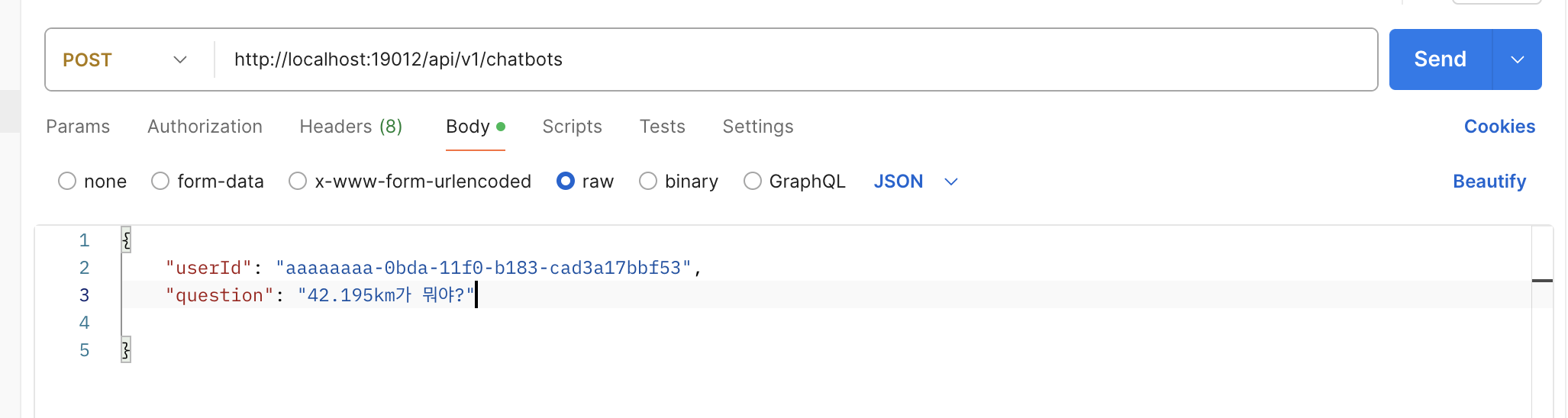
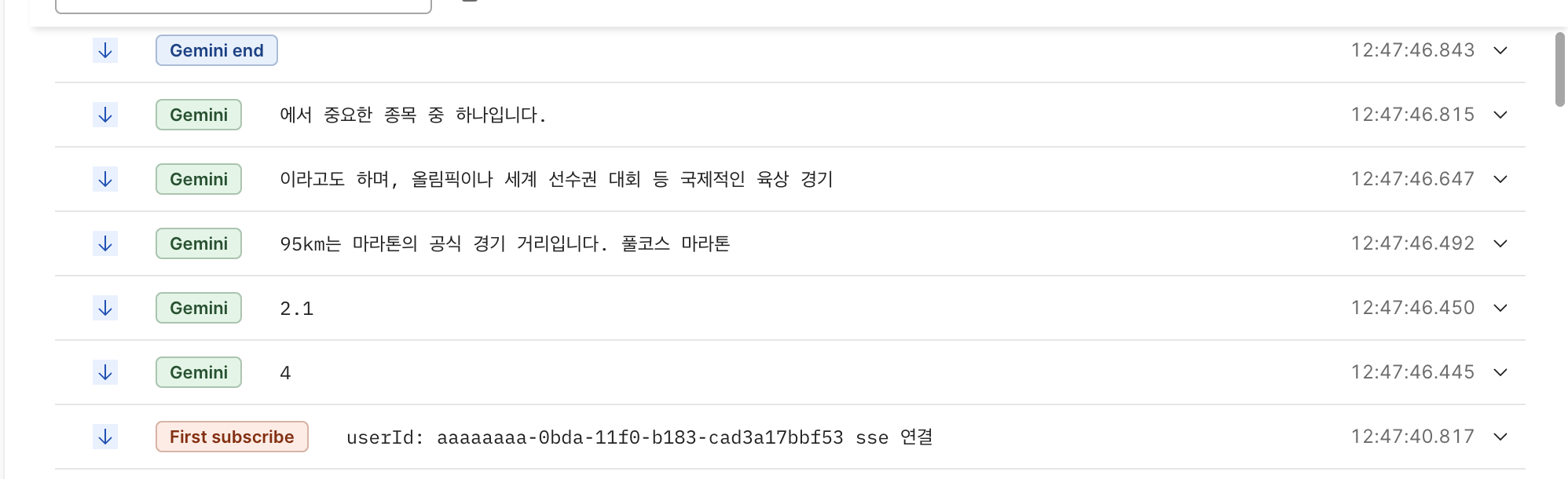 저희 프로젝트는 런닝크루를 위한 플랫폼으로 42.195km는 저희 프로젝트 이름입니다.
42.195km가 뭐냐는 질문에 마라톤에 관한 내용을 답변합니다.
RAG 적용하기
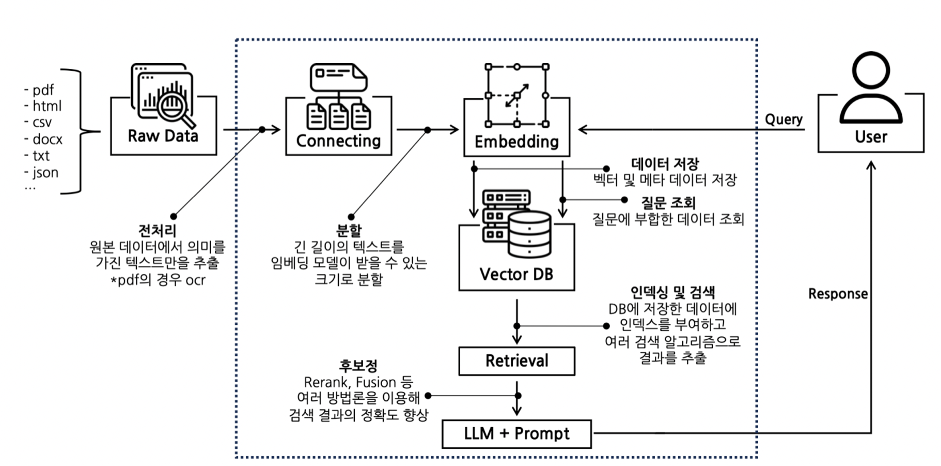 RAG는 기존의 정보를 기반으로 검색하여 답변을 생성해줍니다.
1. Fine tuning에 비해 시간과 비용이 적게 소요됩니다.
외부 데이터베이스를 활용하기 때문에 별도의 학습 데이터를 준비할 필요가 없습니다.
2. 모델의 일반성을 유지할 수 있습니다.
특정 도메인에 국한되지 않고 다양한 분야에 대한 질문에 답변할 수 있습니다.
3. 답변의 근거를 제시할 수 있습니다.
답변과 함께 정보 출처를 제공하여 답변의 신뢰도를 높일 수 있습니다.
4. 할루시네이션 가능성을 줄일 수 있습니다.
외부 데이터를 기반으로 답변을 생성하기 때문에 모델 자체의 편향이나 오류를 줄일 수 있습니다.
Vector Store
이를 위해 관련 정보를 미리 Vector Store에 저장을 해줘야합니다.
그리고 Vector Store에 정보를 그냥 넣는 것이 아니라 Embedding한 값을 넣어야하기 때문에 Embedding Model도 필요합니다. (위에서 Vector Store, Embedding 설정 다 했음)
먼저 정보를 임베딩하여 Vector Store에 저장하는 기능입니다.
import lombok.RequiredArgsConstructor;

import org.springframework.ai.document.Document;
import org.springframework.ai.vectorstore.SearchRequest;
import org.springframework.ai.vectorstore.VectorStore;
import org.springframework.stereotype.Service;

import java.util.List;

@Service
@RequiredArgsConstructor
public class VertexEmbeddingService implements EmbeddingService {

    private final VectorStore vectorStore;

    @Override
    public void saveEmbeddingInfo(String info) {
        List<Document> documents = List.of(new Document(info));
        vectorStore.add(documents);
    }

}
PostgreSQL을 사용해서 PGvector를 사용했으며,
Spring AI에서 제공하는 Vector Database기능에서 제공하는 기능으로 쉽게 값을 Embedding하고 저장할 수 있습니다.
원래는 직접 임베딩하고 직접 테이블에 저장하려고 생각했었는데, Spring AI에서 간편하게 쓸 수 있게 기능을 제공하고있었습니다.
pgVector를 사용하기 위해 그냥 PostgreSQL이 아닌 pgvector 이미지를 사용해야합니다.
docker run -it --rm --name postgres -p 5432:5432 -e POSTGRES_USER=postgres -e POSTGRES_PASSWORD=postgres pgvector/pgvector그리고 vector값을 저장할 테이블을 미리 만들어둬야합니다..
CREATE EXTENSION IF NOT EXISTS vector;
CREATE EXTENSION IF NOT EXISTS hstore;
CREATE EXTENSION IF NOT EXISTS "uuid-ossp";

CREATE TABLE IF NOT EXISTS vector_store (
	id uuid DEFAULT uuid_generate_v4() PRIMARY KEY,
	content text,
	metadata json,
	embedding vector(768) // 1536 is the default embedding dimension
);

CREATE INDEX ON vector_store USING HNSW (embedding vector_cosine_ops);
Vertex AI는 768차원 벡터를 사용한다고 하여 바꿨음..
https://cloud.google.com/vertex-ai/generative-ai/docs/embeddings/get-text-embeddings?hl=ko
PGvector외에 다른 DB사용법들도 아래 공식 홈페이지에 다 자세히 나와 있습니다.
https://docs.spring.io/spring-ai/reference/api/vectordbs/pgvector.html
유사도 검색
Vector Store에서 질문과 비슷한 정보들을 얻어내고, 이 정보에 기반하여 생성형AI가 답변을 해야합니다.
Spring AI의 VectorStore에 기능에 있으므로 사용하면 됩니다.
VertexEmbeddingService에 아래 메서드 추가
    @Override
    public List<Document> similaritySearch(String query) {
        return this.vectorStore.similaritySearch(SearchRequest.builder().query(query).topK(5).build());

    }
이제 42.195km는 저희 프로젝트명이라는 정보를 넣어줍니다.
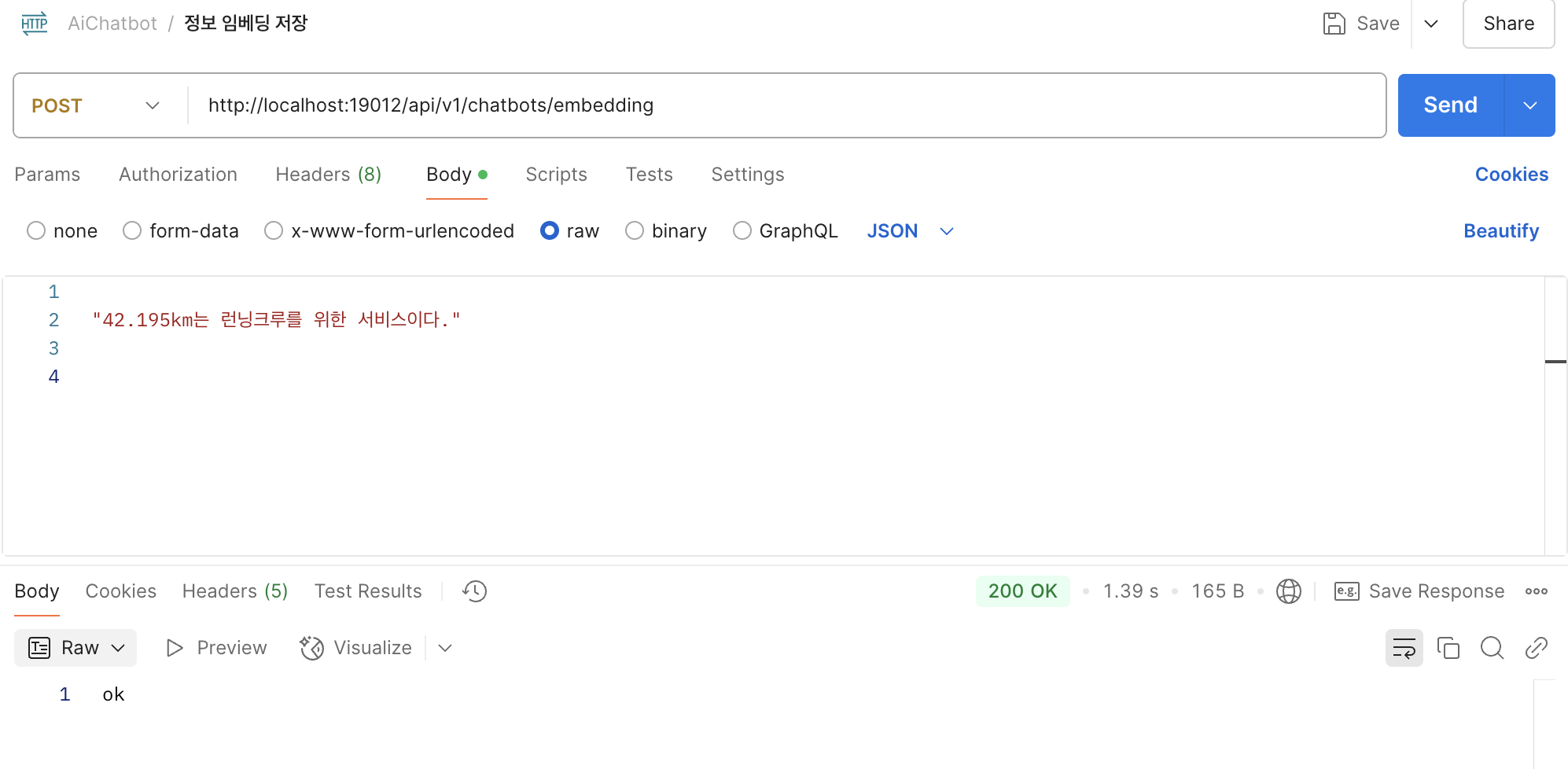
 Spring AI의 VectorStore에서 Embedding하여 vector_store테이블에 저장해줬습니다.
Gemini 프롬프팅 요청하기
이제 미리 저장해둔 정보를 바탕으로 Gemini에게 답변하도록 변경해줍니다.
@Service
@RequiredArgsConstructor
@Slf4j
public class GeminiService implements AiService {
private final VertexAiGeminiChatModel vertexAiGeminiChatModel;
private final SseServiceImpl sseService;
private final ConversationRepository conversationRepository;
private final EmbeddingService embeddingService;
@Override
public void sendQuestion(QuestionRequestAppDto questionDto) {
StringBuffer stringBuffer = new StringBuffer();
List<Document> documents = embeddingService.similaritySearch(questionDto.getQuestion());
String context = documents.stream()
.map(Document::getText)
.collect(Collectors.joining("\n---\n"));
String fullPrompt = String.format("""
아래는 관련된 문서입니다:
%s
위 문서를 참고하여 다음 질문에 답변해주세요:
%s
""", context, questionDto.getQuestion());
log.info("context: {}", context);
log.info("fullPrompt: {}", fullPrompt);
Prompt prompt = new Prompt(fullPrompt);
vertexAiGeminiChatModel
.stream(prompt)
.doOnNext(res -> {
String token = res.getResult().getOutput().getText();
stringBuffer.append(token);
sseService.broadcast(questionDto.getUserId(), "Gemini", token);
})
.doOnComplete(()->{
conversationRepository.save(Conversation.builder()
.userId(questionDto.getUserId())
.question(questionDto.getQuestion())
.answer(stringBuffer.toString())
.build());
sseService.broadcast(questionDto.getUserId(), "Gemini end", "\n");
})
.doOnError(e -> {
throw CustomBusinessException.from(ChatbotCode.AI_ERROR);
})
.subscribe();
}
}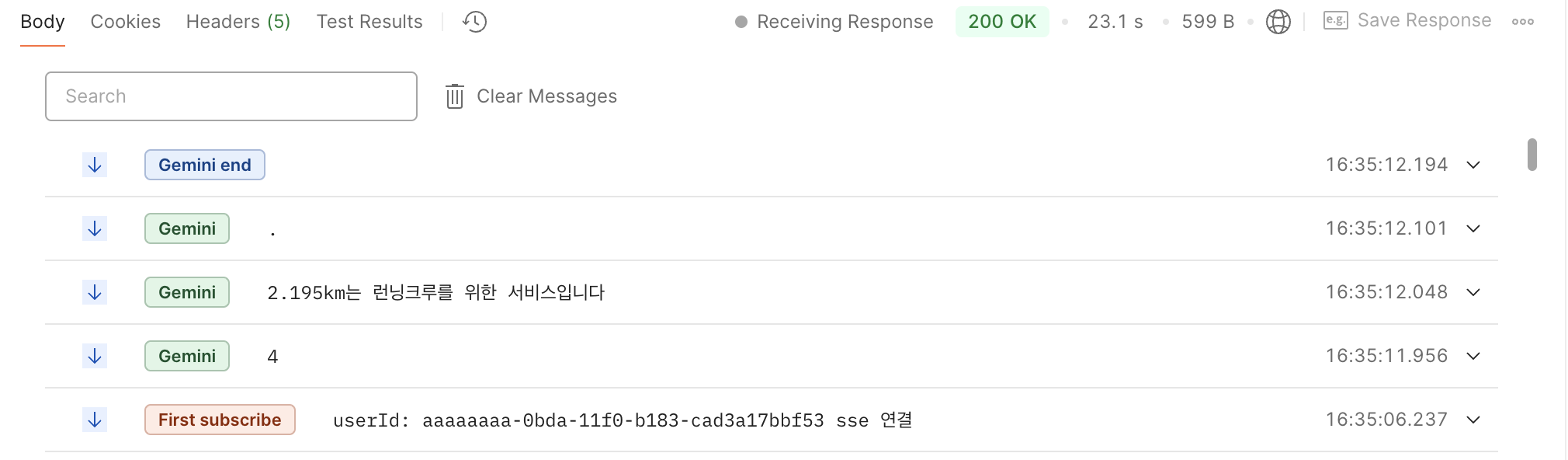 이제 42.195km가 뭐냐? 라는 질문에 이제는 저희 프로젝트라고 잘 답변해줍니다!!
다른 정보도 vector store에 넣어 확인해봅시다.
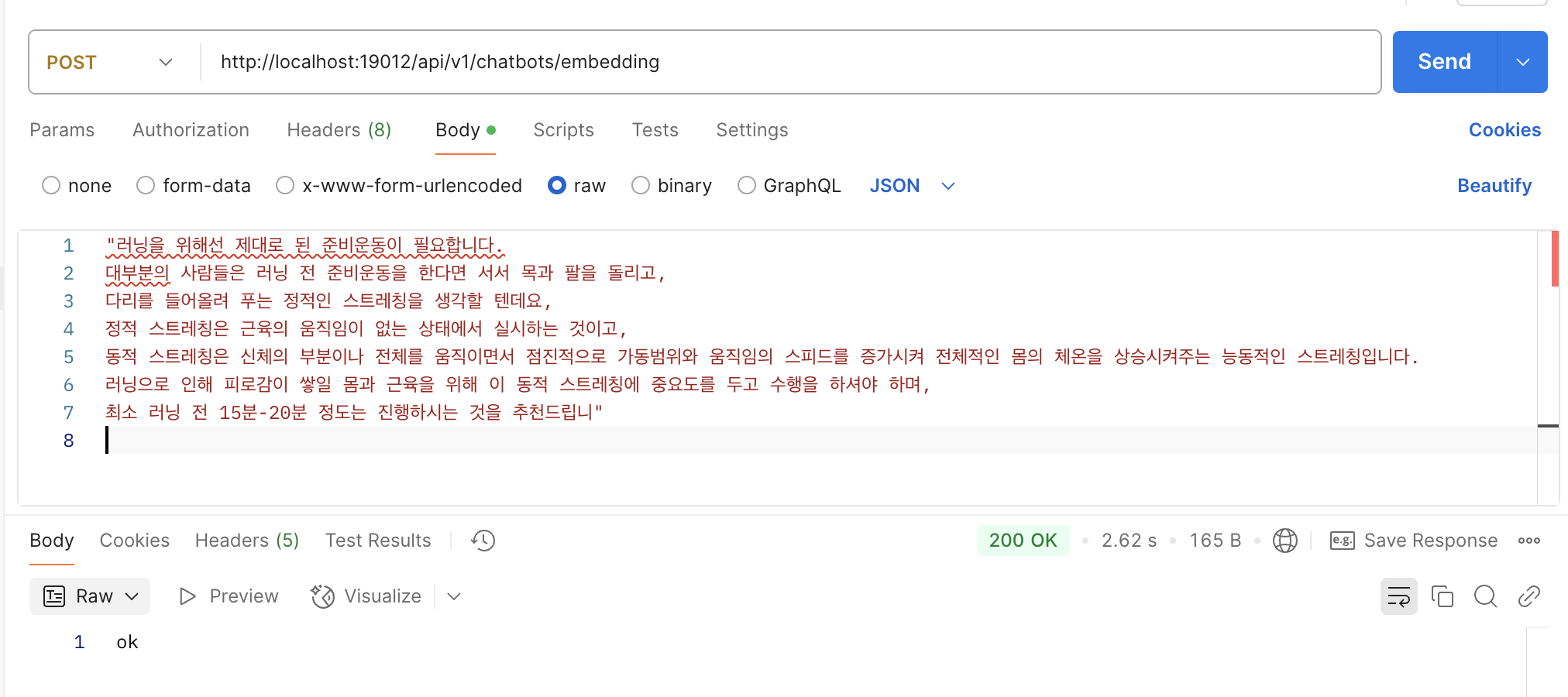
 vector_store테이블에 저장 완료!
런닝 전 스트레칭을 얼마나 해야하는지 물어봅니다.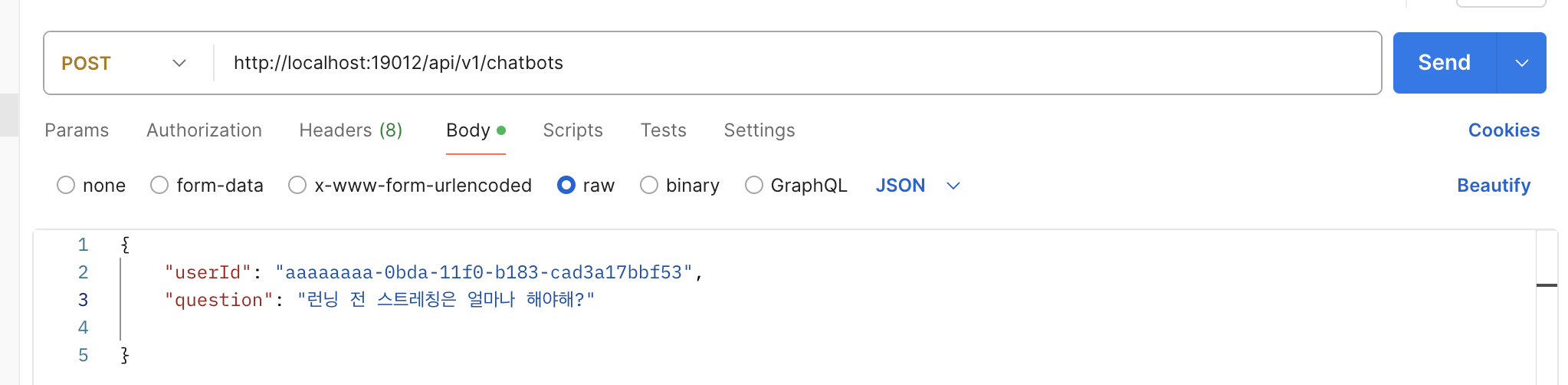
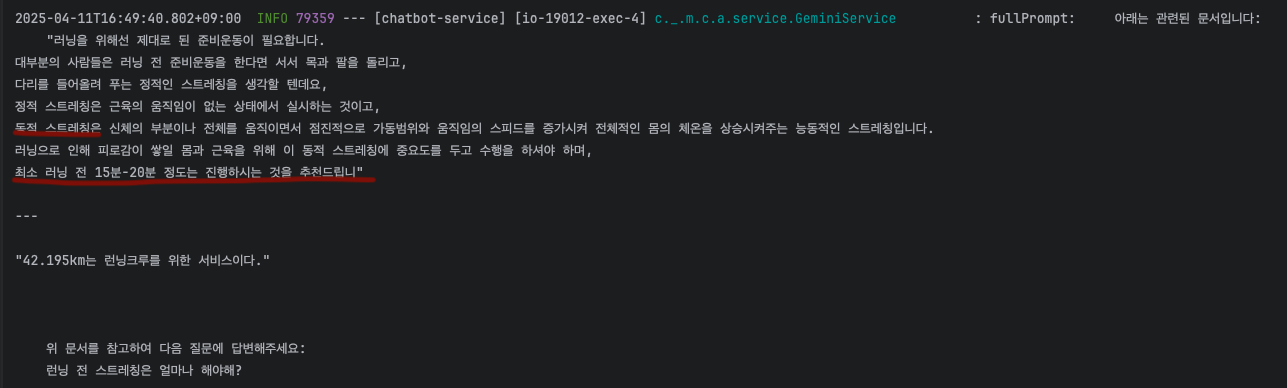
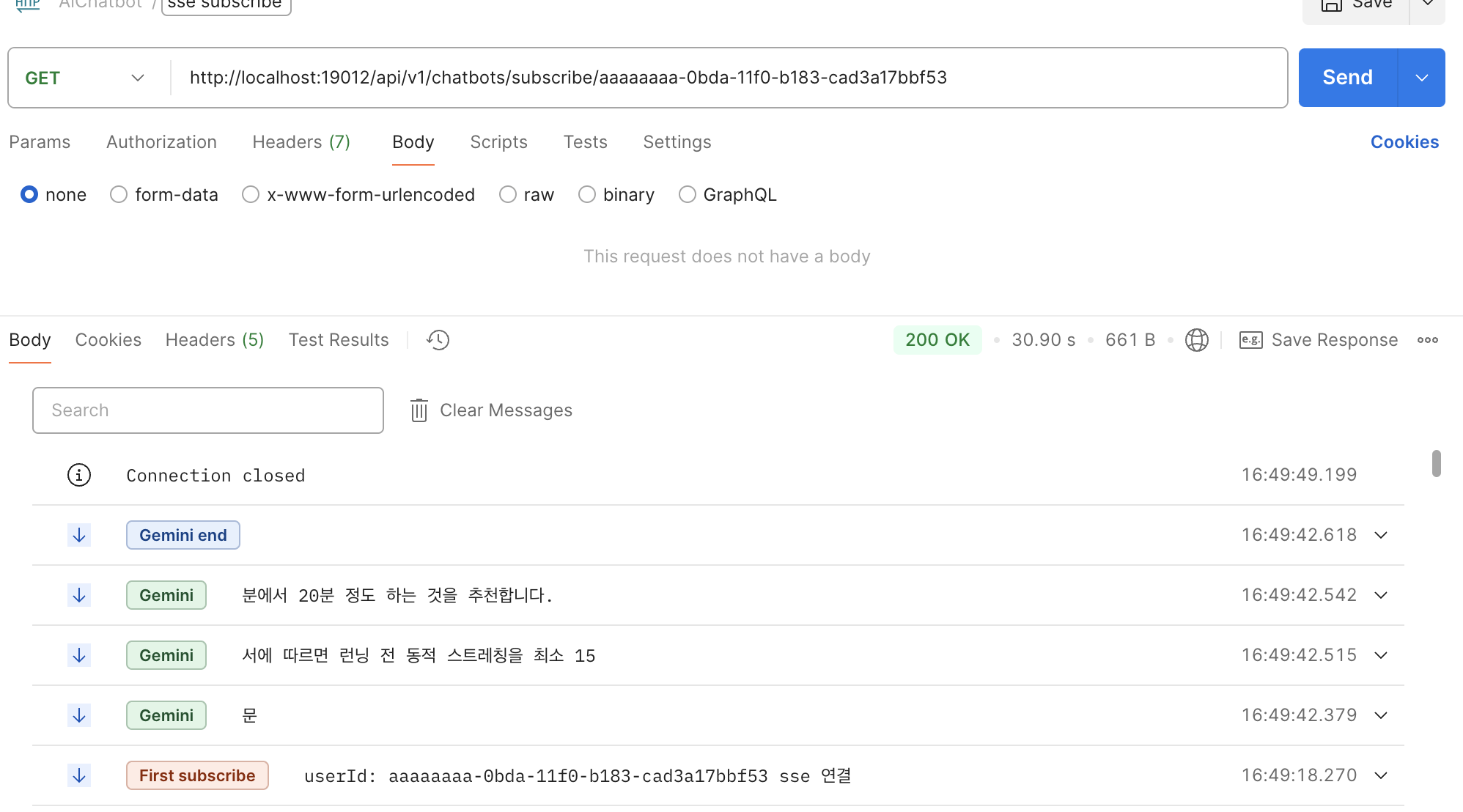 동적스트레칭을 15분~20분 정도하라고 저장해둔 정보를 바탕으로 Gemini가 답하고 있습니다.
마무리
AI 관련 프로젝트를 경험했어도, 제가 직접 역할을 맡은 적이 없어서 이번이 AI를 처음 사용해봤습니다.
Spring AI에서 다양한 기능을 편리하게 사용하도록 지원하여서 저 같은 입문자도 쉽게 AI챗봇을 만들 수 있었습니다.
https://baeji77.github.io/llm/langchin/langchain-with-RAG-1/
https://figure.kim/post/spring-ai
https://docs.spring.io/spring-ai/reference/api/chat/vertexai-gemini-chat.html
https://docs.spring.io/spring-ai/reference/api/embeddings/vertexai-embeddings-text.html
https://docs.spring.io/spring-ai/reference/api/vectordbs/pgvector.html
https://www.youtube.com/watch?v=ctsGQ3lhcYA
https://www.youtube.com/watch?v=F0FGcxkMElk&t=837s
https://cloud.google.com/vertex-ai/generative-ai/docs/embeddings/get-text-embeddings?hl=ko
