
가입양식
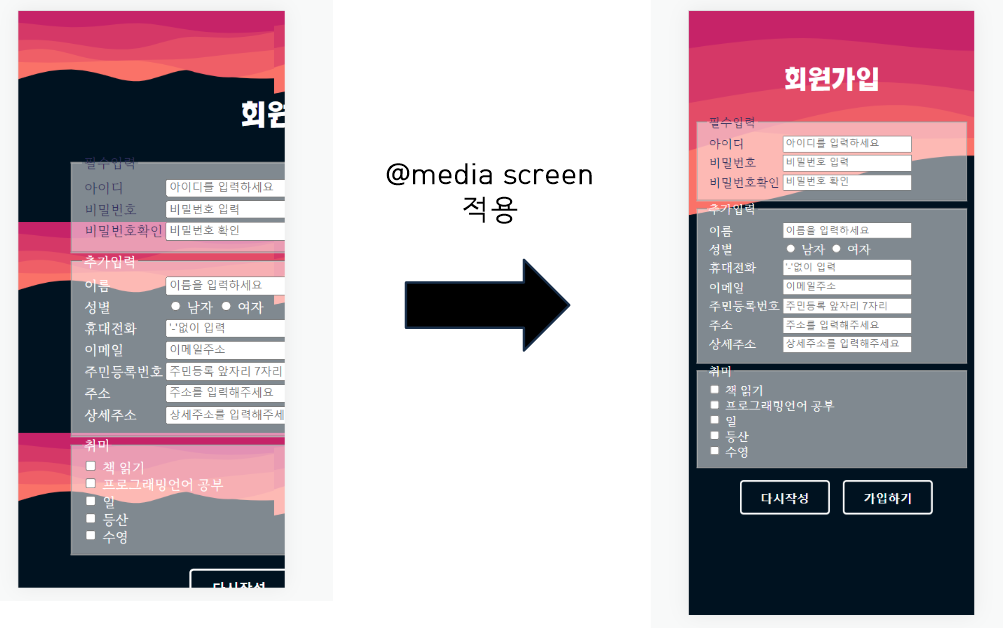
문제점
- ver1.0의 pc버전과 mobile버전의 배경화면의 깨짐 오류
개선안
- screen의 화면 크기에 따라 가변적 요소를 적용시킴(@media screen 사용)
- 기존 font를 개선하여 모바일 화면에서 변화되는 모습을 보일 수 있음 (px → rem 사용)
사이트보러가기
코드보기(ver 2.0)
html 코드
html 에서 style 요소는 모두 제거하고 모두 외부스타일로 옮겼다.
<!DOCTYPE html>
<html lang="en">
<head>
    <meta charset="UTF-8">
    <meta http-equiv="X-UA-Compatible" content="IE=edge">
    <meta name="viewport" content="width=device-width, initial-scale=1.0">
    <link rel="styleSheet" href="./style.css">
    <link rel="icon" href="./form.ico">

    <title>회원가입</title>
</head>
<body>
    <div class="box">
        <h1>회원가입</h1>
       <form>
           <fieldset>
               <legend>필수입력</legend>
            <table>
                <tr>
                    <td>
                        <label for="ID">아이디</label>
                    </td>
                    <td>
                        <input id="ID" type="text" placeholder="아이디를 입력하세요" required>
                    </td>
                </tr>
                <tr>
                    <td>
                        <label for="password1">비밀번호</label>
                    </td>
                    <td>
                        <input id="password1" type="password" placeholder="비밀번호 입력" required>
                    </td>
                </tr>
                <tr>
                    <td>
                        <label for="password2">비밀번호확인</label>
                    </td>
                    <td>
                        <input id="password2" type="password" placeholder="비밀번호 확인" required>
                    </td>
                </tr>
            </table>
        </fieldset>
        <fieldset>
            <legend class="add">추가입력</legend>
            <table class="add">
                <tr>
                    <td>
                        <label for="name">이름</label>
                    </td>
                    <td>
                        <input id="name" type="text" placeholder="이름을 입력하세요">
                    </td>
                </tr>
                <tr>
                    <td>
                        <label>성별</label>
                    </td>
                    <td>
                        <label><input type="radio" name="성별" value="male"> 남자</label>
                        <label><input type="radio" name="성별" value="female"> 여자</label>
                    </td>
                </tr>
                <tr>
                    <td>
                        <label for="phone">휴대전화</label>
                    </td>
                    <td>
                        <input id="phone" type="tel" placeholder="'-'없이 입력">
                    </td>
                </tr>
                <tr>
                    <td>
                        <label for="mail">이메일</label>
                    </td>
                    <td>
                        <input id="mail" type="email" placeholder="이메일주소">
                    </td>
                </tr>
                <tr>
                    <td>
                        <label for="citizenNumber">주민등록번호</label>
                    </td>
                    <td>
                        <input id="citizenNumber" type="tel" placeholder="주민등록 앞자리 7자리">
                    </td>
                </tr>
                <tr>
                    <td>
                        <label for="adress">주소</label>
                    </td>
                    <td>
                        <input id="adress" type="adress" placeholder="주소를 입력해주세요">
                    </td>
                </tr>
                <tr>
                    <td>
                        <label for="detailAdress">상세주소</label>
                    </td>
                    <td>
                        <input id="detailAdress" type="adress" placeholder="상세주소를 입력해주세요">
                    </td>
                </tr>
            </table>
        </fieldset>
            <fieldset class="hobby">
                <legend>취미</legend>
                <input type="checkbox"> 책 읽기<br>
                <input type="checkbox"> 프로그래밍언어 공부<br>
                <input type="checkbox"> 일<br>
                <input type="checkbox"> 등산<br>
                <input type="checkbox"> 수영<br>
            </fieldset>
            <div class="wrap">
                <button class="btn-1" type="reset">다시작성</button>
                <button class="btn-1" type="submit" >가입하기</button>
          </div>
        </div>
    </form>
</body>
</html>
media screen의 적용, px에서 rem으로 적용
@font-face {
  font-family: "KOTRA_BOLD-Bold";
  src: url("https://cdn.jsdelivr.net/gh/projectnoonnu/noonfonts_20-10-21@1.1/KOTRA_BOLD-Bold.woff")
    format("woff");
  font-weight: normal;
  font-style: normal;
}

@font-face {
  font-family: "MaruBuri-Regular";
  src: url("https://cdn.jsdelivr.net/gh/projectnoonnu/noonfonts_20-10-21@1.0/MaruBuri-Regular.woff")
    format("woff");
  font-weight: bolder;
  font-style: normal;
}

body {
  background-color: #001220;
  background-image: url("./waves.svg");
  background-size: cover;
  background-repeat: no-repeat;
}

h1 {
  font-family: "KOTRA_BOLD-Bold";
  text-align: center;
  color: white;
}

.box {
  margin-left: auto;
  margin-right: auto;
  margin-top: 5%;
  width: 50%;
  height: auto;
  font-family: "KOTRA_BOLD-Bold";
  color: #312f5c;
  position: relative;
}

fieldset {
  font-family: "MaruBuri-Regular";
  background-color: rgba(255, 255, 255, 0.5);
}
fieldset:hover {
  background-color: rgba(255, 255, 255, 0.7);
  color: black;
}

.wrap {
  margin-left: auto;
  text-align: center;
}

.add,
.hobby {
  font-family: "MaruBuri-Regular";
  color: white;
}

button,
button::after {
  -webkit-transition: all 0.3s;
  -moz-transition: all 0.3s;
  -o-transition: all 0.3s;
  transition: all 0.3s;
}

button {
  background: none;
  border: 3px solid #fff;
  border-radius: 5px;
  color: #fff;
  display: inline-block;
  font-size: 1em;
  font-weight: bold;
  margin: 1em auto;
  margin-left: 0.8em;
  padding: 0.6em 1.5em;
  position: relative;
}

button::before,
button::after {
  background: #fff;
  content: "";
  position: absolute;
  z-index: -1;
}

button:hover {
  color: #001220;
}
.btn-1::after {
  height: 0;
  left: 0;
  top: 0;
  width: 100%;
}

.btn-1:hover:after {
  height: 100%;
}

@media screen and (min-width: 200px) and (max-width: 600px) {
  .box {
    margin-top: 20%;
    width: 100%;
  }
}
(변화없음)
아래의 코드는 svg이미지 파일로 path태그를 보면 각각 path들의 좌표가 입력되어 있는 것을 알 수 있다.
이 좌표들의 연결로 마치 곡선으로 된 지형이 나타나는 것처럼 보이는 것이다.
아래의 코드는 css와 연결되어있다.
<svg id="visual" viewBox="0 0 900 600" width="900" height="600" xmlns="http://www.w3.org/2000/svg" xmlns:xlink="http://www.w3.org/1999/xlink" version="1.1">
<rect x="0" y="0" width="900" height="600" fill="#001220"></rect>
<path d="M0 235L21.5 231C43 227 86 219 128.8 207C171.7 195 214.3 179 257.2 171.5C300 164 343 165 385.8 174.7C428.7 184.3 471.3 202.7 514.2 199.8C557 197 600 173 642.8 168.5C685.7 164 728.3 179 771.2 186.2C814 193.3 857 192.7 878.5 192.3L900 192L900 0L878.5 0C857 0 814 0 771.2 0C728.3 0 685.7 0 642.8 0C600 0 557 0 514.2 0C471.3 0 428.7 0 385.8 0C343 0 300 0 257.2 0C214.3 0 171.7 0 128.8 0C86 0 43 0 21.5 0L0 0Z" fill="#fa7268"></path>
<path d="M0 132L21.5 134.2C43 136.3 86 140.7 128.8 143.3C171.7 146 214.3 147 257.2 147C300 147 343 146 385.8 143.8C428.7 141.7 471.3 138.3 514.2 141.7C557 145 600 155 642.8 166C685.7 177 728.3 189 771.2 188.8C814 188.7 857 176.3 878.5 170.2L900 164L900 0L878.5 0C857 0 814 0 771.2 0C728.3 0 685.7 0 642.8 0C600 0 557 0 514.2 0C471.3 0 428.7 0 385.8 0C343 0 300 0 257.2 0C214.3 0 171.7 0 128.8 0C86 0 43 0 21.5 0L0 0Z" fill="#ef5f67"></path>
<path d="M0 161L21.5 154.3C43 147.7 86 134.3 128.8 123.7C171.7 113 214.3 105 257.2 109.5C300 114 343 131 385.8 137.7C428.7 144.3 471.3 140.7 514.2 139.3C557 138 600 139 642.8 136.7C685.7 134.3 728.3 128.7 771.2 123.8C814 119 857 115 878.5 113L900 111L900 0L878.5 0C857 0 814 0 771.2 0C728.3 0 685.7 0 642.8 0C600 0 557 0 514.2 0C471.3 0 428.7 0 385.8 0C343 0 300 0 257.2 0C214.3 0 171.7 0 128.8 0C86 0 43 0 21.5 0L0 0Z" fill="#e34c67"></path>
<path d="M0 106L21.5 102.2C43 98.3 86 90.7 128.8 86.2C171.7 81.7 214.3 80.3 257.2 84.2C300 88 343 97 385.8 103.2C428.7 109.3 471.3 112.7 514.2 105.5C557 98.3 600 80.7 642.8 75.3C685.7 70 728.3 77 771.2 76.5C814 76 857 68 878.5 64L900 60L900 0L878.5 0C857 0 814 0 771.2 0C728.3 0 685.7 0 642.8 0C600 0 557 0 514.2 0C471.3 0 428.7 0 385.8 0C343 0 300 0 257.2 0C214.3 0 171.7 0 128.8 0C86 0 43 0 21.5 0L0 0Z" fill="#d53867"></path>
<path d="M0 43L21.5 40C43 37 86 31 128.8 31.3C171.7 31.7 214.3 38.3 257.2 42.3C300 46.3 343 47.7 385.8 44.5C428.7 41.3 471.3 33.7 514.2 34.7C557 35.7 600 45.3 642.8 52C685.7 58.7 728.3 62.3 771.2 62.7C814 63 857 60 878.5 58.5L900 57L900 0L878.5 0C857 0 814 0 771.2 0C728.3 0 685.7 0 642.8 0C600 0 557 0 514.2 0C471.3 0 428.7 0 385.8 0C343 0 300 0 257.2 0C214.3 0 171.7 0 128.8 0C86 0 43 0 21.5 0L0 0Z" fill="#c62368"></path>
</svg>
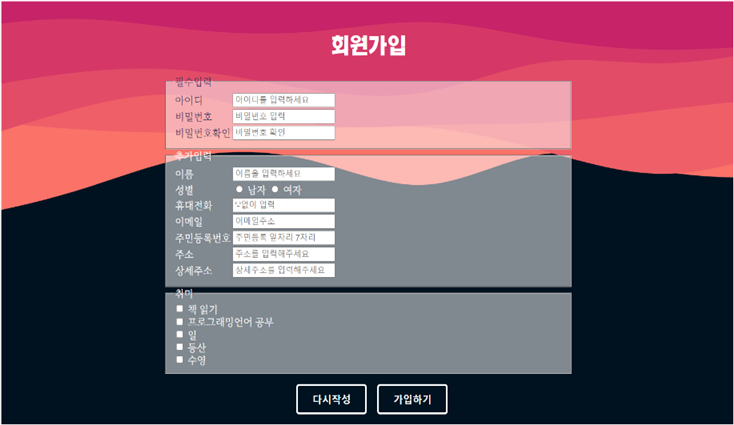
사이트 이미지(pc화면)
사이트 이미지(모바일화면)
모바일 환경에서 개선하고자 배경은 no-repeat에 cover를 적용하고
특히 @media screen 으로 반응형으로 수정하였다.
참고사이트
1. heiki
2. 눈누
3. colorspace

AllTimeDevelop