
prologue
One of the biggest draws of VueJS is the ability to build great Single Page Applications (SPAs).
SPAs are great because they don't require page loads every time the route changes. This means that once everything is loaded, we can quickly switch the view and provide a great user experience.
If you want to build a SPA in Vue, you're going to need Vue Router.
In this chapter, you'll be going over the basics of Vue Router as well as several Router methods for optimizing page loading speed.
Let's dive right in!
contents
1. Vue Router?
2. SPA(Single Page Application)
2.1 Advantage
2.2 Disadvantage
3. Router methods
3.1 the method using app.js file
3.2 the method using different js file
3.3 the method using different js file with webpackPrefetch:true
Vue Router
Routing is a method of moving between web pages. When implementing SPA (Single Page Application) in Vue, Vue Router is a plug-in that determines rendering by mapping to the corresponding component according to the user request path.
Originally, when a user's URI request comes in, the server, that is, the controller in the backend sends a static file (HTML, CSS, Javascript..) as a response corresponding to the request.
Vue Router does not change the entire new DOM according to the URI request in the frontend, but changes the DOM of the changed part in the browser.
SPA (Single Page Application)
A SPA(Single Page Application) is a web application that initially loads an HTML page and then dynamically updates the page by receiving information through Ajax based on user interaction.
Advantage
- Improved User Experience
- Efficiency is improved because only necessary resources are replaced
- Increases server efficiency by allowing the client to take over the burden of the server
- Easy to manage by developing each component
- App and web can use the same API
Disadvantages
- The initial startup speed may be slow because all files are received at first.
-> Solved with Code Splitting, which downloads code by splitting it - Search engine optimization (SEO) is difficult.
-> There is only one page and it changes the necessary parts with JavaScript, but it is hard to be recognized because it mainly parses HTML to create and expose information.
-> Resolved using Server Side Rendering (SSR) - Vulnerable to security
->User information is a client-based cookie, not a server-based session
->Business logic is user visible.
Router Methods
Let's look at three ways to use a view router. When used appropriately in situations where data is to be processed, the loading speed of the entire app can be optimized.
3.1 the method using app.js file
import HomeView from '../views/HomeView.vue'
const routes = [
  {
    path: '/',
    name: 'home',
    component: HomeView
  }
]
This router method uses a separate import code outside the routes array and puts it as a value in the component within routes.
When web development is completed and the vue components are compiled, they are converted into javascript code
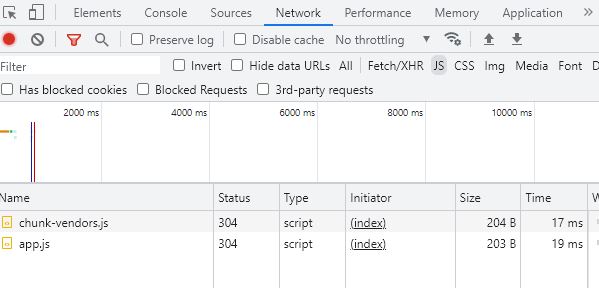
Let's open the dev tools and look at the js tab.
Since app.js is executed together when the first screen is loaded, it is recommended to use a router in this way for home pages that users always need to use. However, what if we have a large application. In that case, loading all the JS code in one go can make the page load time significantly longer. Lazy loading is used to avoid this. The following two approaches are to use the router with lazy loading.
Chunk-vendors.js other than app.js includes external js library script code, excluding developed code.
3.2 the method using different js file
const routes = [
  {
    path: '/about',
    name: 'about',
    component: () => import(/* webpackChunkName: "about" */ '../views/AboutView.vue')
  }
]
The About component here is being imported with an arrow function. This is an example of lazy loading. Unlike Home, Profile and Product component the About component is not loaded with the app.js. The About component will only get loaded when a user visits the /about route. This lazy loading is being done through Webpack’s code splitting feature.
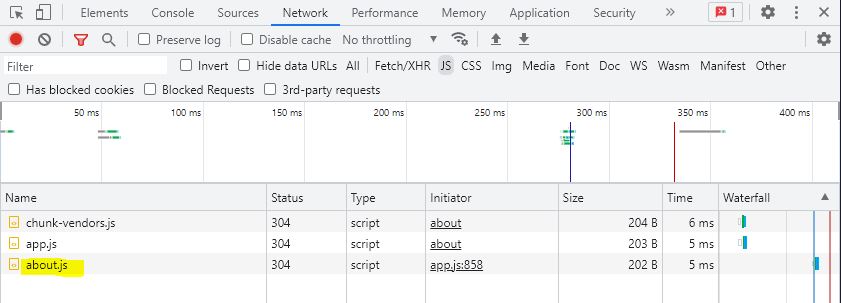
webpackChunkName : " about "
Since "about" is named here, when accessing the page, it is loaded as a js file with the specified "about" name.
The moment you move to the about page, about.js is loaded separately from app.js from the server.
If the page to be moved is unlikely to be visited or the file size is light, using this method is advantageous in terms of data processing speed.
3.3 the method using different js file with webpackPrefetch:true
const routes = [
  {
    path: '/about',
    name: 'about',
    component: () =>
      import(
        /* webpackChunkName: "about", webpackPrefetch:true */ '../views/AboutView.vue'
      )
  }
]
This router method is used by adding ",webpackPrefetch:true" to the previous lazy loading method.
In this case, the js source of the page to be visited is cached in advance, and when the page is accessed, the js file in the cache is executed and the screen loads faster.
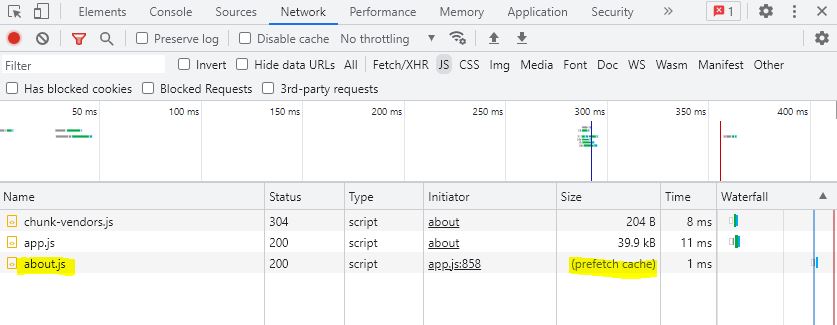
When accessing a page with "webpackPrefetch:true",
You can see that (prefetch cache) is displayed in the network tab of dev tools.
Because it is a method of creating a cache in advance, it is advantageous when users are likely to visit it and the data volume is large.
epilogue
In this chapter, Vue Router and Single Page Application (SPA), and three ways to use a router to effectively implement a web page.
For pages that must be used inevitably among numerous pages, it is recommended to use the router method included in the app.js file.
It has been found that the method of using a separate js file is better to use appropriately according to the user's page visit frequency and data capacity.