4.1 Code
Yanr Application에는 여러 개의 main이 있다.
처음 자바 배울 때 하나의 프로그램에는 하나의 메인만 있을 수 있다고 배웠는데, 엄밀히 말하면
app에 Main이 여러 개가 담겨 있어도 별도의 프로세스로 따로따로 컨테이너에서 실행시킬 거니까
실제로 여러 개가. 존재해도 되긴 함. 그런데 시작할 때 어떤 걸 지정하느냐가 중요함.
settings.gradle
rootProject.name = 'hadoop-yarn-app'build.gradle
plugins {
    id 'java'
    id 'com.github.johnrengelman.shadow' version '7.1.2'
}

group 'de.example.hadoop.yarn'
version '1.0-SNAPSHOT'

repositories {
    mavenCentral()
}

def hadoop_version = "3.2.1"

dependencies {
    implementation "org.apache.hadoop:hadoop-client:${hadoop_version}"
    implementation("org.apache.hadoop:hadoop-common:${hadoop_version}") {
        exclude group: 'commons-el', module: 'commons-el'
        exclude group: 'tomcat', module: 'jasper-runtime'
        exclude group: 'tomcat', module: 'jasper-implementationr'
        exclude group: 'org.mortbay.jetty', module: 'jsp-2.1-jetty'
    }
    implementation "org.apache.hadoop:hadoop-hdfs:${hadoop_version}"
    implementation "org.apache.hadoop:hadoop-yarn-api:${hadoop_version}"
    implementation "org.apache.hadoop:hadoop-yarn-common:${hadoop_version}"
    implementation "org.apache.hadoop:hadoop-yarn-client:${hadoop_version}"
    implementation "org.apache.hadoop:hadoop-yarn-server-nodemanager:${hadoop_version}"
    implementation "org.apache.hadoop:hadoop-yarn-server-resourcemanager:${hadoop_version}"
    implementation 'commons-lang:commons-lang:2.6'
    implementation 'com.google.guava:guava:11.0.2'
    implementation 'commons-cli:commons-cli:1.2'
    implementation 'commons-io:commons-io:2.4'
}

test {
    useJUnitPlatform()
}- shadow는 shadowJar를 실행하면 app>build>libs 폴더 위치에
-all이 붙은 필요 라이브러리를 다 담고 있는 뚱뚱한 Jar파일이 만들어질 것 - hadoop_versiond은 EMR 설치된 버전에 맞춰 "3.2.1"
- 톰캣이나 서버 관련된 패키지들은 exclude를 했다. 하둡 패키지가 커서 필요 없는 기능들이 들어가는 경우가 많은데, 그것 때문에 문제가 되는 경우가 종종 있음.
de.example.hadoop.yarn.Constants.java
package de.example.hadoop.yarn;

public class Constants {
    /**
     * Environment key name pointing to the the app master jar location
     */
    public static final String AM_JAR_PATH = "AM_JAR_PATH";

    /**
     * Environment key name denoting the file timestamp for the shell script.
     * Used to validate the local resource.
     */
    public static final String AM_JAR_TIMESTAMP = "AM_JAR_TIMESTAMP";

    /**
     * Environment key name denoting the file content length for the shell script.
     * Used to validate the local resource.
     */
    public static final String AM_JAR_LENGTH = "AM_JAR_LENGTH";

    public static final String AM_JAR_NAME = "AppMaster.jar";

    //AM_JAR_NAME : 하둡 경로에다가 yarn application사용할 전용 경로나 캐시에 요 이름을 바꿔서 올리게 됨.
}
de.example.hadoop.yarn.MyClient.java
package de.example.hadoop.yarn;

import java.io.IOException;
import java.util.ArrayList;
import java.util.Arrays;
import java.util.HashMap;
import java.util.List;
import java.util.Map;
import java.util.Vector;

import org.apache.commons.cli.CommandLine;
import org.apache.commons.cli.GnuParser;
import org.apache.commons.cli.HelpFormatter;
import org.apache.commons.cli.Options;
import org.apache.commons.cli.ParseException;
import org.apache.commons.io.IOUtils;
import org.apache.hadoop.conf.Configuration;
import org.apache.hadoop.fs.FSDataOutputStream;
import org.apache.hadoop.fs.FileStatus;
import org.apache.hadoop.fs.FileSystem;
import org.apache.hadoop.fs.Path;
import org.apache.hadoop.fs.permission.FsPermission;
import org.apache.hadoop.yarn.api.ApplicationConstants;
import org.apache.hadoop.yarn.api.ApplicationConstants.Environment;
import org.apache.hadoop.yarn.api.protocolrecords.GetNewApplicationResponse;
import org.apache.hadoop.yarn.api.records.ApplicationId;
import org.apache.hadoop.yarn.api.records.ApplicationReport;
import org.apache.hadoop.yarn.api.records.ApplicationSubmissionContext;
import org.apache.hadoop.yarn.api.records.ContainerLaunchContext;
import org.apache.hadoop.yarn.api.records.FinalApplicationStatus;
import org.apache.hadoop.yarn.api.records.LocalResource;
import org.apache.hadoop.yarn.api.records.LocalResourceType;
import org.apache.hadoop.yarn.api.records.LocalResourceVisibility;
import org.apache.hadoop.yarn.api.records.Priority;
import org.apache.hadoop.yarn.api.records.Resource;
import org.apache.hadoop.yarn.api.records.URL;
import org.apache.hadoop.yarn.api.records.YarnApplicationState;
import org.apache.hadoop.yarn.client.api.YarnClient;
import org.apache.hadoop.yarn.client.api.YarnClientApplication;
import org.apache.hadoop.yarn.conf.YarnConfiguration;
import org.apache.hadoop.yarn.exceptions.YarnException;
import org.apache.hadoop.yarn.util.Records;

public class MyClient {

    // Start time for client
    private final long clientStartTime = System.currentTimeMillis();

    // Configuration
    private Configuration conf;

    private YarnClient yarnClient;

    // Application master specific info to register a new Application with RM/ASM
    private String appName = "";

    // App master priority
    private int amPriority = 0;

    // Queue for App master
    private String amQueue = "";

    // Amt. of memory resource to request for to run the App Master
    private long amMemory = 10;

    // Amt. of virtual core resource to request for to run the App Master
    private int amVCores = 1;

    // ApplicationMaster jar file
    private String appMasterJarPath = "";

    // Container priority
    private int requestPriority = 0;

    // Amt of memory to request for container in which the HelloYarn will be executed
    private int containerMemory = 10;

    // Amt. of virtual cores to request for container in which the HelloYarn will be executed
    private int containerVirtualCores = 1;

    // No. of containers in which the HelloYarn needs to be executed
    private int numContainers = 1;

    // Timeout threshold for client. Kill app after time interval expires.
    private long clientTimeout = 600000;

    // Command line options
    private Options opts;

    /**
     * Constructor
     *
     */
    public MyClient() throws Exception {
        createYarnClient();
        initOptions();
    }

    private void createYarnClient() {
    	// 맨 처음 yarn 클라이언트가 yarn에 있는 리소스 매니저한테 뭔가 요청을 하는데 그 전에 클라이언트가 있어야겠지? 그 클라이언트를 말한다. 잡을 요청하는 쪽에서 동작하는 친구
        yarnClient = YarnClient.createYarnClient();
        this.conf = new YarnConfiguration();
        yarnClient.init(conf);
    }

    private void initOptions() {
        opts = new Options();
        // Yarn으로 이 작업을 서밋할 때 파라미터로 넣을 수 있게 만든 옵션
        opts.addOption("appname", true, "Application Name. Default value - HelloYarn");
        opts.addOption("priority", true, "Application Priority. Default 0");
        opts.addOption("queue", true, "RM Queue in which this application is to be submitted");
        opts.addOption("timeout", true, "Application timeout in milliseconds");
        opts.addOption("master_memory", true,
                       "Amount of memory in MB to be requested to run the application master");
        opts.addOption("master_vcores", true,
                       "Amount of virtual cores to be requested to run the application master");
        opts.addOption("jar", true, "Jar file containing the application master");
        opts.addOption("container_memory", true, "Amount of memory in MB to be requested to run the HelloYarn");
        opts.addOption("container_vcores", true,
                       "Amount of virtual cores to be requested to run the HelloYarn");
        opts.addOption("num_containers", true, "No. of containers on which the HelloYarn needs to be executed");
        opts.addOption("help", false, "Print usage");
    }

    /**
     * Helper function to print out usage
     */
    private void printUsage() {
        new HelpFormatter().printHelp("Client", opts);
    }

    /**
     * Parse command line options
     * @param args Parsed command line options
     * @return Whether the init was successful to run the client
     * @throws org.apache.commons.cli.ParseException
     */
    public boolean init(String[] args) throws ParseException {

        CommandLine cliParser = new GnuParser().parse(opts, args);

        if (args.length == 0) {
            throw new IllegalArgumentException("No args specified for client to initialize");
        }

        if (cliParser.hasOption("help")) {
            printUsage();
            return false;
        }

        appName = cliParser.getOptionValue("appname", "HelloYarn");
        amPriority = Integer.parseInt(cliParser.getOptionValue("priority", "0"));
        amQueue = cliParser.getOptionValue("queue", "default");
        amMemory = Integer.parseInt(cliParser.getOptionValue("master_memory", "10"));
        amVCores = Integer.parseInt(cliParser.getOptionValue("master_vcores", "1"));

        if (amMemory < 0) {
            throw new IllegalArgumentException("Invalid memory specified for application master, exiting."
                                               + " Specified memory=" + amMemory);
        }
        if (amVCores < 0) {
            throw new IllegalArgumentException(
                    "Invalid virtual cores specified for application master, exiting."
                    + " Specified virtual cores=" + amVCores);
        }

        if (!cliParser.hasOption("jar")) {
            throw new IllegalArgumentException("No jar file specified for application master");
        }

        appMasterJarPath = cliParser.getOptionValue("jar");

        containerMemory = Integer.parseInt(cliParser.getOptionValue("container_memory", "10"));
        containerVirtualCores = Integer.parseInt(cliParser.getOptionValue("container_vcores", "1"));
        numContainers = Integer.parseInt(cliParser.getOptionValue("num_containers", "1"));

        if (containerMemory < 0 || containerVirtualCores < 0 || numContainers < 1) {
            throw new IllegalArgumentException("Invalid no. of containers or container memory/vcores specified,"
                                               + " exiting."
                                               + " Specified containerMemory=" + containerMemory
                                               + ", containerVirtualCores=" + containerVirtualCores
                                               + ", numContainer=" + numContainers);
        }

        clientTimeout = Integer.parseInt(cliParser.getOptionValue("timeout", "600000"));

        return true;
    }

    /**
     * Main run function for the client
     * @return true if application completed successfully
     * @throws java.io.IOException
     * @throws org.apache.hadoop.yarn.exceptions.YarnException
     */
    public boolean run() throws IOException, YarnException {

        System.out.println("Running Client");
        yarnClient.start();

        // Get a new application id
        YarnClientApplication app = yarnClient.createApplication();
        GetNewApplicationResponse appResponse = app.getNewApplicationResponse();
        // 여기서 id 가져옴

        long maxMem = appResponse.getMaximumResourceCapability().getMemorySize();
        // yarn이 너한테 할당해 줄 수 있는 최대 메모리 사이즈 얼만큼이야 알려줌
        System.out.println("Max mem capabililty of resources in this cluster " + maxMem);

        // A resource ask cannot exceed the max.
        if (amMemory > maxMem) {
            System.out.println("AM memory specified above max threshold of cluster. Using max value."
                     + ", specified=" + amMemory
                     + ", max=" + maxMem);
            amMemory = maxMem;
        }

        int maxVCores = appResponse.getMaximumResourceCapability().getVirtualCores();
        System.out.println("Max virtual cores capabililty of resources in this cluster " + maxVCores);

		// AM를 띄우는 걸 우선하는 코드
        if (amVCores > maxVCores) {
            System.out.println("AM virtual cores specified above max threshold of cluster. "
                     + "Using max value." + ", specified=" + amVCores
                     + ", max=" + maxVCores);
            amVCores = maxVCores;
        }

        // set the application name
        // Yanr을 제출할 때 사용할 context 객체 하나 만들고
        ApplicationSubmissionContext appContext = app.getApplicationSubmissionContext();
        ApplicationId appId = appContext.getApplicationId();

        appContext.setApplicationName(appName);

        // Set up resource type requirements
        // For now, both memory and vcores are supported, so we set memory and
        // vcores requirements
        Resource capability = Records.newRecord(Resource.class);
        capability.setMemorySize(amMemory);
        capability.setVirtualCores(amVCores);
        appContext.setResource(capability);

        // Set the priority for the application master
        Priority priority = Records.newRecord(Priority.class);
        priority.setPriority(amPriority);
        appContext.setPriority(priority);

        // Set the queue to which this application is to be submitted in the RM
        appContext.setQueue(amQueue);

        // Set the ContainerLaunchContext to describe the Container ith which the ApplicationMaster is launched.
        appContext.setAMContainerSpec(getAMContainerSpec(appId.getId()));

        // Submit the application to the applications manager
        // SubmitApplicationResponse submitResp = applicationsManager.submitApplication(appRequest);
        // Ignore the response as either a valid response object is returned on success
        // or an exception thrown to denote some form of a failure
        System.out.println("Submitting application to ASM");

        yarnClient.submitApplication(appContext);

        // Monitor the application
        // 모니터는 임시로 구현한 것
        return monitorApplication(appId);
    }

    private ContainerLaunchContext getAMContainerSpec(int appId) throws IOException, YarnException {
        // Set up the container launch context for the application master
        ContainerLaunchContext amContainer = Records.newRecord(ContainerLaunchContext.class);

        FileSystem fs = FileSystem.get(conf);

        // set local resources for the application master
        // local files or archives as needed
        // In this scenario, the jar file for the application master is part of the local resources
        Map<String, LocalResource> localResources = new HashMap<String, LocalResource>();

        System.out.println("Copy App Master jar from local filesystem and add to local environment");
        // Copy the application master jar to the filesystem
        // Create a local resource to point to the destination jar path
        addToLocalResources(fs, appMasterJarPath, Constants.AM_JAR_NAME, appId,
                            localResources, null);

        // Set local resource info into app master container launch context
        amContainer.setLocalResources(localResources);

        // Set the env variables to be setup in the env where the application master will be run
        System.out.println("Set the environment for the application master");
        amContainer.setEnvironment(getAMEnvironment(localResources, fs));

        // Set the necessary command to execute the application master
        Vector<CharSequence> vargs = new Vector<CharSequence>(30);

        // Set java executable command
        System.out.println("Setting up app master command");
        vargs.add(Environment.JAVA_HOME.$$() + "/bin/java");
        // Set Xmx based on am memory size
        vargs.add("-Xmx" + amMemory + "m");
        // Set class name
        vargs.add("de.example.hadoop.yarn.MyApplicationMaster");
        // Set params for Application Master
        vargs.add("--container_memory " + String.valueOf(containerMemory));
        vargs.add("--container_vcores " + String.valueOf(containerVirtualCores));
        vargs.add("--num_containers " + String.valueOf(numContainers));
        vargs.add("--priority " + String.valueOf(requestPriority));
        // 1>,2> 리눅스 redirect를 써서 요 경로에다가 해줘라
		// LOG_DIR_EXPANSION_VAR 는 어플리케이션 마스터가 어느 노드에 뜰지 리소스 매니저랑 노드 매니저가 통신하면서 서로 결정하는데 결정된 context가 있는 그 경로로 돌려 봐야 정해지는 경로다.
        vargs.add("1>" + ApplicationConstants.LOG_DIR_EXPANSION_VAR + "/AppMaster.stdout");
        vargs.add("2>" + ApplicationConstants.LOG_DIR_EXPANSION_VAR + "/AppMaster.stderr");

        // Get final command
        StringBuilder command = new StringBuilder();
        for (CharSequence str : vargs) {
            command.append(str).append(" ");
        }

        System.out.println("Completed setting up app master command " + command.toString());
        List<String> commands = new ArrayList<String>();
        commands.add(command.toString());
        amContainer.setCommands(commands);

        return amContainer;
    }

    private void addToLocalResources(FileSystem fs, String fileSrcPath,
                                     String fileDstPath, int appId, Map<String, LocalResource> localResources,
                                     String resources) throws IOException {
        String suffix = appName + "/" + appId + "/" + fileDstPath;
        Path dst = new Path(fs.getHomeDirectory(), suffix);
        if (fileSrcPath == null) {
            FSDataOutputStream ostream = null;
            try {
                ostream = FileSystem
                        .create(fs, dst, new FsPermission((short) 0710));
                ostream.writeUTF(resources);
            } finally {
                IOUtils.closeQuietly(ostream);
            }
        } else {
            fs.copyFromLocalFile(new Path(fileSrcPath), dst);
        }
        FileStatus scFileStatus = fs.getFileStatus(dst);
        LocalResource scRsrc =
                LocalResource.newInstance(
                        URL.fromURI(dst.toUri()),
                        LocalResourceType.FILE, LocalResourceVisibility.APPLICATION,
                        scFileStatus.getLen(), scFileStatus.getModificationTime());
        localResources.put(fileDstPath, scRsrc);
    }

    private Map<String, String> getAMEnvironment(Map<String, LocalResource> localResources
            , FileSystem fs) throws IOException {
        Map<String, String> env = new HashMap<String, String>();

        // Set ApplicationMaster jar file
        LocalResource appJarResource = localResources.get(Constants.AM_JAR_NAME);
        Path hdfsAppJarPath = new Path(fs.getHomeDirectory(), appJarResource.getResource().getFile());
        FileStatus hdfsAppJarStatus = fs.getFileStatus(hdfsAppJarPath);
        long hdfsAppJarLength = hdfsAppJarStatus.getLen();
        long hdfsAppJarTimestamp = hdfsAppJarStatus.getModificationTime();

        env.put(Constants.AM_JAR_PATH, hdfsAppJarPath.toString());
        env.put(Constants.AM_JAR_TIMESTAMP, Long.toString(hdfsAppJarTimestamp));
        env.put(Constants.AM_JAR_LENGTH, Long.toString(hdfsAppJarLength));

        // Add AppMaster.jar location to classpath
        // At some point we should not be required to add
        // the hadoop specific classpaths to the env.
        // It should be provided out of the box.
        // For now setting all required classpaths including
        // the classpath to "." for the application jar
        StringBuilder classPathEnv = new StringBuilder(Environment.CLASSPATH.$$())
                .append(ApplicationConstants.CLASS_PATH_SEPARATOR).append("./*");
        for (String c : conf.getStrings(
                YarnConfiguration.YARN_APPLICATION_CLASSPATH,
                YarnConfiguration.DEFAULT_YARN_CROSS_PLATFORM_APPLICATION_CLASSPATH)) {
            classPathEnv.append(ApplicationConstants.CLASS_PATH_SEPARATOR);
            classPathEnv.append(c.trim());
        }
        env.put("CLASSPATH", classPathEnv.toString());

        return env;
    }

    /**
     * Monitor the submitted application for completion.
     * Kill application if time expires.
     * @param appId Application Id of application to be monitored
     * @return true if application completed successfully
     * @throws org.apache.hadoop.yarn.exceptions.YarnException
     * @throws java.io.IOException
     */
    private boolean monitorApplication(ApplicationId appId)
            throws YarnException, IOException {
		// application 끝날 때 까지 무한 루프.
        while (true) {
            // Check app status every 1 second.
            try {
                Thread.sleep(1000);
            } catch (InterruptedException e) {
                System.err.println("Thread sleep in monitoring loop interrupted");
            }

            // Get application report for the appId we are interested in
            ApplicationReport report = yarnClient.getApplicationReport(appId);
            YarnApplicationState state = report.getYarnApplicationState();
            FinalApplicationStatus dsStatus = report.getFinalApplicationStatus();
            if (YarnApplicationState.FINISHED == state) {
                if (FinalApplicationStatus.SUCCEEDED == dsStatus) {
                    System.out.println("Application has completed successfully. "
                             + " Breaking monitoring loop : ApplicationId:" + appId.getId());
                    return true;
                } else {
                    System.out.println("Application did finished unsuccessfully."
                             + " YarnState=" + state.toString() + ", DSFinalStatus=" + dsStatus.toString()
                             + ". Breaking monitoring loop : ApplicationId:" + appId.getId());
                    return false;
                }
            } else if (YarnApplicationState.KILLED == state
                       || YarnApplicationState.FAILED == state) {
                System.out.println("Application did not finish."
                         + " YarnState=" + state.toString() + ", DSFinalStatus=" + dsStatus.toString()
                         + ". Breaking monitoring loop : ApplicationId:" + appId.getId());
                return false;
            }
			// (시작된 시간 + 타임아웃된 시간)이 (현재시간)보다 크다면 타임아웃이 지난 것
            if (System.currentTimeMillis() > (clientStartTime + clientTimeout)) {
                System.out.println("Reached client specified timeout for application. Killing application"
                         + ". Breaking monitoring loop : ApplicationId:" + appId.getId());
                forceKillApplication(appId);
                return false;
            }
        }
    }

    /**
     * Kill a submitted application by sending a call to the ASM
     * @param appId Application Id to be killed.
     * @throws org.apache.hadoop.yarn.exceptions.YarnException
     * @throws java.io.IOException
     */
    private void forceKillApplication(ApplicationId appId)
            throws YarnException, IOException {
        yarnClient.killApplication(appId);

    }

    /**
     * @param args Command line arguments
     */
    public static void main(String[] args) {
        boolean result = false;
        try {
            MyClient client = new MyClient();
            System.out.println("Initializing Client");
            try {
                boolean doRun = client.init(args);
                if (!doRun) {
                    System.exit(0);
                }
            } catch (IllegalArgumentException e) {
                System.err.println(e.getLocalizedMessage());
                client.printUsage();
                System.exit(-1);
            }
            result = client.run();
        } catch (Throwable t) {
            System.err.println("Error running CLient\n" + t.getMessage() + Arrays.toString(t.getStackTrace()));
            System.exit(1);
        }
        if (result) {
            System.out.println("Application completed successfully");
            System.exit(0);
        }
        System.err.println("Application failed to complete successfully");
        System.exit(2);
    }
}
de.example.hadoop.yarn.MyApplicationMaster.java
package de.example.hadoop.yarn;

import java.io.IOException;
import java.util.Arrays;
import java.util.Collections;
import java.util.HashMap;
import java.util.Map;

import org.apache.commons.cli.CommandLine;
import org.apache.commons.cli.GnuParser;
import org.apache.commons.cli.Options;
import org.apache.hadoop.conf.Configuration;
import org.apache.hadoop.fs.FileSystem;
import org.apache.hadoop.fs.Path;
import org.apache.hadoop.util.ExitUtil;
import org.apache.hadoop.yarn.api.ApplicationConstants;
import org.apache.hadoop.yarn.api.protocolrecords.AllocateResponse;
import org.apache.hadoop.yarn.api.records.ApplicationAttemptId;
import org.apache.hadoop.yarn.api.records.Container;
import org.apache.hadoop.yarn.api.records.ContainerId;
import org.apache.hadoop.yarn.api.records.ContainerLaunchContext;
import org.apache.hadoop.yarn.api.records.ContainerStatus;
import org.apache.hadoop.yarn.api.records.FinalApplicationStatus;
import org.apache.hadoop.yarn.api.records.LocalResource;
import org.apache.hadoop.yarn.api.records.LocalResourceType;
import org.apache.hadoop.yarn.api.records.LocalResourceVisibility;
import org.apache.hadoop.yarn.api.records.Priority;
import org.apache.hadoop.yarn.api.records.Resource;
import org.apache.hadoop.yarn.api.records.URL;
import org.apache.hadoop.yarn.client.api.AMRMClient;
import org.apache.hadoop.yarn.client.api.AMRMClient.ContainerRequest;
import org.apache.hadoop.yarn.client.api.NMClient;
import org.apache.hadoop.yarn.conf.YarnConfiguration;
import org.apache.hadoop.yarn.util.Records;
import org.apache.log4j.LogManager;

public class MyApplicationMaster {

    // Application Attempt Id ( combination of attemptId and fail count )
    protected ApplicationAttemptId appAttemptID;

    // No. of containers to run shell command on
    private int numTotalContainers = 1;

    // Memory to request for the container on which the shell command will run
    private int containerMemory = 10;

    // VirtualCores to request for the container on which the shell command will run
    private int containerVirtualCores = 1;

    // Priority of the request
    private int requestPriority;

    // Location of shell script ( obtained from info set in env )
    // Shell script path in fs
    private String appJarPath = "";
    // Timestamp needed for creating a local resource
    private long appJarTimestamp = 0;
    // File length needed for local resource
    private long appJarPathLen = 0;

    // Configuration
    private Configuration conf;

    public MyApplicationMaster() {
        // Set up the configuration
        conf = new YarnConfiguration();
    }

    /**
     * Parse command line options
     *
     * @param args Command line args
     * @return Whether init successful and run should be invoked
     * @throws org.apache.commons.cli.ParseException
     * @throws java.io.IOException
     */
    public boolean init(String[] args) throws Exception {
        Options opts = new Options();
        opts.addOption("app_attempt_id", true,
                       "App Attempt ID. Not to be used unless for testing purposes");
        opts.addOption("shell_env", true,
                       "Environment for shell script. Specified as env_key=env_val pairs");
        opts.addOption("container_memory", true,
                       "Amount of memory in MB to be requested to run the shell command");
        opts.addOption("container_vcores", true,
                       "Amount of virtual cores to be requested to run the shell command");
        opts.addOption("num_containers", true,
                       "No. of containers on which the shell command needs to be executed");
        opts.addOption("priority", true, "Application Priority. Default 0");
        opts.addOption("help", false, "Print usage");

        CommandLine cliParser = new GnuParser().parse(opts, args);

        Map<String, String> envs = System.getenv();

        if (!envs.containsKey(ApplicationConstants.Environment.CONTAINER_ID.name())) {
            if (cliParser.hasOption("app_attempt_id")) {
                String appIdStr = cliParser.getOptionValue("app_attempt_id", "");
                appAttemptID = ApplicationAttemptId.fromString(appIdStr);
            } else {
                throw new IllegalArgumentException(
                        "Application Attempt Id not set in the environment");
            }
        } else {
            ContainerId containerId = ContainerId.fromString(
                    envs.get(ApplicationConstants.Environment.CONTAINER_ID.name()));
            appAttemptID = containerId.getApplicationAttemptId();
        }

        if (!envs.containsKey(ApplicationConstants.APP_SUBMIT_TIME_ENV)) {
            throw new RuntimeException(
                    ApplicationConstants.APP_SUBMIT_TIME_ENV + " not set in the environment");
        }
        if (!envs.containsKey(ApplicationConstants.Environment.NM_HOST.name())) {
            throw new RuntimeException(
                    ApplicationConstants.Environment.NM_HOST.name() + " not set in the environment");
        }
        if (!envs.containsKey(ApplicationConstants.Environment.NM_HTTP_PORT.name())) {
            throw new RuntimeException(
                    ApplicationConstants.Environment.NM_HTTP_PORT + " not set in the environment");
        }
        if (!envs.containsKey(ApplicationConstants.Environment.NM_PORT.name())) {
            throw new RuntimeException(
                    ApplicationConstants.Environment.NM_PORT.name() + " not set in the environment");
        }

        if (envs.containsKey(Constants.AM_JAR_PATH)) {
            appJarPath = envs.get(Constants.AM_JAR_PATH);

            if (envs.containsKey(Constants.AM_JAR_TIMESTAMP)) {
                appJarTimestamp = Long.valueOf(envs.get(Constants.AM_JAR_TIMESTAMP));
            }
            if (envs.containsKey(Constants.AM_JAR_LENGTH)) {
                appJarPathLen = Long.valueOf(envs.get(Constants.AM_JAR_LENGTH));
            }

            if (!appJarPath.isEmpty() && (appJarTimestamp <= 0 || appJarPathLen <= 0)) {
                System.err.println("Illegal values in env for shell script path" + ", path="
                          + appJarPath + ", len=" + appJarPathLen + ", timestamp=" + appJarTimestamp);
                throw new IllegalArgumentException(
                        "Illegal values in env for shell script path");
            }
        }

        System.out.println("Application master for app" + ", appId="
                 + appAttemptID.getApplicationId().getId() + ", clusterTimestamp="
                 + appAttemptID.getApplicationId().getClusterTimestamp()
                 + ", attemptId=" + appAttemptID.getAttemptId());

        containerMemory = Integer.parseInt(cliParser.getOptionValue("container_memory", "10"));
        containerVirtualCores = Integer.parseInt(cliParser.getOptionValue("container_vcores", "1"));
        numTotalContainers = Integer.parseInt(cliParser.getOptionValue("num_containers", "1"));
        if (numTotalContainers == 0) {
            throw new IllegalArgumentException("Cannot run MyAppliCationMaster with no containers");
        }
        requestPriority = Integer.parseInt(cliParser.getOptionValue("priority", "0"));

        return true;
    }

    /**
     * Main run function for the application master
     *
     * @throws org.apache.hadoop.yarn.exceptions.YarnException
     * @throws java.io.IOException
     */
    @SuppressWarnings({ "unchecked" })
    public void run() throws Exception {
        System.out.println("Running MyApplicationMaster");

        // Initialize clients to ResourceManager and NodeManagers
        AMRMClient<ContainerRequest> amRMClient = AMRMClient.createAMRMClient();
        amRMClient.init(conf);
        amRMClient.start();

        // Register with ResourceManager
        amRMClient.registerApplicationMaster("", 0, "");

        // Set up resource type requirements for Container
        Resource capability = Records.newRecord(Resource.class);
        capability.setMemorySize(containerMemory);
        capability.setVirtualCores(containerVirtualCores);

        // Priority for worker containers - priorities are intra-application
        Priority priority = Records.newRecord(Priority.class);
        priority.setPriority(requestPriority);

        // Make container requests to ResourceManager
        for (int i = 0; i < numTotalContainers; ++i) {
            ContainerRequest containerAsk = new ContainerRequest(capability, null, null, priority);
            amRMClient.addContainerRequest(containerAsk);
        }

        NMClient nmClient = NMClient.createNMClient();
        nmClient.init(conf);
        nmClient.start();

        // Setup CLASSPATH for Container
        Map<String, String> containerEnv = new HashMap<String, String>();
        containerEnv.put("CLASSPATH", "./*");

        // Setup ApplicationMaster jar file for Container
        LocalResource appMasterJar = createAppMasterJar();

        // Obtain allocated containers and launch
        int allocatedContainers = 0;
        // We need to start counting completed containers while still allocating
        // them since initial ones may complete while we're allocating subsequent
        // containers and if we miss those notifications, we'll never see them again
        // and this ApplicationMaster will hang indefinitely.
        int completedContainers = 0;
        // 컨테이너를 다 할당 받을 때까지 반복을 함
        while (allocatedContainers < numTotalContainers) {
            AllocateResponse response = amRMClient.allocate(0);
            for (Container container : response.getAllocatedContainers()) {
                allocatedContainers++;

                ContainerLaunchContext appContainer = createContainerLaunchContext(appMasterJar, containerEnv);
                System.out.println("Launching container " + container.getId().toString());
                System.out.println("Allocated containers " + allocatedContainers);

                nmClient.startContainer(container, appContainer);
            }
            for (ContainerStatus status : response.getCompletedContainersStatuses()) {
                ++completedContainers;
                System.out.println("ContainerID:" + status.getContainerId() + ", state:" + status.getState().name());
            }
            // 무한루프다 보니 어플리케이션 마스터가 리소스 매니저나 노드매니저한테 엄청 요청을 많이 보냄. 그러면 시스템에 부하가 오니까 sleep 넣어줌.
            Thread.sleep(100);
        }

        // 다 끝날 때까지 반복.
        // Now wait for the remaining containers to complete
        while (completedContainers < numTotalContainers) {
            AllocateResponse response = amRMClient.allocate(completedContainers / numTotalContainers);
            for (ContainerStatus status : response.getCompletedContainersStatuses()) {
                ++completedContainers;
                System.out.println("ContainerID:" + status.getContainerId() + ", state:" + status.getState().name());
            }
            Thread.sleep(100);
        }

        System.out.println("Completed containers:" + completedContainers);

        // Un-register with ResourceManager
        amRMClient.unregisterApplicationMaster(
                FinalApplicationStatus.SUCCEEDED, "", "");
        System.out.println("Finished MyApplicationMaster");
    }

    private LocalResource createAppMasterJar() throws IOException {
        LocalResource appMasterJar = Records.newRecord(LocalResource.class);
        if (!appJarPath.isEmpty()) {
            appMasterJar.setType(LocalResourceType.FILE);
            Path jarPath = new Path(appJarPath);
            jarPath = FileSystem.get(conf).makeQualified(jarPath);
            appMasterJar.setResource(URL.fromPath(jarPath));
            appMasterJar.setTimestamp(appJarTimestamp);
            appMasterJar.setSize(appJarPathLen);
            appMasterJar.setVisibility(LocalResourceVisibility.PUBLIC);
        }
        return appMasterJar;
    }

    /**
     * Launch container by create ContainerLaunchContext
     *
     * @param appMasterJar
     * @param containerEnv
     * @return
     */

    private ContainerLaunchContext createContainerLaunchContext(LocalResource appMasterJar,
                                                                Map<String, String> containerEnv) {
        ContainerLaunchContext appContainer =
                Records.newRecord(ContainerLaunchContext.class);
        appContainer.setLocalResources(
                Collections.singletonMap(Constants.AM_JAR_NAME, appMasterJar));
        appContainer.setEnvironment(containerEnv);
        // 컨테이너 안에서 실행될 어플리케이션도 하나의 어플리케이션이니까 자바 어플리케이션을 실행할 옵션을 커멘드에다가 세팅
		// 최대 메모리 128M, HelloYarn 클래스가 메인이다
        appContainer.setCommands(
                Collections.singletonList(
                        "$JAVA_HOME/bin/java" +
                        " -Xmx128M" +
                        " de.example.hadoop.yarn.HelloYarn" +
                        " 1>" + ApplicationConstants.LOG_DIR_EXPANSION_VAR + "/stdout" +
                        " 2>" + ApplicationConstants.LOG_DIR_EXPANSION_VAR + "/stderr"
                )
        );

        return appContainer;
    }

    // 여기에 있는 main이 컨테이너에 이 친구가 할당 받아서 Jar의 main class 까지 찾았을 때, 실행되는 함수.
    public static void main(String[] args) throws Exception {
        try {
            MyApplicationMaster appMaster = new MyApplicationMaster();
            System.out.println("Initializing MyApplicationMaster");
            boolean doRun = appMaster.init(args);
            if (!doRun) {
                System.exit(0);
            }
            appMaster.run();
        } catch (Throwable t) {
            System.err.println("Error running MyApplicationMaster\n" + t.getMessage() + Arrays.toString(t.getStackTrace()));
            LogManager.shutdown();
            ExitUtil.terminate(1, t);
        }
    }
}
de.example.hadoop.yarn.HelloYarn.java
package de.example.hadoop.yarn;

public class HelloYarn {

    private static final long MEGABYTE = 1024L * 1024L;

    public HelloYarn() {
        System.out.println("HelloYarn!");
    }

    public static long bytesToMegabytes(long bytes) {
        return bytes / MEGABYTE;
    }

    public void printMemoryStats() {
        long freeMemory = bytesToMegabytes(Runtime.getRuntime().freeMemory());
        long totalMemory = bytesToMegabytes(Runtime.getRuntime().totalMemory());
        long maxMemory = bytesToMegabytes(Runtime.getRuntime().maxMemory());
        System.out.println("The amount of free memory in the Java Virtual Machine: " + freeMemory);
        System.out.println("The total amount of memory in the Java virtual machine: " + totalMemory);
        System.out.println("The maximum amount of memory that the Java virtual machine: " + maxMemory);
    }

    public static void main(String[] args) {
        HelloYarn helloYarn = new HelloYarn();
        helloYarn.printMemoryStats();
    }
}
resources/log4j.properties
log4j.rootLogger=INFO, consoleAppender

log4j.appender.consoleAppender=org.apache.log4j.ConsoleAppender
log4j.appender.consoleAppender.Threshold=All
log4j.appender.consoleAppender.layout=org.apache.log4j.PatternLayout
log4j.appender.consoleAppender.layout.ConversionPattern=[%d] [%-5p] %c %x - %m%n- 이렇게 하면 내가 남긴 로그가 아닌 하둡에서 남기는 로그가 이 설정을 따를 수 있게 된다.
4.2 실행
build 를 수행한 뒤, jar 를 EMR primary node 로 scp 를 통해 복사한다.
scp -i $your_key $your_jar_path hadoop@$your_emr_primary_ec2_public_dns:~/example/jars/.
EMR 환경에 가서
ll
EMR Primary node 에 접속한 후 다음 명령어를 수행한다.
yarn jar $your_jar $yarn_client_mainclass $argsyarn jar hadoop-yarn-app-1.0-SNAPSHOT.jar de.example.hadoop.yarn.MyClient -jar hadoop-yarn-app-1.0-SNAPSHOT.jar- Yarn application을 실행할 건데 Jar로 클래스 파일들을 넘길거야~ 라는 명령
de.example.hadoop.yarn.MyClient: 맨 처음 실행할 Main 함수가 있는 클래스 이름-jar부터는 MyClient.java 에서 해당 파라미터를 받을 수 있도록 구현한 로직때문에 넣는 옵션이다.-num_containers=2등 미리 설정한 옵션들 추가 가능
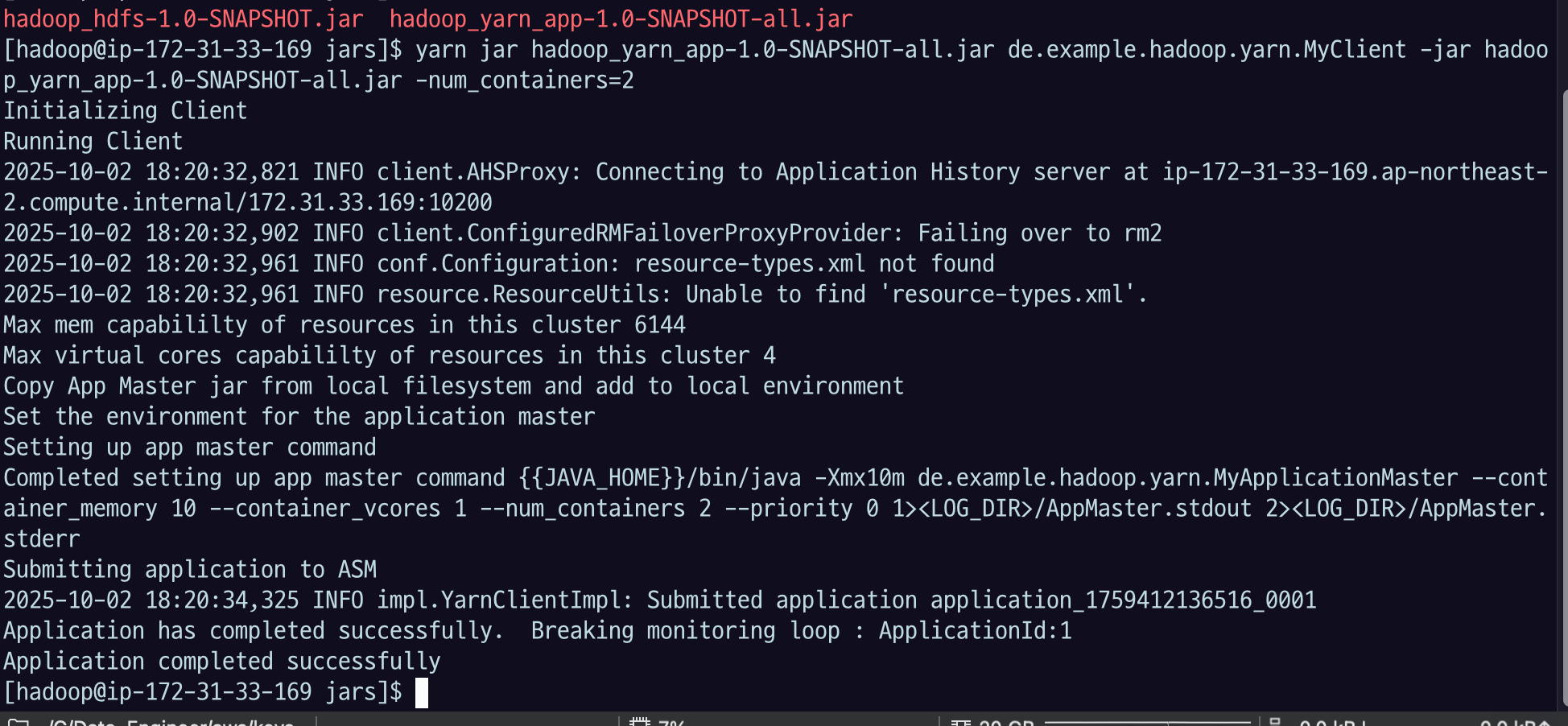
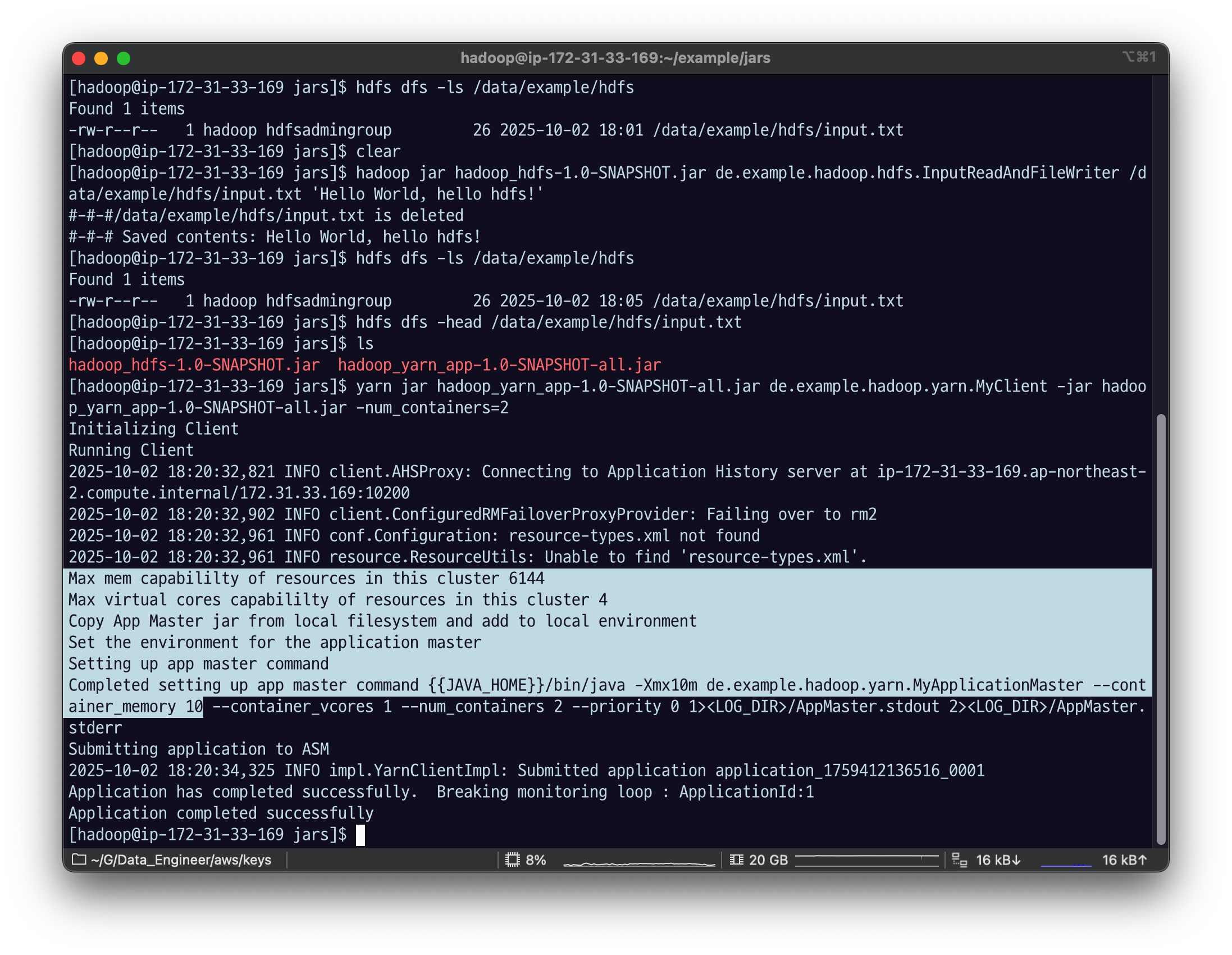
여기 있는 로그들은 자바 코드에서 추가한 부분.
helloworld 로그 찍게 해놨음. 마스터 application에서도 로그를 찍는데
AM랑, application container의 로그는 여기 보이지 않음.
아래에서 로그 확인하는 방법 알아보자.
4.3 log 확인
-
Yarn 에 작업을 제출한 뒤 남는 로그는 YarnClient 입장에서의 로그이다.
-
Yarn UI 에서 볼 수있는 Logs는 Yarn Client 의 로그에, 편의로 추가 로그를 볼 수 있다.
- Application Master 를 시작하는 container 로그를 볼 수 있다.
- Application Master 로그의 일부를 볼 수 있다.
-
각 클라이언트가 수행한 정확한 로그는 데이터노드에서 확인할 수 있다.
편의를 위해 핵심 내용은 Yarn Client, Application Master 로그에서 모두 확인할 수 있도록 하는 것이 좋다.
ApplicationMaster 까지의 로그는 webui 에서 확인이 가능하다.
primary_node_private_address:8088다이나믹 포트포워딩 + proxy omega
ssh -i fastcampus_de.pem -N -D 8157 hadoop@ec2-43-201-67-180.ap-northeast-2.compute.amazonaws.com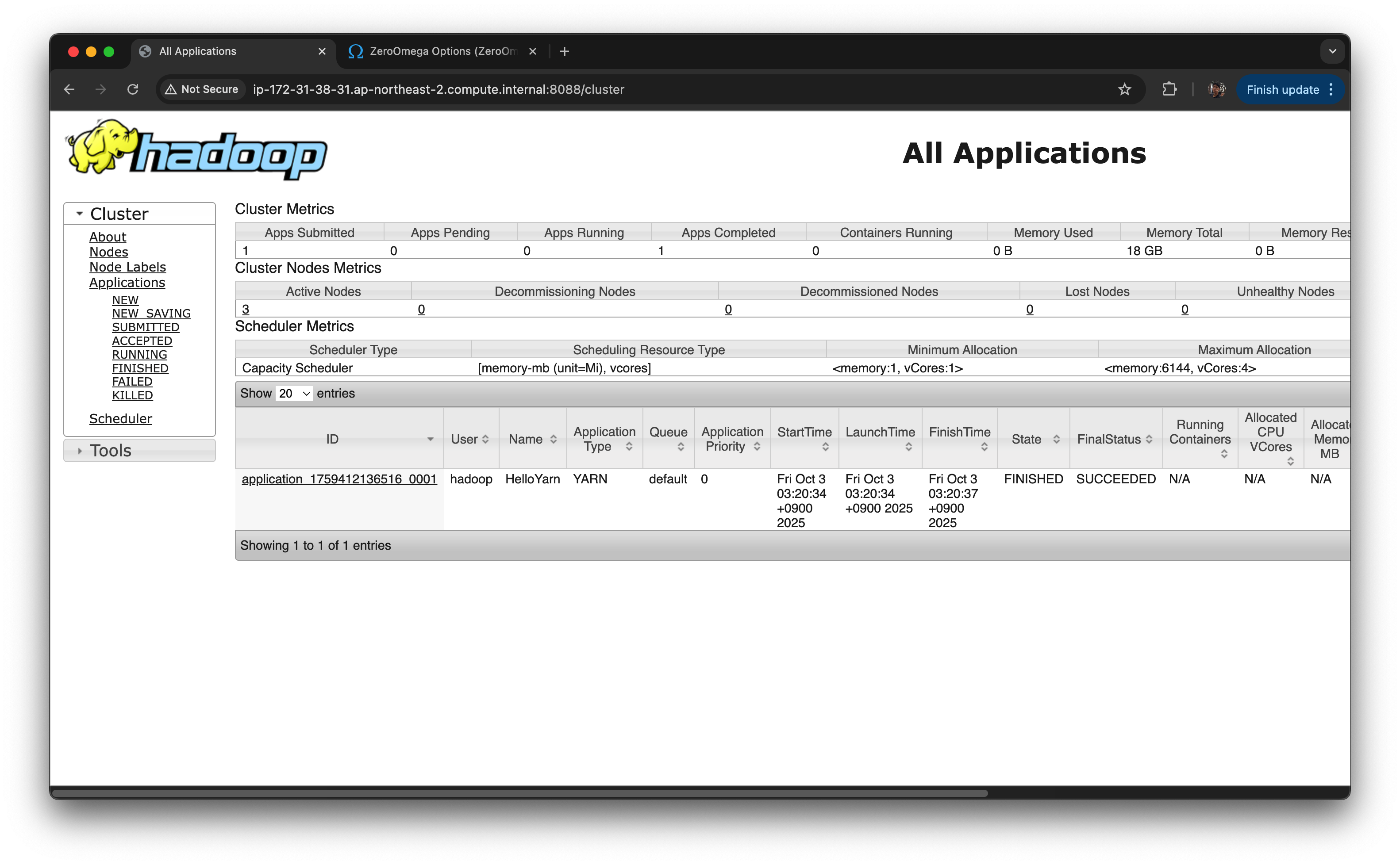
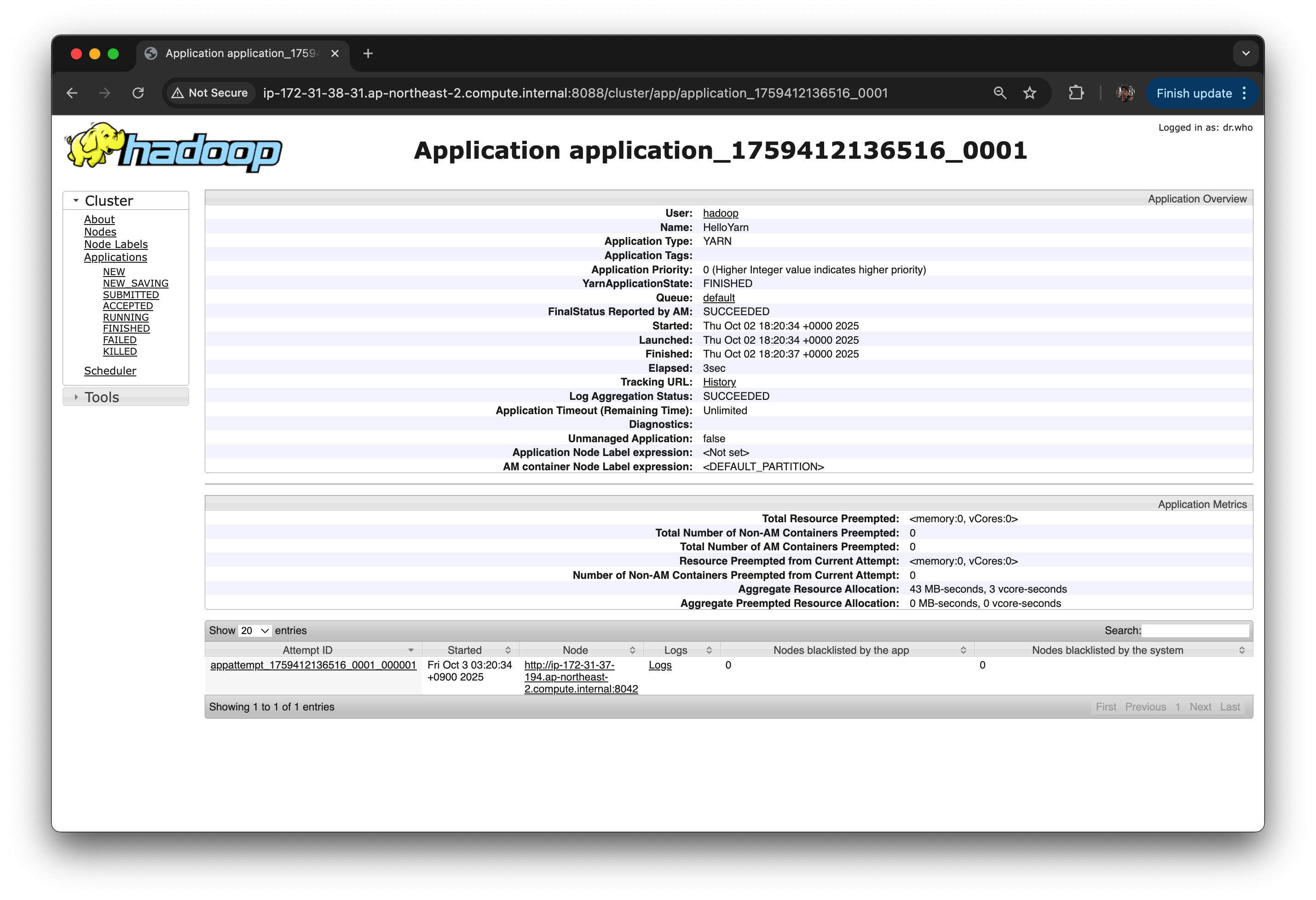
hello yarn APP ID : application_1759412136516_0001 로 실행된 것을 볼 수 있다.
상태 : FINISHED
Queue : default queue 사용.
종료 상태 : SUCCEEDED -> 이건 코드에서 넣어준 것.
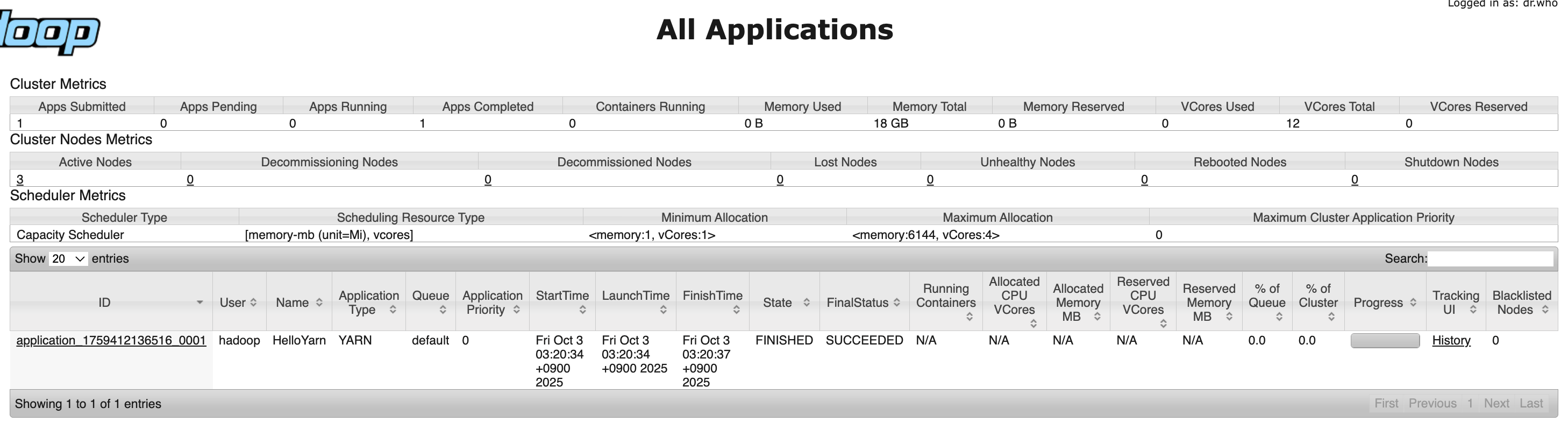
Tracking UI : History 클릭
Logs 클릭
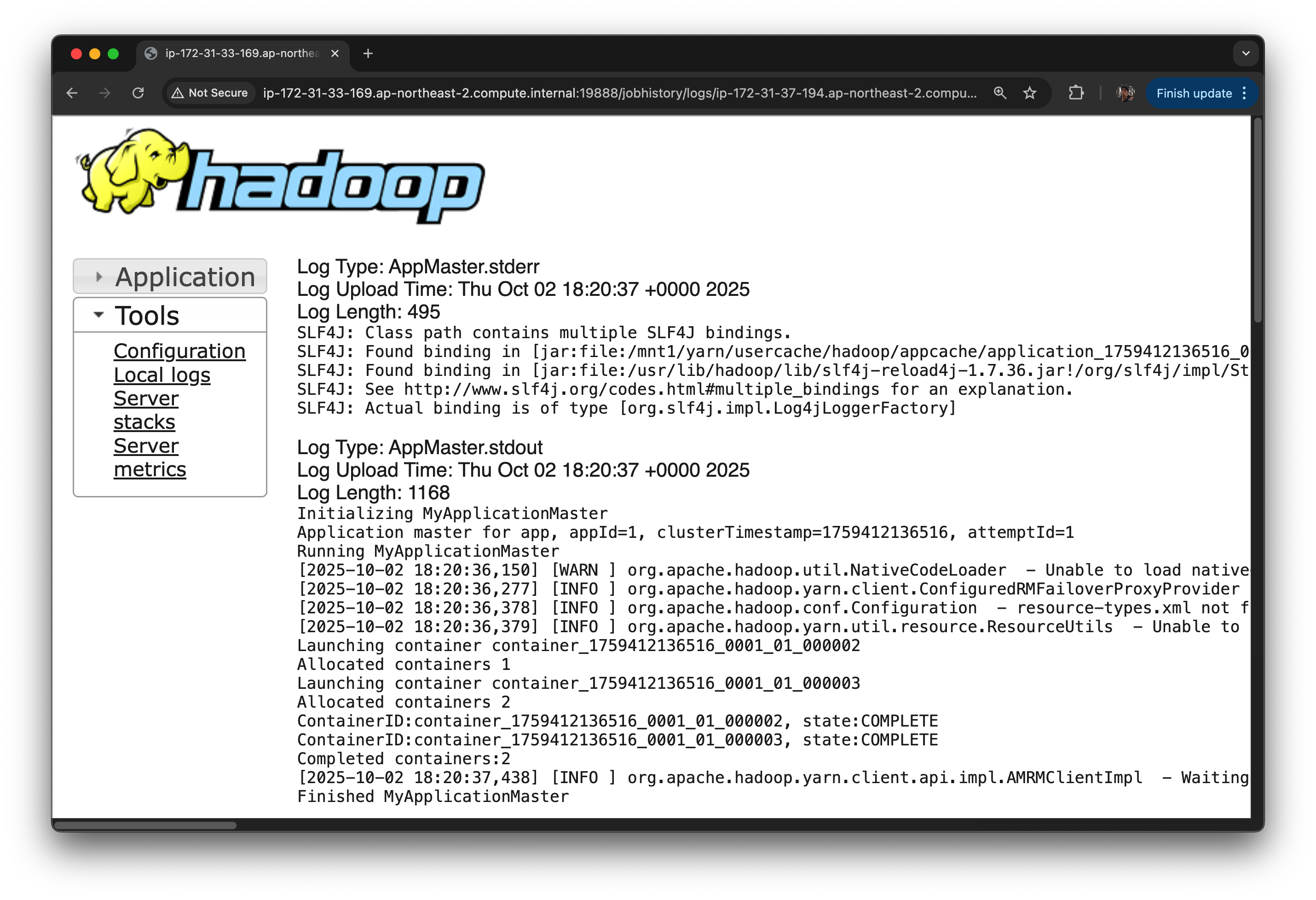
[2025-10-02 18:20:36,150]이런 식으로 timesamp 찍히면서 log4j로 찍혀 있는 게 하둡이 남긴 로그다.
일반 텍스트 out : 우리가 코드로 남긴 로그는 standard out으로 남겼기 때문에 일반 텍스트로 남음

컨테이너 두 개 만들도록 했기 때문에 이렇게 나오게 된다.
rm2 한테 했다가 실패했었고, 그 다음에 성공함.
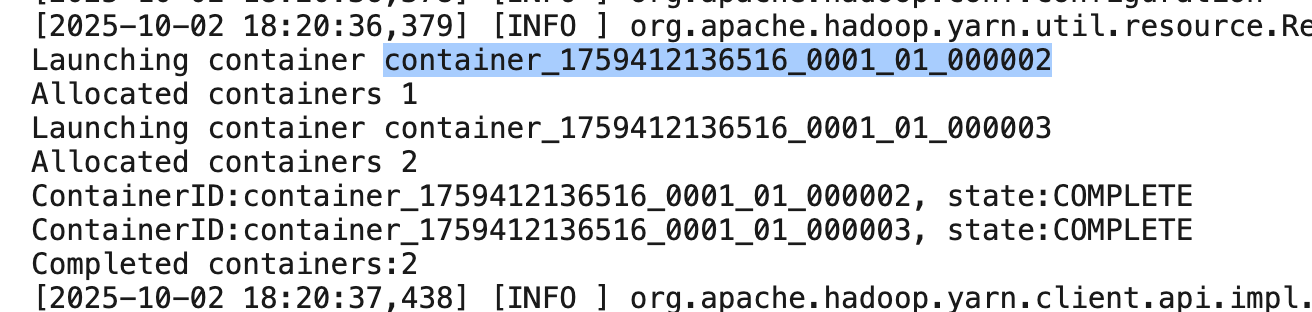
container_1759412136516_0001_01_000002
1759412136516 : app id 번호,
01 : application master 번호,
000002 : 컨테이너 번호.
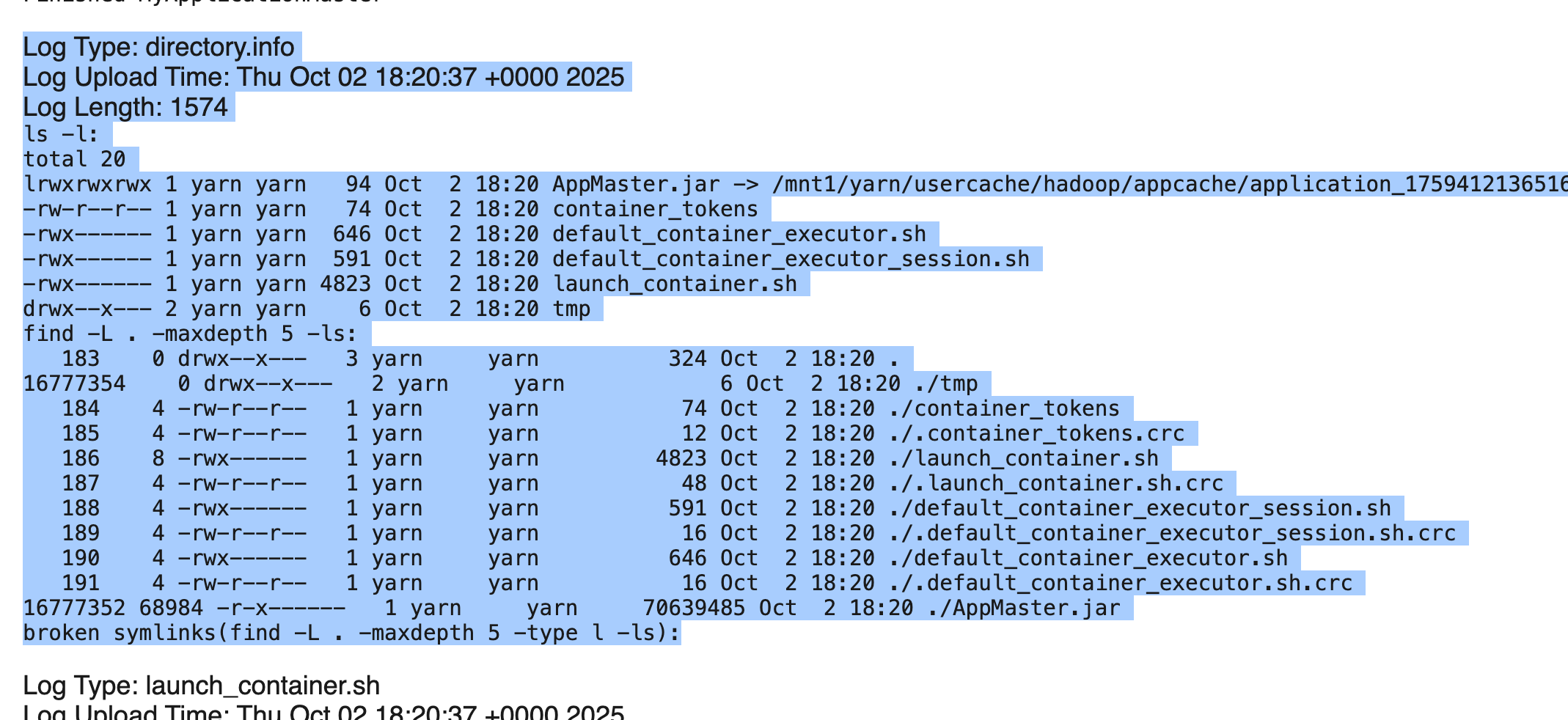
directory.info는 AM.jar가 위치한 디렉토리 인포.
AM가 참조하는 context 환경을 출력
launch container 스크립트
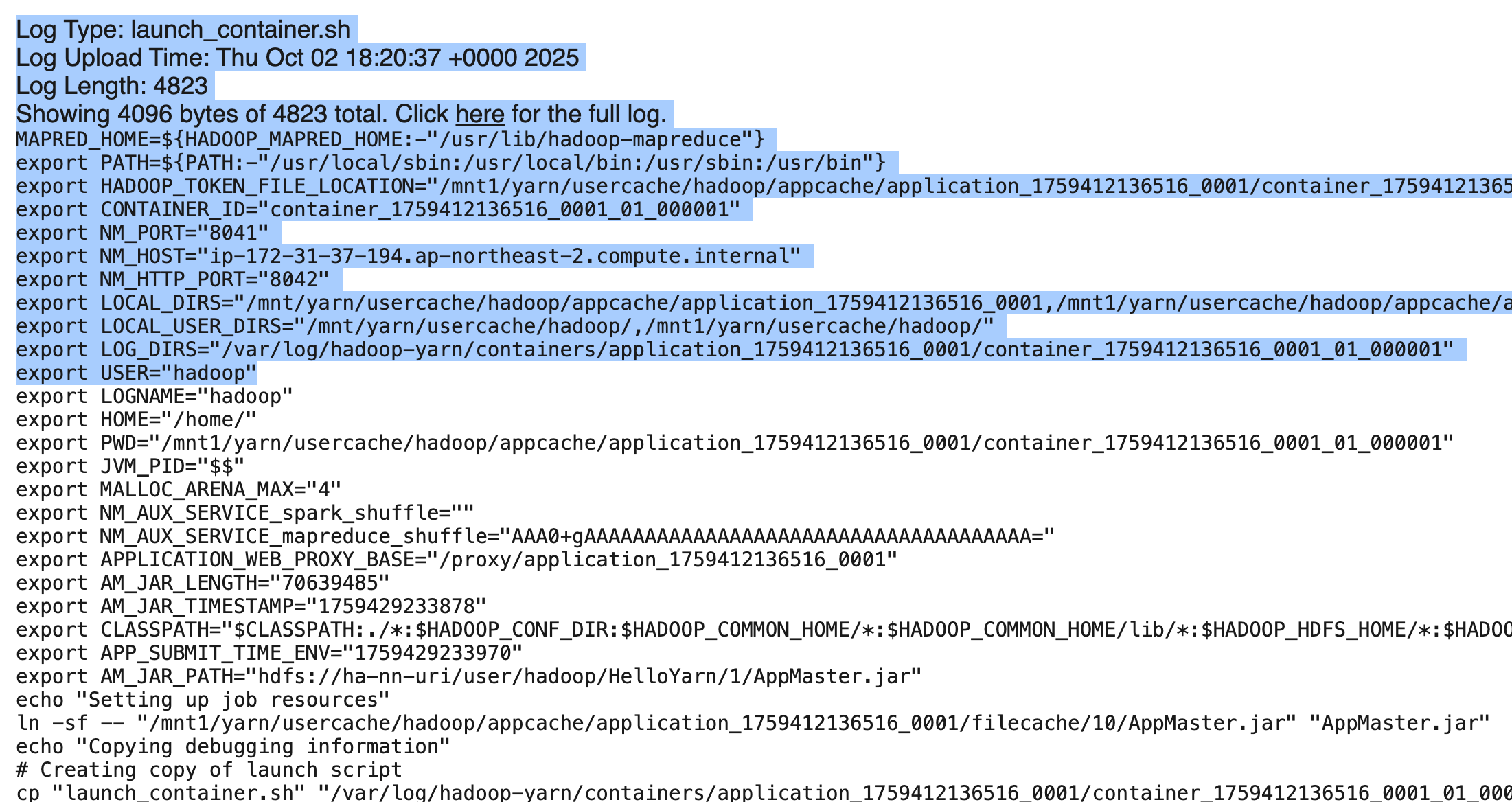
컨테이너를 띄운 다음 우리가 만든 커멘드라인 정보로 app실행하는데
APP실행하기 전 세팅되는 정보들.
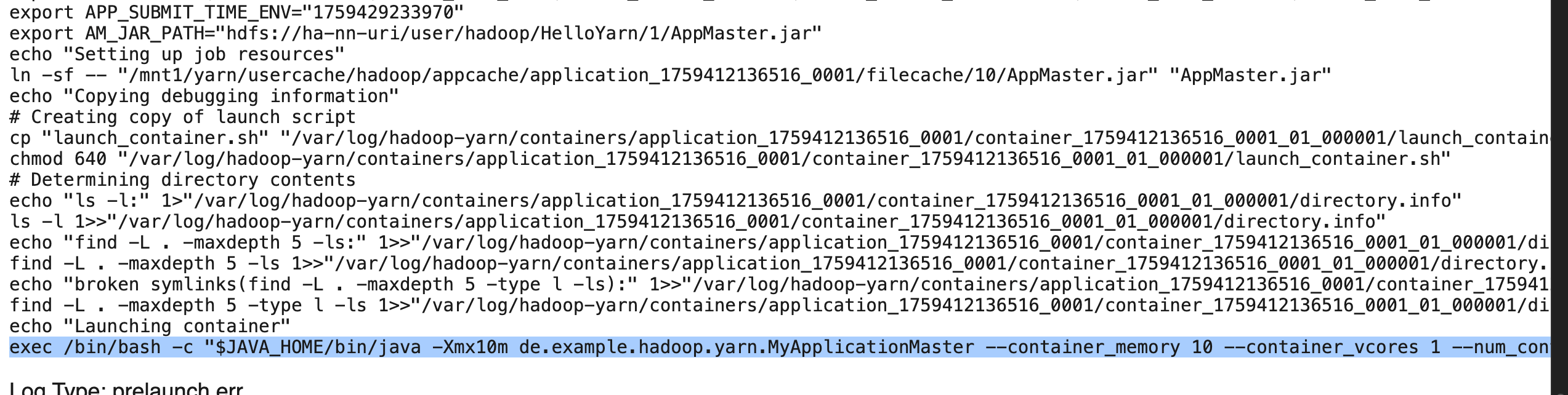
마지막에 쓰인 게 app에서 작성해 두었던 커멘드.
exec /bin/bash -c "$JAVA_HOME/bin/java -Xmx10m de.example.hadoop.yarn.MyApplicationMaster --container_memory 10 --container_vcores 1 --num_containers 2 --priority 0 1>/var/log/hadoop-yarn/containers/application_1759412136516_0001/container_1759412136516_0001_01_000001/AppMaster.stdout 2>/var/log/hadoop-yarn/containers/application_1759412136516_0001/container_1759412136516_0001_01_000001/AppMaster.stderr "
AM Full log는 hadoop들어가서 볼 수 있음
EMR 기본 설치의 경우
- ApplicationMaster의 full log는 HDFS의
/var/log/hadoop-yarn/apps/hadoop/logs-tfile/경로에서 applicationid 별로 확인이 가능하다. - 각 노드의
/var/log/hadoop-yarn/containers/에서 applicationid 별로 디렉토리가 생성된다. 그 하위에 container 별 로그 디렉토리가 생긴다. 이 경로가*ApplicationConstants*.***LOG_DIR_EXPANSION_VAR***이다. 이 하위에 자세한 로그가 파일별로 남는다.
hdfs dfs -ls /var/log/hadoop-yarn/apps/hadoop/logs-tfile/
이 경로는 모듭 하둡의 공통은 아니다. 보통 var/log 밑에 있긴 한데, 상세 경로는 클러스터 세팅에 따라서 다르다.
우리는 emr 세팅 하에 경로가 이렇게 지정됨.
application id 별로 디렉토리가 있음.
hdfs dfs -ls /var/log/hadoop-yarn/apps/hadoop/logs-tfile/application_id
이렇게 보면 1 개가 나옴
결과에 나온 ip 주소 하나하나가 실제 emr에 있는 ec2 정보를 보면 core node의 ec2정보를 보면 그 친구들의 private ip 주소인 걸 알 수 있음.
실제 이 주소는 apllication을 띄운 container, application master, 또는 application container를 띄운 pc일 것.
-get으로 가져오고 ll로 확인을 해보자.
hdfs dfs -get /var/log/hadoop-yarn/apps/hadoop/logs-tfile/application_1759412136516_0001/ip-172-31-37-194.ap-northeast-2.compute.internal_8041
vi ip-172-31-37-194.ap-northeast-2.compute.internal_8041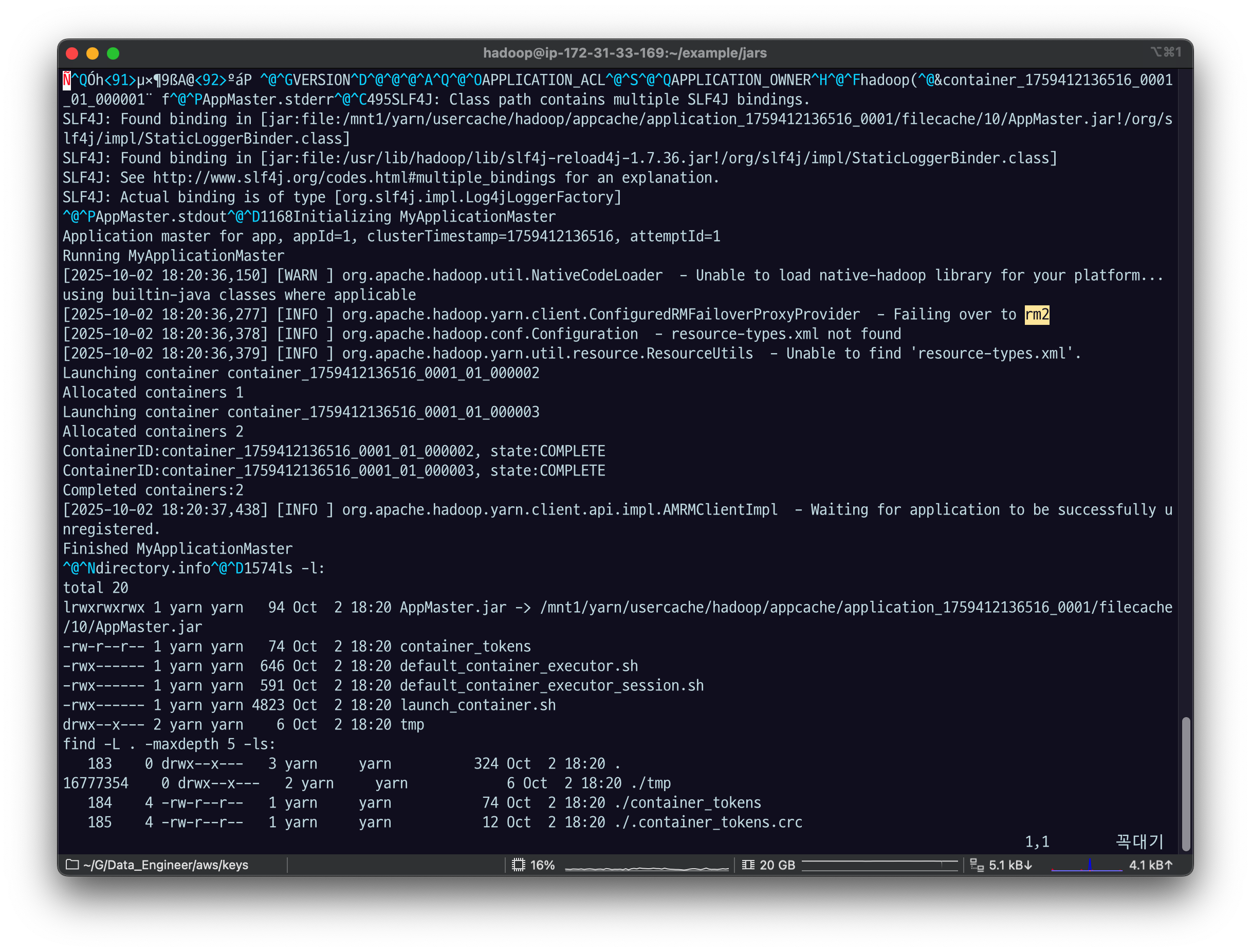
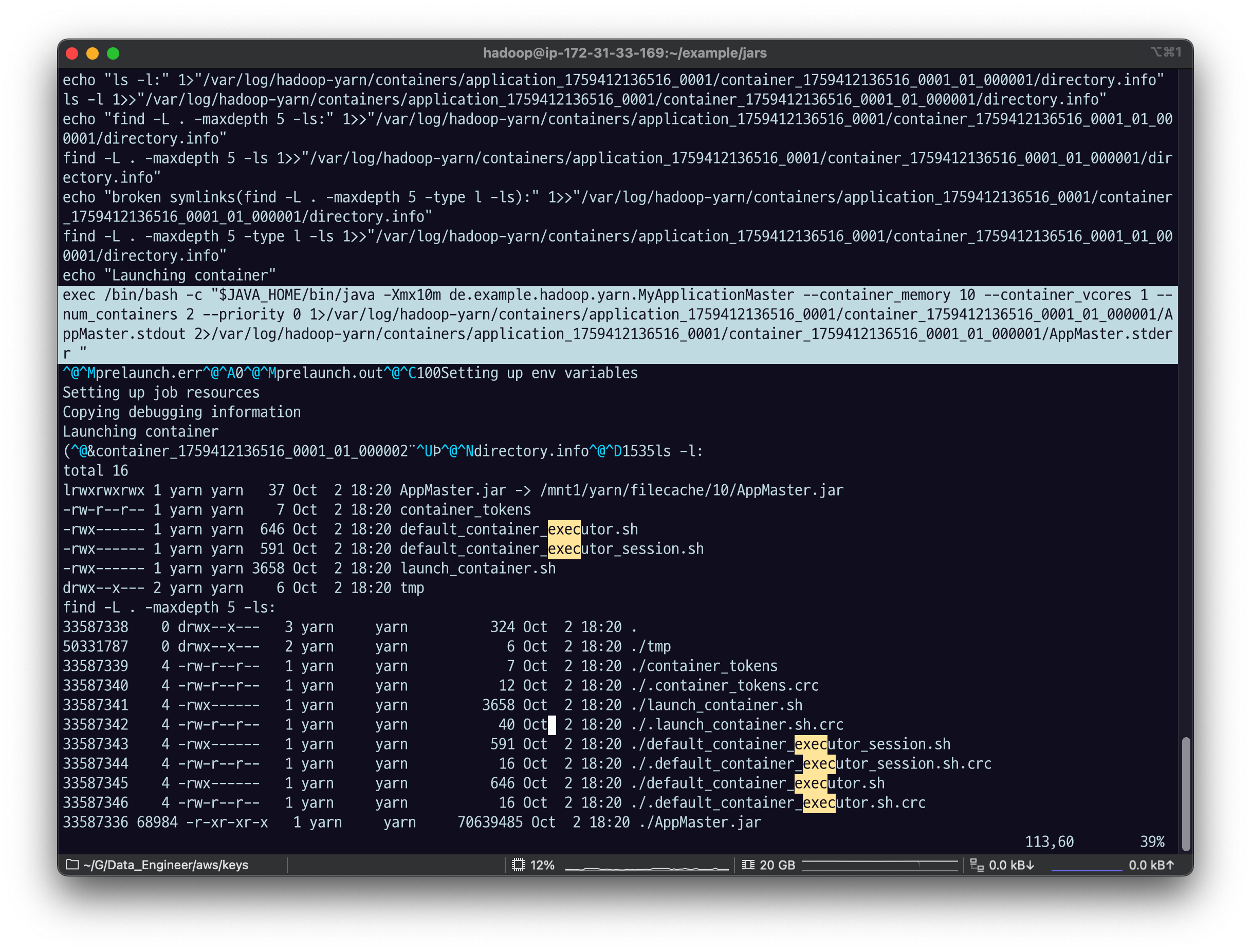
vi로 열어 보면 인코딩 때문에 잘 안보이는 것도 있지만 text를 보면 application master를 실행하는 커맨드를 확인할 수 있음
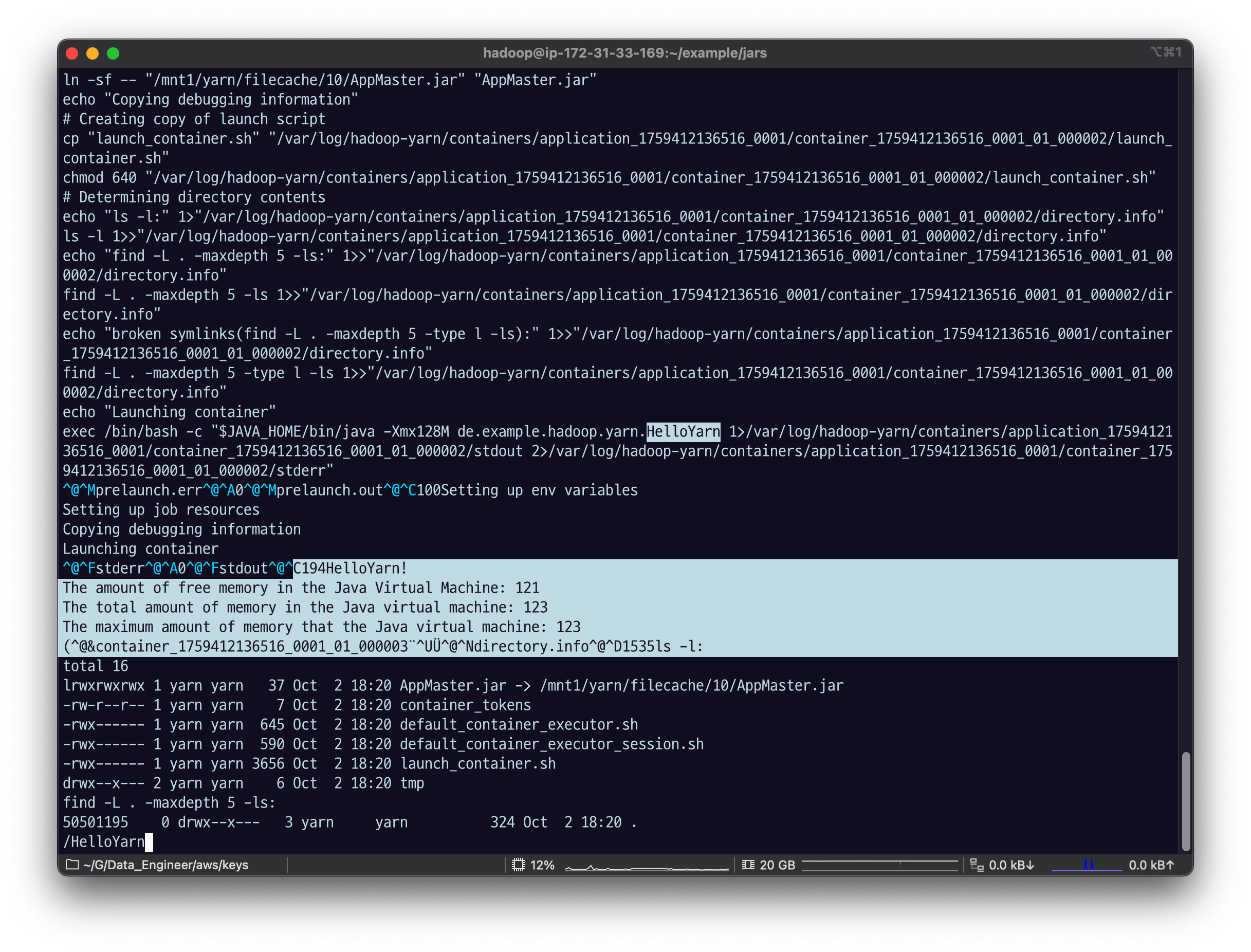
hello yarn이 실행한 standard out이 실행된 것을 볼 수 있음
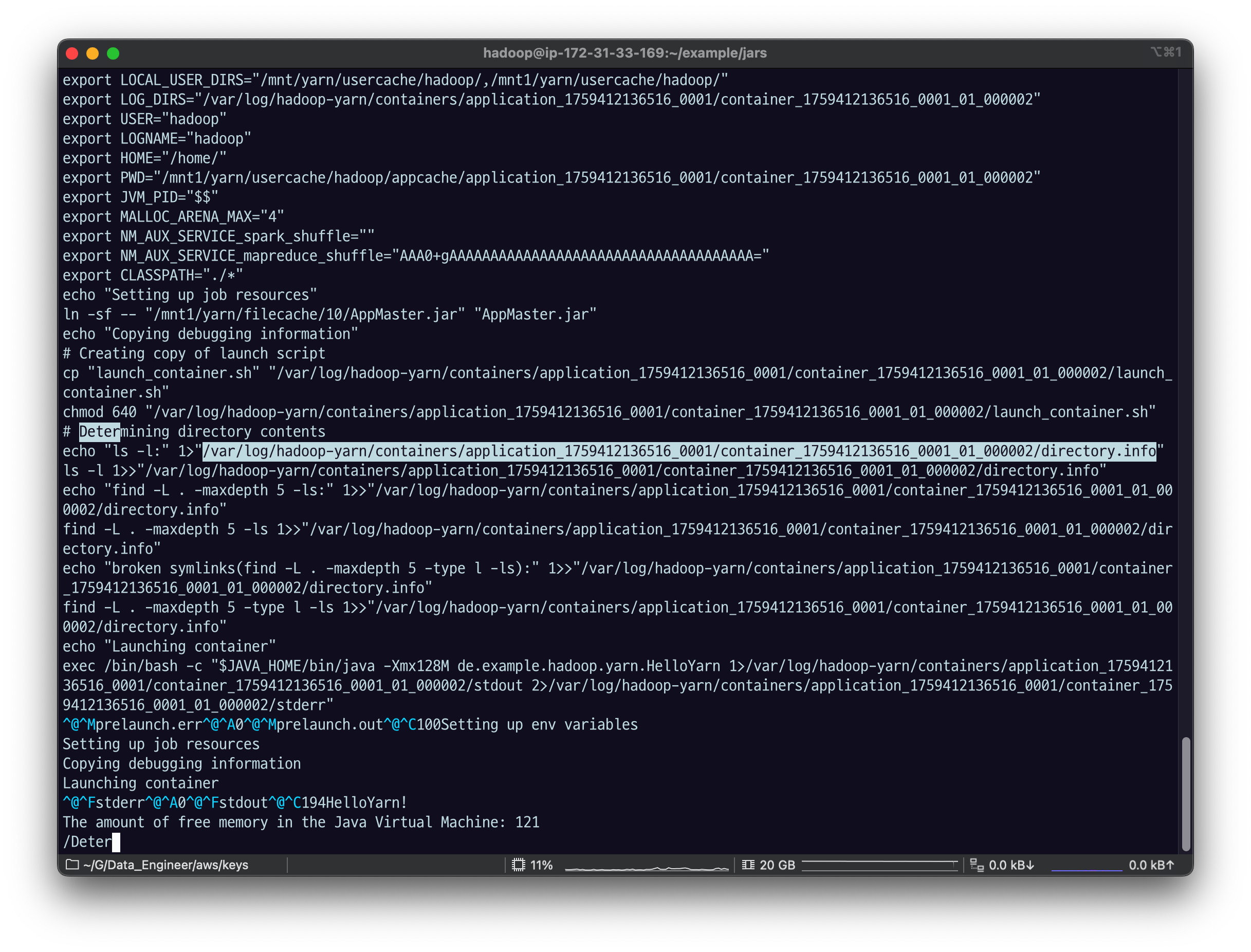
그리고 해당 노드의 위 주소로 가면 정확한 파일 정보를 확인할 수 있음
/var/log/hadoop-yarn/containers/application_1759412136516_0001/container_1759412136516_0001_01_000002/directory.info내 실습 환경에서는 한 코어 노드에서 전부 실행되었기 때문에 해당 ec2환경에서 바로 하면 됐음.
ip-172-31-37-194.ap-northeast-2.compute.internal_8041
해당 노드의 public DNS를 찾아서
/var/log/hadoop-yarn/containers/application_1759412136516_0001/container_1759412136516_0001_01_000002/directory.info
에 들어가보자.
EMR의 클러스터로 들어가서
Instances > core 노드 클릭
instance group > instances 들 중 private IP 기준 아까 그 ip, ip~~~ 의
publicDNS를 복사하고
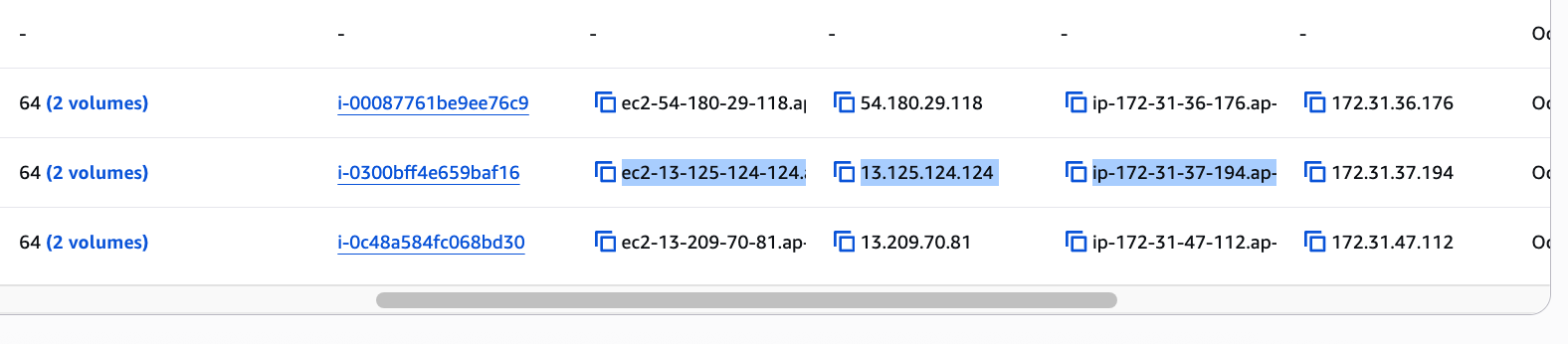
새로운 터미널에서 SSH-i 로 데이터 노드의 public DNS 로그인하고
ssh -i fastcampus_de.pem hadoop@ec2-13-125-124-124.ap-northeast-2.compute.amazonaws.com아까 copy 해 놨던 디렉토리 경로 (로그에서 찾은 dierctory.info 의 주소) 를 ls.
- var/log 로 들어갈 거기 때문에 sudo 권한이 있어야 할 것임.
sudo ls /var/log/hadoop-yarn/containers/application_1759412136516_0001/container_1759412136516_0001_01_000002
directory.info해당 노드에서 container는 가 뜬 게 아니라면
stdout, stderr 가 뜨지 않을 것.
AM만 뜸. 그 경우엔 Hello Yarn이 안 찍힌 게 맞다.
하지만 지금은 stdout, stderr가 있기 때문에 여기서 Hello Yarn이 뜨는 게 맞음.
sudo cat /var/log/hadoop-yarn/containers/application_1759412136516_0001/container_1759412136516_0001_01_000002/stdout
sudo cat /var/log/hadoop-yarn/containers/application_1759412136516_0001/container_1759412136516_0001_01_000002/launch_container.sh#!/bin/bash
set -o pipefail -e
export PRELAUNCH_OUT="/var/log/hadoop-yarn/containers/application_1759412136516_0001/container_1759412136516_0001_01_000002/prelaunch.out"
exec >"${PRELAUNCH_OUT}"
export PRELAUNCH_ERR="/var/log/hadoop-yarn/containers/application_1759412136516_0001/container_1759412136516_0001_01_000002/prelaunch.err"
exec 2>"${PRELAUNCH_ERR}"
echo "Setting up env variables"
export JAVA_HOME=${JAVA_HOME:-"/etc/alternatives/jre"}
export HADOOP_COMMON_HOME=${HADOOP_COMMON_HOME:-"/usr/lib/hadoop"}
export HADOOP_HDFS_HOME=${HADOOP_HDFS_HOME:-"/usr/lib/hadoop-hdfs"}
export HADOOP_CONF_DIR=${HADOOP_CONF_DIR:-"/etc/hadoop/conf"}
export HADOOP_YARN_HOME=${HADOOP_YARN_HOME:-"/usr/lib/hadoop-yarn"}
export HADOOP_MAPRED_HOME=${HADOOP_MAPRED_HOME:-"/usr/lib/hadoop-mapreduce"}
export PATH=${PATH:-"/usr/local/sbin:/usr/local/bin:/usr/sbin:/usr/bin"}
export HADOOP_TOKEN_FILE_LOCATION="/mnt1/yarn/usercache/hadoop/appcache/application_1759412136516_0001/container_1759412136516_0001_01_000002/container_tokens"
export CONTAINER_ID="container_1759412136516_0001_01_000002"
export NM_PORT="8041"
export NM_HOST="ip-172-31-37-194.ap-northeast-2.compute.internal"
export NM_HTTP_PORT="8042"
export LOCAL_DIRS="/mnt/yarn/usercache/hadoop/appcache/application_1759412136516_0001,/mnt1/yarn/usercache/hadoop/appcache/application_1759412136516_0001"
export LOCAL_USER_DIRS="/mnt/yarn/usercache/hadoop/,/mnt1/yarn/usercache/hadoop/"
export LOG_DIRS="/var/log/hadoop-yarn/containers/application_1759412136516_0001/container_1759412136516_0001_01_000002"
export USER="hadoop"
export LOGNAME="hadoop"
export HOME="/home/"
export PWD="/mnt1/yarn/usercache/hadoop/appcache/application_1759412136516_0001/container_1759412136516_0001_01_000002"
export JVM_PID="$$"
export MALLOC_ARENA_MAX="4"
export NM_AUX_SERVICE_spark_shuffle=""
export NM_AUX_SERVICE_mapreduce_shuffle="AAA0+gAAAAAAAAAAAAAAAAAAAAAAAAAAAAAAAAAAAAA="
export CLASSPATH="./*"
echo "Setting up job resources"
ln -sf -- "/mnt1/yarn/filecache/10/AppMaster.jar" "AppMaster.jar"
echo "Copying debugging information"
# Creating copy of launch script
cp "launch_container.sh" "/var/log/hadoop-yarn/containers/application_1759412136516_0001/container_1759412136516_0001_01_000002/launch_container.sh"
chmod 640 "/var/log/hadoop-yarn/containers/application_1759412136516_0001/container_1759412136516_0001_01_000002/launch_container.sh"
# Determining directory contents
echo "ls -l:" 1>"/var/log/hadoop-yarn/containers/application_1759412136516_0001/container_1759412136516_0001_01_000002/directory.info"
ls -l 1>>"/var/log/hadoop-yarn/containers/application_1759412136516_0001/container_1759412136516_0001_01_000002/directory.info"
echo "find -L . -maxdepth 5 -ls:" 1>>"/var/log/hadoop-yarn/containers/application_1759412136516_0001/container_1759412136516_0001_01_000002/directory.info"
find -L . -maxdepth 5 -ls 1>>"/var/log/hadoop-yarn/containers/application_1759412136516_0001/container_1759412136516_0001_01_000002/directory.info"
echo "broken symlinks(find -L . -maxdepth 5 -type l -ls):" 1>>"/var/log/hadoop-yarn/containers/application_1759412136516_0001/container_1759412136516_0001_01_000002/directory.info"
find -L . -maxdepth 5 -type l -ls 1>>"/var/log/hadoop-yarn/containers/application_1759412136516_0001/container_1759412136516_0001_01_000002/directory.info"
echo "Launching container"
exec /bin/bash -c "$JAVA_HOME/bin/java -Xmx128M de.example.hadoop.yarn.HelloYarn 1>/var/log/hadoop-yarn/containers/application_1759412136516_0001/container_1759412136516_0001_01_000002/stdout 2>/var/log/hadoop-yarn/containers/application_1759412136516_0001/container_1759412136516_0001_01_000002/stderr"여기서 컨테이너 Launching 하고, container 아이디를 찍고, unregistered 한 로그까지 여기서 확인할 수 있었다.
역시 조금 어렵다.
Yarn UI에서 우리가 볼 수 있었던 건 Yarn Client는 서밋한 쪽에서 로그를 확인할 수 있었다.
그래서 Yarn client가 로그를 남기거나 Application에 대한 상태정보는 AM가 알고 있다.
AM까지의 로그는 Web UI에서 확인이 가능하니까
Yarn 어플리케이션을 짠다면 AM가 주요 핵심 정보들을 잘 남길 수 있도록 짜는 것이 중요하다.