LSA (Latent Semantic Analysis) 잠재 의미 분석
단어의 빈도수를 이용해 문장의 주제를 찾는 대신 문서의 잠재된 의미를 찾아내는 의미분석 방법
SVD 를 사용한다
토픽모델링에 자주 사용
단어-문서 행렬을 SVD로 분해하여 주요 의미 축만 남기고 불필요한 노이즈를 제거
SVD (Singular Value Decomposition, 특이값 분해)
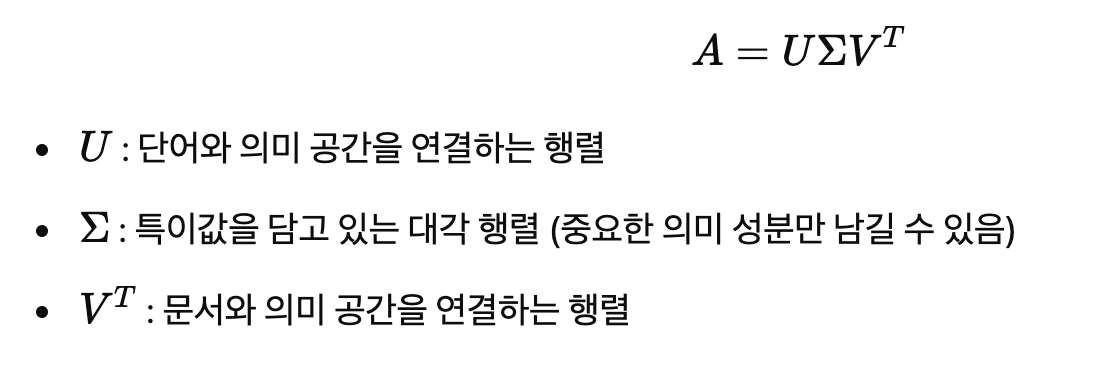
중요한 정보만 유지하고 차원 축소를 하기위해 사용된다
크기가 다른 행렬에서도 적용할 수 있다
단어와 문서 간의 관계를 더 의미 있는 공간에서 표현하는 데 활용
import numpy as np
import pandas as pd
from sklearn.decomposition import TruncatedSVD
from sklearn.feature_extraction.text import TfidfVectorizer

# 1️⃣ 샘플 문서 데이터
documents = [
    "I love deep learning and machine learning.",
    "Deep learning and AI are amazing technologies.",
    "Natural language processing is a part of AI.",
    "Machine learning is used for AI and data science.",
    "I enjoy studying AI and machine learning."
]

# 2️⃣ TF-IDF 벡터화 (단어-문서 행렬 생성)
vectorizer = TfidfVectorizer(stop_words='english')
X = vectorizer.fit_transform(documents)

# 3️⃣ SVD 적용 (LSA 수행) → 차원을 2로 줄임
n_components = 2  # 주성분 개수
svd = TruncatedSVD(n_components=n_components)
X_reduced = svd.fit_transform(X)

# 4️⃣ 결과 출력
print("🔹 원본 TF-IDF 행렬 크기:", X.shape)
print("🔹 차원 축소 후 행렬 크기:", X_reduced.shape)
print("\n🔹 변환된 문서 벡터:")
print(X_reduced)

# 5️⃣ 주성분 분석 결과 확인 (단어-주성분 관계)
terms = vectorizer.get_feature_names_out()
components_df = pd.DataFrame(svd.components_, columns=terms, index=[f"Topic {i+1}" for i in range(n_components)])
print("\n🔹 주성분(토픽)별 주요 단어:")
print(components_df)

---------------------------------------------------------------------
🔹 원본 TF-IDF 행렬 크기: (5, 15)
🔹 차원 축소 후 행렬 크기: (5, 2)

🔹 변환된 문서 벡터:
[[ 0.75238578 -0.28178464]
 [ 0.6351635  -0.07500513]
 [ 0.20911764  0.95501691]
 [ 0.63397735  0.04896327]
 [ 0.67840463  0.04259817]]

🔹 주성분(토픽)별 주요 단어:
               ai   amazing      data      deep     enjoy  language  learning  \
Topic 1  0.350064  0.186842  0.167291  0.327085  0.206008  0.061220  0.561852
Topic 2  0.299022 -0.041325  0.024199 -0.157039  0.024228  0.523659 -0.168755

             love   machine   natural  processing   science  studying  \
Topic 1  0.218571  0.396382  0.061220    0.061220  0.167291  0.206008
Topic 2 -0.153321 -0.070249  0.523659    0.523659  0.024199  0.024228

         technologies      used
Topic 1      0.186842  0.167291
Topic 2     -0.041325  0.024199
문서가 2차원 벡터로 변환
topic1 : machine, learning, ai, deep 등과 관련
topic2 : natural, language, processing, studying 등과 관련
유사한 문서들을 구분 후 중요한 단어를 자동으로 그룹화
import numpy as np
import pandas as pd
import matplotlib.pyplot as plt
from sklearn.decomposition import TruncatedSVD
from sklearn.feature_extraction.text import TfidfVectorizer
from sklearn.manifold import TSNE

# 1️⃣ 샘플 문서 데이터
documents = [
    "I love deep learning and machine learning.",
    "Deep learning and AI are amazing technologies.",
    "Natural language processing is a part of AI.",
    "Machine learning is used for AI and data science.",
    "I enjoy studying AI and machine learning."
]

# 2️⃣ TF-IDF 벡터화 (단어-문서 행렬 생성)
vectorizer = TfidfVectorizer(stop_words='english')
X = vectorizer.fit_transform(documents)

# 3️⃣ LSA 적용 (SVD 기반 차원 축소, 2차원으로 변환)
n_components = 2
svd = TruncatedSVD(n_components=n_components)
X_reduced = svd.fit_transform(X)

# 4️⃣ t-SNE 추가 변환 (✅ perplexity 조정: 샘플 수(5)보다 작게 설정)
X_embedded = TSNE(n_components=2, perplexity=2, random_state=42).fit_transform(X_reduced)

# 5️⃣ 시각화 (각 문서를 2D 공간에 표현)
plt.figure(figsize=(8, 6))
plt.scatter(X_embedded[:, 0], X_embedded[:, 1], color='blue')

# 6️⃣ 각 문서에 라벨 추가
for i, doc in enumerate(documents):
    plt.annotate(f"Doc {i+1}", (X_embedded[i, 0], X_embedded[i, 1]))

plt.title("LSA embedding")
plt.xlabel("LSA Component 1")
plt.ylabel("LSA Component 2")
plt.show()
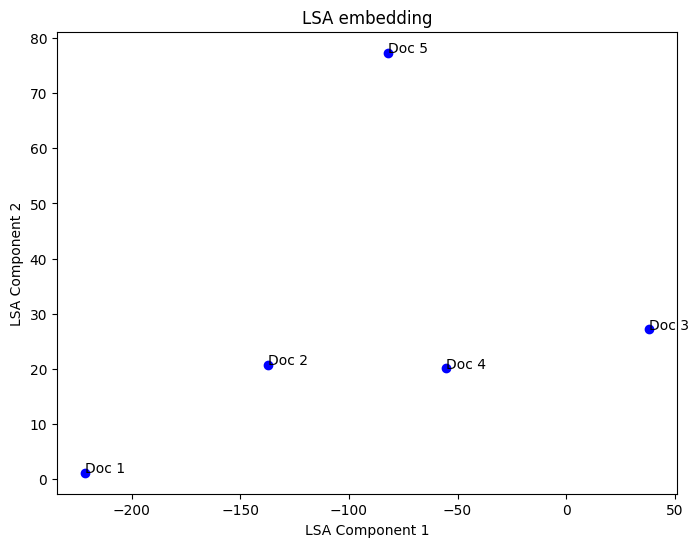
문서를 2차원 공간에 투영
비슷한 문서는 가까이에, 다른 문서는 멀리에 위치
LDA (Latent Dirichlet Allocation, 잠재 디리클레 할당)
토픽의 개수를 정해 모든 단어를 하나의 토픽에 할당하는 작업을 반복
각 단어가 특정 주제에서 생성될 확률을 계산하는 확률 기반 주제 모델링 기법
import numpy as np
import pandas as pd
from sklearn.feature_extraction.text import CountVectorizer
from sklearn.decomposition import LatentDirichletAllocation

# 1️⃣ 샘플 문서 데이터
documents = [
    "I love deep learning and machine learning.",
    "Deep learning and AI are amazing technologies.",
    "Natural language processing is a part of AI.",
    "Machine learning is used for AI and data science.",
    "I enjoy studying AI and machine learning."
]

# 2️⃣ 단어-문서 행렬 생성 (CountVectorizer 사용)
vectorizer = CountVectorizer(stop_words='english')
X = vectorizer.fit_transform(documents)

# 3️⃣ LDA 모델 학습 (주제 개수 2개로 설정)
n_topics = 2
lda = LatentDirichletAllocation(n_components=n_topics, random_state=42)
X_topics = lda.fit_transform(X)

# 4️⃣ 주제별 단어 출력
terms = vectorizer.get_feature_names_out()
topics_df = pd.DataFrame(lda.components_, columns=terms, index=[f"Topic {i+1}" for i in range(n_topics)])
print("\n🔹 주제별 주요 단어:")
print(topics_df)

# 5️⃣ 각 문서의 주제 비율 출력
print("\n🔹 문서별 주제 분포:")
print(pd.DataFrame(X_topics, columns=[f"Topic {i+1}" for i in range(n_topics)]))


# LDA 시각화 (lda_model 버전 사용)
pyLDAvis.enable_notebook()
vis = pyLDAvis.lda_model.prepare(lda, X, vectorizer)  # ✅ Use lda_model instead of sklearn
pyLDAvis.display(vis)
-----------------------------------------------------------------------------

🔹 주제별 주요 단어:
               ai   amazing      data      deep     enjoy  language  learning  \
Topic 1  2.601366  1.491945  0.529545  2.492414  1.491187  0.504159  5.120539
Topic 2  2.398634  0.508055  1.470455  0.507586  0.508813  1.495841  0.879461

             love  machine   natural  processing   science  studying  \
Topic 1  1.493296  2.84328  0.504159    0.504159  0.529545  1.491187
Topic 2  0.506704  1.15672  1.495841    1.495841  1.470455  0.508813

         technologies      used
Topic 1      1.491945  0.529545
Topic 2      0.508055  1.470455

🔹 문서별 주제 분포:
    Topic 1   Topic 2
0  0.911026  0.088974
1  0.904009  0.095991
2  0.108849  0.891151
3  0.267629  0.732371
4  0.900698  0.099302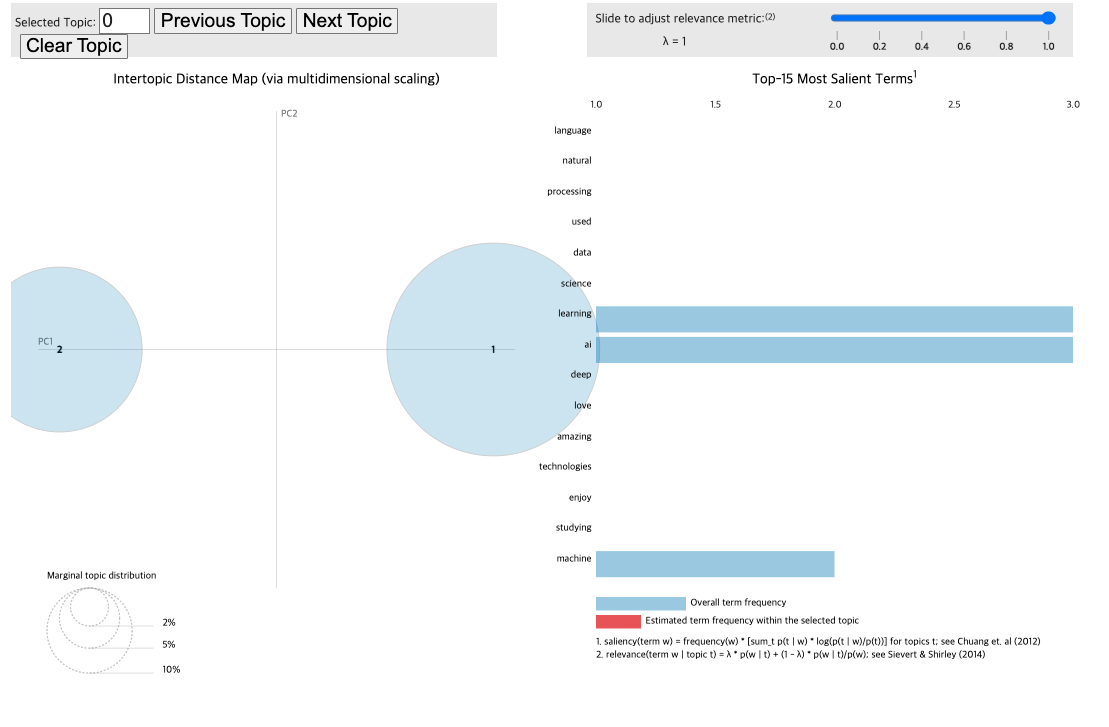
원 = 주제
원의 크기 = 주제의 중요도
원 사이의 거리 = 주제간 차이
오른쪽 = 핵심단어
λ 값 조정시 특정 주제에 대한 중요단어들을 더 볼수 있다
λ = 1 : 가장 중요한 단어만 필터링, 낮출경우 특정주제에 대한 단어 강조

hi!