0. 환경 설정 및 의존성 설치
!pip install pymysql sentence-transformers scikit-learn python-dotenv faiss-cpu환경 변수 로드 및 DB 접속 정보 초기화
import os
from dotenv import load_dotenv
import pymysql

# 1) .env 파일 내용을 읽어 환경변수로 설정
load_dotenv()

# 2) os.getenv 로 값을 가져오기
HOST     = os.getenv('HOST')
PORT     = int(os.getenv('PORT', 3306))
USER     = os.getenv('USER')
PASSWORD = os.getenv('PASSWORD')
DB_NAME  = os.getenv('DB_NAME')
.env 에 정의해 둔 DB 접속 정보를 읽어서 파이썬 변수(HOST, PORT, USER, PASSWORD, DB_NAME)로 할당
MariaDB 연결 및 문서 불러오기
import pymysql

# 2) MariaDB에 연결 (autocommit=True 로 하면 별도 commit() 불필요)
conn = pymysql.connect(
    host=HOST,
    port=PORT,
    user=USER,
    password=PASSWORD,
    db=DB_NAME,
    charset='utf8mb4',
    autocommit=True
)

try:
    with conn.cursor() as cursor:
        # 3) documents 테이블 생성
        cursor.execute("""
        CREATE TABLE IF NOT EXISTS documents (
            id INT PRIMARY KEY,
            content TEXT
        );
        """)

        # 4) 10개 레코드를 한 번에 INSERT
        insert_sql = """
        INSERT INTO documents (id, content) VALUES
        (1,  'Artificial intelligence is transforming many industries.'),
        (2,  'Machine learning models can improve over time with more data.'),
        (3,  'Natural language processing enables computers to understand human language.'),
        (4,  'Deep learning is a subset of machine learning using neural networks.'),
        (5,  'Transformers have revolutionized natural language processing tasks.'),
        (6,  'AI applications range from healthcare to autonomous vehicles.'),
        (7,  'Neural networks are inspired by the structure of the human brain.'),
        (8,  'Training a deep learning model requires large datasets and computing power.'),
        (9,  'Transfer learning allows models to adapt quickly to new tasks.'),
        (10, 'Explainable AI helps humans understand how AI systems make decisions.')
        ;
        """
        cursor.execute(insert_sql)

        print("✅ test_db.documents 테이블에 10개 레코드 삽입 완료")
finally:
    conn.close()
테이블을 만들고 데이터(문장)을 삽입
결과 : ✅ test_db.documents 테이블에 10개 레코드 삽입 완료
try:
    with conn.cursor() as cursor:
        # 1) 모든 레코드 조회
        cursor.execute("SELECT id, content FROM documents ORDER BY id;")
        rows = cursor.fetchall()

        # 2) 출력
        if not rows:
            print("⚠️ documents 테이블에 데이터가 없습니다.")
        else:
            print("✅ documents 테이블 내용:")
            for row in rows:
                print(f"  • id={row[0]}: {row[1]}")
finally:
    conn.close()
✅ documents 테이블 내용:
• id=1: Artificial intelligence is transforming many industries.
• id=2: Machine learning models can improve over time with more data.
• id=3: Natural language processing enables computers to understand human language.
• id=4: Deep learning is a subset of machine learning using neural networks.
• id=5: Transformers have revolutionized natural language processing tasks.
• id=6: AI applications range from healthcare to autonomous vehicles.
• id=7: Neural networks are inspired by the structure of the human brain.
• id=8: Training a deep learning model requires large datasets and computing power.
• id=9: Transfer learning allows models to adapt quickly to new tasks.
• id=10: Explainable AI helps humans understand how AI systems make decisions.
정상적으로 데이터가 저장되었음을 확인할 수 있다.
Sentence-BERT 모델 로딩 및 임베딩 생성 확인
from sentence_transformers import SentenceTransformer

# 2) 코드 내에서 직접 사용할 모델명 지정
model_name = 'all-MiniLM-L6-v2'  # 원하는 SBERT 프리트레인 모델로 변경 가능

# 3) 모델 로딩
print(f"Loading Sentence-BERT model: {model_name} …")
model = SentenceTransformer(model_name)
print("Model loaded successfully!")

# 4) (테스트) 간단히 임베딩 생성 확인
examples = [
    "안녕하세요, Sentence-BERT 테스트입니다.",
    "자연어 처리 모델이 잘 로드되었는지 확인합니다."
]
embeddings = model.encode(examples, show_progress_bar=True)
for text, emb in zip(examples, embeddings):
    print(f"– \"{text}\" → embedding 크기: {len(emb)}")
Model loaded successfully!
Batches: 100%|██████████| 1/1 [00:00<00:00, 4.55it/s]
– "안녕하세요, Sentence-BERT 테스트입니다." → embedding 크기: 384
– "자연어 처리 모델이 잘 로드되었는지 확인합니다." → embedding 크기: 384
모델이 정상적으로 로딩되고 임베딩이 정상적으로 이루어짐을 확인
VectorDB 생성
기존에 연결되었던 MariaDB를 사용하지 않고 새로운 벡터 DB를 생성하여 임베딩 정보들을 저장하였다.
벡터 연산에 최적화된 벡터 DB를 도입함으로써 대규모·고속 검색이 가능해지고, 애플리케이션의 응답성과 유지보수성이 크게 향상시키고자 하였다.
import json
import numpy as np
import faiss
from sentence_transformers import SentenceTransformer
import os
from dotenv import load_dotenv
import pymysql
def build_vector_db(conn, model,
                    index_path='corpus.index',
                    ids_path='ids.json'):
    """
    conn: pymysql 커넥션
    model: 이미 로드된 SentenceTransformer 객체
    index_path, ids_path: 저장할 파일명
    """
    # 1) DB에서 문장 불러오기
    with conn.cursor(pymysql.cursors.DictCursor) as cur:
        cur.execute("SELECT id, content FROM documents;")
        rows = cur.fetchall()

    ids    = [r['id']      for r in rows]
    corpus = [r['content'] for r in rows]

    # 2) 문장 임베딩 (NumPy 배열)
    embeddings = model.encode(
        corpus,
        convert_to_numpy=True,
        show_progress_bar=True
    )

    # 3) FAISS 인덱스 구축 (코사인 유사도용)
    d     = embeddings.shape[1]
    index = faiss.IndexFlatIP(d)
    faiss.normalize_L2(embeddings)
    index.add(embeddings)

    # 4) 디스크에 저장
    faiss.write_index(index, index_path)
    with open(ids_path, 'w', encoding='utf-8') as f:
        json.dump(ids, f, ensure_ascii=False)

    print(f"✅ VectorDB 저장 완료 → {index_path}, {ids_path}")

# — 호출 예 —
# (앞에서 model 이 이미 로드된 상태여야 함)
build_vector_db(conn, model)

conn.close()
“데이터베이스에서 문장 데이터를 로드 → SBERT로 임베딩 생성 → FAISS 기반 벡터DB 인덱싱 및 저장”
Batches: 100%|██████████| 1/1 [00:00<00:00, 15.15it/s]
✅ VectorDB 저장 완료 → corpus.index, ids.json
시맨틱 검색 함수 정의
# FAISS 인덱스 & ID 매핑
index = faiss.read_index('corpus.index')
with open('ids.json','r',encoding='utf-8') as f:
    ids = json.load(f)
corpus.index 파일에서 FAISS 벡터 인덱스를 로드하고, ids.json에서 벡터↔문서 ID 매핑을 불러옴
def get_connection():
    """ .env 기반으로 새 커넥션 반환 """
    return pymysql.connect(
        host=os.getenv('HOST'),
        port=int(os.getenv('PORT', 3306)),
        user=os.getenv('USER'),
        password=os.getenv('PASSWORD'),
        db=os.getenv('DB_NAME'),
        charset='utf8mb4'
    )
.env 에 정의된 환경변수(HOST, PORT, USER, PASSWORD, DB_NAME)를 읽는 함수
def semantic_search(query: str, top_k: int = 5):
    # 1) 쿼리 임베딩
    q_emb = model.encode(query, convert_to_numpy=True).astype('float32')
    q_emb = q_emb.reshape(1, -1)
    faiss.normalize_L2(q_emb)

    # 2) FAISS 검색
    D, I = index.search(q_emb, k=top_k)

    results = []
    conn = get_connection()
    try:
        with conn.cursor(pymysql.cursors.DictCursor) as cur:
            for dist, idx in zip(D[0], I[0]):
                doc_id = ids[int(idx)]
                cur.execute(
                    "SELECT content FROM documents WHERE id = %s",
                    (doc_id,)
                )
                row = cur.fetchone()
                if row:
                    results.append({
                        'id':      doc_id,
                        'content': row['content'],
                        'score':   float(dist)
                    })
    finally:
        conn.close()

return results- 쿼리 임베딩: 입력된 검색어
query를 SBERT 모델로 벡터화하고 L2 정규화 - FAISS 검색: 미리 구축해 둔 FAISS 인덱스(
index)에서 상위top_k개의 벡터 이웃을 찾아 - DB 조회: FAISS가 반환한 인덱스 번호(
idx)→실제 문서 ID(ids[idx])로 매핑한 뒤, 그 ID로documents테이블에서 원문(content)을 꺼내 함께 결과 리스트에 담아 리턴
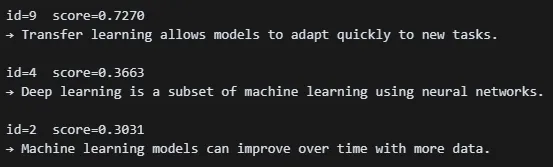
hits = semantic_search("What is transfer learning?", top_k=3)
for hit in hits:
    print(f"id={hit['id']}  score={hit['score']:.4f}")
    print("→", hit['content'], "\n")
What is transfer learning 라는 질문에 대해 3개의 유사도 있는 문장을 찾아온다.
하이브리드 검색
!pip install rank-bm25키워드 기반 랭킹 계산을 위한 라이브러리
from rank_bm25 import BM25Okapi
import json, os
검색 함수 정의
def hybrid_search(query: str,
                  top_k: int = 5,
                  alpha: float = 0.5):
    """
    * query: 검색어
    * top_k: 최종 반환 개수
    * alpha: 시맨틱(score_sem) vs BM25(score_bm) 가중치
    """
    # 1) 쿼리 임베딩 & 정규화
    q_emb = model.encode(query, convert_to_numpy=True).astype('float32')
    q_emb = q_emb.reshape(1, -1)
    faiss.normalize_L2(q_emb)

    # 2) FAISS 시맨틱 검색
    D_sem, I_sem = index.search(q_emb, k=top_k * 2)
    sem_scores = { ids[int(idx)]: float(dist)
                   for dist, idx in zip(D_sem[0], I_sem[0]) }

    # 3) BM25 점수 계산 및 정규화
    tokenized_query = query.split()
    bm25_scores = bm25.get_scores(tokenized_query)
    bm25_norm   = bm25_scores / (bm25_scores.max() or 1.0)
    bm25_scores_map = { ids[i]: bm25_norm[i] for i in range(len(ids)) }

    # 4) 하이브리드 스코어 결합
    all_ids = set(sem_scores) | set(bm25_scores_map)
    hybrid_list = [
        (doc_id, alpha * sem_scores.get(doc_id, 0.0) +
                 (1 - alpha) * bm25_scores_map.get(doc_id, 0.0))
        for doc_id in all_ids
    ]
    hybrid_list.sort(key=lambda x: x[1], reverse=True)
    topk = hybrid_list[:top_k]

    # 5) 결과 조회
    results = []
    conn = get_connection()
    try:
        with conn.cursor(pymysql.cursors.DictCursor) as cur:
            for doc_id, score in topk:
                cur.execute(
                    "SELECT content FROM documents WHERE id=%s", (doc_id,)
                )
                row = cur.fetchone()
                if row:
                    results.append({
                        'id':      doc_id,
                        'content': row['content'],
                        'score':   score
                    })
    finally:
        conn.close()

    return results
hybrid_search 함수는 시맨틱 검색(SBERT+FAISS) 과 키워드 검색(BM25) 점수를 동시에 활용해, 두 점수를 alpha 비율로 가중 결합한 뒤 최종 상위 k개 결과를 반환
for hit in hybrid_search("What is transfer learning?", top_k=3, alpha=0.7):
    print(f"id={hit['id']}  hybrid_score={hit['score']:.4f}")
    print("→", hit['content'], "\n")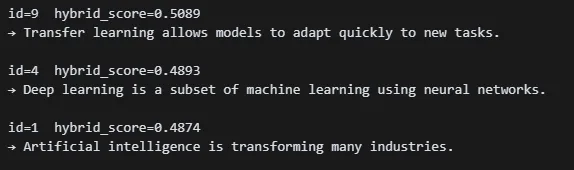

벡터 DB에 대한 관점이 매우 흥미로운 글이네요~!
영진학생 앞으로의 발전이 더욱 기대됩니다~~~