[웹개발 종합반] 2주차 강의
📍 수업 목표
- Javascript 문법에 익숙해진다.
- jQuery로 간단한 HTML을 조작할 수 있다.
- Ajax로 서버 API(약속)에 데이터를 주고, 결과를 받아온다.
📌 목차
- JQuery 시작하기
- JQuery 다뤄보기
- JQuery 적용하기(포스팅 박스)
- Quiz_JQuery 연습하기
- 서버-클라이언트 통신 이해하기
- Ajax 시작하기
- Ajax 함께 연습하기
- Quiz_Ajax 연습하기(1)
- Quiz_Ajax 연습하기(2)
- 2주차 끝 & 숙제 설명
1. JQuery
HTML의 요소들을 조작하는, 편리한 Javascript를 미리 작성해 둔 오픈소스 기반의 라이브러리
- jQuery 사용하기
-
아래의 링크로 접속하여 import한다.
https://www.w3schools.com/jquery/jquery_get_started.asp
-
이름을 가리켜 조작한다!
css와 마찬가지로, jQuery를 쓸 때에도 '가리켜야' ➡️ 조작한할 수 있음. 즉 jQuery를 사용하기 위해서 css의 선택자인 class처럼 id 값을 통해 가리킨다!<input id="input-q1" type="text" /> <button onclick="q1()">클릭</button><script> function q1() { let content = $('#input-q1').val(); if(content == ''){ alert('입력하세요!'); }else{ alert(content); } } </script>
-
jQuery 기본 문법
$('#[id값]').[jQuery함수];
ex) $('#input-q1').val();
- jQuery 적용하기
ex) 태그 내 html 입력하기
<head>
  <script>
    function q3() {
    	// 1. input-q3 값을 가져온다. let txt = ... q1, q2에서 했던 걸 참고!
        // 2. 가져온 값을 이용해 names-q3에 붙일 태그를 만든다. (let temp_html = `<li>${txt}</li>`) 요렇게!
        // 3. 만들어둔 temp_html을 names-q3에 붙인다.(jQuery의 $('...').append(temp_html)을 이용하면 굿!)
        let txt = $('#input-q3').val();
        let temp_html = `<li>${txt}</li>`
        $('#names-q3').append(temp_html);
    }
   </script>
</head><body>
<input id="input-q3" type="text" placeholder="여기에 이름을 입력" />
<button onclick="q3()">이름 붙이기</button>
<button onclick="q3_remove()">다지우기</button>
<ul id="names-q3">
<li>세종대왕</li>
<li>임꺽정</li>
</body>+) 변수 사용
${변수명}

ex)  temp_html = `<tr class="few">
					<td>${position}</td>
                    <td>${allNum}</td>
                    <td>${currentNum}</td>
                  </tr>`
2. Ajax
Ajax(Asynchronous JavaScript and XML), 빠르게 동작하는 동적인 웹 페이지를 만들기 위한 개발 기법의 하나로 웹 페이지 전체를 다시 로딩하지 않고도, 웹 페이지의 일부분만을 서버와 통신하여 표시할 수 있다는 장점이 있다.
*Ajax는 jQuery를 임포트한 페이지에서만 동작이 가능
*Ajax 한계
1. Ajax는 클라이언트가 서버에 데이터를 요청하는 클라이언트 풀링 방식을 사용하므로, 서버 푸시 방식의 실시간 서비스는 만들 수 없다.
2. Ajax로는 바이너리 데이터를 보내거나 받을 수 없다.
3. Ajax 스크립트가 포함된 서버가 아닌 다른 서버로 Ajax 요청을 보낼 수 없다.
4. 클라이언트의 PC로 Ajax 요청을 보낼 수 없다.
- Ajax 사용하기
-
Ajax 기본 문법
$.ajax({
  type: "요청메소드", // GET, POST, PUT, DELETE
  url: "요청할 url",
  data: {}, // 요청하면서 함께 줄 데이터 (GET 요청시엔 비워두세요)
  success: function(response){ // 서버에서 준 결과를 response라는 변수에 담음
    console.log(response) // 서버에서 준 결과를 이용해서 나머지 코드를 작성
  }
})
- Ajax 적용하기
❗️결과물
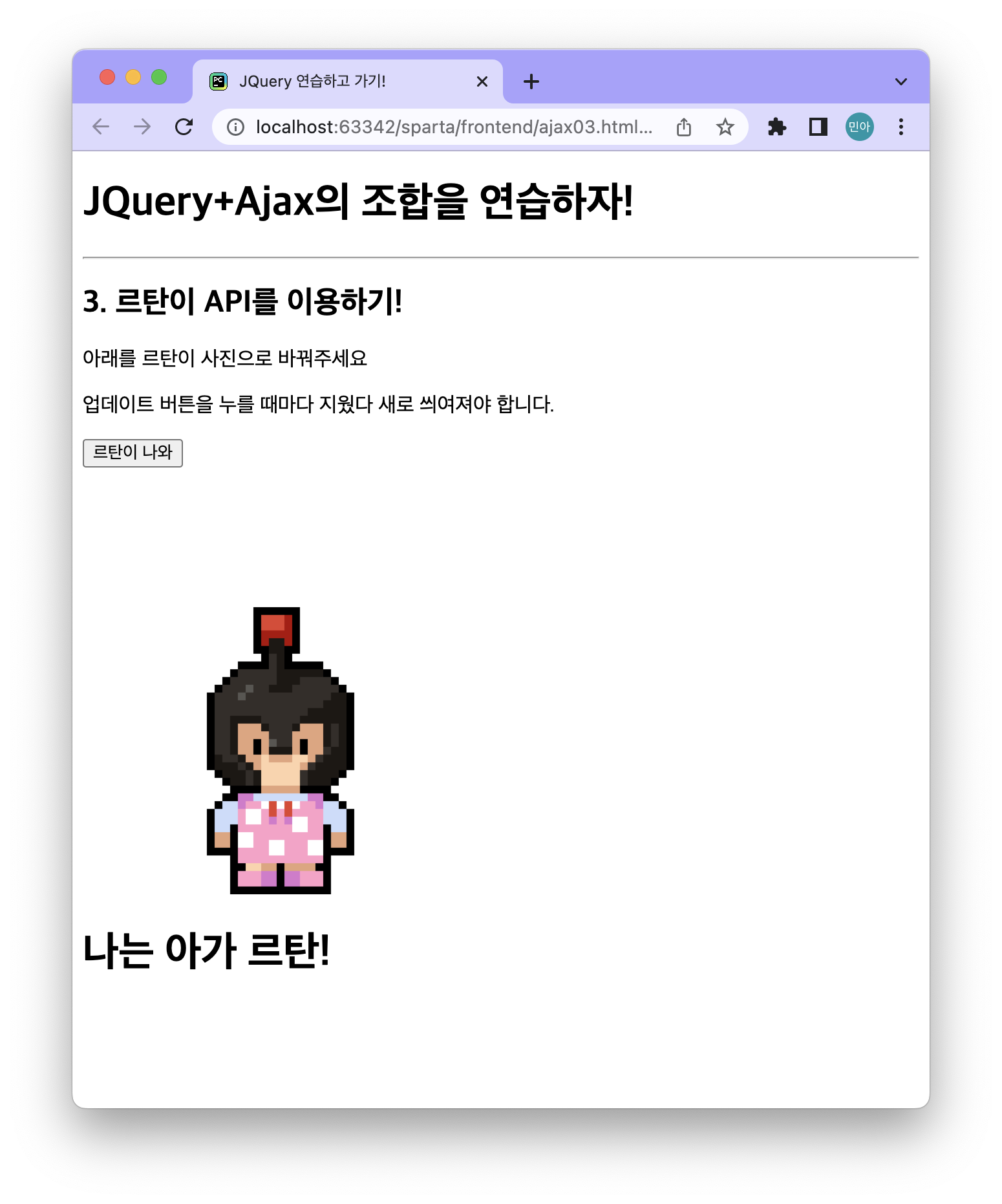
❗️코드
<!doctype html>
<html lang="ko">
<head>
    <meta charset="UTF-8">
    <title>JQuery 연습하고 가기!</title>
    <!-- JQuery를 import 합니다 -->
    <script src="https://ajax.googleapis.com/ajax/libs/jquery/3.4.1/jquery.min.js"></script>

    <style type="text/css">
        div.question-box {
            margin: 10px 0 20px 0;
        }

        div.question-box > div {
            margin-top: 30px;
        }

    </style>

    <script>
        function q1() {
          $.ajax({
            type: "GET",
            url: "http://spartacodingclub.shop/sparta_api/rtan",
            data: {},
            success: function (response) {
              console.log(response)
              let message = response.msg;
              let img = response.url;


              console.log(message, img)

              $('#img-rtan').attr("src", img);
              $('#text-rtan').text(message);
            }
          })
        }
    </script>

</head>
<body>
<h1>JQuery+Ajax의 조합을 연습하자!</h1>

<hr/>

<div class="question-box">
    <h2>3. 르탄이 API를 이용하기!</h2>
    <p>아래를 르탄이 사진으로 바꿔주세요</p>
    <p>업데이트 버튼을 누를 때마다 지웠다 새로 씌여져야 합니다.</p>
    <button onclick="q1()">르탄이 나와</button>
    <div>
        <img id="img-rtan" width="300" src="http://spartacodingclub.shop/static/images/rtans/SpartaIcon11.png"/>
        <h1 id="text-rtan">나는 ㅇㅇㅇ하는 르탄이!</h1>
    </div>
</div>
</body>
</html>
3. 후기
| 2주차 완료! |
|---|
 |
항상 이름만 들어보고 무엇인지도 인지하지 못하고 있던 jQuery, Ajax ❗️
항상 처음 접해보는 것에는 막연한 두려움을 가지고 시작조차 못하고 미래의 나에게 미뤘던 것 같다.
스파르타 코딩클럽을 접하면서 막연한 두려움이 사라지는 기분이다 😎
"역시 코딩은 한번 접해보면 해볼만해!"라는 생각이 든다.
이번달의 목표가 생겼다. 프론트와 백을 모두 구현하여 하나의 웹 사이트를 만들어 봐야겠다 👻!!
Ref.
스파르타코딩클럽