Getting Started with Local LLM Code Completion in Neovim using Ollama
So you want AI-powered code completion but you're not keen on sending your code to the cloud? Maybe you work on proprietary code, maybe you value privacy, or maybe you just want to avoid that awkward moment when your internet dies mid-completion and you realize you've forgotten how to write a for loop. Whatever your reason, running LLMs locally is the answer.
In this guide, we'll set up Ollama with the Qwen2.5-Coder model and hook it into Neovim using the minuet-ai.nvim plugin. By the end, you'll have GitHub Copilot-like completions running entirely on your machine.
Why Local LLMs?
- Privacy: Your code never leaves your machine. Your embarrassing variable names stay between you and your GPU.
- No subscription fees: Once set up, it's free forever. Your wallet will thank you.
- Offline capability: Works on airplanes, in basements, and during apocalyptic internet outages.
- Latency: With a decent GPU, local inference can actually be faster than cloud APIs.
Installing Ollama
Ollama is a lightweight runtime for running LLMs locally. Installation is refreshingly simple:
curl -fsSL https://ollama.com/install.sh | shVerify the installation
ollama -vIf you see a version number, congratulations—you've successfully installed software. The bar was low, but you cleared it.
Configuring Ollama for Optimal Performance
The default Ollama configuration works, but we can do better. On Linux, we'll override the systemd service with custom environment variables:
systemctl edit ollamaThis opens an override file. Add the following configuration:
[Service]
Environment="OLLAMA_HOST=0.0.0.0"
Environment="OLLAMA_FLASH_ATTENTION=1"
Environment="OLLAMA_KV_CACHE_TYPE=q4_0"
Environment="OLLAMA_NUM_PARALLEL=2"
Environment="OLLAMA_KEEP_ALIVE=10m"
Let me explain what each of these does:
| Variable | What it does |
|---|---|
OLLAMA_HOST=0.0.0.0 | Makes Ollama accessible from any network interface, not just localhost. Useful if you want to access it from other devices on your network. |
OLLAMA_FLASH_ATTENTION=1 | Enables Flash Attention, which significantly reduces memory usage as context size grows. This is required for KV cache quantization. |
OLLAMA_KV_CACHE_TYPE=q4_0 | Quantizes the key-value cache to 4-bit, using approximately 1/4 the memory compared to the default fp16. There's a slight quality trade-off, but for code completion it's barely noticeable. Use q8_0 if you have more VRAM and want higher quality. |
OLLAMA_NUM_PARALLEL=2 | Allows processing multiple requests simultaneously. Useful if you're trigger-happy with your completions. |
OLLAMA_KEEP_ALIVE=10m | Keeps the model loaded in memory for 10 minutes after the last request. Default is 5 minutes. Longer means faster first response, but uses more memory. |
Don't forget to restart the service:
systemctl restart ollamaChoosing the Right Model: Qwen2.5-Coder
We're using Qwen2.5-Coder, and here's why it's an excellent choice:
- Fill-in-the-Middle (FIM) support: Essential for code completion—it can complete code in the middle of a function, not just at the end.
- 40+ programming languages: From Python to Haskell to Racket (yes, really).
- 5.5 trillion tokens of training data: It has seen more code than any human ever will.
Pull the model:
ollama pull qwen2.5-coder:latestThis downloads the 7B parameter version (~4.7GB). If you have more VRAM, consider qwen2.5-coder:14b or qwen2.5-coder:32b for even better results.
Note: The 7B model needs ~6GB VRAM, 14B needs ~10GB, and 32B needs ~20GB. Plan accordingly, or your GPU will plan for you (by crashing).
Setting Up Neovim with minuet-ai.nvim
minuet-ai.nvim is a fantastic plugin that brings LLM-powered completions to Neovim. Unlike some alternatives, it doesn't require any proprietary background processes—just curl and your LLM provider.
Key Features
- Multiple frontends: Virtual-text, nvim-cmp, blink-cmp, built-in completion (Neovim 0.11+)
- Streaming support: See completions as they generate
- Fill-in-the-Middle: Proper code completion that understands context before AND after the cursor
- Incremental acceptance: Accept completions word-by-word or line-by-line
Installation with lazy.nvim
Create or edit your plugin spec in your Neovim lua folder:
---@type LazySpec
return {
  "milanglacier/minuet-ai.nvim",
  dependencies = {
    "nvim-lua/plenary.nvim",
  },
  opts = {
    provider = "openai_fim_compatible",
    n_completions = 1, -- Use 1 for local models to save resources
    context_window = 4096, -- Adjust based on your GPU's capability
    throttle = 500, -- Minimum time between requests in ms
    debounce = 300, -- Wait time after typing stops before requesting
    provider_options = {
      openai_fim_compatible = {
        api_key = "TERM", -- Ollama doesn't need a real API key
        name = "Ollama",
        end_point = "http://localhost:11434/v1/completions",
        model = "qwen2.5-coder:latest",
        optional = {
          max_tokens = 256, -- Maximum tokens to generate
          stop = { "\n\n" }, -- Stop at double newlines
          top_p = 0.9, -- Nucleus sampling parameter
        },
      },
    },
    -- Virtual text display settings
    virtualtext = {
      auto_trigger_ft = { "*" }, -- Enable for all filetypes
      keymap = {
        accept = "<Tab>",
        accept_line = "<C-y>",
        next = "<C-n>",
        prev = "<C-p>",
        dismiss = "<C-e>",
      },
    },
  },
}
Configuration Notes
api_key = "TERM": Ollama doesn't require authentication, but minuet-ai needs some environment variable name here.TERMexists on all systems.context_window = 4096: Start with a smaller window and increase if your GPU can handle it. The plugin author recommends starting at 512 to benchmark your hardware.throttleanddebounce: These prevent spamming your GPU with requests. Tune based on how aggressive you want completions to be.
Results
Once everything is set up, you'll see ghost text completions appear as you type. Press <Tab> to accept the full completion, or <C-y> to accept just the current line.
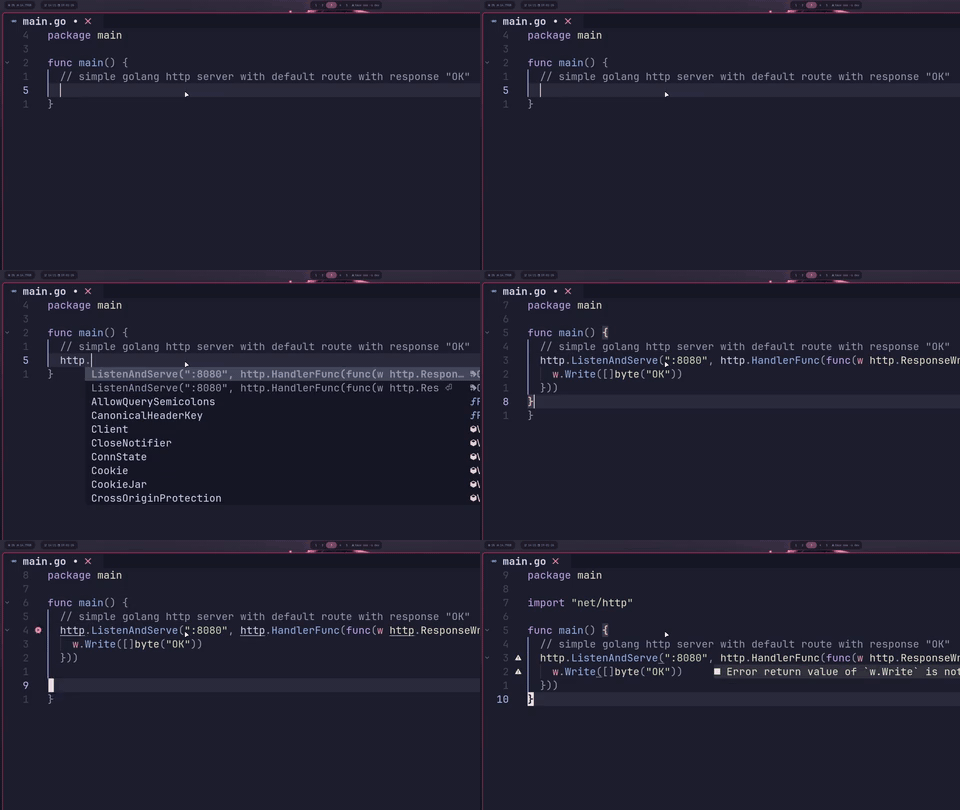
The first completion after loading the model takes a bit longer (cold start), but subsequent completions are fast. If you find it slow, try:
- Reducing
context_window - Using a smaller model (
qwen2.5-coder:7binstead of larger variants) - Increasing
debounceto reduce request frequency
Conclusion
You now have a fully local, privacy-respecting, subscription-free AI code completion setup. Your code stays on your machine, your completions work offline, and you're not paying monthly fees for the privilege.
Happy coding!