Matplotlib
: (Mathdatas plot library) 메타데이터를 도표/그래프로 출력시키는 라이브러리- 데이터 분석 결과를 그래프/차트로 시각화 해주기 위한 라이브러리
- 분석 결과를 수치만으로 설명하는 것보다 시각적인 도구들을 활용하면 훨씬 더 직관적으로 이해가 가능하고 타인에게 전달하기도 용이함
plot chart : 꺾은 선 그래프
import matplotlib.pyplot as plt

plt.plot(y) # x축은 인덱스(0~N-1), y축은 y값으로 이루어진 꺾은 선 그래프
plt.plot(x,y) # x축은 x값, y축은 y값으로 이루어진 꺾은 선 그래프

# 파라미터
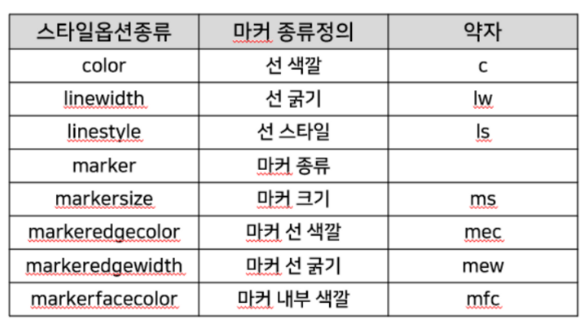
plt.plot(x,y, c='선 색상', ls='선 스타일', lw='선 굵기',
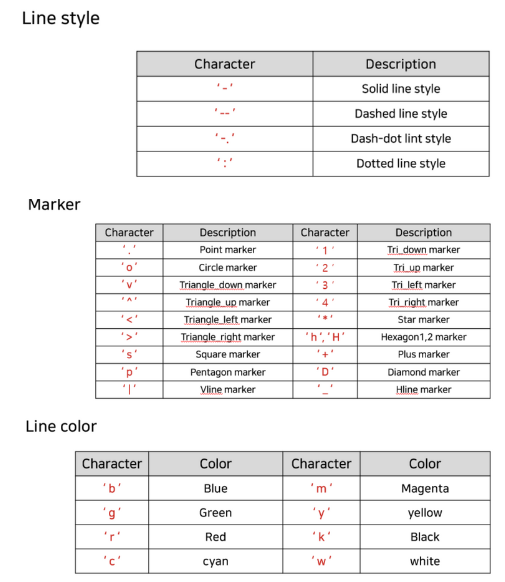
marker='점 종류', ms='마커크기', mec='마커 선 색상', mew='마커 선 굵기', mfc='마커 내부 색상')-
차트 style 옵션
-
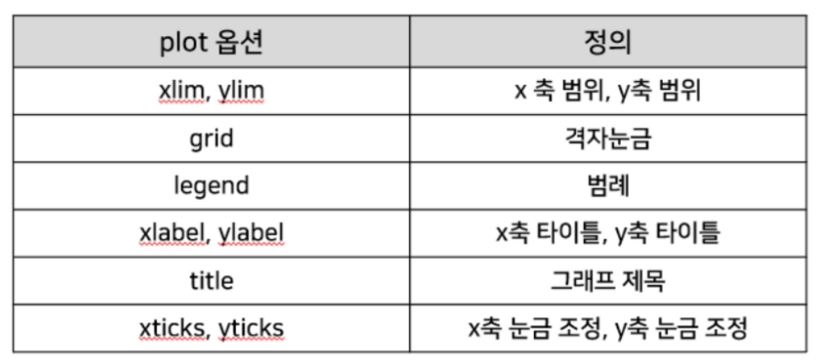
차트 옵션
  # 예시
  x = np.arange(7)
  y = [1,4,5,8,9,5,3]

  ## xlim, ylim : x,y축 표시 범위 설정
  plt.plot(x,y, ls='--', lw=5, marker='o', ms=13, mec='g', mew=5, mfc='r')
  plt.xlim(-2,10)
  plt.ylim(-5,12)
  plt.show()

  ## xticks, yticks : x,y축 눈금 설정
  plt.plot(x,y, ls='--', lw=5, marker='o', ms=13, mec='g', mew=5, mfc='r')
  plt.xticks([0,3,6])
  plt.yticks([1,5,9])
  plt.show()

  ## grid : 격자 눈금 생성 (ticks이 있는 위치에만 생성됨!!)
  plt.plot(x,y, ls='--', lw=5, marker='o', ms=13, mec='g', mew=5, mfc='r')
  plt.xticks([0,3,6])
  plt.yticks([1,5,9])
  plt.grid()
  plt.show()

  ## xlabel, ylabel, title : x,y축 이름, 그래프 이름 설정
  plt.plot(x,y, ls='--', lw=5, marker='o', ms=13, mec='g', mew=5, mfc='r')
  plt.xlabel("X axis")
  plt.ylabel("Y axis")
  plt.title("X-Y graph")
  plt.show()

  # 예시 : 여러 그래프 그리기
  x = np.arange(4)
  y1 = [1,2,3,4]
  y2 = [2,4,6,8]
  y3 = [3,6,9,12]
  ## 범례 설정을 위해 각 plot마다 라벨 설정
  plt.plot(x, y1, label="y1")
  plt.plot(x, y2, label="y2")
  plt.plot(x, y3, label="y3")
  ## legend : 범례 설정
  ### loc : 범례 위치 표시(upper, center, lower) + (left, center, right)
  ### prop : 범례 크기 조절
  plt.legend(loc='upper right', prop={'size':15})
  plt.show()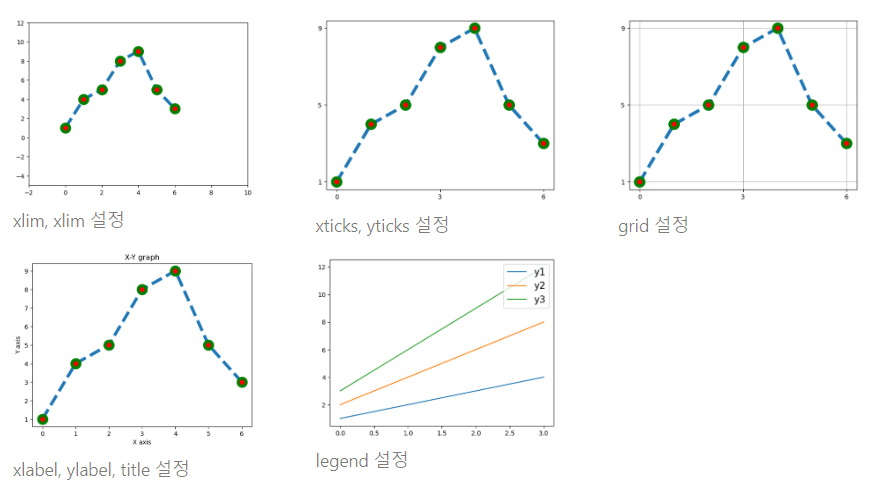
bar chart : 막대 그래프
 plt.bar(x, height)

 # 파라미터
 plt.bar(x, height, color='막대 색상', edgecolor='막대 테두리 색상', linewidth='막대 테두리 굵기',
alpha='투명도(0~1 사이 실수값, 1:불투명, 0:투명)', width='막대 너비(0~1사이 실수값, 기본값은 0.8)',# 예시
x = np.arange(6)
y = [80,85,70,60,50,90]
plt.bar(x,y, color=['orange','cyan','pink','gold'], edgecolor='blue',
linewidth=4, alpha=0.5, width=0.5)
plt.show()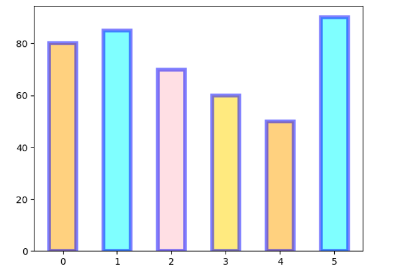
그래프의 한글 폰트 깨질 때
# 한글로 출력해주기 위해서 한글(맑은 고딕) 폰트 지정
from matplotlib import rc
rc('font', family = 'Malgun Gothic')
# 내 pc에 있는 폰트 확인
import matplotlib.font_manager as fm
font_list = fm.findSystemFonts(fontpaths=None, fontext='ttf')
font_list
개발, 분석 배운 내용 정리하기!