An Astrodynamics Simulation Framework
1. Computing Env:
OS : Ubuntu 22.04 LTS
Cpu: Amd 5800x
Gpu: Nvidia 2080ti
#Updated CI scripts to run on latest macOS and no longer use Ubuntu 20.04, Version 2.7.0 (April 20, 2025)
2. Setup on Linux (Ubuntu)
-
Cuda 12.6 & Nvidia drvier 560 for Pytorch
-
vir env : python ver 3.12
3. Package Dependencies
1. $ sudo apt update

2. $ sudo apt upgrade

3. $ sudo apt install git

4. $ sudo apt install build-essential

5. $ sudo apt install python3

6. $ sudo apt install python3-setuptools

7. $ sudo apt install python3-dev

8. $ sudo apt install python3-tk

9. $ sudo apt install libgtk2.0-0 libgtk2.0-dev

10. $ sudo apt install python3-pip

11. $ sudo apt install python3.xx-venv
	 (sudo apt install python3.10-venv)

12. $ python3 --version

13. $ gcc --version
	gcc (Ubuntu 11.4.0-1ubuntu1~22.04.2) 11.4.0
4. Swig
# Requires swig version >= 4.2.1
1. $ swig -version

# if swig version < 4.2.1
2. $ sudo apt remove --purge swig
   $ sudo apt autoremove -y

3. $ sudo apt update
   $ sudo apt upgrade
   $ sudo apt install bison
   $ wget https://github.com/swig/swig/archive/refs/tags/v4.3.1.tar.gz

4. $ tar -xvzf v4.3.1.tar.gz

5. $ cd swig-4.3.1

6. $ make -j$(nproc)

7. $ sudo make install

8. $ swig -version


SWIG Version 4.3.1
Compiled with g++ [x86_64-pc-linux-gnu]
Configured options: +pcre
Please see https://www.swig.org for reporting bugs and further information
5. CMake
# Requires CMake version >= 3.26, < 4.0
1. $ cmake --version

2. $ sudo apt remove --purge cmake cmake-data

3. $ sudo apt autoremove -y


# ref [kitware](https://apt.kitware.com/)
4. $ sudo apt update

5. $ sudo apt install ca-certificates gpg wget

6. $ test -f /usr/share/doc/kitware-archive-keyring/copyright ||
wget -O - https://apt.kitware.com/keys/kitware-archive-latest.asc 2>/dev/null | gpg --dearmor - | sudo tee /usr/share/keyrings/kitware-archive-keyring.gpg >/dev/null


# only for ubuntu 22.04
7. $ echo 'deb [signed-by=/usr/share/keyrings/kitware-archive-keyring.gpg] https://apt.kitware.com/ubuntu/ jammy main' | sudo tee /etc/apt/sources.list.d/kitware.list >/dev/null

   $ sudo apt update


8. $ test -f /usr/share/doc/kitware-archive-keyring/copyright ||
sudo rm /usr/share/keyrings/kitware-archive-keyring.gpg

9. $ sudo apt install kitware-archive-keyring

   $ apt list -a cmake


# choose CMake version 3.31.8
10. $ sudo apt install cmake=3.31.8-0kitware1ubuntu22.04.1 cmake-data=3.31.8-0kitware1ubuntu22.04.1


11. $ cmake --version
	(cmake version 3.31.8)

12. $ which cmake
	(/usr/bin/cmake)
6. Conda Vir Env
# new vir env

1. $ conda create -n BSK python=3.12

# activate vir env
2. $ conda activate BSK

# install packaging & conan for running conanfile.py
3. (BSK) $ pip install packaging conan

4. (BSK) $ conda install -c conda-forge libstdcxx-ng
7. Clone Basilisk Code
1. (BSK) $ mkdir -p ~/Projects/SatGNC && cd ~/Projects/SatGNC

2. (BSK) ~/Projects/SatGNC$ git clone https://github.com/AVSLab/basilisk.git

3. (BSK) ~/Projects/SatGNC$ cd basilisk/

4. (BS) ~/Projects/SatGNC$ pip3 install -r requirements_dev.txt

5. (BSK) ~/Projects/SatGNC/basilisk$ python3 conanfile.py --clean --allOptPkg --vizInterface True --opNav True --buildProject True


... Install for user (u) ? u ...


Total Build Time: 0:04:55.697690
The Basilisk build is successful and the scripts are ready to run
8. Running Project Tests
1. (BSK) ~/Projects/SatGNC/basilisk$ python run_all_test.py


100% tests passed, 0 tests failed out of 57

Total Test time (real) =   0.24 sec


2. (BSK) ~/Projects/SatGNC/basilisk$ cd dist3

3. (BSK) ~/Projects/SatGNC/basilisk/dist3$ ctest


100% tests passed, 0 tests failed out of 57

Total Test time (real) =   0.23 sec


4. (BSK) ~/Projects/SatGNC/basilisk/dist3$ cd ..

5. (BSK) ~/Projects/SatGNC/basilisk/$ cd examples

6. (BSK) ~/Projects/SatGNC/basilisk/examples$ python3 scenarioBasicOrbit.py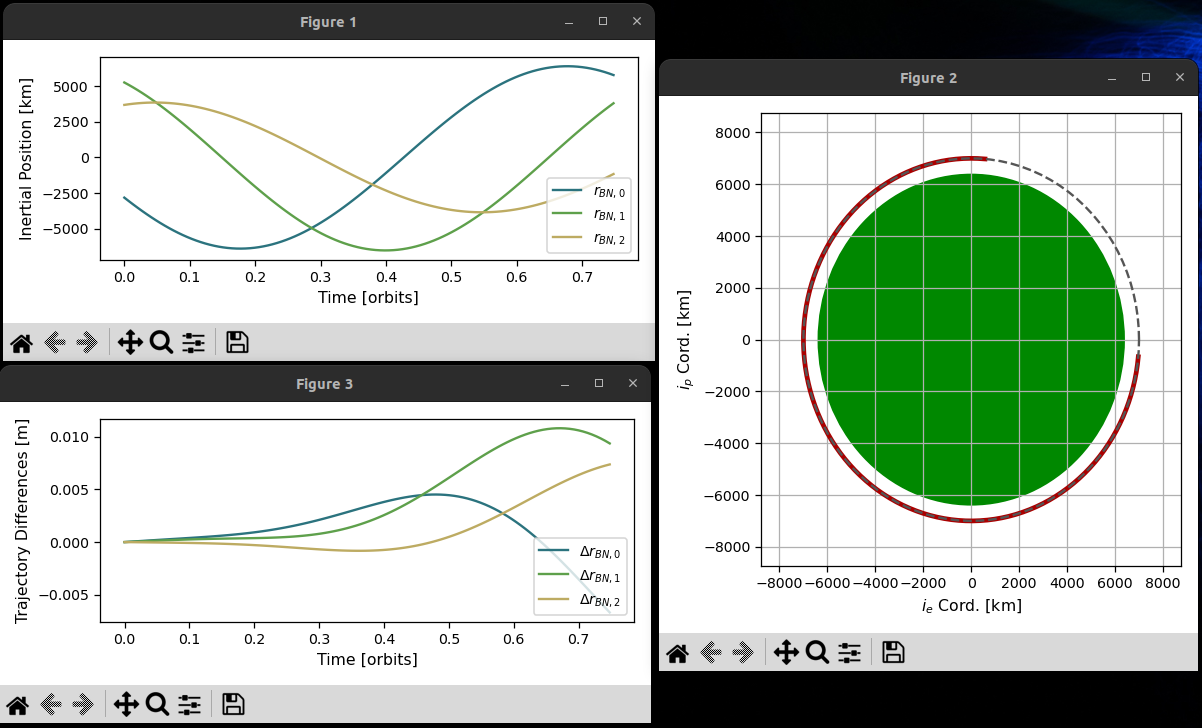
Thanks for reading!

minosauce, Pair the source with sauce !