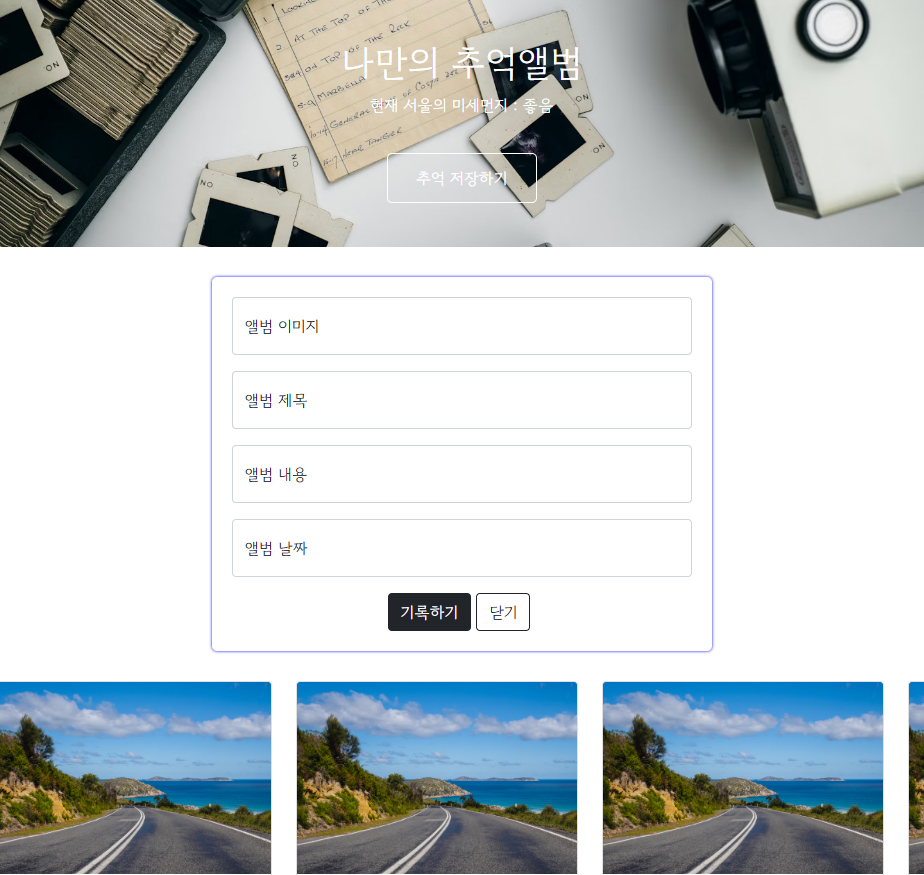
✔️ 아래 링크에서 만든 추억앨범 웹사이트에 fetch를 적용해봅시다!
[CSS] 부트스트랩(bootstrap)으로 추억앨범 웹사이트 만들기 - html
[CSS] 제이쿼리(JQuery)로 추억앨범 웹사이트 만들기 - javascript
💻 기존 CSS 코드
<!DOCTYPE html>
<html lang="en">
    <head>
        <meta charset="UTF-8" />
        <meta name="viewport" content="width=device-width, initial-scale=1.0" />
        <title>나만의 추억앨범</title>
        <script src="https://ajax.googleapis.com/ajax/libs/jquery/3.4.1/jquery.min.js"></script>
        <link
            href="https://cdn.jsdelivr.net/npm/bootstrap@5.0.2/dist/css/bootstrap.min.css"
            rel="stylesheet"
            integrity="sha384-EVSTQN3/azprG1Anm3QDgpJLIm9Nao0Yz1ztcQTwFspd3yD65VohhpuuCOmLASjC"
            crossorigin="anonymous"
        />
        <style>
            @import url('https://fonts.googleapis.com/css2?family=Gowun+Dodum&display=swap');
            * {
                font-family: 'Gowun Dodum', sans-serif;
            }
            .mytitle {
                height: 250px;
                color: white;

                display: flex;
                flex-direction: column;
                align-items: center;
                justify-content: center;

                background-image: url('https://images.unsplash.com/photo-1511992243105-2992b3fd0410?ixlib=rb-4.0.3&ixid=M3wxMjA3fDB8MHxwaG90by1wYWdlfHx8fGVufDB8fHx8fA%3D%3D&auto=format&fit=crop&w=1470&q=80');
                background-position: center;
                background-size: cover;
            }
            .mytitle > button {
                width: 150px;
                height: 50px;
                background-color: transparent;
                color: white;
                border: 1px solid white;
                border-radius: 5px;
                margin-top: 20px;
            }
            .mycards {
                width: 1200px;
                margin: 30px auto 0px auto;
            }
            .mypostingbox {
                width: 500px;
                margin: 30px auto 0px auto;
                padding: 20px;
                box-shadow: 0px 0px 3px 0px blue;
                border-radius: 5px;
            }
            .mybtn {
                display: flex;
                flex-direction: row;
                align-items: center;
                justify-content: center;
            }
            .mybtn > button {
                margin-right: 5px;
            }
        </style>
        <script>
            function openclose() {
                $('#postingbox').toggle();
            }
            function makeCard() {
                let image = $('#image').val();
                let title = $('#title').val();
                let content = $('#content').val();
                let date = $('#date').val();

                let temp_html = `
                <div class="col">
                    <div class="card h-100">
                        <img
                            src="${image}"
                            class="card-img-top"
                            alt="..."
                        />
                        <div class="card-body">
                            <h5 class="card-title">${title}</h5>
                            <p class="card-text">${content}</p>
                        </div>
                        <div class="card-footer">
                            <small class="text-body-secondary">${date}</small>
                        </div>
                    </div>
                </div>`;
                $('#card').append(temp_html);
            }
        </script>
    </head>
    <body>
        <div class="mytitle">
            <h1>나만의 추억앨범</h1>
            <button onclick="openclose()">추억 저장하기</button>
        </div>
        <div class="mypostingbox" id="postingbox">
            <div class="form-floating mb-3">
                <input type="email" class="form-control" id="image" placeholder="앨범 이미지" />
                <label for="floatingInput">앨범 이미지</label>
            </div>
            <div class="form-floating mb-3">
                <input type="email" class="form-control" id="title" placeholder="앨범 제목" />
                <label for="floatingInput">앨범 제목</label>
            </div>
            <div class="form-floating mb-3">
                <input type="email" class="form-control" id="content" placeholder="앨범 내용" />
                <label for="floatingInput">앨범 내용</label>
            </div>
            <div class="form-floating mb-3">
                <input type="email" class="form-control" id="date" placeholder="앨범 날짜" />
                <label for="floatingInput">앨범 날짜</label>
            </div>
            <div class="mybtn">
                <button type="button" onclick="makeCard()" class="btn btn-dark">기록하기</button>
                <button type="button" class="btn btn-outline-dark">닫기</button>
            </div>
        </div>
        <div class="mycards">
            <div id="card" class="row row-cols-1 row-cols-md-4 g-4">
                <div class="col">
                    <div class="card h-100">
                        <img
                            src="https://images.unsplash.com/photo-1446768500601-ac47e5ec3719?ixlib=rb-4.0.3&ixid=M3wxMjA3fDB8MHxwaG90by1wYWdlfHx8fGVufDB8fHx8fA%3D%3D&auto=format&fit=crop&w=1446&q=80"
                            class="card-img-top"
                            alt="..."
                        />
                        <div class="card-body">
                            <h5 class="card-title">앨범 제목</h5>
                            <p class="card-text">앨범 내용</p>
                        </div>
                        <div class="card-footer">
                            <small class="text-body-secondary">앨범 날짜</small>
                        </div>
                    </div>
                </div>
                <div class="col">
                    <div class="card h-100">
                        <img
                            src="https://images.unsplash.com/photo-1446768500601-ac47e5ec3719?ixlib=rb-4.0.3&ixid=M3wxMjA3fDB8MHxwaG90by1wYWdlfHx8fGVufDB8fHx8fA%3D%3D&auto=format&fit=crop&w=1446&q=80"
                            class="card-img-top"
                            alt="..."
                        />
                        <div class="card-body">
                            <h5 class="card-title">앨범 제목</h5>
                            <p class="card-text">앨범 내용</p>
                        </div>
                        <div class="card-footer">
                            <small class="text-body-secondary">앨범 날짜</small>
                        </div>
                    </div>
                </div>
                <div class="col">
                    <div class="card h-100">
                        <img
                            src="https://images.unsplash.com/photo-1446768500601-ac47e5ec3719?ixlib=rb-4.0.3&ixid=M3wxMjA3fDB8MHxwaG90by1wYWdlfHx8fGVufDB8fHx8fA%3D%3D&auto=format&fit=crop&w=1446&q=80"
                            class="card-img-top"
                            alt="..."
                        />
                        <div class="card-body">
                            <h5 class="card-title">앨범 제목</h5>
                            <p class="card-text">앨범 내용</p>
                        </div>
                        <div class="card-footer">
                            <small class="text-body-secondary">앨범 날짜</small>
                        </div>
                    </div>
                </div>
                <div class="col">
                    <div class="card h-100">
                        <img
                            src="https://images.unsplash.com/photo-1446768500601-ac47e5ec3719?ixlib=rb-4.0.3&ixid=M3wxMjA3fDB8MHxwaG90by1wYWdlfHx8fGVufDB8fHx8fA%3D%3D&auto=format&fit=crop&w=1446&q=80"
                            class="card-img-top"
                            alt="..."
                        />
                        <div class="card-body">
                            <h5 class="card-title">앨범 제목</h5>
                            <p class="card-text">앨범 내용</p>
                        </div>
                        <div class="card-footer">
                            <small class="text-body-secondary">앨범 날짜</small>
                        </div>
                    </div>
                </div>
            </div>
        </div>
    </body>
</html>
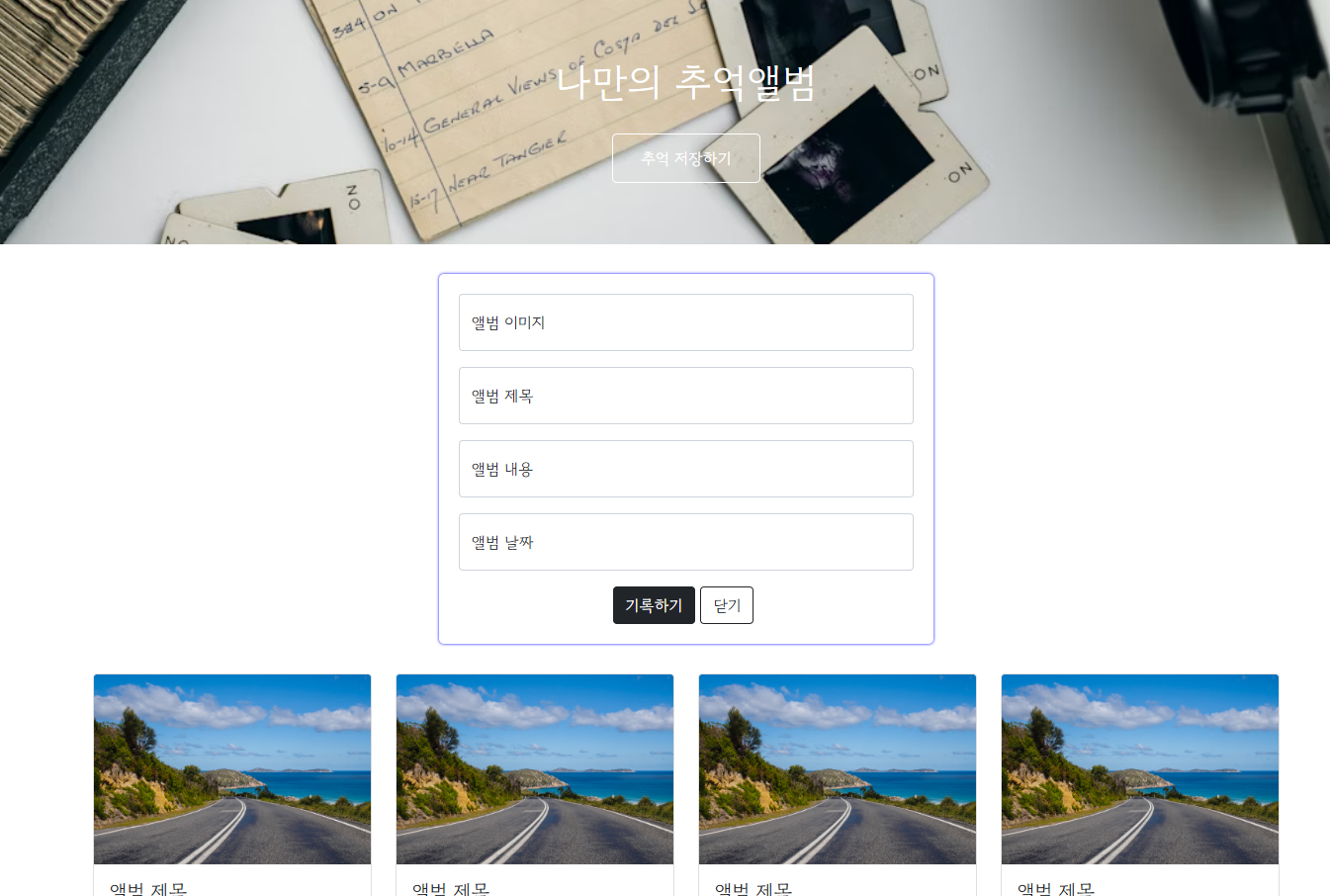
📝 추억앨범 프로젝트
🙂 지금까지 fetch로 데이터 다루는 법을 배웠는데, 이제 써먹어 봐야겠죠!
저희 프로젝트에 fetch를 통해 데이터를 넣어 봅시다!
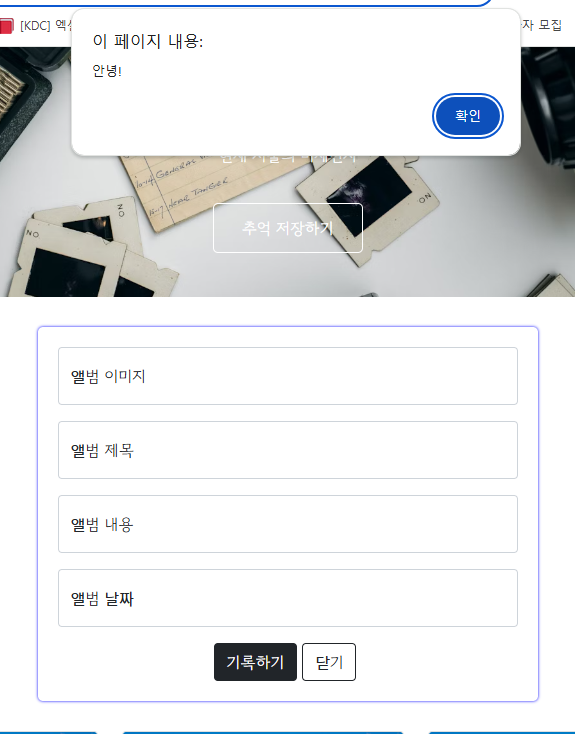
✔️ document ready
💁 지금까지 클릭을 했을 때 변화되는 것들을 만들었다면, 이번에는 페이지가 다 준비가 되었을 때, 즉 페이지 로딩이 다 되었을 때 자동으로
fetch에 콜을 해서 붙여줘야 합니다!
그것이 바로document ready!
$(document).ready(function () {
	alert('안녕!');
})
✔️ 미세먼지 fetch 골격
let url = "http://spartacodingclub.shop/sparta_api/seoulair";
fetch(url).then(res => res.json()).then(data => {
    console.log(data);
})
✔️ fetch 적용하기!
-
script 태그안에 새로운
$(document).ready(function() { ... })함수 작성 -
fetch함수를 사용하여 주어진 URL에서 데이터를 가져오기 -
.then(res => res.json())반환 된 응답(response)내용을 JSON 형식으로 만들기 -
.then(data => { ... })JSON 데이터를 가져온 후 -
temperature값을 변수에 담는다! -
선택자 선택 후
IDEX_NM의 값을 문자열로 삽입 -
div class="mytitle"에 아래 코드 추가 (span id="msg"로 id 값 새로 주기)<p>현재 서울의 미세먼지 : <span id="msg">나쁨</span></p>
💻 추억앨범 fetch 완성 코드
$(document).ready(function () {
    let url = "http://spartacodingclub.shop/sparta_api/seoulair";
    fetch(url).then(res => res.json()).then(data => {
        let mise = data['RealtimeCityAir']['row'][0]['IDEX_NM']
        $('#msg').text(mise)
    })
})
💻 완성 코드
<!doctype html>
<html lang="en">

<head>
    <meta charset="utf-8">
    <meta name="viewport" content="width=device-width, initial-scale=1, shrink-to-fit=no">
    <title>나만의 추억앨범</title>
    <script src="https://ajax.googleapis.com/ajax/libs/jquery/3.6.4/jquery.min.js"></script>
    <link href="https://cdn.jsdelivr.net/npm/bootstrap@5.0.2/dist/css/bootstrap.min.css" rel="stylesheet"
        integrity="sha384-EVSTQN3/azprG1Anm3QDgpJLIm9Nao0Yz1ztcQTwFspd3yD65VohhpuuCOmLASjC" crossorigin="anonymous">

    <style>
        @import url('https://fonts.googleapis.com/css2?family=Gowun+Dodum&display=swap');

        * {
            font-family: 'Gowun Dodum', sans-serif;
        }

        .mytitle {
            background-color: green;
            color: white;

            height: 250px;

            /* 내용물을 정렬 */
            display: flex;
            flex-direction: column;
            align-items: center;
            justify-content: center;

            background-image: url('https://images.unsplash.com/photo-1511992243105-2992b3fd0410?ixlib=rb-4.0.3&ixid=M3wxMjA3fDB8MHxwaG90by1wYWdlfHx8fGVufDB8fHx8fA%3D%3D&auto=format&fit=crop&w=1470&q=80');
            background-position: center;
            background-size: cover;
        }

        .mytitle>button {
            width: 150px;
            height: 50px;
            background-color: transparent;
            border: none;
            color: white;
            font-size: 18px;
            font-weight: bold;
            border-radius: 5px;

            border: 1px solid white;
            margin-top: 20px;
        }

        .mycards {
            margin: 20px auto 20px auto;
            width: 1200px;
        }

        .mypostingbox {
            width: 500px;
            margin: 20px auto 20px auto;
            padding: 20px 20px 20px 20px;
            border-radius: 5px;
            box-shadow: 0px 0px 3px 0px blue;
        }

        .mybtn {
            display: flex;
            flex-direction: row;
            align-items: center;
            justify-content: center;

            margin-top: 10px;
        }

        .mybtn>button {
            margin-right: 10px;
        }
    </style>
    <script>
        $(document).ready(function () {
            let url = "http://spartacodingclub.shop/sparta_api/seoulair";
            fetch(url).then(res => res.json()).then(data => {
                let mise = data['RealtimeCityAir']['row'][0]['IDEX_NM']
                $('#msg').text(mise)
            })
        })

        function openclose() {
            $('#postingbox').toggle();
        }
        function makeCard() {
            let image = $('#image').val();
            let title = $('#title').val();
            let content = $('#content').val();
            let date = $('#date').val();

            let temp_html = `
            <div class="col">
                <div class="card h-100">
                    <img src="${image}"
                        class="card-img-top" alt="...">
                    <div class="card-body">
                        <h5 class="card-title">${title}</h5>
                        <p class="card-text">${content}</p>
                    </div>
                    <div class="card-footer">
                        <small class="text-muted">${date}</small>
                    </div>
                </div>
            </div>`;
            $('#card').append(temp_html);
        }
    </script>
</head>

<body>
    <div class="mytitle">
        <h1>나만의 추억 앨범</h1>
        <p>현재 서울의 미세먼지 : <span id="msg">나쁨</span></p>
        <button onclick="openclose()">추억 저장하기</button>
    </div>
    <div class="mypostingbox" id="postingbox">
        <div class="form-floating mb-3">
            <input type="email" class="form-control" id="image" placeholder="name@example.com">
            <label for="floatingInput">앨범 이미지</label>
        </div>
        <div class="form-floating mb-3">
            <input type="email" class="form-control" id="title" placeholder="name@example.com">
            <label for="floatingInput">앨범 제목</label>
        </div>
        <div class="form-floating">
            <input type="email" class="form-control" id="content" placeholder="name@example.com">
            <label for="floatingTextarea">앨범 내용</label>
        </div>
        <div class="form-floating mb-3">
            <input type="email" class="form-control" id="date" placeholder="name@example.com">
            <label for="floatingInput">앨범 날짜</label>
        </div>
        <div class="mybtn">
            <button onclick="makeCard()" type="button" class="btn btn-dark">기록하기</button>
            <button type="button" class="btn btn-outline-dark">닫기</button>
        </div>
    </div>

    <div class="mycards">
        <div id="card" class="row row-cols-1 row-cols-md-4 g-4">
            <div class="col">
                <div class="card h-100">
                    <img src="https://images.unsplash.com/photo-1446768500601-ac47e5ec3719?ixlib=rb-4.0.3&ixid=M3wxMjA3fDB8MHxwaG90by1wYWdlfHx8fGVufDB8fHx8fA%3D%3D&auto=format&fit=crop&w=1446&q=80"
                        class="card-img-top" alt="...">
                    <div class="card-body">
                        <h5 class="card-title">앨범 제목</h5>
                        <p class="card-text">앨범 내용</p>
                    </div>
                    <div class="card-footer">
                        <small class="text-muted">앨범 날짜</small>
                    </div>
                </div>
            </div>
            <div class="col">
                <div class="card h-100">
                    <img src="https://images.unsplash.com/photo-1446768500601-ac47e5ec3719?ixlib=rb-4.0.3&ixid=M3wxMjA3fDB8MHxwaG90by1wYWdlfHx8fGVufDB8fHx8fA%3D%3D&auto=format&fit=crop&w=1446&q=80"
                        class="card-img-top" alt="...">
                    <div class="card-body">
                        <h5 class="card-title">앨범 제목</h5>
                        <p class="card-text">앨범 내용</p>
                    </div>
                    <div class="card-footer">
                        <small class="text-muted">앨범 날짜</small>
                    </div>
                </div>
            </div>
            <div class="col">
                <div class="card h-100">
                    <img src="https://images.unsplash.com/photo-1446768500601-ac47e5ec3719?ixlib=rb-4.0.3&ixid=M3wxMjA3fDB8MHxwaG90by1wYWdlfHx8fGVufDB8fHx8fA%3D%3D&auto=format&fit=crop&w=1446&q=80"
                        class="card-img-top" alt="...">
                    <div class="card-body">
                        <h5 class="card-title">앨범 제목</h5>
                        <p class="card-text">앨범 내용</p>
                    </div>
                    <div class="card-footer">
                        <small class="text-muted">앨범 날짜</small>
                    </div>
                </div>
            </div>
            <div class="col">
                <div class="card h-100">
                    <img src="https://images.unsplash.com/photo-1446768500601-ac47e5ec3719?ixlib=rb-4.0.3&ixid=M3wxMjA3fDB8MHxwaG90by1wYWdlfHx8fGVufDB8fHx8fA%3D%3D&auto=format&fit=crop&w=1446&q=80"
                        class="card-img-top" alt="...">
                    <div class="card-body">
                        <h5 class="card-title">앨범 제목</h5>
                        <p class="card-text">앨범 내용</p>
                    </div>
                    <div class="card-footer">
                        <small class="text-muted">앨범 날짜</small>
                    </div>
                </div>
            </div>
        </div>
    </div>


</body>

</html>