🫂 키오스크 팀 프로젝트 2일차!
🛍️ 장바구니 데이터 모델 정의
🔹 프로토콜을 사용하여 정의
중복하여 사용하는 데이터를 프로토콜로 정의
- 사용하는 데이터 모델이
JeontongjooSakeWine3가지가 있다. - 모두 같은 프로퍼티를 사용하여, 프로토콜로 정의후 채택했다.
protocol AlcoholItem {
    var name: String { get }
    var price: Int { get }
    var sale: Int { get }
    var originalPrice: Int { get }
    var imageName: String { get }
    var infoName: String { get }
    var info: String { get }
}

struct Jeontongjoo: AlcoholItem {
    var name: String
    var price: Int
    var sale: Int
    var originalPrice: Int
    var imageName: String
    var infoName: String = "종류\n용량\n도수\n맛"
    var info: String
}

extension Jeontongjoo {
    static let list: [Jeontongjoo] = [
        Jeontongjoo(name: "호랑이가 사랑한 단감, 호감",
                    price: 3800,
                    sale: 24,
                    originalPrice: 5000,
                    imageName: "hogam",
                    info: "스파클링 와인\n370ml\n6%\n잘 익은 단감의 달콤함,\n상큼한 사과, 은은한 꿀맛"),
        Jeontongjoo(name: "벚꽃엔딩",
                    price: 11400,
                    sale: 19,
                    originalPrice: 14000,
                    imageName: "cherryBlossom",
                    info: "리큐르\n375ml\n15%\n달콤하고 부드러운 맛,\n상큼한 과일 맛"),
        Jeontongjoo(name: "소곡주",
                    price: 15750,
                    sale: 25,
                    originalPrice: 21000,
                    imageName: "sogok",
                    info: "약주\n700ml\n18%\n진하고 복합적인 맛,\n달콤함과 쓴 맛의 조화"),
        Jeontongjoo(name: "우곡생주 생막걸리",
                    price: 8100,
                    sale: 19,
                    originalPrice: 10000,
                    imageName: "woogoksang",
                    info: "약주\n700ml\n18%\n진하고 복합적인 맛,\n달콤함과 쓴 맛의 조화"),
        Jeontongjoo(name: "매실원주",
                    price: 5900,
                    sale: 26,
                    originalPrice: 8000,
                    imageName: "maesil",
                    info: "과실주\n375ml\n13%\n달콤한 매실, 산뜻한 여운,\n부드러운 목넘김"),
        Jeontongjoo(name: "사랑할때 (사과와인)",
                    price: 3800,
                    sale: 24,
                    originalPrice: 5000,
                    imageName: "atLove",
                    info: "과실주\n300ml\n12%\n사과의 자연스러운 단맛,\n상큼함, 부드러움")
        ]
}
장바구니 데이터 모델
CartItem의 프로퍼티item을AlcoholItem프로토콜 타입으로 지정했다.- 장바구니의 데이터를 접근할때
AlcoholItem프로토콜이 채택된JeontongjooSakeWine에 접근할 수 있게 되었다.
struct CartItem {
    let item: AlcoholItem
    var quantity: Int
}
장바구니 셀에 데이터 불러오기
configure메소드의 매개변수를 통해CartItem의AlcoholItem프로토콜 타입인item프로퍼티에 접근- item
프로퍼티는AlcoholItem프로토콜을 채택하는JeontongjooSakeWine의 각각의 프로퍼티에 접근할 수 있다. - 따라서 어떤 데이터 모델이든
AlcoholItem프로토콜 타입인item프로퍼티를 통해 접근이 가능해진다. - 결국 모든 카테고리의 상품의 가격, 이름 등을 장바구니로 가져올 수 있다.
func collectionView(_ collectionView: UICollectionView, cellForItemAt indexPath: IndexPath) -> UICollectionViewCell {
    // 컬렉션 뷰가 장바구니일때
    if collectionView == cartCollectionView{
        guard let cell = collectionView.dequeueReusableCell(withReuseIdentifier: "CartCell", for: indexPath) as? CartCollectionViewCell else {
            return UICollectionViewCell()
        }

        let cartItem = cartItems[indexPath.item]
        cell.configure(itemName: cartItem.item.name, quantity: cartItem.quantity, price: cartItem.item.price)

        cell.delegate = self

        // 구분선 생성 및 마지막 셀 구분선 숨김 처리
        let isLastCell = indexPath.item == cartItems.count - 1
        cell.separatorView.isHidden = isLastCell

        return cell
🛍️ 장바구니에 선택한 상품 넣기
🔹 Delegate을 이용하여 구현
선택한 상품 장바구니에 추가
// MARK: - 컬렉션 뷰 델리게이트
extension ViewController: UICollectionViewDelegate {
    // 선택된 item을 호출할 메서드
    func collectionView(_ collectionView: UICollectionView, didUnhighlightItemAt indexPath: IndexPath) {
    .
    .
    .
    // 상품 선택 시, 장바구니에 상품 데이터 전송
    	if let selected = selectedItem {
    		// 장바구니에 같은 상품이 있는지 확인
        	if let index = cartItems.firstIndex(where: { $0.item.name == selected.name }) {
        		cartItems[index].quantity += 1 // 수량 증가
        	} else {
        		// 새 상품 추가
            	let newCartItem = CartItem(item: selected, quantity: 1)
            	cartItems.append(newCartItem)
        	}

        	cartCollectionView.reloadData() // 새로고침
    	}
    }
}
🛍️ 장바구니에 상품 수량 -+버튼으로 조작 기능 구현
🔹 Delegate 패턴 사용
Delegate 프로토콜 정의
protocol CartCollectionViewCellDelegate: AnyObject {
    func didTapPlusButton(in cell: CartCollectionViewCell)
    func didTapMinusButton(in cell: CartCollectionViewCell)
}
셀에 delegate 프로퍼티 추가
class CartCollectionViewCell: UICollectionViewCell {
	.
    .
    .
    weak var delegate: CartCollectionViewCellDelegate?
    .
    .
    .
}
ViewController에서 셀 델리게이트 설정 + 구현
extension ViewController: CartCollectionViewCellDelegate {
    func didTapMinusButton(in cell: CartCollectionViewCell) {
        guard let indexPath = cartCollectionView.indexPath(for: cell) else { return }

        if cartItems[indexPath.item].quantity > 1 {
            cartItems[indexPath.item].quantity -= 1
        } else {
            cartItems.remove(at: indexPath.item)
        }
        cartCollectionView.reloadData()
    }

    func didTapPlusButton(in cell: CartCollectionViewCell) {
        guard let indexPath = cartCollectionView.indexPath(for: cell) else { return }

        cartItems[indexPath.item].quantity += 1
        cartCollectionView.reloadItems(at: [indexPath])
    }
}
버튼 액션 추가
    @objc func minusButtonTapped() {
        delegate?.didTapMinusButton(in: self)
    }

    @objc func plusButtonTapped() {
        delegate?.didTapPlusButton(in: self)
    }
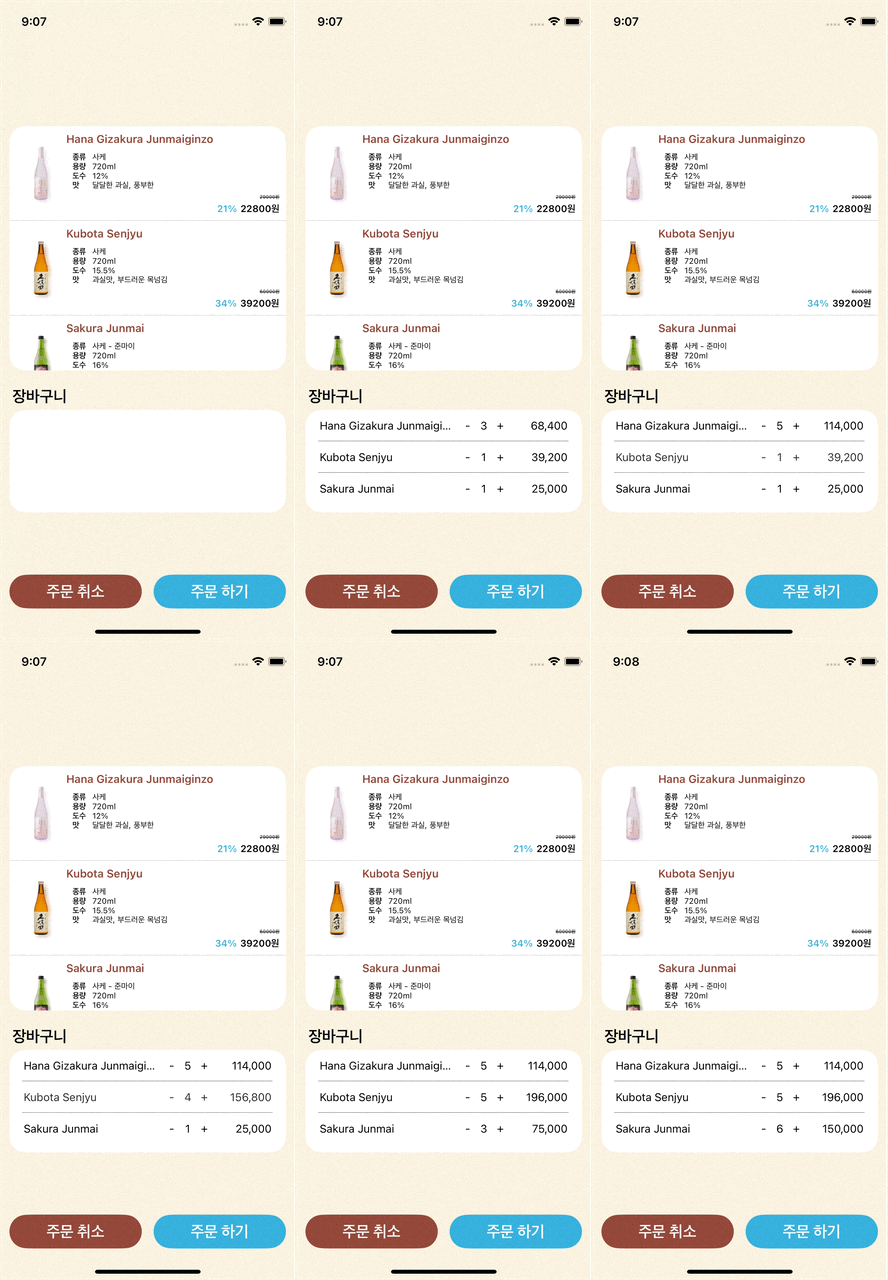
🔹 결과: 장바구니 기능 완성 😎
델리게이트 패턴이란?
델리게이트 패턴(Delegate Pattern)은 iOS 개발에서 진짜 자주 쓰이는 디자인 패턴 중 하나
💡 "어떤 객체가 해야 할 일을 다른 객체에게 대신 시켜주는 방법"
델리게이트 예시
카페 사장이 매번 손님이 오면 직접 커피 내리지 않고
직원한테 "손님 오면 커피 내려줘"라고 시킴.이때 이 직원이 바로 Delegate(대리인) 이고, 사장은 델리게이트를 갖고 있는 객체야.
코드 예시
-
프로토콜 선언 (일종의 계약서)
protocol CoffeeDelegate: AnyObject { func didOrderCoffee() } -
Delegate를 갖고 있는 객체 (사장)
class Cafe { weak var delegate: CoffeeDelegate? func customerArrived() { print("손님이 왔다!") delegate?.didOrderCoffee() } } -
일을 대신할 객체 (직원)
class Barista: CoffeeDelegate { func didOrderCoffee() { print("커피 내리는 중...") } } -
둘을 연결
let cafe = Cafe()
let barista = Barista()

cafe.delegate = barista
cafe.customerArrived()
// 👉 손님이 왔다!
// 👉 커피 내리는 중...
내가 만든 장바구니 코드에서는?
CartCollectionViewCell에서-버튼+버튼이 눌렸을 때- "셀 내부에서 직접 처리하지 말고
ViewController(부모)한테 알려줘서 처리하게 시켜라" 라는 의미 - 셀은 온전히 UI에만 집중!
- "셀 내부에서 직접 처리하지 말고
델리게이트 패턴 사용 이유
-
역할을 분리해서 코드가 깔끔해짐
→ 셀은 UI에 집중하고, 뷰컨은 데이터 처리 담당 -
재사용성 증가
→ 다른 화면에서도 셀은 그대로 쓸 수 있어 -
유연하고 확장성 있음
→ 상황에 따라 delegate가 달라져도 문제 없음
정리
- 델리게이트 패턴 = 어떤 객체가 자기 대신 어떤 일을 하라고 위임(delegate) 하는 패턴

iOS 개발 블로그