(Jetson Project#13)Integrating All Components and Testing
Developing Self Driving with Jetson Nano

Part7: Integrating All Components(Node && Launch) and Testing
With all individual components set up, it's time to integrate them and perform comprehensive testing to ensure everything works harmoniously.
7.1. Launch All Nodes
To streamline the process, consider using separate terminals for each node or utilizing a launch file that includes all necessary nodes. Here's how to proceed using separate terminals:
Terminal 1: Launch roscore (if not already running)
roscoreTerminal 2: Launch RPLIDAR Node
roslaunch rplidar_ros rplidar_a1.launchTerminal 3: Launch IMU Node
roslaunch mpu6050_driver mpu6050.launchTerminal 4: Launch TF Broadcaster(Not necessary, already included in mpu.launch.. if you can't understand, review the last post)
roslaunch mpu6050_driver tf_broadcaster.launch
Terminal 5: Launch Motor Control Node
roslaunch motor_control motor_control.launch
Terminal 6: Launch Obstacle Avoidance Node
roslaunch motor_control obstacle_avoidance.launch
Terminal 7: Launch RViz
rvizConfigure RViz:
* Fixed Frame: Set to laser.
- Add Displays:
Map (/map)
RobotModel (/robot_description)
LaserScan (/scan)
IMU (/imu/data_raw)
TF
7.2. Testing the Integrated System
-
Verify LIDAR and IMU Data in RViz:
- Ensure that the LIDAR data is visualized.
- Observe IMU data reflecting the robot's orientation and movement.
-
Test Motor Control:
2.1. Manual Commands:- Publish commands to motor_command topic and observe motor responses.
2.2. Obstacle Avoidance:
- Introduce obstacles and verify that the robot stops or maneuvers accordingly.
-
Monitor ROS Logs:
- Use rqt_console:
rosrun rqt_console rqt_console- Use rqt_graph:
rosrun rqt_graph rqt_graph
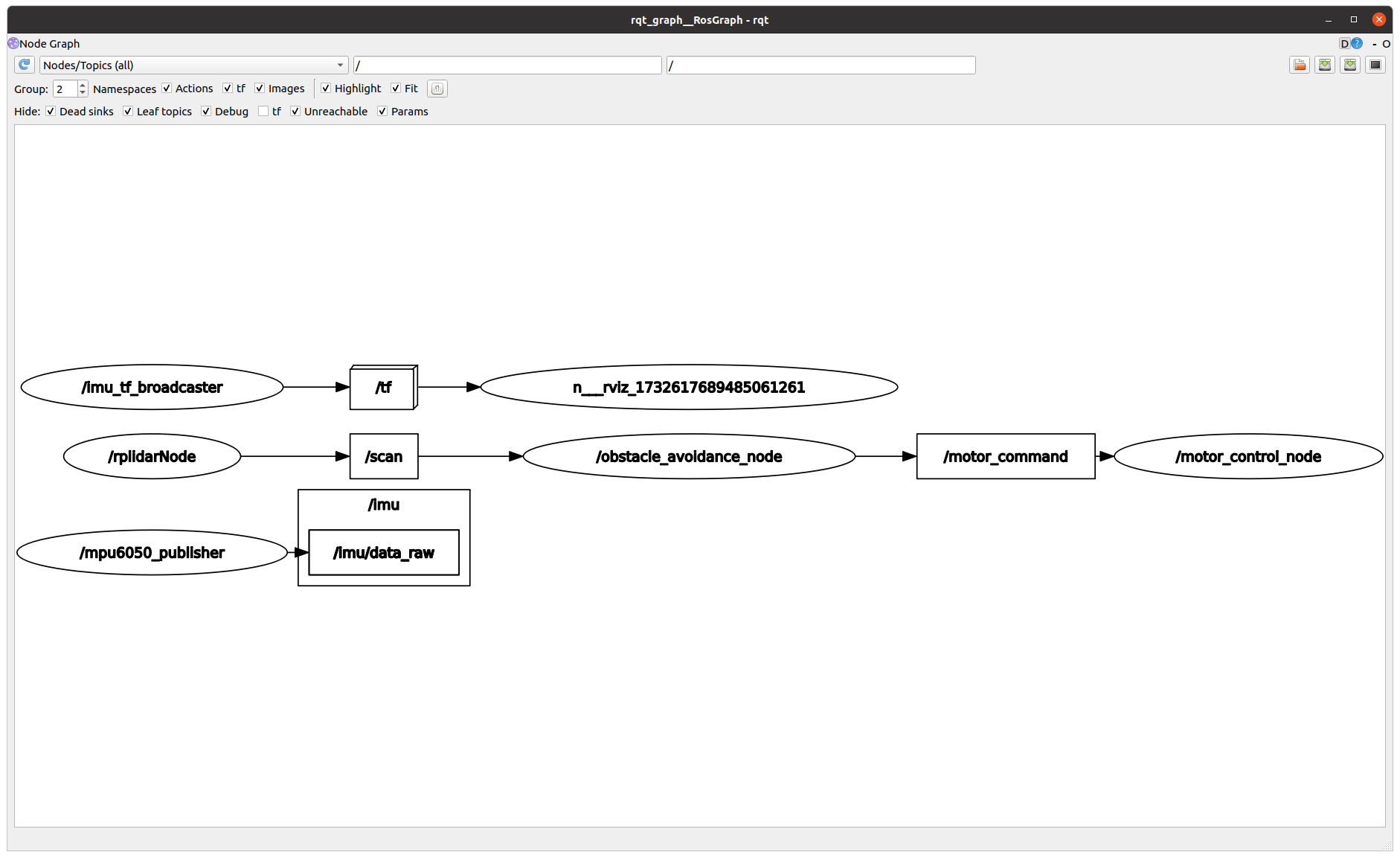
similar above diagram...(maybe)
These tools help visualize node connections and monitor logs for any errors or warnings.