열거형
열거라는 뜻은 그냥 늘여뜨려 놓다. 라는 의미이다. 보통 사건을 열거하다와 같이 사용된다.
어떻게 보면 배열과도 비슷하지만 그 성격이 다르다.
이번 시간에는 enum을 이용한 열거형 자료형(!?)을 알아보자.
ENUM
Enumerate의 줄임말로 보인다. 숫자에 별명을 짓는다라고 배우고 있다. 일종의 Tag.
하지만 실체로 그 숫자를 사용하는 것이 아니라 Tag를 사용하여 코딩의 실수를 줄이고 보다 읽기 편한 코드를 작성하는데 도움을 준다.
코드 예시
using System;

namespace Enumerate
{
    class Program
    {
        static void Main(string[] args)
        {
            for (int i = -2; i < 7; i++)
            {
                // 이렇게 실제 값이 주어 져 있는지 확인도 가능하다.
                if (Enum.IsDefined(typeof(EnumExample), i))
                {
                    // (Enum)번호 로 출력할 수도 있긴하다.
                    Console.WriteLine($"{(EnumExample)i}");
                }
            }
            // 일반적인 사용법은 이렇게 되어 있다.
            Console.WriteLine(EnumExample.Apple);
        }

        public enum EnumExample
        {
            // 일반적으로 '0' 부터 index가 매겨진다.
            Orange,
            Apple,
            Pineapple,
            Banana,
            WaterMelon,
            // 특정 index에 쓰려고 하면, Override 되지 않고 무시되어 버린다.
            Grape = 4
        }

    }
}
실행 결과
Orange
Apple
Pineapple
Banana
WaterMelon
주로 ConsoleKey에서 자주 볼 수 있다. 그 외에도 특정 값을 지정하고 이를 변경하지 않아야 할 때 등으로 쓰을 것으로 보인다.
ChatGPT 와 함께 한 1주일간 게임 개발기 에서 개발시 게임의 실패 성공 관련으로 활용했던 것으로 기억한다.
구조체
구조체는 데이터를 사용자가 직접 그 형태를 디자인하여 구현하는 내용이다.
가장 중요한 것은 구조체는 값 타입이라는 것이다.
코드 예시
using System;
using System.Collections.Generic;
using System.Linq;
using System.Text;

namespace _20251215
{
    public struct GraduationData
    {
        // 일반적인 구조체 모양
        public GraduationData(string name, string grade)
        {
            Name = name;
            Grade = grade;
        }
        public string Name { get; set; }
        public string Grade { get; set; }
    }
    public struct Student
    {
        // 구조체를 처음 불러올 때 초기화. 매개변수와 같이 쓰는 것이 일반적이다.
        public Student(string name, int age, float height, string motivate)
        {
            Name = name;
            Age = age;
            Height = height;
            Motivate = motivate;
            // 당연하지만 구조체내 구조체 선언이 가능하다.
            Graduations  = new List<GraduationData>();
        }

        // 구조체 내 변수 선언. public/private 등에 따라 접근 제한 제어가 가능하다.
        public string Name { get; set; }
        public int Age { get; set; }
        public float Height { get; set; }
        public string Motivate { get; set; }
        public List<GraduationData> Graduations { get; set; }

        public void PrintInfo()
        {
            Console.WriteLine($"Name: {Name}\nAge: {Age}\nHeight: {Height}\nMotivate: {Motivate}");
            if (Graduations.Count > 0)
            {
                Console.WriteLine("Graduations:");
                for (int i = 0; i < Graduations.Count; i++)
                {
                    Console.WriteLine($" - {Graduations[i].Name}; {Graduations[i].Grade}");
                }
            }
        }
    }

    internal class Program
    {
        static void Main(string[] args)
        {
            List<Student> students = new List<Student>();
            students.Add(new Student("Alex", 21, 181.0f, "save me"));
            students.Add(new Student("Mike", 18, 201.2f, "kill shit"));
            students.Add(new Student("Kuba", 19, 175.3f, "hungry"));
            Student nia = new Student("Nia", 100, 162.0f, "whatthef");
            nia.Graduations.Add(new GraduationData("Seoul University", "B+"));
            nia.Graduations.Add(new GraduationData("Kwangwoon University", "A+"));
            students.Add(nia);

            foreach (var s in students)
            {
                s.PrintInfo();
                Console.WriteLine("------------------");
            }
        }

    }
}
실행 결과
Name: Alex
Age: 21
Height: 181
Motivate: save me
------------------
Name: Mike
Age: 18
Height: 201.2
Motivate: kill shit
------------------
Name: Kuba
Age: 19
Height: 175.3
Motivate: hungry
------------------
Name: Nia
Age: 100
Height: 162
Motivate: whatthef
Graduations:
 - Seoul University; B+
 - Kwangwoon University; A+
------------------
잡도리
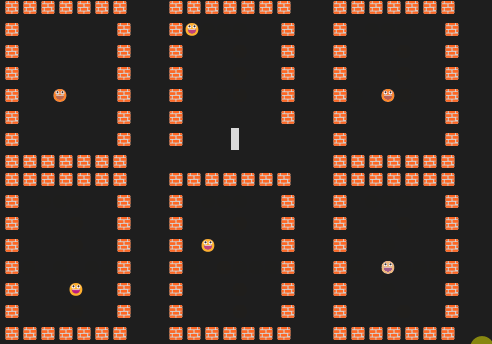
전에 콘솔 화면에서 사각형 맵에 뭔가 움직이는 것을 강사님이 보여주신 적이 있다.
잠깐 시간이 있어 간단히 구현해 보았다.
코드
using System;
using System.Text;

namespace _20251215
{
    internal class Program
    {
        static void Drawing(char[,] map, int x, int y)
        {
            string emptySpace = "  ";
            string wallIcon = "🧱";
            string player = "😀";

            for (int i = 0; i < map.GetLength(0); i++)
            {
                for (int j = 0; j < map.GetLength(1); j++)
                {
                    if (i == 0 || i == map.GetLength(0) - 1 || j == 0 || j == map.GetLength(1) - 1)
                    {
                        Console.Write(wallIcon);
                    }
                    else if (j == x && i == y)
                    {
                        Console.ForegroundColor = ConsoleColor.Blue;
                        Console.Write(player);
                        Console.ResetColor();
                    }
                    else Console.Write(emptySpace);

                }
                Console.WriteLine();
            }
        }
        static void Main(string[] args)
        {
            Console.OutputEncoding = Encoding.UTF8;

            int mapSize = 8;
            char [,] map = new char[mapSize, mapSize];
            int x = 1;
            int y = 1;
            while (true)
            {
                Console.Clear();
                Drawing(map, x, y);
                switch (Console.ReadKey().Key)
                {
                    case ConsoleKey.UpArrow:
                        if (y > 1) y--;
                        break;
                    case ConsoleKey.DownArrow:
                        if (y < mapSize - 2) y++;
                        break;
                    case ConsoleKey.LeftArrow:
                        if (x > 1) x--;
                        break;
                    case ConsoleKey.RightArrow:
                        if (x < mapSize - 2) x++;
                        break;
                    case ConsoleKey.Escape:
                        return;
                }
            }
        }
    }
}
실행 스냅샷
고찰
보통 Logging 을 많이 하는데 이것을 Console.WriteLine으로 하지는 않을 것 같다.
StreamHandler관련 내용이 있을 것 같은데 가볍게 찾아봐야겠다.
오늘의 코딩 테스트

Python Dev with Infra -> Game Programmer