아래 내용은 AI 와 함께 학습한 내용을 토대로, AI 를 이용한 정리 내용임을 먼저 말씀 드립니다.
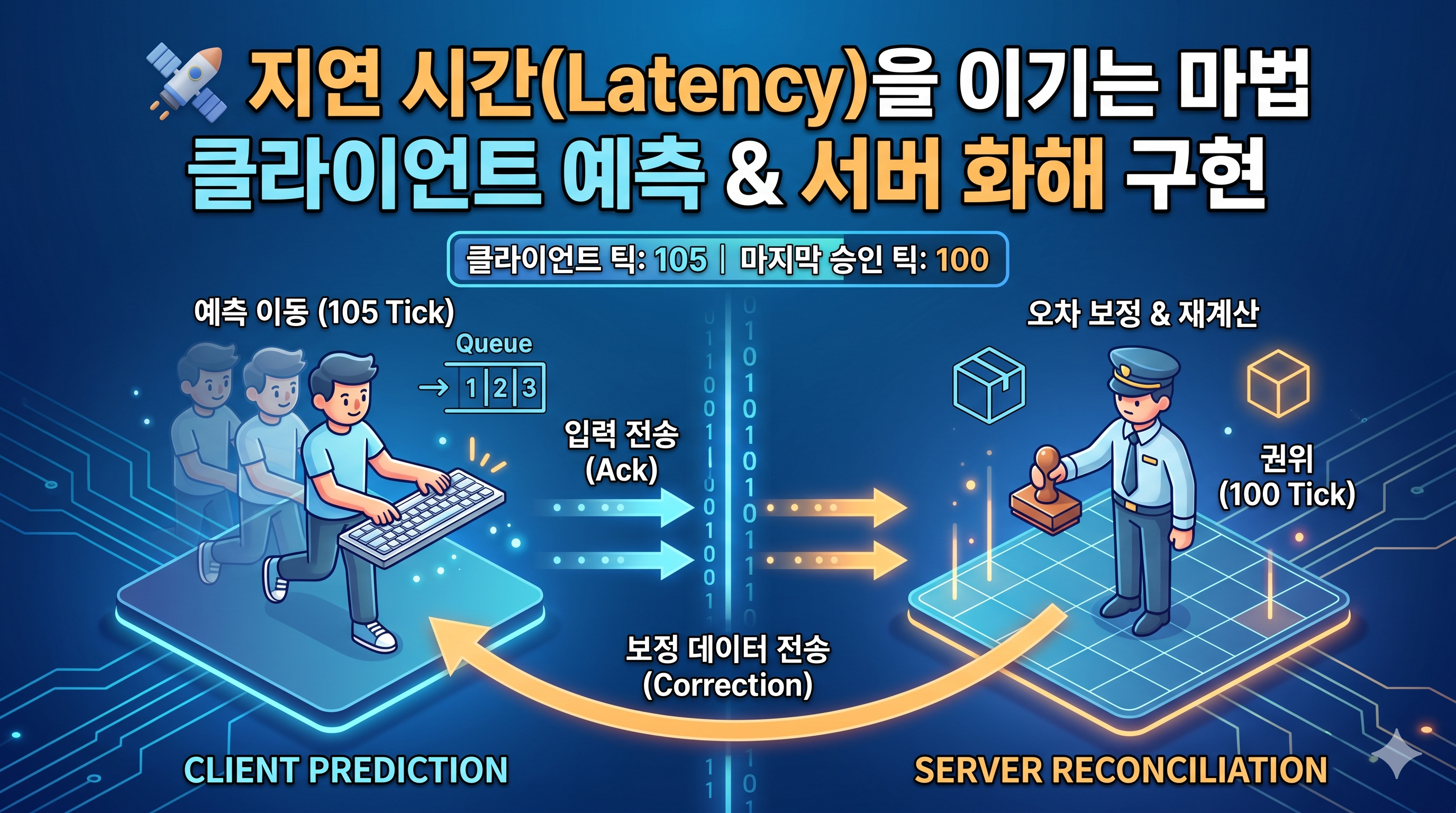
🛰️ 멀티플레이어 게임의 마법: 클라이언트 측 예측 & 서버 화해
멀티플레이어 게임에서 내가 키를 눌렀는데 캐릭터가 0.1초 뒤에 움직인다면 어떨까요? 아마 1분도 안 되어 게임을 끌 것입니다. 이 불쾌한 '렉'을 해결하기 위해 현대 게임들이 사용하는 핵심 기술인 클라이언트 측 예측(Client-Side Prediction)과 서버 화해(Server Reconciliation)를 직접 구현하며 배운 점들을 정리합니다.
1. 문제 정의: "서버는 너무 느리다"
권위 있는 서버(Authoritative Server) 모델에서 모든 연산의 정답은 서버가 가지고 있습니다.
- 클라이언트: "나 오른쪽 가도 돼?" (요청 전송)
- 네트워크: (100ms 지연)
- 서버: "응, 너 이제 (1, 0)이야." (계산 및 응답)
- 클라이언트: (응답 받고 이동) -> 사용자는 0.1초의 답답함을 느낌.
2. 해결책 1: 클라이언트 측 예측 (Client-Side Prediction)
서버의 허락을 기다리지 않고 "일단 움직이는 것"입니다.
- 사용자가 키를 누르는 즉시 로컬에서 위치를 시뮬레이션합니다.
- 사용자는 자신의 입력에 즉각적으로 반응하는 화면을 보게 됩니다.
- 핵심: 내가 한 행동(Input)을 Tick 번호와 함께 버퍼(Queue)에 소중히 보관해야 합니다.
3. 해결책 2: 서버 화해 (Server Reconciliation)
클라이언트의 예측이 항상 맞을 수는 없습니다. 장애물에 부딪히거나 다른 유저와 충돌하면 서버는 클라이언트와 다른 결과를 내놓습니다. 이때 필요한 것이 '화해' 과정입니다.
💡 내가 고민했던 핵심 로직과 해결
Q1. 서버로부터 데이터를 받으면 그냥 그 위치로 순간이동 하면 안 되나?
- 문제: 서버의 응답은 100ms 전의 '과거' 데이터입니다. 단순히 그 위치로 옮기면 캐릭터가 뒤로 튕기는(Snap-back) 현상이 발생합니다.
- 해결: 서버가 준 과거의 확정 좌표(sPos)로 워프한 뒤, 아직 서버가 확인해주지 않은 '미래의 입력값들(Pending Inputs)'을 버퍼에서 꺼내 순식간에 다시 계산(Replay)합니다.
Q2. 버퍼(Buffer)는 언제 비워야 하는가?
- 고민: 재계산을 했으니 싹 비워야 할까?
- 해결: 아닙니다. 서버가 "n번 틱까지 확인했어"라고 알려준 그 시점까지만 비워야 합니다. 그래야 다음 서버 패킷이 왔을 때 또 그 이후의 미래를 재계산할 재료가 남기 때문입니다.
Q3. 틱(Tick) 오버플로 문제
- 고민: int값이 최대치를 넘어서 0으로 돌아가면 비교 연산(<=)이 깨지지 않을까?
- 해결: 정수 순환(Wrap-around) 특성을 이용합니다. (currentTick - targetTick) > 0 방식을 사용하면 숫자가 한 바퀴 돌아도 선후 관계를 정확히 알 수 있습니다.
4. 최종 구현 구조 (Refactoring 포인트)
직접 코드를 짜보며 확립한 데이터 흐름은 다음과 같습니다.
| 주체 | 데이터 관리 | 핵심 역할 |
|---|---|---|
| 클라이언트 | Queue (Input Buffer) | 입력을 보낼 때 Tick ID를 붙여 저장. 서버 응답 시 '과거 기점'부터 현재까지 초고속 재시뮬레이션. |
| 서버 | Latest State (변수) | 큐가 필요 없음. 받은 입력을 물리 월드에 적용하고, '최종 결과 좌표'와 '처리한 틱 번호'만 클라이언트에 전송. |
5. 마치며
이 시스템의 핵심은 "서버의 권위를 인정하되, 클라이언트의 조작 연속성을 보장하는 것"에 있습니다.
- 서버: 절대 좌표(진실)를 전달한다.
- 클라이언트: 과거의 진실 위로 미래의 조작을 다시 입힌다.
단순히 transform.position을 옮기는 것보다 훨씬 복잡한 작업이었지만, 이 로직 하나로 멀티플레이어 게임의 사용자 경험이 얼마나 극적으로 개선되는지 이해할 수 있는 귀중한 시간이었습니다.
Tip: 테스트할 때 의도적으로 네트워크 지연(Lag)을 발생시키는 툴을 사용하거나, 서버에서 강제로 위치 오차를 발생시켜 보면 캐릭터가 부드럽게 보정되는 것을 확인할 수 있습니다!
6. 예제 Code
using System.Collections;
using System.Collections.Generic;
using UnityEngine;
using Unity.Netcode;

[RequireComponent(typeof(NetworkObject))]
public class PlayerController : NetworkBehaviour
{
    [SerializeField] private float _moveSpeed = 5f;

    private int _tick;
    private Queue<(int tick, Vector3 data, Vector3 pos)> clientBuffer = new();
    private (int tick, Vector3 pos) serverBuffer;
    private Coroutine _clientCorrectionCoroutine;

    public override void OnNetworkSpawn()
    {
        if (IsServer)
        {
            if (_clientCorrectionCoroutine == null)
            {
                _clientCorrectionCoroutine = StartCoroutine(ClientCorrectionCoroutine());
            }
        }
        if (!IsOwner) return;
        // 소유자 전용 입력 바인딩 등 초기화
    }

    public override void OnNetworkDespawn()
    {
        if (IsServer)
        {
            if (_clientCorrectionCoroutine != null)
            {
                StopCoroutine(_clientCorrectionCoroutine);
                _clientCorrectionCoroutine = null;
            }
        }
    }

    private void Update()
    {
        if (!IsOwner) return;

        Move();
    }

    private Vector3 GetMoveData(Vector3 inputData) => inputData * (_moveSpeed * Time.deltaTime);

    private void Move()
    {
        if (!IsOwner) return;
        // 간단한 이동
        float h = Input.GetAxis("Horizontal");
        float v = Input.GetAxis("Vertical");
        Vector3 inputData = new Vector3(h, 0f, v);
        Vector3 move = GetMoveData(inputData);
        transform.position += move;
        clientBuffer.Enqueue((_tick, inputData, move));
        MoveServerRpc(_tick, inputData);
        _tick++;
    }

    [ServerRpc]
    private void MoveServerRpc(int tick, Vector3 inputData)
    {
        serverBuffer.tick = tick;
        serverBuffer.pos = transform.position + GetMoveData(inputData);
    }

    private IEnumerator ClientCorrectionCoroutine()
    {
        while (true)
        {
            // 보정을 위해 보내고
            MoveCorrectionClientRpc(serverBuffer.tick, serverBuffer.pos);
            yield return new WaitForSeconds(0.01f);  // 10ms 마다..?
        }
    }

    [ClientRpc]
    private void MoveCorrectionClientRpc(int sTick, Vector3 sPos)
    {
        // 서버가 클라들에게 보정하라고 시키는 짓...
        if (!IsOwner) return;

        Vector3 clientPos = sPos;

        // 과거 값 삭제
        while (clientBuffer.Count > 0 && (clientBuffer.Peek().tick - sTick) >= 0)
        {
            (_, _, clientPos) = clientBuffer.Dequeue();
        }

        // 보정 조건
        if (Vector3.Distance(sPos, clientPos) > 0.001f)
        {
            // 서버의 현재 ~ 클라의 현재 보정.
            transform.position = sPos;
            foreach (var buf in clientBuffer)
            {
                transform.position += GetMoveData(buf.data);
            }
        }
    }
}
Python Dev with Infra -> Game Programmer
MPPM 환경에서는 아래 설정 꼭 넣고 하도록 하자.