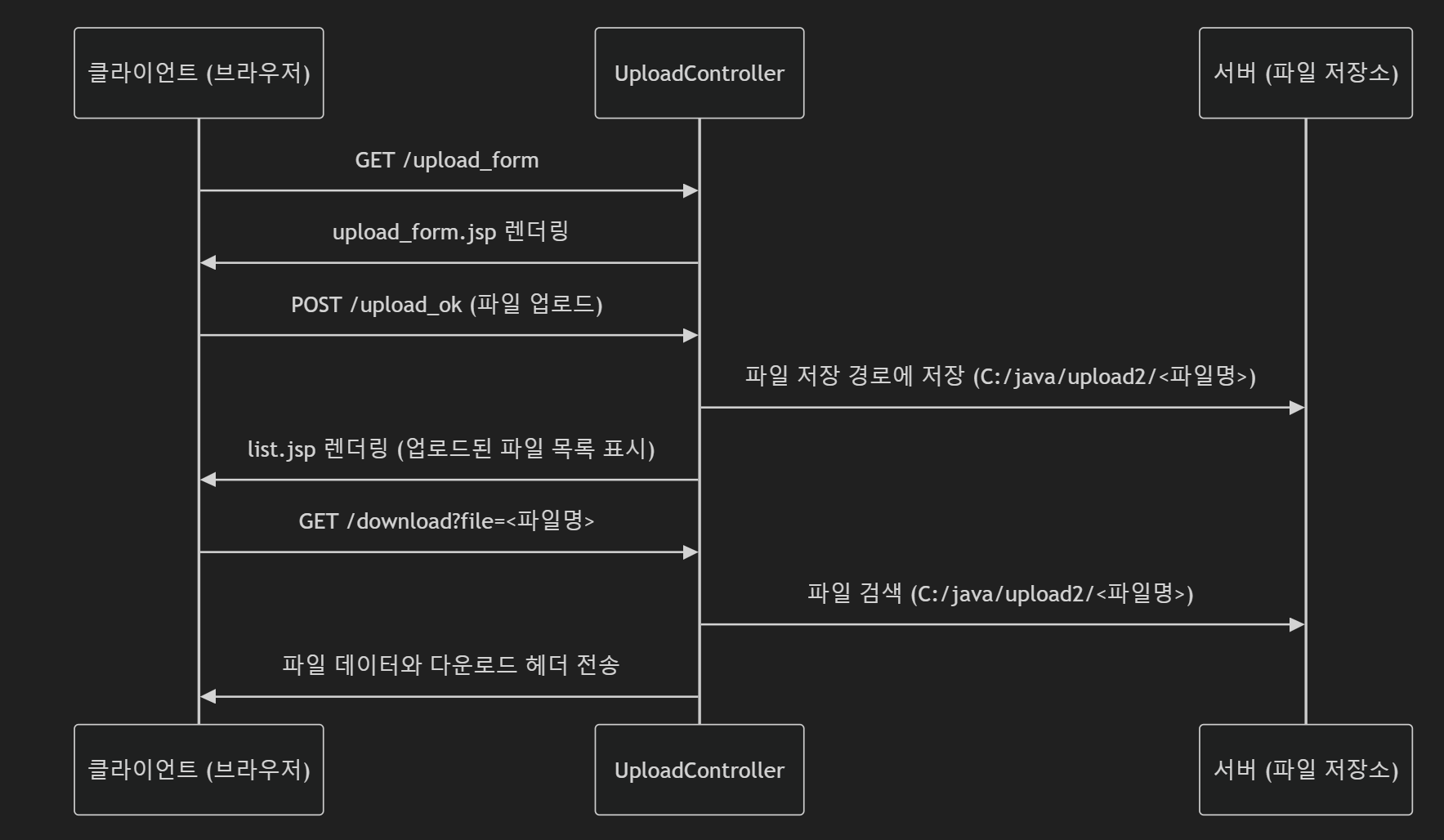
1 업로드 요청
- URL:
/upload_form - 요청 방식:
GET - 설명: 클라이언트가 업로드 양식을 요청하고, 서버는 HTML 폼을 렌더링합니다.
upload_form.jsp
- 클라이언트가 파일을 선택하고 서버로 업로드할 수 있는 HTML 폼.
enctype="multipart/form-data"설정으로 Multipart 요청을 지원.
2 업로드 처리
- URL:
/upload_ok - 요청 방식:
POST - 설명: 클라이언트가 파일을 업로드하면, 서버는 파일을 지정된 경로에 저장하고 업로드된 파일의 목록을 보여줍니다.
업로드 프로세스
- 클라이언트가 업로드한 파일은
MultipartFile로 처리. - 파일명 고유화:
- 원래 파일명에
System.nanoTime()추가하여 이름 충돌 방지. 혹은 UUID random값 붙혀서 사용.
- 원래 파일명에
- 저장 경로 설정:
- 파일은
C:/java/upload2에 저장.
- 파일은
- 업로드 완료 후
list.jsp에 업로드된 파일 목록 표시.
3 다운로드 요청
- URL:
/download?file=<파일명> - 요청 방식:
GET - 설명: 클라이언트가 파일 다운로드를 요청하면, 서버는 해당 파일을 응답 스트림으로 전송합니다.
다운로드 프로세스
- 파일 검색:
- 요청된 파일명을 기반으로 저장소 디렉토리(
C:/java/upload2)에서 파일을 검색.
- 요청된 파일명을 기반으로 저장소 디렉토리(
- 응답 헤더 설정:
Content-Disposition: attachment설정으로 다운로드를 강제.
- 파일 전송:
InputStreamResource를 사용해 파일 데이터를 스트리밍.
⭐ response header
일반적인 HTTP 응답에서, Content-Disposition 응답 헤더는 콘텐츠라 브라우저 내부에 보여질 것인지, 아니면 다운로드돼서 로컬에 저장될 것인지를 알려주는 헤더다.
- Content-Disposition:
inline
-> default. 웹페이지 내부에 display함. - Content-Disposition:
attachment
-> download 해야 하는 거라고 명시
-> filename="filename.jpg" : file name도 같이 전송해줄 수 있다.
UploadController.java
package com.example.upload.controller;

import org.springframework.core.io.InputStreamResource;
import org.springframework.core.io.Resource;
import org.springframework.http.ContentDisposition;
import org.springframework.http.HttpHeaders;
import org.springframework.http.HttpStatus;
import org.springframework.http.ResponseEntity;
import org.springframework.stereotype.Controller;
import org.springframework.ui.Model;
import org.springframework.web.bind.annotation.RequestMapping;
import org.springframework.web.bind.annotation.RequestParam;
import org.springframework.web.multipart.MultipartFile;

import java.io.File;
import java.io.IOException;
import java.nio.file.Files;
import java.nio.file.Path;
import java.nio.file.Paths;

@Controller
public class UploadController {

    @RequestMapping("/upload_form")
    public String upload_form() {
        return "upload_form";
    }

    @RequestMapping("/upload_ok")
    public String upload_ok(MultipartFile upload, Model model) {
        String file = null;
        // 업로드된 파일이 있는 경우 처리
        if (upload != null) {
            try {
                // 업로드된 파일의 원래 이름 출력
                System.out.println(upload.getOriginalFilename());

                // 파일 이름과 확장자를 분리
                String filename = upload.getOriginalFilename().substring(0, upload.getOriginalFilename().lastIndexOf("."));
                String extension = upload.getOriginalFilename().substring(upload.getOriginalFilename().lastIndexOf("."));

                // 파일 이름에 시스템 시간 추가하여 고유한 이름 생성
                file = filename + "_" + System.nanoTime() + extension;

                // 지정된 경로에 파일 저장
                upload.transferTo(new File("C:\\Java\\upload2\\" + file));

            } catch (IOException e) {
                System.out.println("[에러] " + e.getMessage());
            }
            model.addAttribute("file", file);
        } else {
            System.out.println("업로드 없음");
        }

        return "list";
    }

    @RequestMapping("/download")
    public ResponseEntity download(@RequestParam("file") String strFile) throws IOException {
        // 다운로드할 파일의 경로 설정
        String path = "C:/java/upload2/" + strFile;

        // 파일 경로로부터 Resource 객체 생성
        Path filePath = Paths.get(path);
        Resource resource = new InputStreamResource(Files.newInputStream(filePath));

        // 파일 객체 생성
        File file = new File(path);

        // 다운로드 응답 헤더 설정
        HttpHeaders headers = new HttpHeaders();
        headers.setContentDisposition(ContentDisposition.builder("attachment").filename(file.getName()).build());

        // ResponseEntity로 파일과 헤더를 함께 반환
        return new ResponseEntity<>(resource, headers, HttpStatus.OK);

    }
}
upload_form.jsp
<%@ page language="java" contentType="text/html; charset=UTF-8" pageEncoding="UTF-8" %>
<!doctype html>
<html lang="ko">
<head>
    <meta charset="UTF-8">
    <title>파일 업로드</title>
</head>
<body>
<h1>파일 업로드 폼</h1>
<form action="upload_ok" method="post" enctype="multipart/form-data">
    <!-- 파일 선택 입력 -->
    <input type="file" name="upload">
    <!-- 업로드 버튼 -->
    <button>업로드</button>
</form>
</body>
</html>
list.jsp
<%@ page language="java" contentType="text/html; charset=UTF-8" pageEncoding="UTF-8" %>
<!doctype html>
<html lang="ko">
<head>
    <meta charset="UTF-8">
    <title>업로드 목록</title>
</head>
<body>
<h1>업로드된 파일 목록</h1>

<%
    // 모델에서 전달된 업로드된 파일 이름 가져오기
    String file = (String) request.getAttribute("file");
%>
<ul>
    <!-- 업로드된 파일을 다운로드 링크로 표시 -->
    <li><a href='download?file=<%=file%>' ><%=file%></a></li>
</ul>

</body>
</html>