MCP Protocol: AI 에이전트를 위한 도구 연결 프로토콜
Model Context Protocol (MCP)는 AI 에이전트를 외부 도구와 데이터 소스에 연결하기 위한 오픈 표준입니다. 도구 통합을 하드코딩하는 대신, 에이전트가 런타임에 도구를 동적으로 발견할 수 있게 해줍니다. 이를 통해 다양한 AI 애플리케이션 간에 도구를 공유할 수 있는 모듈화되고 분산된 생태계를 구축할 수 있습니다.
왜 MCP를 사용해야 할까요?
기존의 도구 통합 방식은 취약합니다:
❌ 기존 방식: 에이전트 ↔ 하드코딩된 도구 A ↔ 하드코딩된 도구 B ↔ 하드코딩된 도구 C
✅ MCP 방식: 에이전트 ↔ MCP 클라이언트 ↔ 모든 MCP 서버 (런타임에 도구 발견)
MCP를 사용하면 여러분의 에이전트가 다음과 같은 일을 할 수 있습니다:
- 도구를 동적으로 발견 — 도구가 추가되거나 업데이트되어도 코드 변경 불필요
- 모든 MCP 서버에 연결 — Cursor, Claude Desktop, 또는 커스텀 서버의 도구 사용 가능
- 앱 간 도구 공유 — 하나의 MCP 서버가 여러 에이전트에 서비스 제공
- 핫 리로드 — 재배포 없이 도구 정의 업데이트
작동 원리
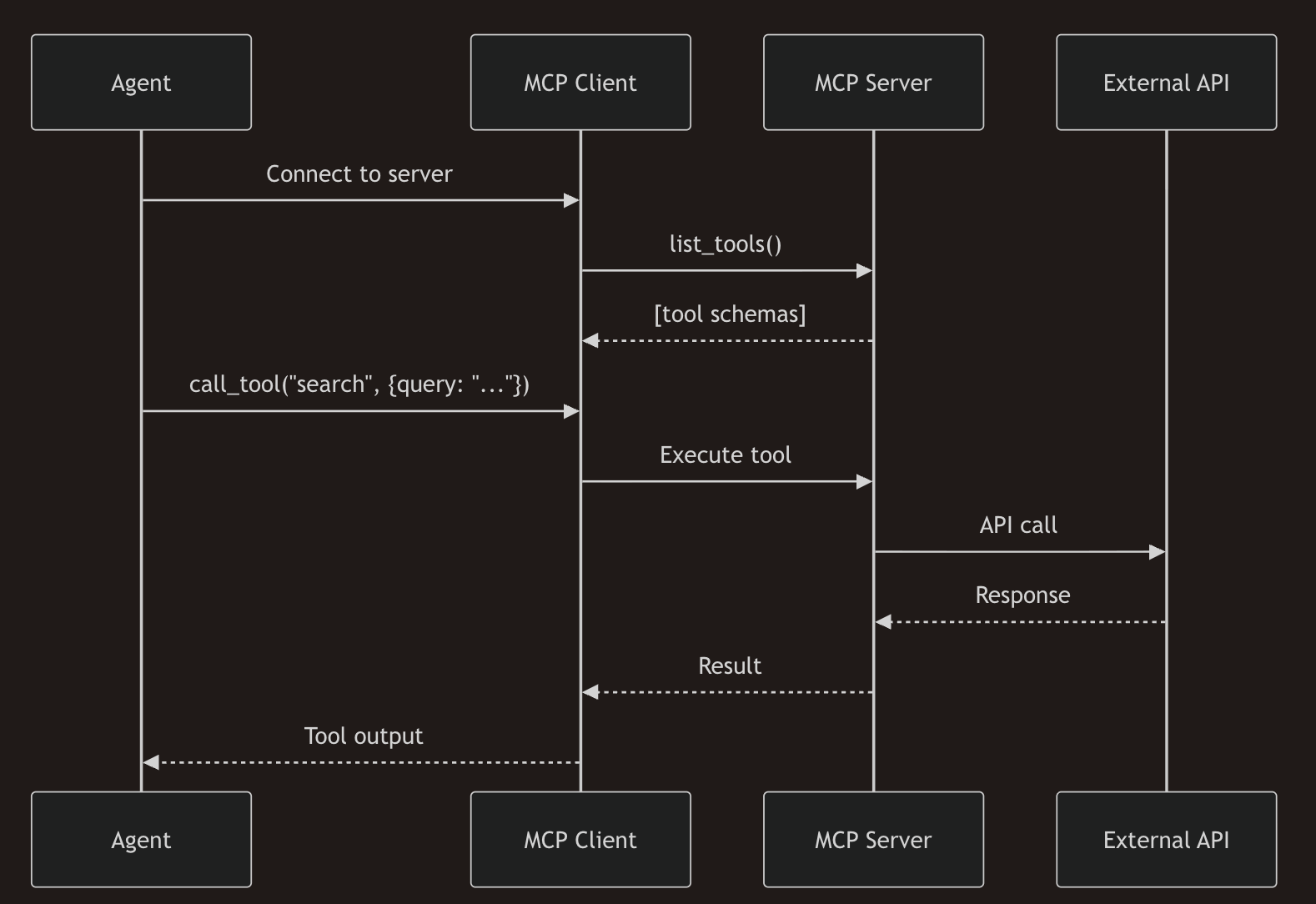
| 개념 | 설명 |
|---|---|
| MCP Server | 표준 프로토콜을 통해 도구를 노출합니다. 서브프로세스(stdio), HTTP/SSE, 또는 WebSocket으로 실행 가능합니다. |
| MCP Client | 서버에 연결하고, 도구를 발견하며, 에이전트를 대신해 도구를 실행합니다. |
| Tool Schema | 도구 이름, 설명, 매개변수의 JSON-schema 정의로, 런타임에 가져옵니다. |
| Resources | 선택사항: MCP는 문서, 데이터베이스 및 기타 데이터를 위한 리소스 URI도 지원합니다. |
MCP vs 다른 접근 방식
| 측면 | MCP | OpenAI Plugins | 하드코딩된 도구 |
|---|---|---|---|
| Discovery | 런타임 list_tools() | URL의 매니페스트 파일 | 컴파일 타임 |
| Transport | stdio, SSE, WebSocket | HTTPS만 | 프로세스 내 |
| Ecosystem | Cursor, Claude, SpoonOS 등 | ChatGPT만 | 단일 앱 |
| Updates | 핫 리로드, 재배포 불필요 | 플러그인 재배포 | 앱 재배포 |
빠른 시작
pip install spoon-ai에이전트와 함께 MCP 도구 사용하기
MCP 도구를 사용하는 권장 방법은 SpoonReactMCP를 사용하는 것입니다:
"""
DeepWiki MCP Agent Demo - SpoonReactMCP 에이전트와 함께 MCP 도구를 사용하는 방법을 보여줍니다.
"""
import asyncio
from spoon_ai.agents.spoon_react_mcp import SpoonReactMCP
from spoon_ai.tools.mcp_tool import MCPTool
from spoon_ai.tools.tool_manager import ToolManager
from spoon_ai.chat import ChatBot

class DeepWikiAgent(SpoonReactMCP):
    """DeepWiki MCP를 통해 GitHub 저장소를 분석할 수 있는 에이전트"""
    name: str = "DeepWikiAgent"
    system_prompt: str = """당신은 DeepWiki를 사용하여 GitHub 저장소를 분석할 수 있는 도움이 되는 어시스턴트입니다.
저장소에 대해 질문받으면 repoName 매개변수와 함께 read_wiki_structure 도구를 사용하세요.
예를 들어, "XSpoonAi/spoon-core"에 대해 질문받으면 repoName="XSpoonAi/spoon-core"로 read_wiki_structure를 호출하세요.
질문에 답하기 전에 항상 도구를 사용하여 저장소에 대한 정보를 얻으세요."""

    def __init__(self, **kwargs):
        super().__init__(**kwargs)
        self.available_tools = ToolManager([])

    async def initialize(self):
        # DeepWiki용 MCP 도구 생성 (API 키 불필요!)
        # 중요: 서버의 실제 도구 이름 사용: "read_wiki_structure"
        deepwiki_tool = MCPTool(
            name="read_wiki_structure",  # "deepwiki"가 아닌 실제 도구 이름 사용
            description="GitHub 저장소를 분석하고 구조와 문서를 가져옵니다",
            mcp_config={
                "url": "https://mcp.deepwiki.com/sse",
                "transport": "sse",
                "timeout": 30,
            }
        )
        # LLM이 올바른 스키마를 볼 수 있도록 매개변수 미리 로드
        await deepwiki_tool.ensure_parameters_loaded()
        self.available_tools = ToolManager([deepwiki_tool])

async def main():
    # 에이전트 생성 및 초기화
    agent = DeepWikiAgent(
        llm=ChatBot(
            llm_provider="openai",
            model_name="gpt-5.1-chat-latest"
        )
    )

    print("에이전트 초기화 및 MCP 도구 로딩 중...")
    await agent.initialize()
    # 명확한 요청으로 에이전트에 쿼리
    query = "XSpoonAi/spoon-core는 무엇에 관한 것인가요? 저장소를 분석하고 목적을 요약해주세요."
    response = await agent.run(query)
    print("\n 응답:")
    print(response)

if __name__ == "__main__":
    asyncio.run(main())
직접 MCP 도구 사용하기
에이전트 없이 직접 MCP 도구를 호출하는 경우:
import asyncio
from spoon_ai.tools.mcp_tool import MCPTool

# SSE/HTTP MCP 서버에 연결
mcp_tool = MCPTool(
    name="read_wiki_structure",
    description="저장소 분석을 위한 DeepWiki MCP 도구",
    mcp_config={
        "url": "https://mcp.deepwiki.com/sse",
        "transport": "sse",
        "timeout": 30,
        "headers": {"User-Agent": "SpoonOS-MCP/1.0"}
    }
)

async def main():
    # 도구 매개변수는 처음 사용될 때 지연 로드됩니다
    await mcp_tool.ensure_parameters_loaded()

    # 도구 호출
    result = await mcp_tool.execute(repo="XSpoonAi/spoon-core")
    print(result)

asyncio.run(main())
아키텍처
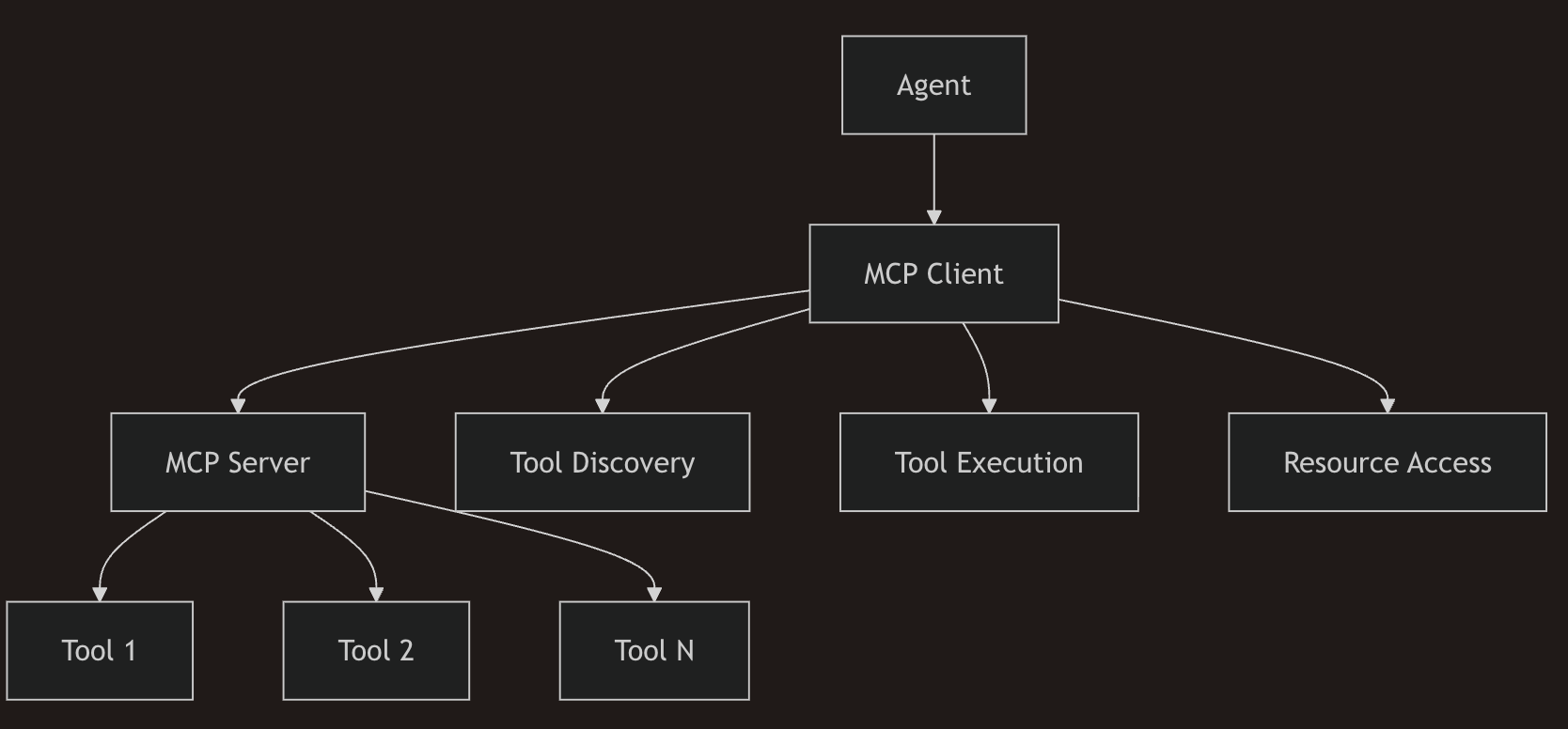
MCP 구성 요소
- MCP Server - 도구와 리소스를 호스팅합니다
- MCP Client - 에이전트를 서버에 연결합니다
- Tools - 정의된 스키마를 가진 실행 가능한 함수들
- Resources - 데이터 소스 및 콘텐츠
MCP 서버에 연결하기 (클라이언트 전용)
이 가이드는 MCP 클라이언트에 초점을 맞춥니다. MCPTool을 사용하여 모든 MCP 서버(stdio/HTTP/SSE/WS)에 연결할 수 있습니다. 서버 호스팅은 여기서 다루지 않습니다—선택한 서버의 문서를 따르세요.
MCP 클라이언트 설정
SpoonOS는 여러 MCP 전송 유형을 지원합니다:
SSE/HTTP 전송 (원격 서버)
from spoon_ai.tools.mcp_tool import MCPTool

# SSE 전송 (Server-Sent Events)
sse_tool = MCPTool(
    name="read_wiki_structure",
    description="저장소 분석을 위한 DeepWiki MCP 도구",
    mcp_config={
        "url": "https://mcp.deepwiki.com/sse",
        "transport": "sse",
        "timeout": 30,
        "headers": {"User-Agent": "SpoonOS-MCP/1.0"}
    }
)

# HTTP 전송 (스트리밍 가능한 HTTP)
http_tool = MCPTool(
    name="read_wiki_structure",
    description="DeepWiki HTTP MCP 도구",
    mcp_config={
        "url": "https://mcp.deepwiki.com/mcp",
        "transport": "http",
        "timeout": 30,
        "headers": {"Accept": "application/json"}
    }
)
Stdio 전송 (npx/uvx를 통한 CLI 도구)
import os
from spoon_ai.tools.mcp_tool import MCPTool

# NPX 전송 (Node.js MCP 서버)
tavily_tool = MCPTool(
    name="tavily-search",
    description="Tavily를 통한 웹 검색",
    mcp_config={
        "command": "npx",
        "args": ["--yes", "tavily-mcp"],
        "env": {"TAVILY_API_KEY": os.getenv("TAVILY_API_KEY")}
    }
)

# UVX 전송 (Python MCP 서버)
python_tool = MCPTool(
    name="python-mcp",
    description="Python MCP 서버",
    mcp_config={
        "command": "uvx",
        "args": ["my-python-mcp-server"],
        "env": {}
    }
)

# python 전송 (Python MCP 서버)
python_tool = MCPTool(
    name="python-mcp",
    description="Python MCP 서버",
    mcp_config={
        "command": "python",
        "args": ["my-python-mcp-server"],
        "env": {}
    }
)
WebSocket 전송
from spoon_ai.tools.mcp_tool import MCPTool

ws_tool = MCPTool(
    name="ws-mcp",
    description="WebSocket MCP 서버",
    mcp_config={
        "url": "ws://localhost:8765",  # 또는 보안을 위한 wss://
    }
)
도구 발견
자동 발견
mcp_tool = MCPTool(
    name="discover_tools",  # 임시 이름, 실제 도구를 발견하면 교체됩니다
    description="사용 가능한 MCP 도구를 발견하는 도구",
    mcp_config={
        "url": "https://mcp.deepwiki.com/sse",
        "transport": "sse",
        "timeout": 30,
    }
)

tools = await mcp_tool.list_available_tools()
for tool in tools:
    tool_name = tool.get('name')
    tool_desc = tool.get('description')
도구 등록
MCPTool을 사용하여 모든 MCP 서버(stdio/HTTP/SSE/WS)에 연결하세요. 가이드 예제에서는 spoon_cli import가 필요하지 않습니다.
도구 실행
직접 실행
# 도구 실행
result = await mcp_tool.call_mcp_tool("get_weather", location="New York")
result2 = await mcp_tool.execute("get_weather", location="New York")

print(result)
에이전트 주도 실행
import asyncio
import os
from spoon_ai.agents.spoon_react_mcp import SpoonReactMCP
from spoon_ai.tools.mcp_tool import MCPTool
from spoon_ai.tools.tool_manager import ToolManager
from spoon_ai.chat import ChatBot

class MyMCPAgent(SpoonReactMCP):
    """MCP 도구를 가진 커스텀 에이전트"""
    name: str = "MyMCPAgent"
    system_prompt: str = "웹 검색 기능을 가진 도움이 되는 어시스턴트입니다."

    def __init__(self, **kwargs):
        super().__init__(**kwargs)
        self.available_tools = ToolManager([])

    async def initialize(self):
        """MCP 도구 초기화"""
        tavily_tool = MCPTool(
            name="tavily-search",
            description="Tavily를 통한 웹 검색",
            mcp_config={
                "command": "npx",
                "args": ["--yes", "tavily-mcp"],
                "env": {"TAVILY_API_KEY": os.getenv("TAVILY_API_KEY")}
            }
        )
        self.available_tools = ToolManager([tavily_tool])

async def main():
    agent = MyMCPAgent(llm=ChatBot(llm_provider="openai", model_name="gpt-5.1-chat-latest"))
    await agent.initialize()

    response = await agent.run("최신 암호화폐 뉴스를 검색해주세요")
    print(response)

asyncio.run(main())
보안 고려사항
인증
# 헤더를 사용한 인증
external_api = MCPTool(
    name="external_api_tool",  # 서버의 도구 이름
    description="Bearer 토큰을 가진 외부 API",
    mcp_config={
        "url": "https://api.example.com/mcp",
        "transport": "http",
        "timeout": 30,
        # 헤더를 통한 Bearer 토큰 (auth config가 아님)
        "headers": {
            "Authorization": f"Bearer {os.getenv('MCP_API_TOKEN', 'your_token_here')}",
        }
    }
)
도구 권한
# 도구 권한 정의
class RestrictedTool(BaseTool):
    required_permissions = ["read_data", "write_files"]

    async def execute(self, **kwargs):
        # 실행 전 권한 확인
        if not self.check_permissions():
            raise PermissionError("권한이 부족합니다")

        return await self.perform_action(**kwargs)
입력 검증
# 도구 입력 검증
class SecureTool(BaseTool):
    async def execute(self, user_input: str) -> str:
        # 입력 정리
        clean_input = self.sanitize_input(user_input)

        # 스키마에 대한 검증
        if not self.validate_input(clean_input):
            raise ValueError("유효하지 않은 입력입니다")

        return await self.process(clean_input)
성능 최적화
연결 풀링
참고:
MCPConnectionPool은spoon_ai에서 제공되지 않습니다.MCPClientMixin은 이미 작업당 세션을 재사용합니다. 서버 간 풀링이 필요한 경우 자체 풀링 로직으로 래핑하거나 FastMCP 클라이언트를 래핑하세요.
직접 제어가 정말 필요한 경우 (보통은 불필요):
from spoon_ai.agents.mcp_client_mixin import MCPClientMixin
from fastmcp.client.transports import SSETransport

# 전송 객체 생성 (문자열이 아님!)
transport = SSETransport(url="https://mcp.example.com/sse")
client = MCPClientMixin(transport)

# MCPClientMixin은 이미 작업당 세션을 풀링합니다
async with client.get_session() as session:
    tools = await session.list_tools()
    result = await session.call_tool("tool_name", arguments={"param": "value"})

# 세션은 같은 작업 내에서 자동으로 재사용됩니다
async with client.get_session() as session:  # 기존 세션 재사용
    tools2 = await session.list_tools()
캐싱
참고:
MCPCache는spoon_ai에 포함되어 있지 않습니다. 발견 결과에 대해 간단한 인메모리 캐시나functools.lru_cache와 같은 라이브러리를 사용하세요.
# 도구 발견을 위한 최소한의 인메모리 캐시
tool_cache: dict[str, list] = {}

async def get_tools_cached():
    if "tools" not in tool_cache:
        tool_cache["tools"] = await mcp_tool.list_available_tools()
    return tool_cache["tools"]
비동기 작업
# 여러 도구를 동시에 실행
import asyncio

async def parallel_execution():
    tasks = [
        mcp_tools.execute_tool("tool1", {"param": "value1"}),
        mcp_tools.execute_tool("tool2", {"param": "value2"}),
        mcp_tools.execute_tool("tool3", {"param": "value3"})
    ]

    results = await asyncio.gather(*tasks)
    return results
일반적인 사용 사례
API 통합
# MCP를 통한 외부 API 통합
class APITool(BaseTool):
    name = "api_call"

    async def execute(self, endpoint: str, method: str = "GET") -> dict:
        async with aiohttp.ClientSession() as session:
            async with session.request(method, endpoint) as response:
                return await response.json()
데이터베이스 접근
# MCP를 통한 데이터베이스 작업
class DatabaseTool(BaseTool):
    name = "query_database"

    async def execute(self, query: str) -> list:
        # 데이터베이스 쿼리 실행
        return await self.db.execute(query)
파일 작업
# 파일 시스템 작업
class FileTool(BaseTool):
    name = "read_file"

    async def execute(self, filepath: str) -> str:
        with open(filepath, 'r') as f:
            return f.read()
모범 사례
도구 설계
- 명확한 명명 - 설명적인 도구 이름 사용
- 포괄적인 스키마 - 완전한 매개변수 스키마 정의
- 오류 처리 - 프레임워크의 자동 오류 처리 활용
- 문서화 - 명확한 설명과 예제 제공
성능
- 연결 재사용 - 가능한 경우 MCP 연결 재사용
- 캐싱 - 발견 결과와 자주 사용되는 데이터 캐싱
- 타임아웃 - 도구 실행에 적절한 타임아웃 설정
보안
- 입력 검증 - 항상 도구 입력 검증
- 인증 - 적절한 인증 메커니즘 구현
- 권한 - 최소 권한 접근 원칙 사용
오류 처리 철학
SpoonOS 프레임워크는 MCP 작업에 대해 "빠르게 실패하고 우아하게 복구" 접근 방식을 따릅니다:
- 자동 복구: 연결 실패, 타임아웃, 서버 오류가 자동으로 처리됩니다
- 우아한 성능 저하: 도구를 사용할 수 없을 때 시스템이 의미 있는 대체책을 제공합니다
- 최소한의 수동 처리: 프레임워크가 오류를 처리하도록 하고, 커스텀 비즈니스 로직에만 개입하세요
# 권장: 프레임워크가 MCP 오류를 처리하도록 하기
result = await mcp_tools.execute_tool("weather_tool", {"location": "NYC"})

# 프레임워크가 자동으로 처리:
# - 서버 연결 문제
# - 도구 발견 실패
# - 실행 타임아웃
# - 매개변수 검증 오류
문제 해결
일반적인 문제
연결 오류
프레임워크는 내장된 재시도 메커니즘으로 연결 실패를 자동으로 처리합니다:
# 프레임워크가 연결 실패를 자동으로 처리
await mcp_client.connect()  # 지수 백오프를 사용한 자동 재시도
도구 발견 실패
# 프레임워크가 발견 문제를 우아하게 처리
tools = await mcp_tools.discover_tools()
# 서버를 사용할 수 없을 경우 캐시된 도구로 자동 대체
실행 타임아웃
# 프레임워크가 타임아웃을 자동으로 관리
result = await mcp_tools.execute_tool("slow_tool", {})
# 구성 가능한 제한으로 자동 타임아웃 처리