실력을 기르는 데는 문제 푸는 게 가장 좋다. 힘들지만, 이제는 해야지.
빠르게 진행해보자.
LLM, 구글링은 하지 말고 pandas 공식 문서로만 풀어보자.
pandas.show_versions() : provide useful information, important for bug reports
- hosting operation system, pandas version, 설치된 관련 패키지들의 버전
04. dictionary로 된 data와 labels를 DataFrame의 data,index가 되도록 생성
df = pd.DataFrame(data=data, index=labels)
df.select_dtypes(include= data_type) 활용하기 좋은 함수인 것 같다.
df.select_dtypes(include='bool')실행 시 data_type이 boolean 형태인 column만 추출된다.
05. DataFrame의 기본적인 정보 추출
df.info() || df.describe()
df.info()와 df.describe()의 차이**
df.info() : 데이터의 뼈대 -> 데이터프레임이 어떻게 구성돼있는지
- 전체 행의 개수와 인덱스 범위
- 결측치(Non-Null Count)
- data type
- memory 사용량
=> 데이터를 막 불러온 후, 변경 후 상태 체크 위해 사용
df.describe() : 기술 통계량(descriptive statistics) 요약
- count : 결측치 제외 데이터 개수
- mean / std
- min / max
- 25%, 50%, 75% : 사분위수
숫자형(Numeric) 컬럼만 보여주므로 문자형 데이터를 보고 싶은 경우 ->df.describe(include='object')
07.08 dataframe에서 특정 컬럼 추출
1개만 추출 -> df['animal'], df.animal
2개 이상 추출
- 리스트로 뽑아서 전달
df[['animal', 'age']]
- index, 조건을 활용한 선택 (
.loc,.iloc)
.loc[행_선택자, 열_선택자](이름 기반) : 행과 열의 이름 직접 지정 -df.loc[:, 'animal', 'age']
.iloc(Interger LOCation : 숫자 기반 위치 추출) : 컬럼의 순서로 지정 -df.iloc[:, 0:1]
df.iloc[[3,4,8],[0,1]]와 같이 슬라이싱 하지 않고 그대로 전달해줘도 된다.
특정 조건을 만족하는 데이터 출력 - Boolean Indexing
df[(df['animal']=='cat') & (df['age'] < 3)]df[df['animal'].isnull()]: animal 컬럼 중 결측치인 행 출력df[df['model'].str.contains('Wilson')]: 특정 단어가 들어간 행 찾을 때
df.loc[df['age']>5, ['name','weight']] : 5살 초과 동물들의 'name', 'weight' 컬럼만 추출
df['age']>5는 행 선택자에 해당 (<- 이름이나 boolean mask 들어가도 된다.)
12. select the rows the age is between 2 and 4(inclusive).
df[(df['age']>=2) & (df['age']<=4), ['age']]df[df['age'].between(2,4)]
14. calculate the sum of all visits in df
- series로 변환 후 총합 구하기
visits = df['visits']
sum = 0
for i in visits:
	sum += i
print(sum)df['visits'].sum(): sum 함수
15. calculate the mean age for each different animal in df
df.groupby(['animal'])['age'].mean()
['animal']와 같이 리스트로 작성한 이유는 확장성 때문인데
df.groupby('animal')['age'].mean()로 작성해도 문법 상 오류 없이 제대로 작동한다.
기준이 두 개 이상이 될 경우가 많기 때문에 아예 통일감 있게 리스트로 인자를 전달해주는 것이다.
16. Append a new row 'k' to df with your choice of values for each column. Then delete that row to return the original DataFrame.
.loc에 존재하지 않는 인덱스 이름을 넣고 값을 할당하면, pandas는 자동으로 행 생성한다.
df.loc['k'] = [5.5, 'dog', 'no', 2]
왜 iloc으로는 안될까?
iloc은 integer location으로 정수 기반이다. 따라서 index의 위치를 확인할 때 정수로 체크하기 위해서 현재 존재하는 순서를 파악하는데, 이때 없는 index를 호출하면 새롭게 행을 생성하는 것이 아니라 IndexError가 발생한다.
loc의 역할: 조회, 수정, 삽입
- select : 특징 이름의 행, 열 데이터 로드
- update : 이미 있는 값에 덮어씌움
- insert : 없는 이름의 위치에 값을 넣어 새로운 행/열 생성
-df.loc[:, 'new_col'] = 넣고 싶은 값
17. count the number of each type of animal in df
animal 컬럼에 동물 종 별로 몇 개의 데이터가 있는지 세는 문제
df['animal'].value_counts()
각 컬럼별로 고유값 개수를 보고 싶다. -> df.nunique()
모든 컬럼 각각의 빈도표 -> df.apply(pd.Series.value_counts)
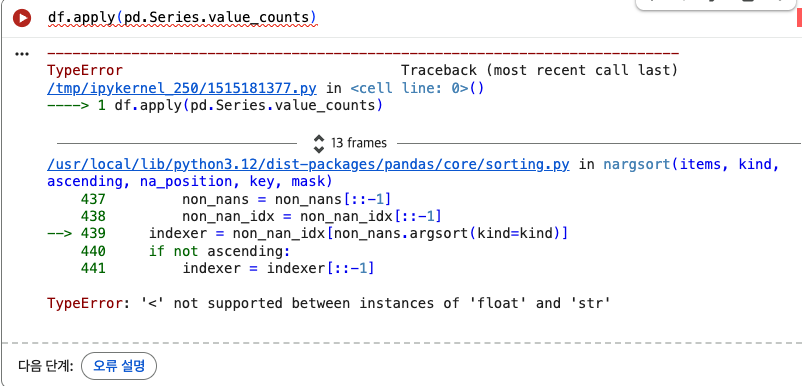
apply 함수에 의해서 모든 컬럼에 대해서 빈도 수를 구하고, 그 결과들을 하나의 dataframe으로 결합하려고 시도한다. 이때, pandas는 각 컬럼에서 인덱스를 보기 좋게 정렬하려고 하는데 숫자랑 문자열은 비교가 되지 않기에 에러가 발생한다. -> TypeError
이를 해결하는 방법은?
그럼 정렬하지 마! 그냥 합쳐 = sort=False
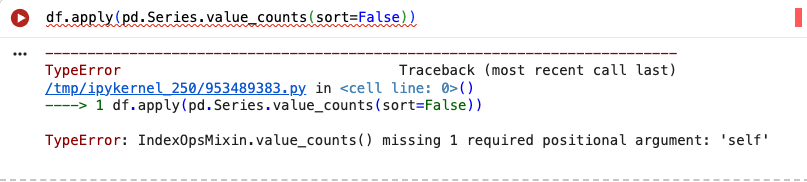
apply 함수는 인자로 함수의 이름을 받아서, 나중에 자기가 각 컬럼에 직접 적용하는 함수다.
apply(pd.Series.value_counts(sort=False)) 코드에서 apply 함수는 sort=False를 바로 실행하려고 하는데, Series 객체가 없는 상황에서 sort=False만 받으니 missing 1 required positional argument: 'self'라고 에러가 뜨는 것이다.
apply는 기본적으로 함수(데이터) 형태(함수 객체)만 지원하기 때문에, 데이터 외의 옵션을 넣으려고 하면 lambda라는 완충재가 필수적이다.
(lambda가 일회용 함수를 만드는 문법임을 생각하면 이해가 된다.)
lambda 활용
score라는 컬럼이 있을 때, 80점 이상인 항목의 등급을 'A'라고 설정하고 그 이외는 'B'라고 설정한다면?
# 01. lambda
df['grade'] = df.apply(lambda x : 'A' if x['score']>=80 else 'B', axis=1)

# 02. loc
df['grade'] = 'B'
df.loc[df['score'] >= 80, 'grade'] = 'A'
18. Sort df first by the values in the 'age' in decending order, then by the value in the 'visits' column in ascending order (so row i should be first, and row d should be last).
df.sort_values(by=['age', 'visits'], ascending=[False, True])
19. 'priority' column contains the values 'yes' and 'no'. Replace this column with a column of boolean values: 'yes' should be True and 'no' should be False.
df.replace(['yes', 'no'], [True, False])
df.replace는 Nested 구조로 사용 가능
df.repalce({'A': {0: 100, 4: 400}}): 딕셔너리 안에 딕셔너리 들어간 중첩 구조- df.repalce({컬럼명 : {기존값:새로운값}})
20. In the 'animal' column, change the 'snake' entries to 'python'.
# 01
df['animal'].replace(['snake'], ['python'], inplace=True)

# 02
df['animal'] = df['animal'].replace(['snake'], ['python'])