IMDb Review Data 준비 및 Preprocess

Comment :
Udacity - DeepLearning 강의 중 IMDb Review data를 활용한 Sentiment Analysis Model(리뷰감정분석모델)을 만드는 과정 중,
웹(웹사이트 파일 다운로드 링크)을 통해서 데이터를 다운로드받고, 기본적인 준비 후 텍스트 데이터 전처리를 하는 과정을 복습 겸 정리하고자 한다.
[!] 간단하게 Google Colab 환경에서 실시
Step 1: Data Download 및 압축해제
# 현재 디렉토리 체크
import os
os.getcwd()

>>> '/content'
# (content 폴더 하위로) data 폴더 생성
%mkdir /content/data
# Web을 통해 IMDb Review 데이터 다운로드
!wget -O /content/data/aclImdb_v1.tar.gz http://ai.stanford.edu/~amaas/data/sentiment/aclImdb_v1.tar.gz
# 다운로드된 데이터(압축파일) 압축해제
!tar -zxf /content/data/aclImdb_v1.tar.gz -C /content/data🔰 코드 설명
!wget명령어의-O(대문자 O, output을 의미?)은 웹을 통해 다운로드 받은 파일이 위치할 디렉토리를 지정해주는 옵션
!tar명령어의-zxf옵션은 gzip 압축을 해제하고,-C옵션은 압축해제된 파일을 특정 디렉토리에 저장하라는 의미
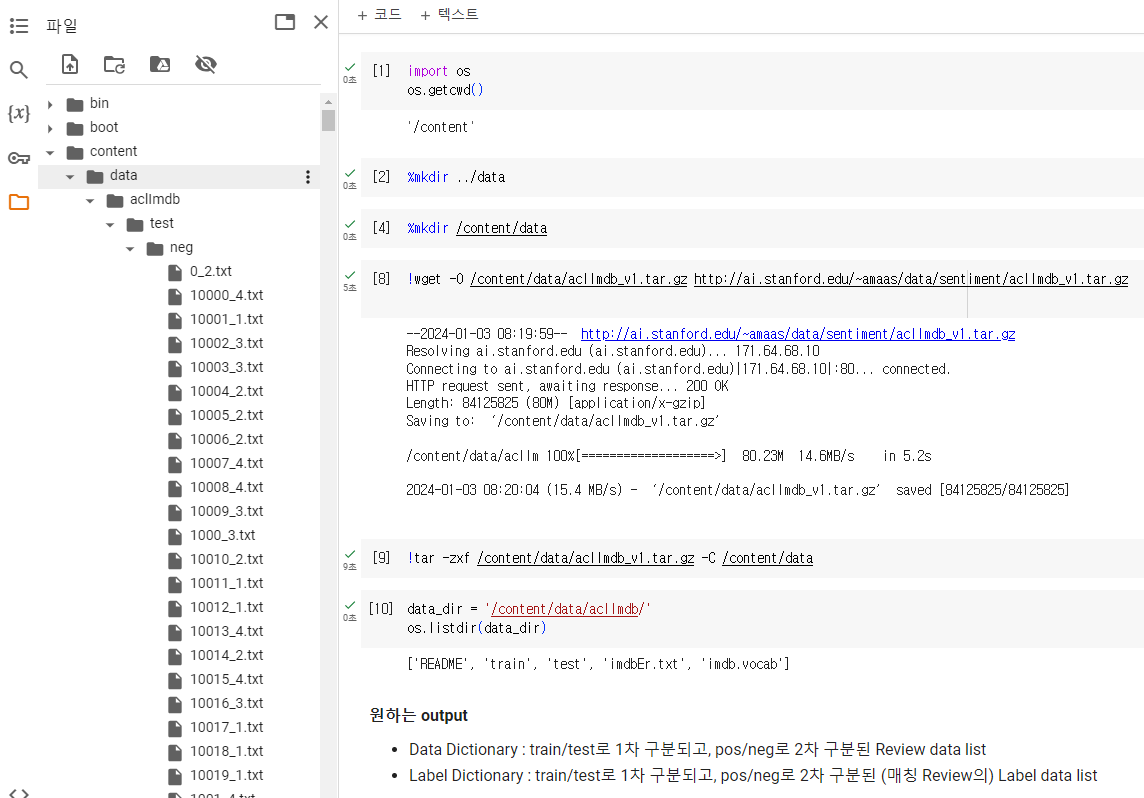
압축해제를 완료하면 위 사진과 같이 /content/data/aclImdb/ 하위 디렉토리에 test, train 폴더가 있고 그 아래에 각각 pos, neg폴더가 있다.
- aclImdb
- train
- pos
- neg
- test
- pos
- neg
- train
그리고 그 아래에는 실제 Review Text 데이터들이 (낱개로) txt 파일로 형성되어 있다. 이를 처리하기 쉽게 2개의 Dictionary에 아래와 같이 분류하여 넣어보자
- Data
- train
- pos - (train, pos 폴더 내 있는 Review Text 데이터 List)
- neg - (train, neg 폴더 내 있는 Review Text 데이터 List)
- test
- pos - (test, pos 폴더 내 있는 (Review Text 데이터와 대응되는) 라벨 List
- neg - (test, neg 폴더 내 있는 (Review Text 데이터와 대응되는) 라벨 List
[+] 라벨값은 Positive : 1 / Negative : 0으로 처리
- train
Step 2: Data 준비
다운로드 및 압축해제한 원본 데이터를 준비(세팅)하기 위하여 read_imdb_data 라는 function을 생성하고자 한다.
우리가 원하는 Output (반환값)은 아래와 같다.
datadictionary : train/test로 1차 구분, pos/neg로 2차 구분된 Review Text data listlabelsdictionary : train/test로 1차 구분, pos/neg로 2차 구분된 (매칭되는 Review data의) Label data list
def read_imdb_data_1(data_dir = '/content/data/aclImdb'): # _1로 function 구분
  data = {}
  labels = {}

  for data_type in ['train', 'test']:
    data[data_type] = {}
    labels[data_type] = {}

    for sentiment in ['pos', 'neg']:
      data[data_type][sentiment] = []
      labels[data_type][sentiment] = []

      # 여기까지 왔으면 (예를들어) data_type = 'train' / sentiment = 'pos'
      # 따라서 'aclImdb/train/pos' 내 모든 txt 파일 경로 추출 가능

      path = os.path.join(data_dir, data_type, sentiment, '*.txt')
      files = glob.glob(path) # path 경로, 모든 txt파일의 절대경로 list로 반환

      for f in files:
        with open(f) as review:
          data[data_type][sentiment].append(review.read())
          labels[data_type][sentiment].append(1 if sentiment == 'pos' else 0)

      assert len(data[data_type][sentiment]) == len(labels[data_type][sentiment]), \
                 "{}/{} data size does not match labels size".format(data_type, sentiment)

return data, labelsdata, labels = read_imdb_data_1()1개의 Review마다 1개의 Text파일(.txt)로 되어있었던 IMDb Review 데이터를 위와 같이 깔끔하게 2개의 Dictionary(data, labels)로 정리하였다. 이제 train_X, test_y와 같이 훈련용, 테스트용, X/y로 만들자.
[+] 들어가기 전에
sklearn.utils.shuffle에 대하여 체크
- n개의 Array를 앞 parameter들로 넣으면 (매핑된 그대로 함께) Shuffle이 된다. 아래 코드 예시처럼 각 club의 key player가 유지됨
n_samples: 최종적으로 몇개의 Sample만 추출할 것인지random_state: 반복재현을 위한 변수club = ['Liverpool', 'Mancity', 'RealMadrid', 'PSG'] key_players = ['Salah', 'Holand', 'Vinicious', 'KanginLee'] shuffled_club, shuffled_kp = shuffle(club, key_players, n_samples=2, random_state=42) print(shuffled_club) print(shuffled_kp) >>> ['Mancity', 'PSG'] >>> ['Holand', 'KanginLee']
from sklearn.utils import shuffle

def prepare_imdb_data_1(data, labels):
	"""Prepare training and test sets"""

    data_train = data['train']['pos'] + data['train']['neg'] # list + list
    data_test = data['test']['pos'] + data['test']['neg']
    labels_train = labels['train']['pos'] + labels['train']['neg']
    labels_test = labels['test']['pos'] + labels['test']['neg']

    # Shuffle
    data_train, labels_train = shuffle(data_train, labels_train)
    data_test, labels_test = shuffle(data_test, labels_test)

    # Return a unified training data, test data, training labels, test labets
return data_train, data_test, labels_train, labels_testtrain_X, test_X, train_y, test_y = prepare_imdb_data(data, labels)
#print("IMDb reviews (combined): train = {}, test = {}".format(len(train_X), len(test_X)))여기까지 진행하면 깔끔히 정리된 4개의 list를 갖게된다.
train_X: 25,000개의 Review Text 덩어리가 1개의 요소로 되어 있는 listtrain_y: 25,000개의 (train_X와 매칭되는) label값 (0 or 1)test_X: 25,000개~test_y: 25,000개~
ex)
train_X : [ review1, review2, ... review25000 ]
train_y : [ 0, 1, ... 1 ]
이제는 저 review1, review25000과 같은 Review Text 덩어리들에 대해서 (모델이 사용할 수 있게끔, 기본적인) 텍스트 전처리를 진행해보자
Step 3: (Text) Data Preprocessing
◼ 텍스트 전처리 관련 import
import nltk
nltk.download("stopwords")
from nltk.corpus import stopwords
from nltk.stem.porter import *

stemmer = PorterStemmer()
◼ 각 Review(1개) 전처리함수 생성
import re
from bs4 import BeautifulSoup

def review_to_words(review):
	text = BeautifulSoup(review, "html.parser").get_text()
    text = re.sub(r"[&a-zA-X0-9]", " ", text.lower())
    words = text.split()
    words = [w for w in words if w not in stopwords.words("english")]
    words = [PorterStemmer().stem(w) for w in words]

    return words
🔰 코드설명
먼저 input으로 받는
review는 string이다. 예를 들면 "This is the best movie of the 1990s!"
이러한 string에 대해서 기초적인 전처리(html 문자제거, 영문자,숫자 외 제거, 소문자화, string word들로 분할, stopwords 제거, Stemming)를 진행하고, output으로 쪼개진 단어들로 이루어진 list를 반환한다.
◼ review_to_words 함수를 활용한 전처리 함수 생성
import pickle

cache_dir = os.path.join("/content/cache", "sentiment_analysis")
os.makedirs(cache_dir, exist_ok=True)

def preprocess_data(data_train, data_test, labels_train, labels_test,
					cache_dir = cache_dir,
                    cache_file = "preprocessed_data.pkl"):

	cache_data = None # cache_data는 (Default값으로) None으로 설정
    if cache_file is not None:
    	try:
        	with open(os.path.join(cache_dir, cache_file), "rb") as f:
            	cache_data = pickle.load(f)
            print("Read preprocessed data from cache file:", cache_file)
        except:
        	pass

    if cache_data is None:
    	words_train = [review_to_words(review) for review in data_train]
        words_test = [review_to_words(review) for review in data_test]

        if cache_file is not None:
        	cache_data = dict(words_train = words_train,
							  words_test = words_test,
                              labels_train = labels_train,
                              labels_test = labels_test)
			with open(os.path.join(cache_dir, cache_file), "wb") as f:
            	pickle.dump(cache_data, f)
            print("Wrote preprocessed data to cache file:", cache_file

    # 이 else문으로 오려면 위에서 cache_data가 존재하여야함, 즉 이미 있었던
	# cache_file로부터 cache_data를 가져온 케이스
    else:
    	words_train, words_test, labels_train, labels_test = (cache_data['words_train'], cache_data['words_test'], cache_data['labels_train'], cache_data['labels_test'])

    return words_train, words_test, labels_train, labels_test
🔰 코드설명
if문, try문 정도말고는 따로 어려운게 없다. 포커스는 아래 두개의 parameter
cache_data: (미리 전처리된) 실제 데이터cache_file: (미리 전처리된) 저장 파일 명
# Preprocess data
train_X, test_X, train_y, test_y = preprocess_data(train_X, test_X, train_y, test_y)
이제는 정리된 4개(y, 즉 label 2개는 그대로)의 list를 갖게된다.
train_X: 25,000개의 Review Text들이 각각 1개의 요소, 단어들 리스트로 되어 있는 이중 listtrain_y: 25,000개의 (train_X와 매칭되는) label값 (0 or 1)test_X: 25,000개~test_y: 25,000개~
ex)
train_X : [ ['movie', 'good',...] ['Bad', 'Nightmare',...] ... ['Awesome', 'Movie'] ]
train_y : [ 0, 1, ... 1 ]
◼ Extract Bag-of-Words features
🔰 Bag of Words, DTM이란?
우리는 어떠한 영화 Review가 긍정적(Positive, 1)인지 부정적(Negative, 0)인지 예측하는 단순 모델에 Review 텍스트를 넣기 위하여 (자연어처리의 기초중의 기초...?) Bag of Words & Document Term Matrix(DTM) 개념을 사용할 것이다.
우리에게 어떤 문서, 즉 Document(기사, 리뷰텍스트, 에쎄이)가 있다고 생각해보자.
이러한 문서를 '데이터'로써 바라볼 수 있으려면 어떻게 해야될까?
불필요한 문자를 없애고, 단어 단위로 쪼개서 각 단어들을 어떠한 숫자에 매핑시키면 하나의 Document를 단순 숫자로 이루어진 Array로 이용할 수 있다.그런데 1개의 Document에 중복되는 단어가 너무 많을 경우 비효율적일 수 있다.
예를 들어서, 어떠한 Document 내 단어의 개수가 10,000개인데 그 중 9,999개가 동일한 단어일 경우
(단어와 숫자가 매핑된) 단어장은 단 2개의 단어로 이루어져 있는데
(단어가 숫자로 변환된) Array는 10,000개 그대로일것이다.
빈도수(Frequency) 개념 필요또한 우리는 1개의 Document, 즉 (스몰)데이터로만 무엇을 하려는 것이 아니다. 매우 많은 Document, 즉 (빅)데이터를 처리해야한다. 그러면 아래와 같은 문제점이 생길 수 있다.
예를 들어서, 서로 너무나도 다른 단어들을 가진 Document들 or 서로 너무나도 다른 단어개수를 가진 Document들 일 경우
(단어와 숫자가 매핑된) 단어장은 각 Document마다 따로 존재해야할것이며
(단어가 숫자로 변환된) Array는 서로 길이가 다를 것이다.
Bag of Words 개념 필요
이제 Document Term Matrix(문서-단어 행렬) 에 대해서 배워보자
(어렵게 생각할것없이) 각기 다른 단어의 개수를 가진 수많은 Document들이 존재할 때,
모든 Document들에서 등장하는 단어들로 [!]넘버링된 단어장을 만들어 Column으로 두고
각 Document들은 Row로 두어서
어떤 Column, 즉 단어가
어떤 Row, 즉 Document에
등장하는 빈도수를 값으로 하는 것이 DTM이다.이해를 위하여 단 2개의 Document에 대한 DTM을 봐보자 (좀만쳐다보면 이해됨 )
# Document 2개
t_doc_1 = ['he', 'loves', 'movies', 'he', 'is', 'acted']
t_doc_2 = ['she', 'loves', 'movies', 'she', 'watched']
# 단어장
'acted', 0, 'he', 1, 'is', 2, 'loves', 3, 'movies', 4, 'she', 5, 'watched', 6
# DTM
array([[1, 2, 1, 1, 1, 0, 0],
      [0, 0, 0, 1, 1, 2, 1]])
[+] DTM에 대한 한계성과 TF-IDF에 대한 개념을 알고싶으면 문서 단어 행렬(Document-Term Matrix, DTM)
🔰
sklearn.feature_extraction.text-CountVectorizer사용방법import numpy as np from sklearn.feature_extraction.text import CountVectorizer t_doc_1 = ['he', 'loves', 'movies', 'he', 'is', 'acted'] t_doc_2 = ['she', 'loves', 'movies', 'she', 'watched'] t_doc_3 = ['he', 'hates', 'movies', 'that', 'are', 'crucial'] t_vectorizer = CountVectorizer(max_features=10, # 최대 단어장 개수, 낭낭히 10개 preprocessor = lambda x: x, # Dummy function tokenizer = lambda x: x) # Dummy function # 2개의 document로만 fitting t_vectorizer.fit_transform( [t_doc_1, t_doc_2] ).toarray() >>> array([[1, 2, 1, 1, 1, 0, 0], [0, 0, 0, 1, 1, 2, 1]]) # Vectorizer를 통한 단어장 체크 sorted( t_vectorizer.vocabulary_.items(), key = lambda x: x[1] ) >>> [('acted', 0), ('he', 1), ('is', 2), ('loves', 3), ('movies', 4), ('she', 5), ('watched', 6)] # 새로운 document를 transform t_vectorizer.transform( [t_doc_3] ).toarray() >>> array([[0, 1, 0, 0, 1, 0, 0]]) # 단어장 : acted / he / is / loves / movies / she / watched # t_doc_3 : he, hates, movies, that, are, crucial
import numpy as np
from sklearn.feature_extraction.text import CountVectorizer
from sklearn.externals import joblib
# joblib is an enhanced version of pickle that is more efficient for storing NumPy arrays

def extract_BoW_features(words_train, words_test, vocabulary_size=5000,
                         cache_dir=cache_dir, cache_file="bow_features.pkl"):
    """Extract Bag-of-Words for a given set of documents, already preprocessed into words."""

    # If cache_file is not None, try to read from it first
    cache_data = None
    if cache_file is not None:
        try:
            with open(os.path.join(cache_dir, cache_file), "rb") as f:
                cache_data = joblib.load(f)
            print("Read features from cache file:", cache_file)
        except:
            pass  # unable to read from cache, but that's okay

    # If cache is missing, then do the heavy lifting
    if cache_data is None:
        # Fit a vectorizer to training documents and use it to transform them
        # NOTE: Training documents have already been preprocessed and tokenized into words;
        #       pass in dummy functions to skip those steps, e.g. preprocessor=lambda x: x
        vectorizer = CountVectorizer(max_features=vocabulary_size,
                preprocessor=lambda x: x, tokenizer=lambda x: x)  # already preprocessed
        features_train = vectorizer.fit_transform(words_train).toarray()

        # Apply the same vectorizer to transform the test documents (ignore unknown words)
        features_test = vectorizer.transform(words_test).toarray()

        # NOTE: Remember to convert the features using .toarray() for a compact representation

        # Write to cache file for future runs (store vocabulary as well)
        if cache_file is not None:
            vocabulary = vectorizer.vocabulary_
            cache_data = dict(features_train=features_train, features_test=features_test,
                             vocabulary=vocabulary)
            with open(os.path.join(cache_dir, cache_file), "wb") as f:
                joblib.dump(cache_data, f)
            print("Wrote features to cache file:", cache_file)
    else:
        # Unpack data loaded from cache file
        features_train, features_test, vocabulary = (cache_data['features_train'],
                cache_data['features_test'], cache_data['vocabulary'])

    # Return both the extracted features as well as the vocabulary
    return features_train, features_test, vocabulary
# Extract Bag of Words features for both training and test datasets
train_X, test_X, vocabulary = extract_BoW_features(train_X, test_X)여기까지 진행하면...! Document Term Matrix(2D-Array)으로 정리된 X 데이터들과 단어장을 얻을 수 있다.
vocabulary: 원래의train_X에서 추출된 빈도수가 높은 단어 5,000개에 대한 Dictionary, Key는 단어, Value는 인덱스train_X: 25,000개의 Review Text들이 각각 Row로 되어있고, vocabulary를 Column으로 가지는 2D-Arraytest_X: 25,000개의 Review Text들이 각각 Row로 되어있고, vocabulary를 Column으로 가지는 2D-Array
train_y: 25,000개의 (train_X와 매칭되는) label값 (0 or 1)test_y: 25,000개~
ex)
train_X : [ ['0', '0',...] ['1', '0',...] ... ['0', '1',...] ]
train_y : [ 0, 1, ... 1 ]