이전 게시물에서 나만의 agent로 여행 지원 챗봇의 흐름을 설명하였다.
그 흐름에 맞춰 구현한 코드 내용에 대해 구체적으로 기록해 보려고 한다.
( langGraph 처음 사용했기 때문에 잘못된 부분이 있을 수 있습니다 🥲)
여행 가이드봇 작동 흐름
흐름을 아래에서 다시 확인해보자
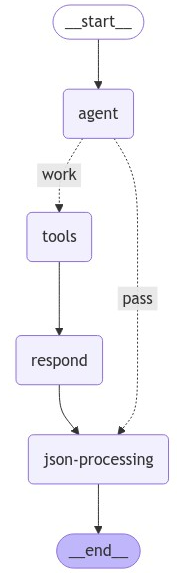
현재 흐름은 단순하다.
-
언어 모델이 로드되어 있는
agent노드에 사용자 메시지 전달 -
사용자 메시지가 호출할 수 있는 함수와 관련이 있는지 판단 후 다음 단계 진입, 관련이 있는 경우 AI가 tool_calls 변수를 가진 메시지 생성
-
호출 가능한 함수가 존재한다면,
tools노드로 진입 후 작동, 이때 질문과 관련된 정보 검색도 호출된 함수 안에서 실행
호출 가능한 함수가 없다면, AI의 일반적인 답변을 생성한 후 다음 노드로 전달 -
호출 결과는
respond노드로 전달되어 호출된 함수에 따라 다른 지시사항과 함께 적용되어 답변 생성 (답변은 JSON 형태로 생성) -
생성된 답변이 지정된 JSON 형식으로 잘 생성되고, 올바른 JSON인지 확인하는 단계를
json-processing노드에서 진행 후 답변을 사용자에게 전달한다.
1. Main 진행 코드
import os
from fastapi import FastAPI, HTTPException
from pydantic import BaseModel
from typing import Optional, List, Dict
from langgraph.checkpoint.memory import MemorySaver

from openAI_api import llm
from access_milvusDB import database
from available_functions import callable_tools
from agent_executor import create_my_agent

# langsmith, langchain 환경 설정
os.environ["LANGCHAIN_TRACING_V2"] = "true"
os.environ["LANGCHAIN_API_KEY"] = "api key"
os.environ["LANGCHAIN_PROJECT"] = "test name"


class QuestionRequest(BaseModel):
    question: str


class AiResponse(BaseModel):
    answer: str
    place: Optional[List[Dict]] = None


app = FastAPI()

# 대화 기록 메모리 생성
memory = MemorySaver()

# 호출할 함수 리스트 가져오기
tools = callable_tools

# 에이전트 생성
agent = create_my_agent(
    model=llm,
    tools=tools,
    checkpointer=memory
)

config = {"configurable": {"thread_id": "test-thread1"}}

db = database

@app.post("/ask-ai/", response_model=AiResponse)
async def ask_ai(request: QuestionRequest):
    question = request.question  # JSON에서 question 필드 추출

    try:
        db.reconnect()

        system_prompt = """
        - You are a tour guide called 'TBTI'. Ask the user a short and clear question.
        - Just ask once what kind of trip the user wants.
          ex. Is there anything you want when you travel?
        - Only up to five locations will be notified.
        """

        messages_list = [("system", f"{system_prompt}")]
        messages_list.append(("human", f"{question}"))

        # 에이전트 실행
        response = agent.invoke({"messages": messages_list}, config)['final_response']
        #print(response)

        return response

    except Exception as e:
        print("에러 발생: ", e)
        raise HTTPException(status_code=500, detail="AI 처리 중 오류 발생")
    finally:
        db.unconnect()

if __name__ == "__main__":
    import uvicorn
    uvicorn.run(app, host="0.0.0.0", port=8991)
사용자의 질문은 fastAPI 이용해서 받아오며 나중에 답변도 이를 통해 전달한다.
위의 코드에서 중요한 부분은 에이전트 생성과 실행 부분이다.
에이전트는 create_my_agent 함수를 통해 생성하는데 이는 LangGraph의 create_react_agent 코드와 아래의 문서를 참고해 구현하였다.
에이전트를 생성하면 invoke()에 사용자 질문과 메모리 설정을 담아 실행시킨다.
2. agent 구현 코드
전체 코드는 다음과 같다.
create_my_agent 안에 흐름의 각 단계를 의미하는 함수들이 정의되어 있고 마지막 부분엔 이 함수들을 이용한 노드와 노드를 연결하는 edges를 구성하여 흐름을 만들었다.
import json
from langgraph.graph import StateGraph, END
from langgraph.prebuilt import ToolNode
from langchain_core.tools import BaseTool
from langgraph.checkpoint.base import BaseCheckpointSaver
from langgraph.graph.graph import CompiledGraph
from langgraph.prebuilt.tool_executor import ToolExecutor
from langgraph.graph.message import add_messages
from langchain_core.language_models import LanguageModelLike

from criteria_of_answers import system_informations_of_functions
from openAI_api import chat_completion_request

from typing import (
    Optional,
    TypedDict,
    Annotated,
    Union,
    Sequence
)


def escape_json_strings(response):
    try:
        # JSON 문자열을 딕셔너리 자료형으로 변환
        response_dict = json.loads(response)
        return response_dict
    except Exception as e:
        print(f"Error escaping JSON strings: {e}")
        return response


# 노드에 전달되는 state
class AgentState(TypedDict):
    previous_result : str # 이전 단계에서의 결과값 저장
    final_response : dict # 사용자에게 전달되는 최종 메시지
    messages : Annotated[list, add_messages]  # 대화 history 전달


def create_my_agent(
    model: LanguageModelLike,
    tools: Union[ToolExecutor, Sequence[BaseTool], ToolNode],
    checkpointer: Optional[BaseCheckpointSaver] = None
) -> CompiledGraph:

    # LLM 시스템 프롬프트 리스트 로드 - 작동되는 함수에 따라 시스템 프롬프트 내용 다름
    configuration_for_answers = system_informations_of_functions

    # 함수 호출 도구 사용할 수 있는 모델 생성
    model_with_tools = model.bind_tools(tools)

    # 사용할 AI 모델 로드 및 AI 답변 처리
    def call_model(state: AgentState):
        response = model_with_tools.invoke(state['messages'])
        last_response = response.content.strip("<>() ").replace('\"', '\'')
        last_response = f'{{\"answer\": \"{last_response}\", \"place\": null}}'

        # AI 답변을 json 형식의 문자열로 만들어 previous_result에 저장 / 답변 history에 저장
        return {"previous_result" : last_response , "messages" : [response]}

    # 도구 작동 후 함수 결과 LLM에게 최종 전달 후 답변 생성
    def respond_after_calling_tools(state: AgentState):
        # 작동된 마지막 도구 메시지 가져오기
        messages = state["messages"]
        last_tool_message = messages[-1]

        # 작동된 함수 이름 가져오기
        name_of_functions_called = last_tool_message.name
        print(name_of_functions_called)

        # 함수 리턴값 가져오기 = 검색 결과 가져오기
        reference = last_tool_message.content

        # 작동된 도구에 맞는 시스템 프롬프트 가져오기
        system_prompt = configuration_for_answers[name_of_functions_called]['system_prompt']
        response_format = configuration_for_answers[name_of_functions_called]['response_format']

        # 결과 참고해서 LLM 답변 생성
        messages = [
            {"role":"system", "content": f"{system_prompt}"},
            {"role": "user", "content":f"{reference}"}
        ]

        llm_response = chat_completion_request(
            messages=messages,
            response_format=response_format
        ).choices[0].message.content

        return {"previous_result": llm_response}

    # Define the function that determines whether to continue or not
    def should_continue(state: AgentState):
        messages = state["messages"]
        last_message = messages[-1]

        # 함수 호출이 없으면 바로 사용자에게 리턴
        if not last_message.tool_calls:
            return "pass"
        # 있으면 워크플로우 지속
        else:
            return "work"

    def post_processing_of_answer(state: AgentState):
        ai_answer = state["previous_result"]
        escaped_response = escape_json_strings(ai_answer)
        return {"final_response" : escaped_response}


    # 새로운 그래프 정의
    workflow = StateGraph(AgentState)

    # agent, tools 노드 생성
    workflow.add_node("agent", call_model)
    workflow.add_node("tools", ToolNode(tools))
    workflow.add_node("respond", respond_after_calling_tools)
    workflow.add_node("json-processing", post_processing_of_answer)

    # Set the entrypoint as `agent`
    # This means that this node is the first one called
    workflow.set_entry_point("agent")

    # We now add a conditional edge
    workflow.add_conditional_edges(
        "agent",
        should_continue,
        {
            "work": "tools",
            "pass": "json-processing",
        },
    )

    workflow.add_edge("tools", "respond")
    workflow.add_edge("respond", "json-processing")
    workflow.add_edge("json-processing", END)

    graph = workflow.compile(
        checkpointer=checkpointer
    )

    return graph
하나씩 뽑아서 구체적으로 내용을 확인해 보겠다.
2-1. State 설정
# 노드에 전달되는 state
class AgentState(TypedDict):
    previous_result : str # 이전 단계에서의 결과값 저장
    final_response : dict # 사용자에게 전달되는 최종 메시지
    messages : Annotated[list, add_messages]  # 대화 history 전달
각 노드들이 공유할 수 있는 데이터 구조라고 볼 수 있다. 노드에서 위에 설정된 변수들에 접근하여 이를 사용하거나 저장할 수 있다.
나는 주석에 달린 것처럼 이전 단계에서의 결과값, 마지막 전달되는 최종 메시지, 대화 기록을 저장하여 사용하였다.
2-2. 실행할 함수(작업) 정의
-------------------------------- 작업 1 ---------------------------------

   # 함수 호출 도구 사용할 수 있는 모델 생성
    model_with_tools = model.bind_tools(tools)

    # 사용할 AI 모델 로드 및 AI 답변 처리
    def call_model(state: AgentState):
        response = model_with_tools.invoke(state['messages'])
        last_response = response.content.strip("<>() ").replace('\"', '\'')
        last_response = f'{{\"answer\": \"{last_response}\", \"place\": null}}'

        return {"previous_result" : last_response , "messages" : [response]}
bind_tools 함수를 이용해 호출 가능한 도구 정보들을 모델이 담고 이를 사용할 것이다. 작업 내용을 짧게 정리해보겠다.
- call_model :
도구를 호출할 수 있는 모델을 가져와 사용자의 메시지를 모델에 전달해 답변을 생성한다. 답변의 내용만을 추출해 previous_results 변수에 딕셔너리 형태의 문자열로 저장하고 messages 변수에는 대화 기록을 저장한다.
-------------------------------- 작업 2 ---------------------------------

	# 도구 작동 후 함수 결과 LLM에게 최종 전달 후 답변 생성
    def respond_after_calling_tools(state: AgentState):
        # 작동된 마지막 도구 메시지 가져오기
        messages = state["messages"]
        last_tool_message = messages[-1]

        # 작동된 함수 이름 가져오기
        name_of_functions_called = last_tool_message.name
        print(name_of_functions_called)

        # 함수 리턴값 가져오기 = 검색 결과 가져오기
        reference = last_tool_message.content

        # 작동된 도구에 맞는 시스템 프롬프트 가져오기
        system_prompt = configuration_for_answers[name_of_functions_called]['system_prompt']
        response_format = configuration_for_answers[name_of_functions_called]['response_format']

        # 결과 참고해서 LLM 답변 생성
        messages = [
            {"role":"system", "content": f"{system_prompt}"},
            {"role": "user", "content":f"{reference}"}
        ]

        llm_response = chat_completion_request(
            messages=messages,
            response_format=response_format
        ).choices[0].message.content

        return {"previous_result": llm_response}
- respond_after_calling_tools :
호출된 도구의 작동 결과와 지정 프롬프트를 이용해 답변을 생성하는 작업이다. 작동 결과를 대화 기록에서 추출하고 작동된 도구 이름에 따라 각각 다른 시스템 프롬프트 내용을 가져온다.
이 함수에선 내부에 도구 호출 가능한 모델이 아닌 일반 LLM을 사용하여 답변을 생성하는데 아래의 json 스키마 같이 지정된 json 형태로 답변을 생성하도록 했다. 답변 json 형태도 호출되는 함수에 따라 다르다.
생성한 답변은 마지막에 previous_result 변수에 저장해 이전 단계 결과값으로 저장한다.
  response_format_1 = {
      "type": "json_schema",
      "json_schema" : {
          "name" : "A_general_answer",
          "schema" : {
              "type": "object",
              "properties" : {
                  "answer": {
                      "type": "string",
                      "description" : "put your answer in the value."
                  },
                  "place": {
                      "type": ["null", "object"],
                      "description": "This will be null."
                  }
              },
              "required" : ["answer", "place"],
              "additionalProperties": False
          },
          "strict" : True
      }
  }
-------------------------------- 작업 3,4 -------------------------------

    def should_continue(state: AgentState):
        messages = state["messages"]
        last_message = messages[-1]

        # 함수 호출이 없으면 바로 사용자에게 리턴
        if not last_message.tool_calls:
            return "pass"
        # 있으면 워크플로우 지속
        else:
            return "work"

    def post_processing_of_answer(state: AgentState):
        ai_answer = state["previous_result"]
        escaped_response = escape_json_strings(ai_answer)
return {"final_response" : escaped_response}-
should_continue :
사용자의 질문이 도구 호출이 가능한 지 판단하는 작업
함수 호출이 필요하면 work 과정으로 진행, 없으면 pass 과정으로 진행 -
post_processing_of_answer :
이전 단계에서 저장된 LLM의 답변을 다시 가져와 JSON 형식이 아닌 문자열이 있는지 검토하고 이를 파이썬 딕셔너리의 형태로 변환해 저장한다.
2-3. 그래프 생성
    # 새로운 그래프 정의
    workflow = StateGraph(AgentState)

    # agent, tools 노드 생성
    workflow.add_node("agent", call_model)
    workflow.add_node("tools", ToolNode(tools))
    workflow.add_node("respond", respond_after_calling_tools)
    workflow.add_node("json-processing", post_processing_of_answer)

    # Set the entrypoint as `agent`
    # This means that this node is the first one called
    workflow.set_entry_point("agent")

    # We now add a conditional edge
    workflow.add_conditional_edges(
        "agent",
        should_continue,
        {
            "work": "tools",
            "pass": "json-processing",
        },
    )

    workflow.add_edge("tools", "respond")
    workflow.add_edge("respond", "json-processing")
    workflow.add_edge("json-processing", END)

    graph = workflow.compile(
        checkpointer=checkpointer
    )

    return graph
이제 그래프를 정의해 에이전트 흐름을 구현해 본다.
StateGraph 객체를 통해 '상태'를 가지는 챗봇의 구조를 정의했다고 할 수 있다. 그 다음으로 위에서 정의한 작업 내용들을 노드로 구성하고, 호출 가능한 도구들도 ToolNode로 정의하여 하나의 노드로 만든다.
노드 생성 후에는 시작 노드를 설정하고 Edge를 통해 노드들을 연결한다. 이는 노드들이 통신하는 지점을 만드는 것이며 Edge는 진행 로직을 만들고 라우팅 되거나 중지되는 부분도 만들 수 있다.
마지막에 구현한 흐름을 compile()을 통해 실행 가능한 에이전트를 생성한다.
3. 호출 도구 정의 코드
import json
from langchain_core.tools import tool
from access_milvusDB import database
from openAI_api import embedding

@tool
def recommand_travel_destination(question : str, location : str, area : str) -> str:
    """
    recommand the various places that user wants to know or to travel
    It only works when user wants to know the various places.
    It doesn't work when user told to plan the trip and when user told to reserve the place.

    Args:
        question: Identify the travel the user want and input the questions.
        location: input the area of Korea to travel, e.g. 서울 or 부산 or 대구 or 강원도
        area: Enter only the following words to indicate where the place in the user's question belongs to the following Korean administrative districts. e.g. 강원특별자치도
              - 한국 행정 구역 : 서울특별시, 부산광역시, 인천광역시, 대구광역시, 대전광역시, 광주광역시, 울산광역시, 세종특별자치시, 경기도, 충청북도, 충청남도, 전라남도, 경상북도, 경상남도, 강원특별자치도, 전북특별자치도, 제주특별자치도
    """

    milvus = database

    # 사용자 질문 벡터화
    vector  =  embedding(question)

    # 필터링 생성 후 테이블 검색 진행
    filtering = f"area_name == '{area}'"
    results_localCreator, results_nowLocal = milvus.search_all_tables(embedding=vector, filtering=filtering)

    # 쿼리 결과 합치기
    total_results = milvus.get_formatted_results(results_localCreator, results_nowLocal)

    return f"user question: {question} \n\nreference: \n{total_results}"


@tool
def search_specific_place(question : str, place_name : str = None) -> json:
    """
    give the information of the specific places mentioned by the user.
    It works when a user question contains a name of specific place.
    It doesn't work when you recommand a place.

    Args:
        question: input the user's question as it is
        place_name: The name of the particular place that user wants to know or to reserve
    """

    # 특정 장소 검색 과정 진행....

    return f"user question: {question} \n\nreference: \n{total_results}"


callable_tools = [recommand_travel_destination, create_travel_plan, search_specific_place]
여행지 추천, 여행 계획 생성, 특정 장소 검색 기능을 도구들로 정의하여 모델이 사용자 질문의 의도를 파악해 그에 맞는 기능을 사용할 수 있도록 한다. 위의 코드는 중간 생략해서 전체 코드는 아니다.
호출할 도구는 위와 같이 정의하면 되는데 @tool 어노테이션을 달아 호출할 도구라는 것을 표시하고, 함수 내부의 주석으로 어떤 기능이며 언제 작동하고, 입력될 파라미터 값의 설명을 포함하여 LLM이 도구를 이해하고 사용할 수 있도록 만든다.
호출할 도구들은 정의 후 callable_tools안에 넣어 리스트로 저장한다.
코드 진행 예시
사용자 질문에서 LLM의 답변까지 어떻게 진행되는 건지 예시를 들어 정리해보도록 하겠다.
🙎 사용자: 강릉으로 여행 갈 건데 갈만한 곳 알려줘.
1. Main 작동
- http://0.0.0.0:8991/ask-ai 경로로 사용자 질문 post 요청
- 전달 받은 JSON 에서 사용자 질문을 추출 후 생성한 에이전트에 전달
2. 에이전트 작동
-
agent node :
에이전트는 전달 받은 질문이 여행지 추천 함수인recommand_travel_destination와 관련있다고 판단 -
tools node :
여행지 추천 함수 호출하여 작동, 강릉의 여행지를 검색하여 사용자에게 맞는 여행지 리스트를 질문과 함께 리턴 -
respond node :
함수 리턴 결과와 여행지 추천 시 답변 생성 기준을 가져와 LLM 답변 생성 -
json-processing :
LLM이 생성한 JSON 형태의 문자열이 올바른 JSON 형식인지 확인 후 딕셔너리로 변환
딕셔너리 객체를 최종 전달 메시지로 저장 후 사용자에게 전달