[stereo camera를 이용한 vslam]
목표 : matlab 환경에서 orb_stereo vslam을 기 확보된 데이터셋을 통해 수행해보자.
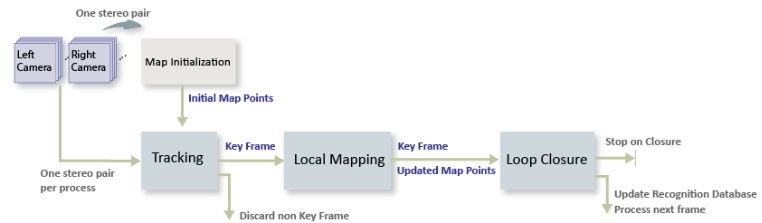
SLAM flow
이미지간 특징점 검출 -> 루프 클로져 -> 지도 제작
루프 클로저(Loop Closure)는 로봇이나 자율주행 시스템에서 이미 방문한 위치를 다시 방문했을 때 그 위치를 인식하고 지도를 수정하는 과정입니다. 간단히 말해, 루프 클로저는 로봇이 '아, 여기를 전에 왔었네!'라고 인식하는 기능
[Matlab 예제 따라해보기]
😊matlab orb_slam_Matlab_official_Site
- 이미 양안 카메라로 촬영된 이미지셋 다운로드.
ftpObj       = ftp('asrl3.utias.utoronto.ca');
tempFolder   = fullfile(tempdir);
dataFolder   = [tempFolder, '2020-vtr-dataset/UTIAS-In-The-Dark/'];
zipFileName  = [dataFolder, 'run_000005.zip'];
folderExists = exist(dataFolder, 'dir');

% Create a folder in a temporary directory to save the downloaded file
if ~folderExists
    mkdir(dataFolder);
    disp('Downloading run_000005.zip (818 MB). This download can take a few minutes.')
    mget(ftpObj,'/2020-vtr-dataset/UTIAS-In-The-Dark/run_000005.zip', tempFolder);

    % Extract contents of the downloaded file
    disp('Extracting run_000005.zip (818 MB) ...')
    unzip(zipFileName, dataFolder);
end
2.왼쪽카메라, 오른쪽카메라 사진 담을 각각의 디렉토리 생성 및 테스트 이미지 출력해보기(잘 저장되었는지)
imgFolderLeft  = [dataFolder,'/images/left/'];
imgFolderRight = [dataFolder,'/images/right/'];
imdsLeft       = imageDatastore(imgFolderLeft);
imdsRight      = imageDatastore(imgFolderRight);

% Inspect the first pair of images
currFrameIdx   = 1;
currILeft      = readimage(imdsLeft, currFrameIdx);
currIRight     = readimage(imdsRight, currFrameIdx);
imshowpair(currILeft, currIRight, 'montage');
3.Map initialization
첫 번째 이미지에서 특징점을 찾아냅니다.
-두 번째 이미지에서 특징점들을 매칭합니다.
-매칭된 특징점들을 3D 공간으로 재구성하여, 첫 번째 3D 맵을 만듭니다.
-이 맵을 바탕으로, 로봇은 초기 위치를 추정하고, 이후에 맵을 계속 확장해 나갈 수 있습니다.
-> 별 의미 아니고, 그냥 양안 이미지에서 특징점 찾아서 로봇이 주변환경을 매핑하기 '시작'한다 라는 의미인듯.
% Set random seed for reproducibility
rng(0);

% Load the initial camera pose. The initial camera pose is derived based
% on the transformation between the camera and the vehicle:
% http://asrl.utias.utoronto.ca/datasets/2020-vtr-dataset/text_files/transform_camera_vehicle.t
initialPoseData = load("initialPose.mat");
initialPose     = initialPoseData.initialPose;

% Construct the reprojection matrix for 3-D reconstruction.
% The intrinsics for the dataset can be found at the following page:
% http://asrl.utias.utoronto.ca/datasets/2020-vtr-dataset/text_files/camera_parameters.txt
focalLength     = [387.777 387.777];     % specified in pixels
principalPoint  = [257.446 197.718];     % specified in pixels [x, y]
baseline        = 0.239965;              % specified in meters
imageSize       = size(currILeft,[1,2]); % in pixels [mrows, ncols]
intrinsics      = cameraIntrinsics(focalLength, principalPoint, imageSize);

reprojectionMatrix = [1, 0, 0, -principalPoint(1);
    0, 1, 0, -principalPoint(2);
    0, 0, 0, focalLength(1);
    0, 0, 1/baseline, 0];

% In this example, the images are already undistorted and rectified. In a general workflow,
% uncomment the following code to undistort and rectify the images.
% currILeft     = undistortImage(currILeft, intrinsics);
% currIRight    = undistortImage(currIRight, intrinsics);
% stereoParams  = stereoParameters(intrinsics, intrinsics, eye(3), [-baseline, 0 0]);
% [currILeft, currIRight] = rectifyStereoImages(currILeft, currIRight, stereoParams, OutputView="full");

% Detect and extract ORB features from the rectified stereo images
scaleFactor = 1.2;
numLevels   = 8;
numPoints = 600;
[currFeaturesLeft,  currPointsLeft]   = helperDetectAndExtractFeatures(im2gray(currILeft), scaleFactor, numLevels, numPoints);
[currFeaturesRight, currPointsRight]  = helperDetectAndExtractFeatures(im2gray(currIRight), scaleFactor, numLevels, numPoints);

% Match feature points between the stereo images and get the 3-D world positions
disparityRange = [0 48];  % specified in pixels
[xyzPoints, matchedPairs] = helperReconstructFromStereo(im2gray(currILeft), im2gray(currIRight), ...
    currFeaturesLeft, currFeaturesRight, currPointsLeft, currPointsRight, reprojectionMatrix, initialPose, disparityRange);
4.특징점 추출(키프레임 생성) 및 3D 맵 생성
⚠️ 절대 결과로 나온 figure 창을 끄지 말것. 이후 SLAM이 해당 창에서 수행됨. 꺼버리면 이미지 객체 찾을 수 없다고 나옴!
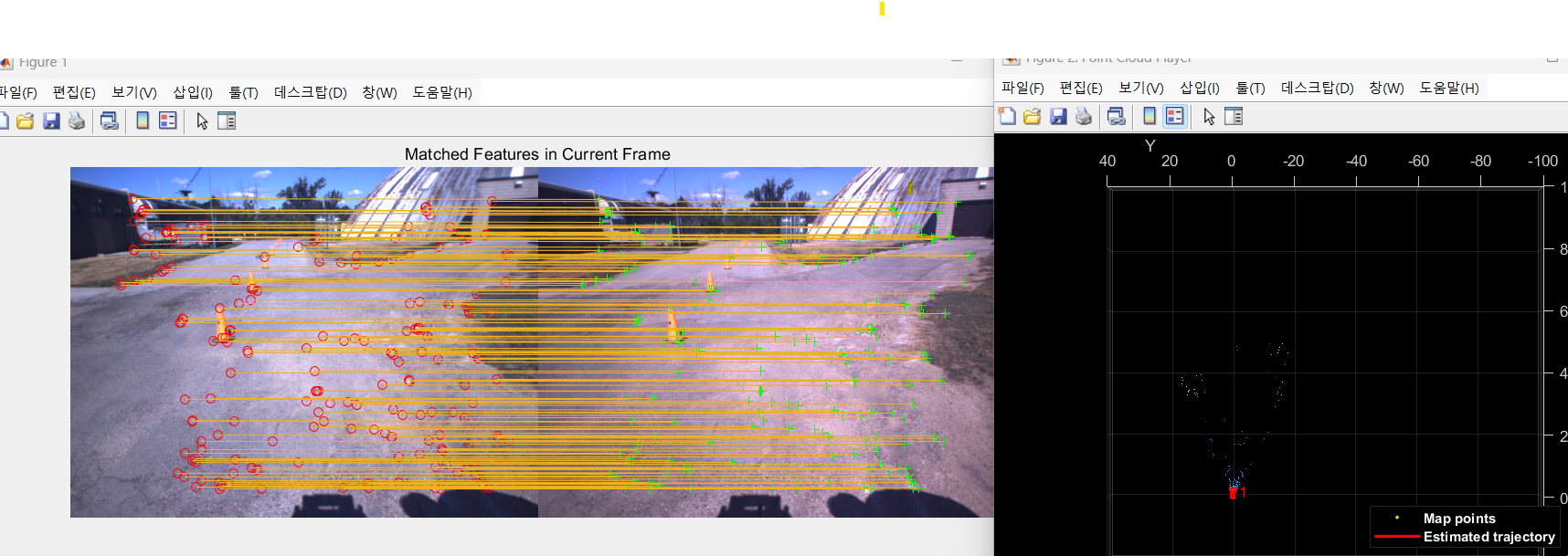
특징점을 추출해서, SLAM에 활용되는 키프레임 생성. 이를 기반으로 깊이정보나 위치정보를 알 수 있음.
첫 키프레임으로 생성된 (Map initialized) 3D mapping 결과 시각화 하는 부분.
% Create an empty imageviewset object to store key frames
vSetKeyFrames = imageviewset;

% Create an empty worldpointset object to store 3-D map points
mapPointSet   = worldpointset;

% Add the first key frame
currKeyFrameId = 1;
vSetKeyFrames = addView(vSetKeyFrames, currKeyFrameId, initialPose, Points=currPointsLeft,...
    Features=currFeaturesLeft.Features);

% Add 3-D map points
[mapPointSet, stereoMapPointsIdx] = addWorldPoints(mapPointSet, xyzPoints);

% Add observations of the map points
mapPointSet = addCorrespondences(mapPointSet, currKeyFrameId, stereoMapPointsIdx, matchedPairs(:, 1));

% Update view direction and depth
mapPointSet = updateLimitsAndDirection(mapPointSet, stereoMapPointsIdx, vSetKeyFrames.Views);

% Update representative view
mapPointSet = updateRepresentativeView(mapPointSet, stereoMapPointsIdx, vSetKeyFrames.Views);

% Visualize matched features in the first key frame
featurePlot = helperVisualizeMatchedFeaturesStereo(currILeft, currIRight, currPointsLeft, ...
    currPointsRight, matchedPairs);

% Visualize initial map points and camera trajectory
mapPlot     = helperVisualizeMotionAndStructureStereo(vSetKeyFrames, mapPointSet);

% Show legend
showLegend(mapPlot);
5.루프클로져를 위한 데이터베이스 생성
루프 클로저 (Loop Closure):
루프 클로저는 이미 갔던 길을 다시 돌아올 때, 그 길이 어디였는지 인식하는 기술.
예를 들어, 너가 어떤 큰 공원에서 돌아서 길을 나갔다가, 다시 돌아왔을 때, "아! 내가 여기를 처음 지나왔을 때와 같은 길을 지나왔구나!"라고 인식할 수 있게 돕는 기능이다. 그러면 경로가 어긋난 것을 바로잡고, 정확한 위치를 파악할 수 있다.
bags-of-words" 접근법:
이 길이 어디인지 메모. 예) 감래등 앞
SLAM하며 경로가 틀어지거나, 같은 경로를 다시 왔을때, 이미 왔던길임을 메모를 보고 알고, 로봇 경로를 보정. (터틀봇 다시 돌아왔을때, mapping 깔끔해지는게 루프클로저 덕분.)
% Load the bag of features data created offline
bag         = bagOfFeaturesDBoW("bagOfFeatures.bin.gz");

% Initialize the place recognition database
loopDatabase    = dbowLoopDetector(bag);

% Add features of the first two key frames to the database
addVisualFeatures(loopDatabase, currKeyFrameId, currFeaturesLeft);
6. Tracking 과정
이미지 사이사이를 확인하며, 내 로봇이 어디에 있고, 어떻게 이동하고 있고, 경로는 어떻게 보정을 할지 인접한 키프레임을 통해 확인.
만약 새로운곳을 방문하면(인접한 키프레임과 새로이 들어온 이미지의 특징점이 너무 다르면), 특정 조건에 의하여 키프레임 생성
찍은 사진을 추적하면서, 내가 어디 있는지 계속 추정하고,
중요한 순간마다 "여기서 내 위치를 기록"하며,
두 개의 카메라로 찍은 왼쪽과 오른쪽 사진을 비교해서 3D 맵을 만들고,
이전에 갔던 곳을 인식하여, 정확한 경로로 이동하도록 돕는 과정이다.
현재 위치 추적 (Tracking)
길을 걸으며 찍은 사진을 통해 내가 어디 있는지 추적함. 각 사진에서 특징을 추출하고, 이전 사진들과 비교해서 위치를 파악함.
새로운 Key Frame 결정 (Key Frame Decision)
중요한 순간을 기록하는데, 조건은:
최소 5장 이상의 사진이 지나야 기록.
3D 포인트가 적으면 기록.
이전 사진과 90% 이상 비슷하지 않으면 기록. 기록된 사진은 새로운 Key Frame이 되고, 맵 업데이트와 추적을 다시 시작함.
Stereo Matching (스테레오 이미지 비교)
왼쪽, 오른쪽 사진을 비교해서 3D 맵을 만들기 위한 정보를 추출함. 같은 물체를 찾아 3D 위치를 계산함.
새로운 위치 계산 (Pose Estimation)
각 사진에서 카메라의 위치와 방향을 계산함. 사진들을 비교하여 내 위치를 추정하고, 새로운 Key Frame을 결정해 기록함.
루프 클로저 및 오차 수정
길을 걷다가 다시 같은 장소에 오면, 이전 경로를 인식하고 오차를 수정함.
% ViewId of the last key frame
lastKeyFrameId    = currKeyFrameId;

% Index of the last key frame in the input image sequence
lastKeyFrameIdx   = currFrameIdx;

% Indices of all the key frames in the input image sequence
addedFramesIdx    = lastKeyFrameIdx;

currFrameIdx      = 2;
isLoopClosed      = false;

% Main loop
isLastFrameKeyFrame = true;
while ~isLoopClosed && currFrameIdx <= numel(imdsLeft.Files)

    currILeft  = readimage(imdsLeft, currFrameIdx);
    currIRight = readimage(imdsRight, currFrameIdx);

    currILeftGray = im2gray(currILeft);
    currIRightGray = im2gray(currIRight);

    [currFeaturesLeft, currPointsLeft]    = helperDetectAndExtractFeatures(currILeftGray, scaleFactor, numLevels, numPoints);
    [currFeaturesRight, currPointsRight]  = helperDetectAndExtractFeatures(currIRightGray, scaleFactor, numLevels, numPoints);

    % Track the last key frame
    % trackedMapPointsIdx:  Indices of the map points observed in the current left frame
    % trackedFeatureIdx:    Indices of the corresponding feature points in the current left frame
    [currPose, trackedMapPointsIdx, trackedFeatureIdx] = helperTrackLastKeyFrame(mapPointSet, ...
        vSetKeyFrames.Views, currFeaturesLeft, currPointsLeft, lastKeyFrameId, intrinsics, scaleFactor);

    if isempty(currPose) || numel(trackedMapPointsIdx) < 30
        currFrameIdx = currFrameIdx + 1;
        continue
    end

    % Track the local map  and check if the current frame is a key frame.
    % localKeyFrameIds:   ViewId of the connected key frames of the current frame
    numSkipFrames     = 5;
    numPointsKeyFrame = 80;
    [localKeyFrameIds, currPose, trackedMapPointsIdx, trackedFeatureIdx, isKeyFrame] = ...
        helperTrackLocalMap(mapPointSet, vSetKeyFrames, trackedMapPointsIdx, ...
        trackedFeatureIdx, currPose, currFeaturesLeft, currPointsLeft, intrinsics, scaleFactor, ...
        isLastFrameKeyFrame, lastKeyFrameIdx, currFrameIdx, numSkipFrames, numPointsKeyFrame);

    % Match feature points between the stereo images and get the 3-D world positions
    [xyzPoints, matchedPairs] = helperReconstructFromStereo(currILeftGray, currIRightGray, currFeaturesLeft, ...
        currFeaturesRight, currPointsLeft, currPointsRight, reprojectionMatrix, currPose, disparityRange);

    % Visualize matched features in the stereo image
    updatePlot(featurePlot, currILeft, currIRight, currPointsLeft, currPointsRight, trackedFeatureIdx, matchedPairs);

    if ~isKeyFrame && currFrameIdx < numel(imdsLeft.Files)
        currFrameIdx = currFrameIdx + 1;
        isLastFrameKeyFrame = false;
        continue
    else
        [untrackedFeatureIdx, ia] = setdiff(matchedPairs(:, 1), trackedFeatureIdx);
        xyzPoints = xyzPoints(ia, :);
        isLastFrameKeyFrame = true;
    end

    % Update current key frame ID
    currKeyFrameId  = currKeyFrameId + 1;
-아직 명령어줄이 끝나지 않았음. 아래의 명령어들도 쳐주면 됨.
7. SLAM부분 Mapping, loop-closure, SLAM 시각화
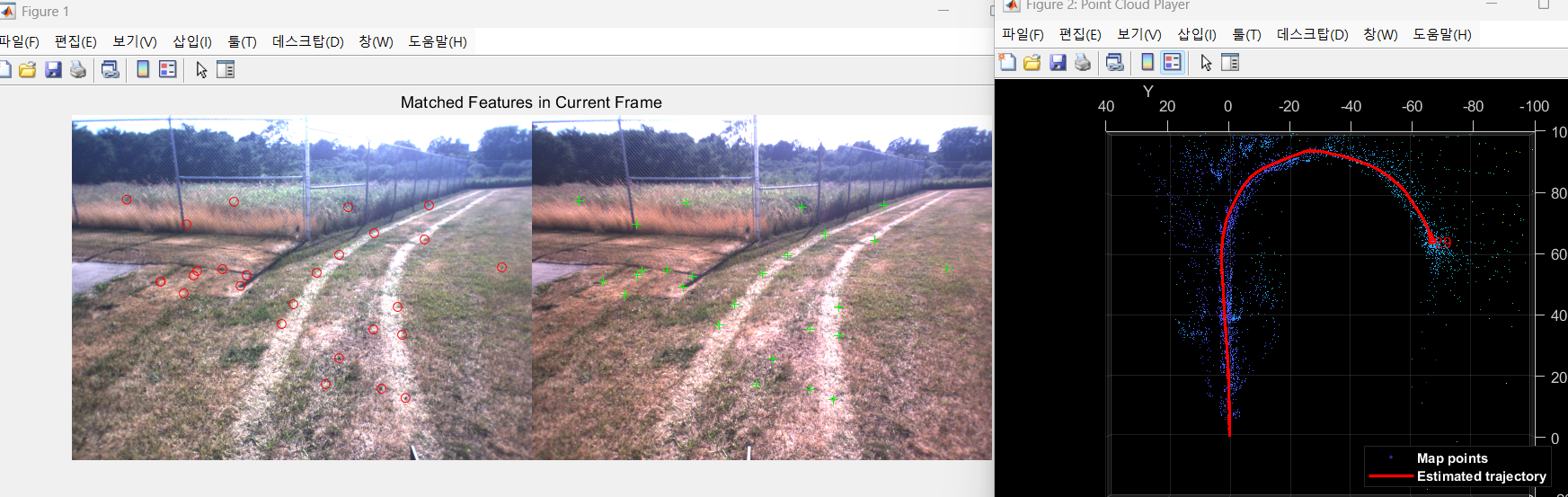
새로운 Key Frame 추가:
걷다가 중요한 순간에 새로운 사진을 찍었음. 그 사진을 Key Frame으로 추가하고, 그 사진에서 본 특징들을 바탕으로 맵을 업데이트함. 이를 통해 새로운 3D 맵 포인트가 생성됨.
잘못된 맵 포인트 제거:
이전에 생성된 맵 포인트 중에서, 너무 적게 등장한 포인트들(예: 3개 이하의 사진에서만 보인 포인트)은 신뢰할 수 없어서 제거해야 함. 이걸 통해 맵을 더 정확하게 만듦.
새로운 맵 포인트 계산:
현재 찍은 사진과 이전에 찍었던 사진들을 비교해서, 그 사진들에서 새로운 맵 포인트를 계산하고 추가함. 이때, 삼각측량(triangulation)을 통해 새로운 3D 포인트를 생성함.
로컬 번들 조정(Local Bundle Adjustment):
새로운 Key Frame이 추가되면, 기존에 연결된 Key Frame들과 함께 3D 맵 포인트와 카메라 위치를 다시 조정함. 이때, 몇 가지 Key Frame들을 고정(fixed)하고, 나머지 포인트들을 정밀하게 조정해서 전체적인 오차를 최소화함.
맵과 카메라 궤적 시각화:
이렇게 개선된 맵을 시각적으로 나타내서, 걸어간 경로와 맵을 확인할 수 있게 해줌.
    % Add the new key frame
    [mapPointSet, vSetKeyFrames] = helperAddNewKeyFrame(mapPointSet, vSetKeyFrames, ...
        currPose, currFeaturesLeft, currPointsLeft, trackedMapPointsIdx, trackedFeatureIdx, localKeyFrameIds);

    % Remove outlier map points that are observed in fewer than 3 key frames
    if currKeyFrameId == 2
        triangulatedMapPointsIdx = [];
    end

    mapPointSet = helperCullRecentMapPointsStereo(mapPointSet, ...
        trackedMapPointsIdx, triangulatedMapPointsIdx, stereoMapPointsIdx);

    % Add new map points computed from disparity
    [mapPointSet, stereoMapPointsIdx] = addWorldPoints(mapPointSet, xyzPoints);
    mapPointSet = addCorrespondences(mapPointSet, currKeyFrameId, stereoMapPointsIdx, ...
        untrackedFeatureIdx);

    % Create new map points by triangulation
    minNumMatches = 20;
    minParallax   = 0.35;
    [mapPointSet, vSetKeyFrames, triangulatedMapPointsIdx, stereoMapPointsIdx] = helperCreateNewMapPointsStereo( ...
        mapPointSet, vSetKeyFrames, currKeyFrameId, intrinsics, scaleFactor, minNumMatches, minParallax, ...
        untrackedFeatureIdx, stereoMapPointsIdx);

    % Local bundle adjustment
    [refinedViews, dist] = connectedViews(vSetKeyFrames, currKeyFrameId, MaxDistance=2);
    refinedKeyFrameIds = refinedViews.ViewId;

    % Always fix the first two key frames
    fixedViewIds = refinedKeyFrameIds(dist==2);
    fixedViewIds = fixedViewIds(1:min(10, numel(fixedViewIds)));

    % Refine local key frames and map points
    [mapPointSet, vSetKeyFrames, mapPointIdx] = bundleAdjustment(...
        mapPointSet, vSetKeyFrames, [refinedKeyFrameIds; currKeyFrameId], intrinsics, ...
        FixedViewIDs=fixedViewIds, PointsUndistorted=true, AbsoluteTolerance=1e-7,...
        RelativeTolerance=1e-16, Solver='preconditioned-conjugate-gradient', MaxIteration=10);

    % Update view direction and depth
    mapPointSet = updateLimitsAndDirection(mapPointSet, mapPointIdx, ...
        vSetKeyFrames.Views);

    % Update representative view
    mapPointSet = updateRepresentativeView(mapPointSet, mapPointIdx, ...
        vSetKeyFrames.Views);

    % Visualize 3-D world points and camera trajectory
    updatePlot(mapPlot, vSetKeyFrames, mapPointSet);

        % Check loop closure after some key frames have been created
    if currKeyFrameId > 50

        % Minimum number of feature matches of loop edges
        loopEdgeNumMatches = 50;

        % Detect possible loop closure key frame candidates
        [isDetected, validLoopCandidates] = helperCheckLoopClosure(vSetKeyFrames, currKeyFrameId, ...
            loopDatabase, currFeaturesLeft, loopEdgeNumMatches);

        isTooCloseView = currKeyFrameId - max(validLoopCandidates) < 100;
        if isDetected && ~isTooCloseView
            % Add loop closure connections
            [isLoopClosed, mapPointSet, vSetKeyFrames] = helperAddLoopConnectionsStereo(...
                mapPointSet, vSetKeyFrames, validLoopCandidates, currKeyFrameId, ...
                currFeaturesLeft, currPointsLeft, loopEdgeNumMatches);
        end
    end

    % If no loop closure is detected, add current features into the database
    if ~isLoopClosed
        addVisualFeatures(loopDatabase,  currKeyFrameId, currFeaturesLeft);
    end

    % Update IDs and indices
    lastKeyFrameId  = currKeyFrameId;
    lastKeyFrameIdx = currFrameIdx;
    addedFramesIdx  = [addedFramesIdx; currFrameIdx];
    currFrameIdx    = currFrameIdx + 1;
end % End of main loop
% Optimize the poses
vSetKeyFramesOptim = optimizePoses(vSetKeyFrames, minNumMatches, Tolerance=1e-16);
% Update map points after optimizing the poses
mapPointSet = helperUpdateGlobalMap(mapPointSet, vSetKeyFrames, vSetKeyFramesOptim);
updatePlot(mapPlot, vSetKeyFrames, mapPointSet);
% Plot the optimized camera trajectory
optimizedPoses = poses(vSetKeyFramesOptim);
plotOptimizedTrajectory(mapPlot, optimizedPoses)
% Update legend
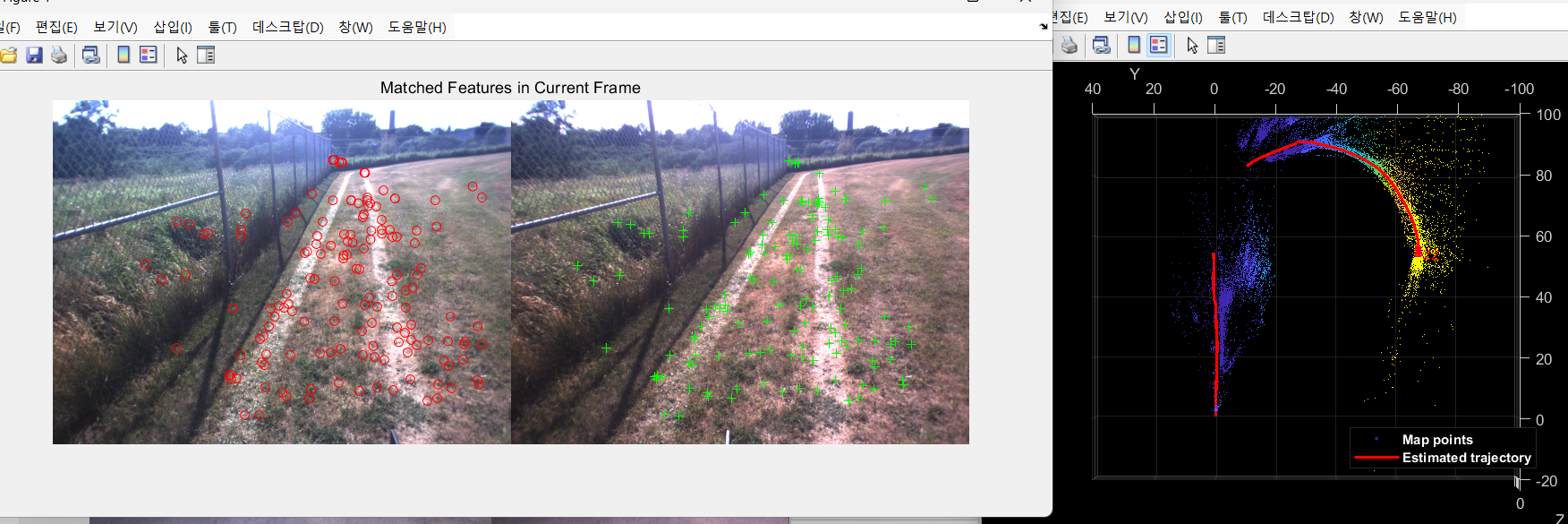
showLegend(mapPlot);❗❗❗3번의 Map initialize 코드에서 파라미터 변경없이 바로 실행하면, 예제의 잔디밭 부분에서 특징점이 너무 적어서 SLAM이 종료됨.
(위치 추정이 불가능 할정도로 특징점이 작게됨)❗❗❗
**scaleFactor = 1.2; -> 1.1 로 변경 ( 더 세밀하게)**
**numLevels = 8; -> 9 로 변경 (더 자세하게)**
**numPoints = 600; -> 4000로 변경 (더 많은 특징점 추출)**
아래 사진은 파라미터 수정후의 결과임. SLAM잘됨.
❗❗❗위 코드의 optimize poses 부분은 경로들을 보정 해주는 부분인데, 실행시 오류가 뜬다.
HelperUpdateGlobalMap은 monocular-visual-internal-slam 예제에서 쓰이는 헬퍼함수라서 그렇다.
오류가 뜨면 해당 예제 하이퍼링크를 클릭해서 예제를 열어주고 다시 실행하면된다.❗❗❗
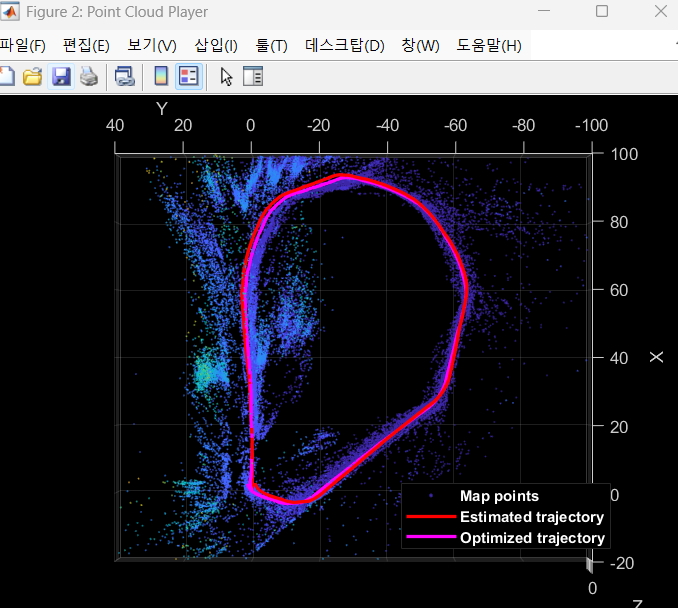
8. Ground Truth를 이용한 알고리즘 정확도 평가
모종의 이유로 안된다. 걍 하지말자.
stereo vslam이니까 gps를 이용해서 미리 만들어둔 정보(slam할 경로와 동일하게 미리 움직여서 받아둔 gps정보)
slam을 잘 하고 있는지 평가를 해보는거임.
% Load GPS data
gpsData     = load("gpsLocation.mat");
gpsLocation = gpsData.gpsLocation;

% Transform GPS locations to the reference coordinate system
gTruth = helperTransformGPSLocations(gpsLocation, optimizedPoses);

% Plot the GPS locations
plotActualTrajectory(mapPlot, gTruth(addedFramesIdx, :));

% Show legend
showLegend(mapPlot);
9. Dense Reconstruction
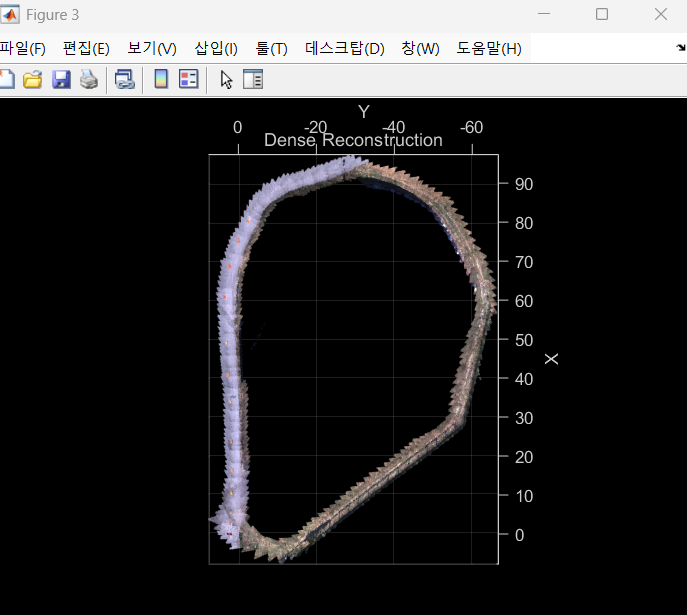
% Create an array of pointCloud objects to store the 3-D world points
% associated with the key frames
ptClouds =  repmat(pointCloud(zeros(1, 3)), numel(addedFramesIdx), 1);

for i = 1: numel(addedFramesIdx)
    ILeft  = readimage(imdsLeft, addedFramesIdx(i));
    IRight = readimage(imdsRight, addedFramesIdx(i));

    % Reconstruct scene from disparity
    disparityMap = disparitySGM(im2gray(ILeft), im2gray(IRight), DisparityRange=disparityRange);
    xyzPoints    = reconstructScene(disparityMap, reprojectionMatrix);

    % Ignore the upper half of the images which mainly show the sky
    xyzPoints(1:floor(imageSize(1)/2), :, :) = NaN;

    % Ignore the lower part of the images which show the vehicle
    xyzPoints(imageSize(1)-50:end, :, :) = NaN;

    xyzPoints  = reshape(xyzPoints, [imageSize(1)*imageSize(2), 3]);

    % Get color from the color image
    colors = reshape(ILeft, [imageSize(1)*imageSize(2), 3]);

    % Remove world points that are too far away from the camera
    validIndex = xyzPoints(:, 3) > 0 & xyzPoints(:, 3) < 100/reprojectionMatrix(4, 3);
    xyzPoints  = xyzPoints(validIndex, :);
    colors     = colors(validIndex, :);

    % Transform world points to the world coordinates
    currPose   = optimizedPoses.AbsolutePose(i);
    xyzPoints  = transformPointsForward(currPose, xyzPoints);
    ptCloud    = pointCloud(xyzPoints, Color=colors);

    % Downsample the point cloud
    ptClouds(i) = pcdownsample(ptCloud, random=0.5);
end

% Concatenate the point clouds
pointCloudsAll = pccat(ptClouds);

% Visualize the point cloud
figure
ax = pcshow(pointCloudsAll,VerticalAxis="y", VerticalAxisDir="down");
xlabel('X')
ylabel('Y')
zlabel('Z')
title('Dense Reconstruction')

% Display the bird's eye view of the scene
view(ax, [0 0 1]);
camroll(ax, 90);- Code generation
위의 과정이 너무 긴 코드를 쳐야함. 이과정을 하나의 함수로서 만들어서(code generation) 한번에 수행할 수 있도록 하는 함수를 만드는 과정임.
설명 생략
💡마무리
1.ORB_VSLAM에 대해 알게되었음.
2.데이터셋을 내 데이터셋으로 바꿔끼우면 될듯.
3.언리얼 가상환경에서 어떻게 양안 카메라 데이터셋을 저장하고, 형식에 맞게 포팅하여 이 알고리즘에 집어넣을지를 알아봐야할듯!
4.뎁스카메라나 라이다 안쓰면 '위치'추정만 될뿐, ROS에서 하듯이 '공간'적인 정보는 안나오는데.... 이거 우짜냐?