CodeBehind vs ICommand vs MVVM 관계
- CodeBehind 방식 (MVVM 아님)
진짜 웹 개발 하면서 항상 이 방식으로 개발 해온 나..
WPF를 시작하면서 MVVM 패턴 적응에 아직도 적응을 못하겠다ㅠ
<!-- XAML -->
<Button Click="Button_Click" Content="Click Me"/>
// MainWindow.xaml.cs (CodeBehind)
private void Button_Click(object sender, RoutedEventArgs e)
{
MessageBox.Show("버튼 클릭!");
}❌ MVVM 패턴 아님
❌ View와 로직이 강하게 결합
❌ 테스트하기 어려움
❌ 재사용성 떨어짐
- MVVM + ICommand 방식
<!-- XAML -->
<Button Command="{Binding ButtonCommand}" Content="Click Me"/>
// ViewModel
public ICommand ButtonCommand { get; set; }✅ 진정한 MVVM 패턴
✅ View와 로직 분리
✅ 테스트 가능
✅ 재사용 가능
핵심: View가 ViewModel만 알고, CodeBehind에 로직이 없어야 함
그러면 왜 ICommand를 쓸까?
- CanExecute 기능
// CodeBehind 방식: 버튼 활성화/비활성화 복잡함
private void TextBox_TextChanged(object sender, TextChangedEventArgs e)
{
    myButton.IsEnabled = !string.IsNullOrEmpty(myTextBox.Text);
}

// ICommand 방식: 자동으로 처리됨
public bool CanExecute(object parameter) => !string.IsNullOrEmpty(InputText);- 바인딩의 일관성
<!-- 모두 바인딩으로 통일 -->
<TextBox Text="{Binding InputText}"/>
<Button Command="{Binding SaveCommand}"/>
<CheckBox IsChecked="{Binding IsEnabled}"/>
ICommand, RelayCommand
그래서 ICommand를 사용해 코드를 작성 해보았다.
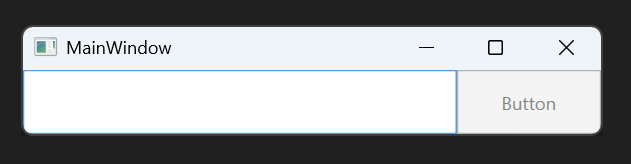
<Window x:Class="RelayCommandTest.MainWindow"
        xmlns="http://schemas.microsoft.com/winfx/2006/xaml/presentation"
        xmlns:x="http://schemas.microsoft.com/winfx/2006/xaml"
        xmlns:d="http://schemas.microsoft.com/expression/blend/2008"
        xmlns:mc="http://schemas.openxmlformats.org/markup-compatibility/2006"
        xmlns:local="clr-namespace:RelayCommandTest"
        mc:Ignorable="d"
        Title="MainWindow" Height="80" Width="400">


    <Grid>
        <Grid.ColumnDefinitions>
            <ColumnDefinition Width="3*"/>
            <ColumnDefinition/>
        </Grid.ColumnDefinitions>

        <TextBox Text="{Binding InputString, UpdateSourceTrigger=PropertyChanged}"/>
        <Button Grid.Column="1" Content="Button" Command="{Binding ButtonICommand}" Height="NaN" Width="NaN" />

    </Grid>
</Window>
//MainViewModel.cs
namespace RelayCommandTest
{
public class MainViewModel
{
private string _inputString;
public string InputString
{
get => _inputString;
set
{
_inputString = value;
((MyICommand)ButtonICommand).CheckExecute(!string.IsNullOrEmpty(_inputString));
}
}
public MainViewModel()
{
}
private class MyICommand : ICommand
{
private MainViewModel _viewModel;
private bool _canExecute = false;
public event EventHandler? CanExecuteChanged;
public MyICommand(MainViewModel viewModel)
{
_viewModel = viewModel;
}
public bool CanExecute(object? parameter)
{
return _canExecute;
}
public void Execute(object? parameter)
{
MessageBox.Show(_viewModel._inputString);
}
public void CheckExecute(bool canExecute)
{
_canExecute = canExecute;
this.CanExecuteChanged(this, EventArgs.Empty);
}
}
private ICommand _buttonICommand;
public ICommand ButtonICommand
{
get
{
_buttonICommand ??= new MyICommand(this);
return _buttonICommand;
}
}
}
}
기능상에는 문제가 없는데, MyICommand가 특정 ViewModel에 종속되어있다.
private class MyICommand : ICommand
{
    private MainViewModel _viewModel; // 특정 ViewModel에 종속
    // ...
}
그렇다고 버튼마다 MyICommand를 만들자니 말이 안됨..
최악의 경우 다음과 같은 코드가..
public class MainViewModel
{
    // 저장 버튼용 클래스
    private class SaveCommand : ICommand { ... }

    // 삭제 버튼용 클래스
    private class DeleteCommand : ICommand { ... }

    // 취소 버튼용 클래스
    private class CancelCommand : ICommand { ... }

    public ICommand SaveButtonCommand => new SaveCommand(this);
    public ICommand DeleteButtonCommand => new DeleteCommand(this);
    public ICommand CancelButtonCommand => new CancelCommand(this);
}
그러다 RelayCommand 라는걸 발견.
하나의 RelayCommand Class로 모든 버튼을 처리 할 수 있다고 한다.
public class MainViewModel
{
    public ICommand SaveCommand => new RelayCommand(_ => Save());
    public ICommand DeleteCommand => new RelayCommand(_ => Delete(), _ => CanDelete());
    public ICommand CancelCommand => new RelayCommand(_ => Cancel());
}
실제 기존 ICommand --> RelayCommand 개선
namespace RelayCommandTest
{
    public class RelayCommand : ICommand
    {
    	// Action<object> : 실행 할 동작을 담는 델리게이트
        // 반환 값 없음
        // Predicate<object> : 조건을 확인하는 델리게이트
        // 반환 값 bool
        private Predicate<object>? _canExecute;
        private Action<object> _execute;

        public RelayCommand(Action<object> execute)
            : this(execute, null)
        {
        }

        public RelayCommand(
            Action<object> execute,
            Predicate<object>? canExecute)
        {
            _execute = execute;
            _canExecute = canExecute;
        }


        public bool CanExecute(object? parameter)
        {
            return (_canExecute == null) || _canExecute(parameter);
        }

        public void Execute(object? parameter)
        {
            _execute(parameter);
        }

		// 1. RelayCommand가 가진 이벤트
        public event EventHandler? CanExecuteChanged
        {
        	// 2. WPF CommandManager가 가진 전역 이벤트 (WPF 내부)
        	// CommandManager.RequerySuggested는 특정 조건이 발생할 때마다 자동으로 발생
            // Command들아, CanExecute 상태를 다시 확인해봐!!
            add { CommandManager.RequerySuggested += value; }
            remove { CommandManager.RequerySuggested -= value; }
        }
    }

    public class MainViewModel
    {
        public string InputString { get; set; }

        public ICommand ButtonICommand { get; }

        public MainViewModel()
        {
            // ButtonICommand는 InputString이 비어 있지 않을 때만 활성화됩니다.
            ButtonICommand = new RelayCommand(
                o => MessageBox.Show($"Button 1: {InputString}"), // Execute 로직
                o => !string.IsNullOrEmpty(InputString) // CanExecute 로직
            );
        }
    }
}
근데 쭉 개발하면서 계속 직관적이지 않았던 부분은
내가 직접적으로 메서드와 UI를 매핑하지 않는 부분이었다.
혹시 public event EventHandler? CanExecuteChanged에 대해 더 자세히 알고 싶으면
정리한 글이 있으니 참고 해라.
WPF에서 자동으로 Button과 Binding 된 Command와 연결되어 Execute라는 메서드가 실행되는건 그렇다 쳐도, Execute 전에 CanExecute와 같이 실행이 가능한지도 자동으로 체킹이 되는게 아직도 적응하기 어렵다.
참고 : https://endtime-co-kr.tistory.com/entry/RelayCommand-ICommand