
이전 예제에서 했던 코드에 기능을 추가해보려고 한다.
추가할 기능은 TextBox옆에 입력된 글자 수를 보여주는 기능이다.
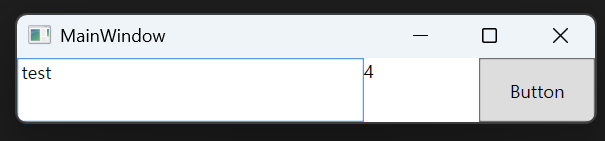
[테스트 이미지]
이 기능을 구현하기 위해서는 INotifyPropertyChanged라는게 필요하다고 한다.
INotifyPropertyChanged
"속성 값이 바뀌었다”는 사실을 바인딩 엔진에 알려 UI를 자동 갱신하게 하는 이벤트 계약
그러니까, ViewModel에서 값이 변경 되었을 때, 그걸 다시 View(UI)에 반영하는 경우 INotifyPropertyChanged가 사용된다.
우리가 하는 예제의 경우 TextBox에 입력할 때마다 ViewModel의 Count가 변경 되게 될텐데, 이걸 View(UI)에 다시 반영해야 하기 때문에 INotifyPropertyChanged가 필요하다.
먼저 저번 예시를 보면 다음과 같다.
namespace RelayCommandTest
{
    public class RelayCommand : ICommand
    {
    	// Action<object> : 실행 할 동작을 담는 델리게이트
        // 반환 값 없음
        // Predicate<object> : 조건을 확인하는 델리게이트
        // 반환 값 bool
        private Predicate<object>? _canExecute;
        private Action<object> _execute;

        public RelayCommand(Action<object> execute)
            : this(execute, null)
        {
        }

        public RelayCommand(
            Action<object> execute,
            Predicate<object>? canExecute)
        {
            _execute = execute;
            _canExecute = canExecute;
        }


        public bool CanExecute(object? parameter)
        {
            return (_canExecute == null) || _canExecute(parameter);
        }

        public void Execute(object? parameter)
        {
            _execute(parameter);
        }

		// 1. RelayCommand가 가진 이벤트
        public event EventHandler? CanExecuteChanged
        {
        	// 2. WPF CommandManager가 가진 전역 이벤트 (WPF 내부)
        	// CommandManager.RequerySuggested는 WPF의 전역 Event.
            // Command들아, CanExecute 상태를 다시 확인해봐!!
            add { CommandManager.RequerySuggested += value; }
            remove { CommandManager.RequerySuggested -= value; }
        }
    }

    public class MainViewModel
    {
        public string InputString { get; set; }

        public ICommand ButtonICommand { get; }

        public MainViewModel()
        {
            // ButtonICommand는 InputString이 비어 있지 않을 때만 활성화됩니다.
            ButtonICommand = new RelayCommand(
                o => MessageBox.Show($"Button 1: {InputString}"), // Execute 로직
                o => !string.IsNullOrEmpty(InputString) // CanExecute 로직
            );
        }
    }
}
여기서 추가해야 할 것은 먼저 MainViewModel에 INotifyPropertyChanged 인터페이스를 상속 받는 것이다.
INotifyPropertyChanged 인터페이스를 상속받으면 필수적으로 구현해야 하는 PropertyChanged 이벤트도 함께 구현해준다.
 public class MainViewModel : INotifyPropertyChanged
 {
 	public event PropertyChangedEventHandler? PropertyChanged;
 	...
 }
또한, InputString의 문자열 개수를 카운트 해야 하기 때문에 프로퍼티도 다음과 같이 변경한다.
public class MainViewModel : INotifyPropertyChanged
{
    public event PropertyChangedEventHandler? PropertyChanged;

    private string _inputString;
    public string InputString
    {
        get => _inputString;
        set
        {
            _inputString = value;
            OnPropertyChanged();
            OnPropertyChanged(nameof(CharacterCount));

        }
    }
    ...
}
여기서 OnPropertyChanged() 라는게 나오는데 이건 프로퍼티 이름을 자동적으로 추론하기 위해 편의상 만드는 메서드이다. 하지만 관례적으로 항상 사용한다고한다.
메서드는 다음과 같이 구현하면 된다.
protected void OnPropertyChanged([CallerMemberName] string propertyName = null)
{
  PropertyChanged?.Invoke(this, new PropertyChangedEventArgs(propertyName));
}
처음 C# WPF 처음 하면서 이 괴랄한 문법 보고 마음이 어려워졌다....
[CallerMemberName]은 호출한 멤버(프로퍼티)의 이름을 자동으로 전달해준다고한다.
뭔가 WPF는 자동으로 뭔가를 많이 해주는데 이게 내가 컨트롤 하는 느낌이 없으니까 자꾸 뜬구름 잡는 느낌이랄까..
[CallerMemberName]의 작동 시나리오는 다음과 같다.
public string InputString
{
    get => _inputString;
    set
    {
        _inputString = value;
        OnPropertyChanged();  // 파라미터 없이 호출!
        // 컴파일러가 자동으로 OnPropertyChanged("InputString")으로 변환
    }
}
그래서 OnPropertyChanged 메서드의 궁극적인 사용 목적은
UI야! 이 프로퍼티 값이 변경 됐으니까 화면 빨리 업데이트해!
PropertyChanged? 는 PropertyChanged 이벤트가 null이 아닌지 확인하는 null 조건 연산자이다. 이벤트 구독자가 없는데 호출하면 오류가 발생하므로, 이를 방지하기 위한 안전장치.
.Invoke(...)는 이벤트를 호출(trigger)하는 메서드.
this는 이벤트를 발생시키는 객체. 즉, 현재 클래스의 인스턴스이다.
new PropertyChangedEventArgs(propertyName): 변경된 속성의 이름을 담은 이벤트 데이터 객체를 생성.
이 객체를 통해서 WPF의 바인딩 시스템은 어떤 속성이 변경되었는지 알고 또 자동으로 UI를 업데이트 한다..
최종 InputString 프로퍼티는
public string InputString
{
    get => _inputString;
    set
    {
        _inputString = value;
        OnPropertyChanged(nameof(CharacterCount));
    }
}
그리고, 문자열 개수를 카운트 할 프로퍼티가 필요하다
public int CharacterCount
{
    get { return InputString.Length; }
}
그럼 이제 View의 문자열 카운트를 표시할 요소를 하나 추가하고 CharacterCount에 바인딩 해준다
<TextBlock Grid.Column="1" Text="{Binding CharacterCount}"/> 전체코드 ```xml
<Grid>
    <Grid.ColumnDefinitions>
        <ColumnDefinition Width="3*"/>
        <ColumnDefinition Width="*"/>
        <ColumnDefinition/>
    </Grid.ColumnDefinitions>

    <TextBox Grid.Column="0" Text="{Binding InputString, UpdateSourceTrigger=PropertyChanged}"/>
    <TextBlock Grid.Column="1" Text="{Binding CharacterCount}"/>
    <Button Grid.Column="2" Content="Button" Command="{Binding ButtonICommand}" Height="NaN" Width="NaN" />

</Grid>
namespace RelayCommandTest
{
public class RelayCommand : ICommand
{
private Predicate<object>? _canExecute;
private Action<object> _execute;
public RelayCommand(Action<object> execute)
: this(execute, null)
{
}
public RelayCommand(
Action<object> execute,
Predicate<object>? canExecute)
{
_execute = execute;
_canExecute = canExecute;
}
public bool CanExecute(object? parameter)
{
return (_canExecute == null) || _canExecute(parameter);
}
public void Execute(object? parameter)
{
_execute(parameter);
}
public event EventHandler? CanExecuteChanged
{
add { CommandManager.RequerySuggested += value; }
remove { CommandManager.RequerySuggested -= value; }
}
}
public class MainViewModel : INotifyPropertyChanged
{
public event PropertyChangedEventHandler? PropertyChanged;
public ICommand ButtonICommand { get; }
private string _inputString;
public string InputString
{
get => _inputString;
set
{
_inputString = value;
OnPropertyChanged(nameof(CharacterCount));
}
}
protected void OnPropertyChanged([CallerMemberName] string propertyName = null)
{
PropertyChanged?.Invoke(this, new PropertyChangedEventArgs(propertyName));
}
public MainViewModel()
{
// Button1Command는 InputString이 비어 있지 않을 때만 활성화됩니다.
ButtonICommand = new RelayCommand(
o => MessageBox.Show($"Button 1: {InputString}"), // Execute 로직
o => !string.IsNullOrEmpty(InputString) // CanExecute 로직
);
}
public int CharacterCount
{
get { return InputString.Length; }
}
}
}