오픈월드 제작기(1)
게임 캐릭터 이동 및 카메라 조작
1. 게임 캐릭터 이동
카메라 기반 이동카메라가 SC를 통해 동적으로 방향 Vector가 변하므로 이 변화한 Vector를 기반으로 캐릭터의 이동 방향이 설정되도록 하는 방식
특징
- 일반적인 오브젝트의 움직임은 상,하,좌,우가 절대좌표계를 기준 고정된 Vector로 이동합니다.
- 카메라가 바라보는 방향을 기준으로 캐릭터의 이동 방향(Vector)이 설정됩니다.
Sample Code
void Move()
{
    float moveHorizontal = Input.GetAxis("Horizontal");
    float moveVertical = Input.GetAxis("Vertical");

    Vector3 cameraForward = Camera.main.transform.forward;
    Vector3 cameraRight = Camera.main.transform.right;

    cameraForward.y = 0;
    cameraRight.y = 0;

    Vector3 movement = cameraRight * moveHorizontal + cameraForward * moveVertical ;

    rb.velocity = movement * moveSpeed;

    if (movement != Vector3.zero)
    {
        Quaternion targetRotation = Quaternion.LookRotation(movement);
        transform.rotation = Quaternion.Slerp(transform.rotation, targetRotation, Time.deltaTime * 10f);
    }
}
💥 주의
 cameraForward.y = 0;
 cameraRight.y = 0;
방향 Vector의 y를 0으로 설정하는 이유...
- 위 사진은 LookAt으로 Main Camera가 캐릭터를 바라보도록 설정 되어있습니다.
- 파란색 화살표 즉, z축 방향으로 캐릭터 이동을 구현하고자 할 경우, 카메라의 Forward와 Right로 받아온 방향 Vector를 그대로 사용할 경우 y값이 아래와 같이 불필요한 값을 가져오게 됩니다.
캐릭터가 지면을 따라 이동하는 것이 목표 이므로 해당 값을 그대로 사용할 경우, 방향키를 누르는 것 만으로도 의도치 않게 위아래(Global y축 기준)로 이동도 추가적으로 일어나게 됩니다.
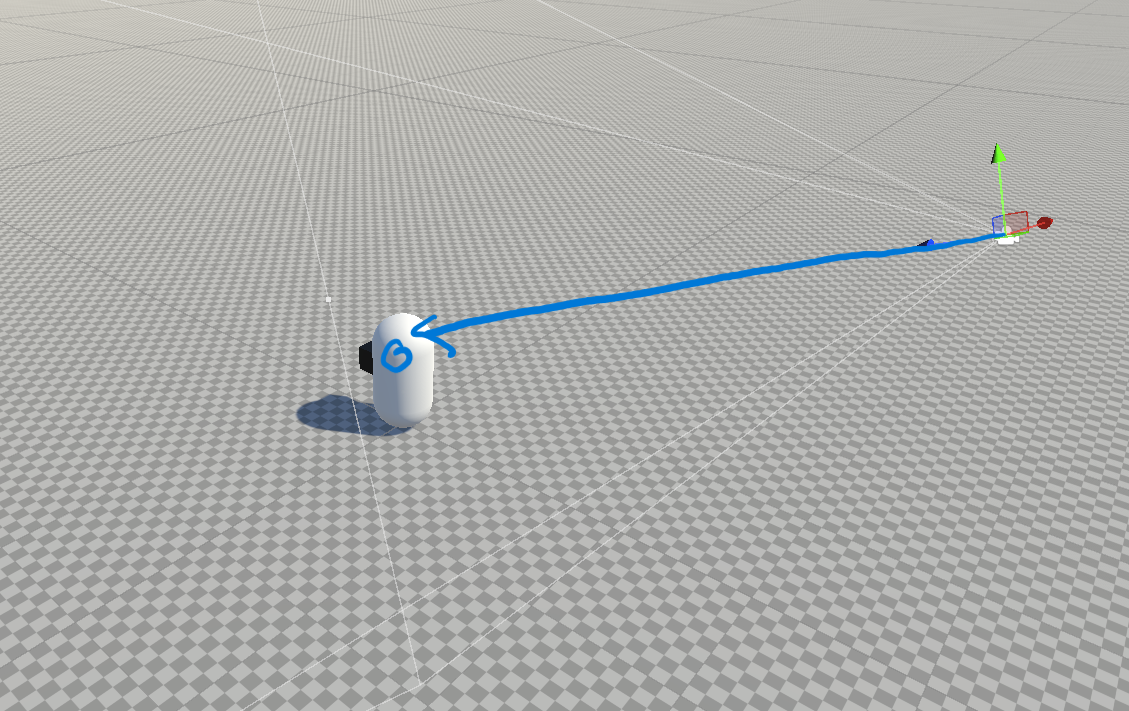

Main Camera로 부터 받아온 Vector의 y값을 0으로 초기화하지 않으면 지면을 따라 이동하는 모습이 나오지 않습니다.
⇒ Camera의 경우 다양한 방향, 위치로 target 캐릭터를 바라보기 때문에 y에 다양한 값이 들어 있을 수 밖에 없습니다.
⇒ 최종적으로 이 값을 통해 캐릭터의 움직임을 구현하기 때문에 캐릭터의 이동 Vector중 y값이 원치 않는 값이 들어가 캐릭터가 붕 떠있거나, 지면에 가라앉는 움직임이 나타나게 됩니다.
2. 카메라 이동
Free Walking CameraOpenWorld와 같은 3D 게임에서 사용자의 마우스 이동을 통해 카메라의 각도 및 Zoom 설정이 되는 방식
Sample Code
카메라 각도 조절
void CameraMove()
{
    if (Input.GetMouseButton(1))
    {
        Cursor.lockState = CursorLockMode.Locked;
        Cursor.visible = false;

        currentX += Input.GetAxis("Mouse X") * rotationSpeed * Time.deltaTime;
        currentY -= Input.GetAxis("Mouse Y") * rotationSpeed * Time.deltaTime;

        currentY = Mathf.Clamp(currentY, Y_ANGLE_MIN, Y_ANGLE_MAX);
    }
    else
    {
        Cursor.lockState = CursorLockMode.None;
        Cursor.visible = true;
    }
}
카메라 Zoom 조절
void CameraZoom()
{
    float scrollInput = Input.GetAxis("Mouse ScrollWheel");
    currentZoom = Mathf.Clamp(currentZoom + scrollInput * zoomSpeed, -maxZoom, -minZoom);
}
전체 CODE
public class CamearaConroller : MonoBehaviour
{
    public Transform target;
    private Vector3 defaultPos = new Vector3(0, 15, -10);
    public float rotationSpeed = 100f;

    private float currentX = 0f;
    private float currentY = 0f;
    private const float Y_ANGLE_MIN = -20f;
    private const float Y_ANGLE_MAX = 50f;

    public float zoomSpeed = 5f;
    public float minZoom = 20f;
    public float maxZoom = 40f;
    private float currentZoom;

    void Start()
    {
        Cursor.lockState = CursorLockMode.Locked;
        Cursor.visible = true;
        currentZoom = -200f;
    }

    void LateUpdate()
    {
        CameraMove();
        CameraZoom();
        SetCamera();
    }

    void CameraMove()
    {
        if (Input.GetMouseButton(1))
        {
            Cursor.lockState = CursorLockMode.Locked;
            Cursor.visible = false;

            currentX += Input.GetAxis("Mouse X") * rotationSpeed * Time.deltaTime;
            currentY -= Input.GetAxis("Mouse Y") * rotationSpeed * Time.deltaTime;

            currentY = Mathf.Clamp(currentY, Y_ANGLE_MIN, Y_ANGLE_MAX);
        }
        else
        {
            Cursor.lockState = CursorLockMode.None;
            Cursor.visible = true;
        }
    }

    void CameraZoom()
    {
        float scrollInput = Input.GetAxis("Mouse ScrollWheel");
        currentZoom = Mathf.Clamp(currentZoom + scrollInput * zoomSpeed, -maxZoom, -minZoom);
    }

    void SetCamera()
    {
        Vector3 direction = new Vector3(0, 0, currentZoom);
        Quaternion rotation = Quaternion.Euler(currentY, currentX, 0);
        transform.position = target.position + new Vector3(0, defaultPos.y, 0) + rotation * direction;
        transform.LookAt(target.position + Vector3.up * 10f);
    }
}
안녕하세요