C#프로그래밍
객체
- 정수 : byte, int, long
- 부동 소수점 : float, double, decimal
- 불리언 : bool
- 문자 : char 유니코드 지원 UTF-16
- 문자열 : string
- C#에서 문자열 타입은 불변 타입이라 항상 새로운 인스턴스를 생성한다.
새롭게 공간을 할당해 생성
접근해서 수정 불가능- 문자열 보관 :
int id = 1234;
s = $"ID는 {id}입니다.";
- 문자열 보관 :
using System.Collections;
using System.Collections.Generic;
using UnityEngine;

public class LogTest : MonoBehaviour
{
    // Start is called before the first frame update
    void Start()
    {
        // 정수
        byte b = 16;
        int i = 0x20;
        long l = 0b_1000_0101;

        Debug.Log($"byte 타입의 b 에들어있는 데이터 값은 {b}입니다.");
        Debug.Log($"int 타입의 i 에들어있는 데이터 값은 {i}입니다.");
        Debug.Log($"long 타입의 l 에들어있는 데이터 값은 {l}입니다.");

        // 부동 소수점
        float f = 13f;

        Debug.Log($"float 타입의 b 에들어있는 데이터 값은 {f}입니다.");

        // 불리언
        bool bo = true;

        Debug.Log($"bool 타입의 bo 에들어있는 데이터 값은 {bo}입니다.");

        // 문자
        char ch = '凸';

        Debug.Log($"ch 타입의 b 에들어있는 데이터 값은 {ch}입니다.");

        string s = "내일은 재민이 생일^-^";
        Debug.Log($"s의 길이는 {s.Length}입니다.");

        s = s.ToLower(); // 소문자로 변환

        s = s.ToUpper(); // 대문자로 변환

        s = s.Trim(); // 문자열 내 공백 제거

        if (s == "내일은 재민이 생일^-^")
        {
            Debug.Log("같음");
        }

        if (s.StartsWith("내일은"))
        {
            Debug.Log("내일은 으로 시작합니다.");
        }

        if (s.EndsWith("생일^-^"))
        {
            Debug.Log("생일^-^ 로 끝납니다.");
        }

        s = "Hello";

        switch(s)
        {
            case "Hello":
                Debug.Log("스위치문에서 문자열 사용가능");
                break;
            case "World":
                break;
            default:
                break;
        }

    }
}
배열
선언
int[] arr = new int[5]; 이런식으로 선언하고
초기화
int[] arr = new int[5] { 1, 2, 3, 4, 5 };
int[] arr = { 1, 2, 3, 4, 5 };
arr = new int[5] { 1, 2, 3, 4, 5 };
arr = { 1, 2, 3, 4, 5};
다 된다.
원소접근
arr[1]
다차원 배열
int[,] arr = new int[5,5]; (2차원) (행,열)
int[,,] arr = new int[5,5,5]; (3차원)
int[,,,] arr = new int[5,5,5,5]; (4차원)
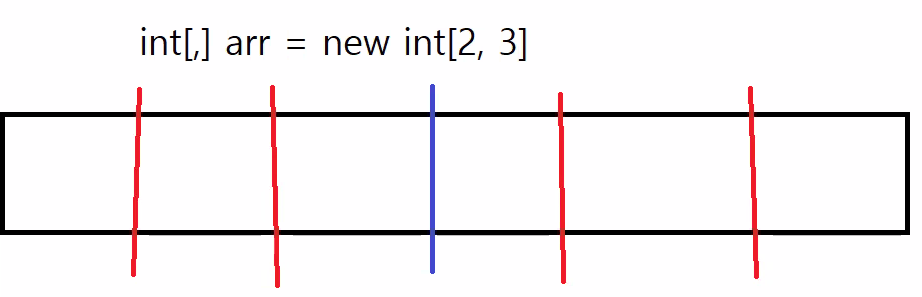
다차원 배열 초기화
arr2 = new int[5, 5] { { 1, 2, 3 }, { 4, 5, 6 }};
arr2 = { { 1, 2, 3 }, { 4, 5, 6 } };
다차원 배열 원소 접근
arr[1, 2]; // 문법에 주의한다. 값은 6이다.
가변 배열 : 배열의 배열
연속적인 배열이 아니다.
주소값을 담고있는 배열이다.
C#에선 동적할당이 느리지 않기때문에 다차원배열보다 가변 배열을 더 많이 쓴다.
		// C# 가변 배열
        int[][] arr = new int[3][];
        arr[0] = new int[2] { 1, 2 };
        arr[1] = new int[4] { 1, 2, 3, 4 };
        arr[2] = new int[3] { 1, 2, 3 };

        // C++
        int** arr = new int*[3];
        arr[0] = new int[2] { 1, 2 };
        arr[1] = new int[4] { 1, 2, 3, 4 };
        arr[2] = new int[3] { 1, 2, 3 };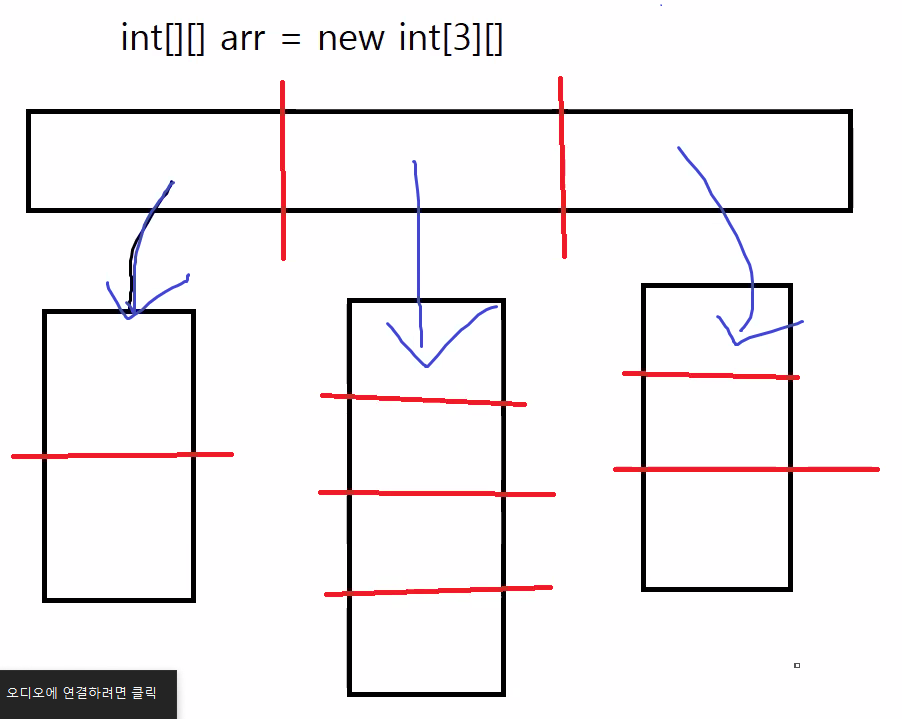
가변 배열 원소접근
arr[1][2]; // 3
함수
문법은 C++과 같으며 기본인자와 오버로딩 또한 가능하다
// C++
int Add(int a, int b = 10)
{
    return a + b;
}

int Add(float a, float b = 3.0f)
{
    return a + b;
}

// C#
int Add(int a, int b = 10)
{
    return a + b;
}

int Add(float a, float b = 3f)
{
    return a + b;
}

// 구문이 하나인 경우 아래와 같이 쓸 수 있다.
int Add(int a, int b = 10) => a + b;
간접참조
매개 변수 한정자 : ref / in / out
ref :
// C++
void Swap(int& a, int& b)
{
    int temp = a;
    a = b;
    b = temp;
}

// C#
// ref 한정자를 쓰면 인자가 반드시 초기화 되어 있어야 한다.
// 초기화를 하지 않으면 컴파일 오류가 난다.
void Swap(ref int a, ref int b)
{
    int temp = a;
    a = b;
    b = temp;
}

int a = 10;
int b = 20;
Swap(ref a, ref b); // 호출할 때 꼭 ref 키워드를 적는다.
in : 읽기전용
// C++
void Foo(const int& a, const int& b)
{
    // Do Something...
}

// C#
// in 한정자도 인자가 반드시 초기화 되어야 한다.
// 초기화를 하지 않으면 컴파일 오류가 난다.
void Foo(in int a, in int b)
{
    // Do Something...
}
out : 반환값 넣는
// C++
void Foo(int a, int b, int& result)
{
    result = a + b;
}

// C#
// out 한정자는 함수가 끝나기 전 반드시 어떤 값이 할당되어야 한다.
void Foo(int a, int b, out int result)
{
    result = a + b;
}

int r;
Foo(10, 20, out r); // 호출할 땐 꼭 out 키워드를 적는다.
간접참조를 해서 해본 예시 가독성이 많이 좋아졌다.
using System.Collections;
using System.Collections.Generic;
using UnityEngine;
using System;

public class LogTest : MonoBehaviour
{

    void Swap(ref int a, ref int b)
    {
        int temp = a;
        a = b;
        b = temp;
    }

    void Foo (in int a, in int b)
    {
        Debug.Log($"a : {a}, b : {b}");
    }

    void Foo (int a, int b, out int result)
    {
        result = a + b;
    }

    void Start()
    {
        int a = 10;
        int b = 5;
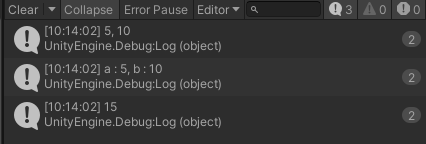
        Swap(ref a, ref b);

        Debug.Log($"{a}, {b}");

        Foo(a, b);

        int result;
        Foo(a, b, out result);

        Debug.Log(result);
    }

    void Update()
    {

    }
}
결과 :
클래스
C++과 동일하게 필드와 메소드를 작성할 수 있으나, 문법이 다르다.
접근 한정자를 매번 적어야 하며, 접근 한정자의 종류 또한 다르다.
public : 액세스가 제한되지 않습니다.
protected : 액세스가 포함하는 클래스 또는 포함하는 클래스에서 파생된 형식으로 제한됩니다.
private : 액세스가 포함하는 형식으로 제한됩니다.
// C++
class Temp
{
public:
    Temp()
    {
        std::cout << "기본 생성자"
    }

    Temp(int a, int b)
        : a(a), b(b)
    {

    }

    Temp(const Temp& other)
        : a(other.a), b(other.b)
    {

    }

    void Print()
    {
        std::cout << a << ", " << b << "\n";
    }
private:
    int a = 0;
    int b = 0;
};

Temp temp = Temp(1, 2); // C++에서의 객체 생성

// C#
public class Temp
{
    private int a = 0;
    private int b = 0;

    public Temp() => Debug.Log("기본 생성자");

    // 초기자 리스트가 없다.
    public Temp(int a, int b)
    {
        // C#에는 포인터라는 게 없어서 -> 연산자는 없다.
        this.a = a;
        this.b = b;
    }

    // 복사 생성자는 매우 드물게 작성한다.
    public Temp(Temp temp)
    {
        a = temp.a;
        b = temp.b;

        // 얕은 복사인 경우 아래와 같은 메서드를 이용할 수 있다.
        // this = temp.MemberwiseClone();
    }

    public void Print() => Debug.Log($"{a}, {b}");
}

Temp temp = new Temp(1, 2); // C#에서의 객체 생성
속성
필드의 확장된 버전
속성을 이용하면 좀 더 적은 코드로 필드와 관련된 메서드를 작성할 수 있다.
// C++
class Person
{
public:
    std::string GetFirstName() const { return _firstName;}
    std::string GetSecondName() const { return _secondName; }
    std::string GetFullName() const { return _firstName + _secondName; }

    void SetFirstName(const std::string& firstName) { _firstName = firstName; }
    void SetSecondName(const std::string& secondName) { _secondName = secondName; }
private:
    std::string _firstName;
    std::string _secondName;
}

// C#
class Person
{
    public string FirstName { get; set; }
    // private string _firstName;
    // public string GetFirstName() { return _firstName; }
    // public string SetFirstName(string name)
    //{
    //	_firstName = name;
    //}
    public string SecondName { get; set; }
    public string FullName
    {
        get { return $"{FirstName} + {SecondName}"; }
    }
}
using System.Collections;
using System.Collections.Generic;
using UnityEngine;
using System;
public class LogTest : MonoBehaviour
{
class Person
{
public string FirstName { get; set; }
public string SecondName { get; set; }
public string FullName
{
get
{
return $"{FirstName} {SecondName}";
}
}
}
void Start()
{
Person person = new Person();
person.FirstName = "DongHyun";
person.SecondName = "Kim";
// person.FullName = "asdasdasd";
}
void Update()
{
}
}상속과 다형성
다중상속을 지원하지 않으며 접근 한정자를 안써도 된다
// C++
class Base
{

};

// public을 항상 써줘야 함
class Derived : public Base
{

};

// C#
class Base
{

}

// 안써도 됨
class Derived : Base
{

}
책에서 배운거
값타입과 참조타입
값 타입 : 기본 타입 스텍에 할당됨(바로 값을 넣을 수 있음) 구조체 매개변수에 값을 넣으면 복사가 됨
참조 타입 : C++의 레퍼런스와 비슷 힙에 할당됨 (인스턴스의 주소가 변수에 담김) 클래스 매개변수에 주소값을 넣으면 레퍼런스로 처리.