저번에 만든 Delaunay Triangulation을 사용해서 맵을 만들어보겠습니다.
일단, 저번에 참고한 reddit의 방법부터 정리하겠습니다.
개요
- 방 랜덤 생성 (위치, 크기 랜덤)
- 물리 연산으로 겹치지 않게 펼치기
- 어떤 값(ex. 평균)보다 큰 사이즈의 사각형을 Room로 결정
- Delaunay Triangulation + MST 로 방 연결
- 연결을 토대로 복도 생성 (1자 혹은 L자)
- 복도에 닿은 사각형들만 활성화해서 복도로 사용
수정방안
물론 이대로 만들어도 멋있겠지만 제가 만들 게임에 어울리도록 수정해보겠습니다.
- Room을 결정할 때, 평균보다 큰 방으로 결정하게 되면 방의 개수를 특정할 수 없습니다.
=> 비율이 한쪽으로 치우치지 않은 방들을 큰 순서대로 N개 선택하도록 수정 - L자 복도 생성시, L자를 아무렇게나 생성하면 던전이 어색해질 수 있습니다.
=> 방의 위치에 따라 L자 복도의 모양을 조정 - 사각형 + 복도만 사용하면 딱딱하고 어색해 보일 수 있습니다.
=> CellularAutomata 를 적절히 사용하여 smoothing
구현
0. 변수 설정
    [Header("Map Generate Variables")]
    [SerializeField] private GameObject GridPrefab;		// 사각형 프리팹
    [SerializeField] private int generateRoomCnt = 60; 	// 생성하는 방의 개수
    [SerializeField] private int selectRoomCnt = 7;		// 선택하는 방의 개수
    [SerializeField] private int minRoomSize = 2;		// 방의 최소 크기
    [SerializeField] private int maxRoomSize = 8;		// 방의 최대 크기
    [SerializeField] private int overlapOffset = 3;		// 겹치는 부분이 3칸 이상이면 일자복도
1. 방 랜덤 생성
랜덤으로 좌표와 크기를 받고 인스턴스를 생성합니다.
GridPrefab은 Rigidbody2D, BoxCollider2D를 추가하고 Rigidbody2D의 BodyType은 Kinematic 으로 설정해둡니다.
        for (int i = 0; i < generateRoomCnt; i++)
        {
            rooms.Add(Instantiate(GridPrefab, GetRandomPointInCircle(10), Quaternion.identity));
            rooms[i].transform.localScale = GetRandomScale();
            yield return null;
        }
2. 물리 연산
물리 연산은 Unity에게 맡깁니다.
각 사각형 Rigidbody2D의 BodyType을 Kinematic에서 Dynamic으로 바꿔줍니다.
따로 다른 처리를 하지 않아도 사각형끼리 밀어내게 됩니다.
        for (int i = 0; i < generateRoomCnt; i++)
        {
            rooms[i].GetComponent<Rigidbody2D>().bodyType = RigidbodyType2D.Dynamic;
            rooms[i].GetComponent<Rigidbody2D>().gravityScale = 0f;
        }

        yield return new WaitForSeconds(4f);
하지만 밀어내는데 시간이 걸리기 때문에 3~5초정도 기다려줍니다.
3. Room 결정
큰 순서대로 뽑기 위해 새로운 배열에 사각형들을 넣고 정렬합니다. (단, 비율이 치우친 사각형은 제외)
선택한 Room들은 points에 Vertex로 넣어서 방을 연결하기위한 데이터를 만들어줍니다.
    private void FindMainRooms(int roomCount)
    {

        List<(float size, int index)> roomSizes = new List<(float size, int index)>();

        for (int i = 0; i < rooms.Count; i++)
        {
            rooms[i].GetComponent<Rigidbody2D>().bodyType = RigidbodyType2D.Kinematic;
            rooms[i].transform.position = new Vector3(RoundPos(rooms[i].transform.position.x, PIXEL), RoundPos(rooms[i].transform.position.y, PIXEL), 1);

            Vector3 scale = rooms[i].transform.localScale;
            float size = scale.x * scale.y; // 방의 크기(넓이) 계산
            float ratio = scale.x / scale.y; // 방의 비율 계산
            if (ratio > 2f || ratio < 0.5f) continue; // 1:2 또는 2:1 비율을 초과하는 경우 건너뛰기
            roomSizes.Add((size, i));
        }

        // 방의 크기에 따라 내림차순으로 정렬
        var sortedRooms = roomSizes.OrderByDescending(room => room.size).ToList();

        // 모든 방을 일단 비활성화
        foreach (var room in rooms)
        {
            room.SetActive(false);
        }

        // 비율 조건을 만족하는 방 선택 및 처리
        int count = 0;
        foreach (var roomInfo in sortedRooms)
        {
            if (count >= roomCount) break; // 선택 후 종료
            GameObject room = rooms[roomInfo.index];
            SpriteRenderer renderer = room.GetComponent<SpriteRenderer>();
            if (renderer != null)
            {
                renderer.color = Color.black;
            }
            room.SetActive(true);
            points.Add(new Delaunay.Vertex((int)room.transform.position.x, (int)room.transform.position.y)); // points 리스트에 추가
            count++;
        }
    }
4. 방 연결
방 연결을 하기 전에, 우선 2차원 배열에 모든 방 정보를 저장합니다.
이 정보는 복도 생성할 때에 사용됩니다. (이 코드는 쉬운데 양만 많아서 생략하겠습니다.)
    private void ConnectRooms()
    {

        var triangles = DelaunayTriangulation.Triangulate(points);

        var graph = new HashSet<Delaunay.Edge>();
        foreach (var triangle in triangles)
            graph.UnionWith(triangle.edges);

        var tree = Kruskal.MinimumSpanningTree(graph);

        GenerateHallways(graph);
    }
저번에 만들어둔 DelaunayTriangulation 과 MST를 사용합니다.
graph에 Edge들을 담고 그 정보를 통해서 복도를 만듭니다.
5. 복도 생성
edge 정보들을 토대로 복도를 만들어 보겠습니다.
    private void GenerateHallways(IEnumerable<Delaunay.Edge> tree)
    {
        Vector2Int size1 = new Vector2Int(2, 2);
        Vector2Int size2 = new Vector2Int(2, 2);

        foreach (Delaunay.Edge edge in tree)
        {
            Delaunay.Vertex start = edge.a;
            Delaunay.Vertex end = edge.b;

            size1 = new Vector2Int((int)rooms[map[start.y-minY, start.x-minX]].transform.localScale.x, (int)rooms[map[start.y-minY, start.x-minX]].transform.localScale.y);
            size2 = new Vector2Int((int)rooms[map[end.y-minY, end.x-minX]].transform.localScale.x, (int)rooms[map[end.y-minY, end.x-minX]].transform.localScale.y);

            // 시작점과 끝점 사이의 복도 생성
            CreateCorridor(start, end, size1, size2);
        }

        foreach (Delaunay.Edge edge in tree)
        {
            Delaunay.Vertex start = edge.a;
            Delaunay.Vertex end = edge.b;

            size1 = new Vector2Int((int)rooms[map[start.y - minY, start.x - minX]].transform.localScale.x, (int)rooms[map[start.y - minY, start.x - minX]].transform.localScale.y);
            size2 = new Vector2Int((int)rooms[map[end.y - minY, end.x - minX]].transform.localScale.x, (int)rooms[map[end.y - minY, end.x - minX]].transform.localScale.y);

            CreateCorridorWidth(start, end, size1, size2);
        }

    }
minY, minX 는 원점에서 사방으로 퍼진 사각형들을 배열에 저장하기 위한 Offset입니다.
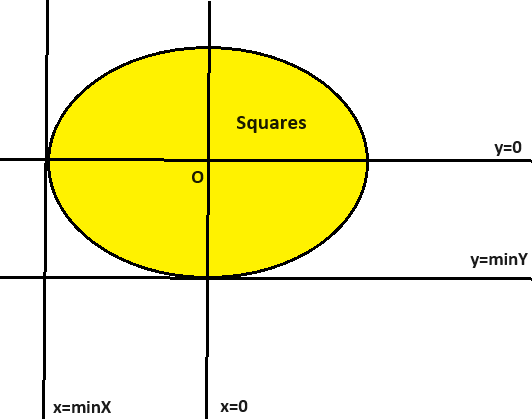
CreateCorridor는 복도를 만들고, CreateCorridorWidth는 복도의 폭을 만듭니다.
 private void CreateCorridor(Delaunay.Vertex start, Delaunay.Vertex end, Vector2Int startSize, Vector2Int endSize)
    {
        bool isHorizontalOverlap = Mathf.Abs(start.x - end.x) < ((startSize.x + endSize.x) / 2f - overlapOffset);
        bool isVerticalOverlap = Mathf.Abs(start.y - end.y) < ((startSize.y + endSize.y) / 2f - overlapOffset);

        // 수평 복도 생성
        if (isVerticalOverlap)
        {
            int startY = Mathf.Min(start.y + startSize.y / 2, end.y + endSize.y/2) + Mathf.Max(start.y - startSize.y / 2, end.y - endSize.y/2);
            startY = startY / 2;
            for (int x = Mathf.Min(start.x + startSize.x/2, end.x + endSize.x/2) ; x <= Mathf.Max(start.x - startSize.x/2, end.x - endSize.x/2); x++)
            {
                InstantiateGrid(x, startY);
            }
        }
        // 수직 복도 생성
        else if (isHorizontalOverlap)
        {
            int startX= Mathf.Min(start.x + startSize.x / 2, end.x + endSize.x / 2) + Mathf.Max(start.x - startSize.x / 2, end.x - endSize.x / 2);
            startX = startX / 2;
            for (int y = Mathf.Min(start.y + startSize.y/2, end.y + endSize.y/2); y <= Mathf.Max(start.y - startSize.y/2, end.y - endSize.y/2); y++)
            {
                InstantiateGrid(startX, y);
            }
        }
        else // 'ㄴ'자 또는 'ㄱ'자 복도 생성
        {
            // 전체 Delaunay.Vertex의 중간점 계산
            int mapCenterX = map.GetLength(0) / 2;
            int mapCenterY = map.GetLength(1) / 2;

            // start와 end 사이의 중간점 계산
            int midX = (start.x + end.x) / 2;
            int midY = (start.y + end.y) / 2;

            // 중간점이 전체 맵의 중심점에 비해 어느 사분면에 위치하는지 파악
            int quadrant = DetermineQuadrant(midX - mapCenterX - minX, midY - mapCenterY - minY);

            // 사분면과 start와 end의 상대적 위치에 따라 'ㄴ' 혹은 'ㄱ' 형태 결정, 항상 start의 x가 작음.
            if (quadrant == 2 || quadrant == 3)
            {
                // 사분면이 2 또는 3인 경우
                CreateStraightPath(start.x, start.y,end.x, start.y); // 가로로 먼저 이동
                CreateStraightPath(end.x, start.y, end.x, end.y); // 다음 세로로 이동
            }
            else if (quadrant == 1 || quadrant == 4)
            {
                // 사분면이 1 또는 4인 경우
                CreateStraightPath(start.x, start.y,start.x, end.y); // 세로로 먼저 이동
                CreateStraightPath(start.x, end.y, end.x, end.y); // 다음 가로로 이동
            }
        }
    }
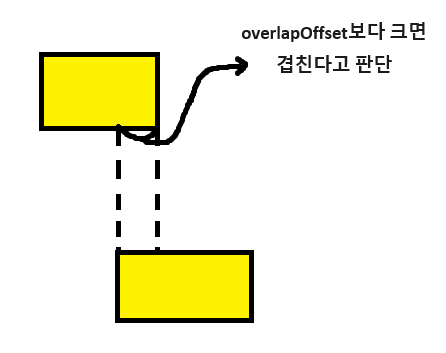
x좌표나 y좌표가 겹치면 수평/수직으로 복도를 이어줍니다.
overlapOffset을 변수로 둬서 얼마나 겹치면 일자복도를 생성할지 조절가능합니다.
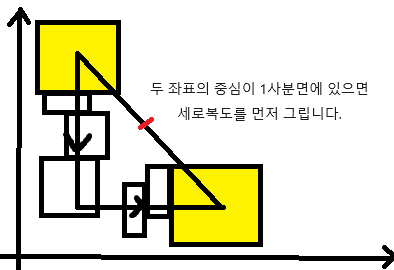
또한 ㄴ자 복도를 생성할 때에는 둘 다 생성하거나 랜덤으로 생성하는 것 보단, 두 사각형 중심점의 사분면 위치에 따라 모양을 결정합니다. 반대 복도를 생성하게 되면 복도가 지나가는 길에 비활성화된 사각형이 없는 경우가 많아서 어색해보일 수 있습니다.
6. Cellular Automata
Cellular Automata를 통해 각진 부분을 다듬어보겠습니다.
단어가 생소하실 수도 있는데 어려운 개념은 아닙니다.
자신과 주변 칸들을 입력값으로 받아서 다음 상태를 출력값으로 뱉습니다.
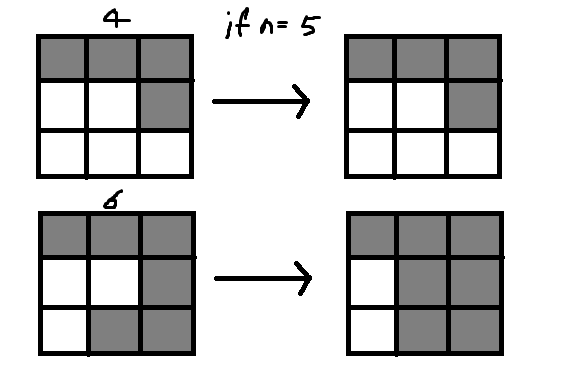
저는 간단하게 주변 셀들 중에서 활성화된 칸의 개수가 n칸 이상이면 해당 칸도 활성화하도록 했습니다.
    private void CellularAutomata(int n)
    {
        for (int x = 0; x < maxX - minX; x++)
        {
            for (int y = 0; y < maxY - minY; y++)
            {
                if (map[y, x] == hallwayId) continue;
                if ((map[y, x] != -1 && map[y, x] != hallwayId && rooms[map[y, x]].activeSelf)) continue;


                int nonWallCount = 0; // 벽이 아닌 공간의 수를 카운트

                // 나를 포함한 주위 9칸 검사
                for (int offsetX = -1; offsetX <= 1; offsetX++)
                {
                    for (int offsetY = -1; offsetY <= 1; offsetY++)
                    {
                        int checkX = x + offsetX;
                        int checkY = y + offsetY;

                        // 배열 범위를 벗어나면 벽으로 간주
                        if (checkX < 0 || checkX >= maxX - minX || checkY < 0 || checkY >= maxY - minY)
                        {
                            continue;
                        }
                        else if (map[checkY, checkX] == -1) continue;
                        else if (map[checkY, checkX] == cellularId) continue;
                        else if (map[checkY, checkX] == hallwayId || rooms[map[checkY, checkX]].activeSelf) // 벽이 아닌 공간 확인
                        {
                            nonWallCount++;
                        }
                    }
                }

                //
                if (nonWallCount >= n)
                {
                    GameObject grid = Instantiate(GridPrefab, new Vector3(x + minX + 0.5f, y + minY + 0.5f, 0), Quaternion.identity);
                    grid.GetComponent<SpriteRenderer>().color = Color.black;
                    map[y, x] = cellularId;
                }
            }
        }


        for (int x = 0; x < maxX - minX; x++)
        {
            for (int y = 0; y < maxY - minY; y++)
            {
                if (map[y, x] == cellularId) map[y, x] = hallwayId;
            }
        }
    }
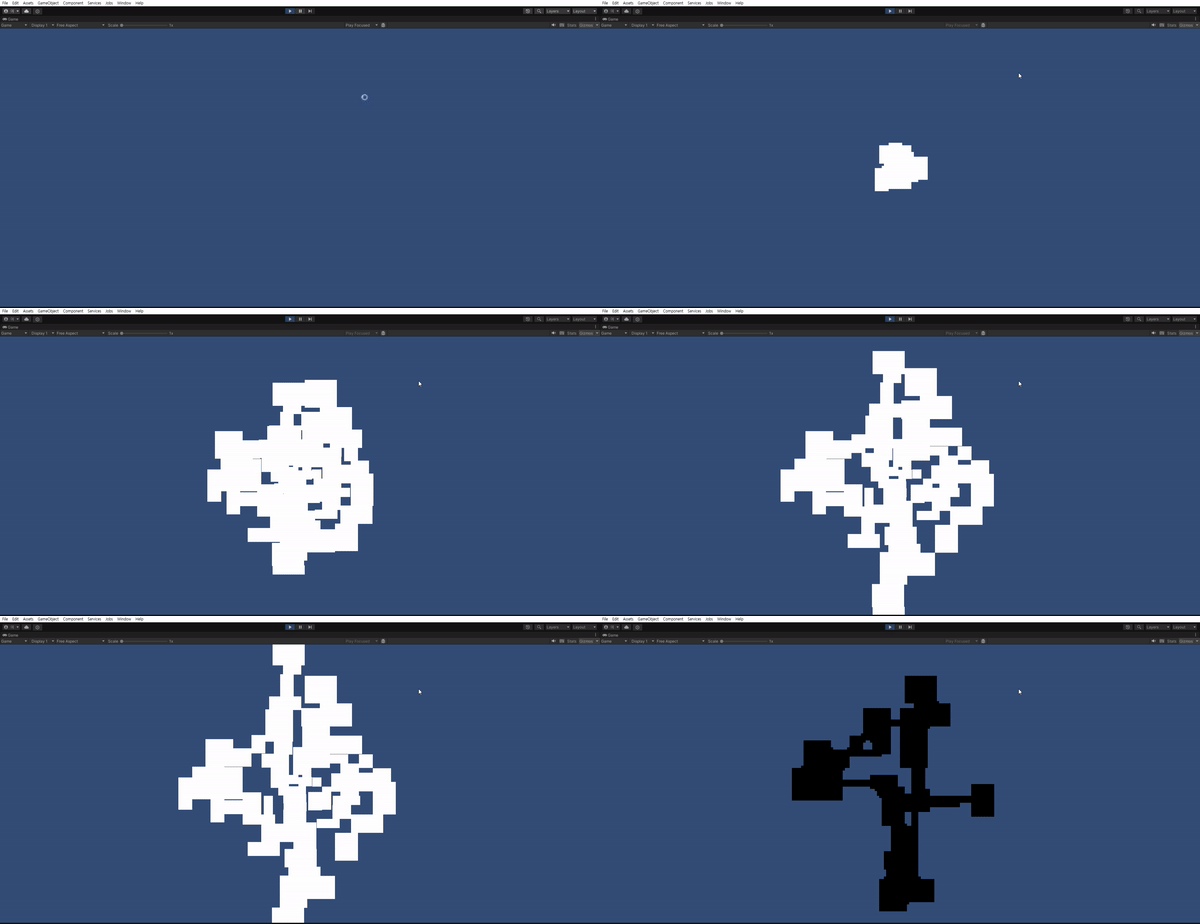
n의 값을 조절하며 맵을 직접 만들어보겠습니다.
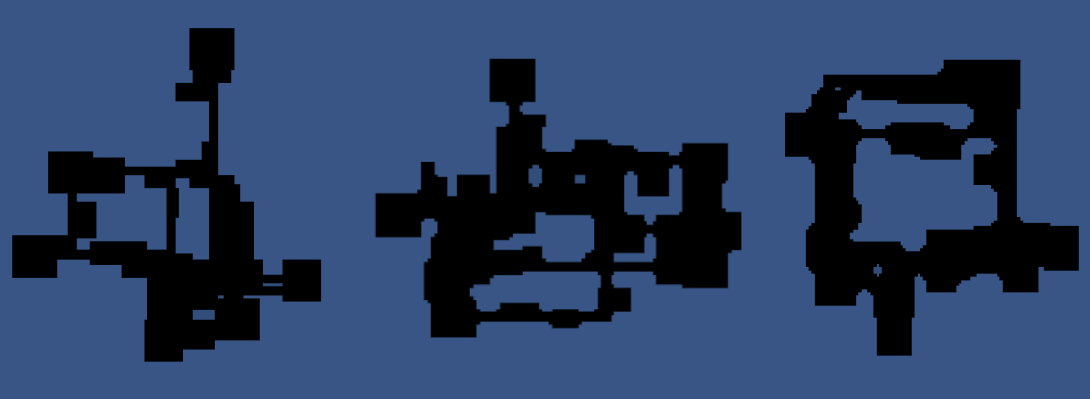
좌측부터 n=INF, n=5로 두 번, n=4로 두 번 실행시킨 든 맵입니다.
n=4로 두 번 실행시키면 방의 평평한 외벽부분은 smoothing이 안되고 교차한 부분만 과하게 다듬어져서 이질감이 드네요.
n=3부터는 방이 둥글어지고 교차한 부분은 smoothing이 안됩니다.
취향에 맞게 적절히 잘 조절하면 될 것 같습니다.
마무리
절차적 맵 생성을 통해서 모양까지 만들어봤습니다.
이대로 게임에 쓸 수는 없기 때문에 다음 글에서는 무료에셋을 사용해서 AutoTiling을 구현해보겠습니다.
참고자료
https://www.reddit.com/r/gamedev/comments/1dlwc4/procedural_dungeon_generation_algorithm_explained/
https://en.wikipedia.org/wiki/Cellular_automaton