스트림 재사용 시도

InputStream 사용시 주의사항
일반적인 스트림은 한번 사용하면 재사용이 불가능합니다. 따라서 아래와 같이 코드를 설계하면 잘못된 동작을 하게 됩니다.
pseudo code
InputStream inputStream = new FileInputStream(file) // (1)
byte[] byteBuffer = toByteArray(inputStream) // (1)
use(byteBuffer) // (2)
makeUploadFile(inputStream) // (3)
- InputStream을 이용해 파일을 읽어들여 byteBuffer에 담습니다.
- byteBuffer를 자유롭게 활용합니다.
- file로부터 만들어낸 InputStream에 file의 정보가 있을 거라 생각하고 다시 사용했지만, 이는 잘못된 접근입니다.
스트림은 무한한 입력을 가정합니다. 따라서 InputStream을 Read하면 새로운 데이터의 흐름을 처리하지 이전의 스트림을 다시 사용하지 않습니다. 우리는 (1)에서 파일의 내용을 모두 읽었기 때문에 더 이상 들어올 값은 없고 (3)에는 빈 파일이 생성됩니다.
실제 예시 코드로 살펴보면 다음과 같습니다.
public class Main {
    public static void main(String[] args) {
        File file = new File("input.txt");

        try (InputStream inputStream = new FileInputStream(file)) {

            // 1. InputStream → byte[]
            byte[] fileBytes = toByteArray(inputStream);

            // 2. byte[] → List<String>
            List<String> lines = byteArrayToLines(fileBytes);
            System.out.println("lines = " + lines);

            // 3. 이미 소비된 inputStream으로 CSV 파일 만들기 시도
            File outputFile = makeCsv(inputStream);
            System.out.println("outputFileLength = " + outputFile.length());


        } catch (Exception e) {
            e.printStackTrace();
        }
    }

    public static byte[] toByteArray(InputStream inputStream) throws Exception {
        ByteArrayOutputStream buffer = new ByteArrayOutputStream();
        byte[] data = new byte[1024];
        int bytesRead;

        while ((bytesRead = inputStream.read(data, 0, data.length)) != -1) {
            buffer.write(data, 0, bytesRead);
        }

        return buffer.toByteArray();
    }

    public static List<String> byteArrayToLines(byte[] bytes) throws Exception {
        List<String> lines = new ArrayList<>();
        try (BufferedReader reader = new BufferedReader(new InputStreamReader(new ByteArrayInputStream(bytes), StandardCharsets.UTF_8))) {
            String line;
            while ((line = reader.readLine()) != null) {
                lines.add(line);
            }
        }
        return lines;
    }

    public static File makeCsv(InputStream inputStream) throws Exception {
        File outputCsv = new File("output.csv");
        try (BufferedReader reader = new BufferedReader(new InputStreamReader(inputStream));
             BufferedWriter writer = new BufferedWriter(new FileWriter(outputCsv))) {

            String line;
            while ((line = reader.readLine()) != null) {
                writer.write(line);
                writer.newLine();
            }
        }
        return outputCsv;
    }

}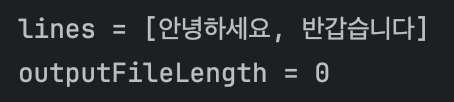
- InputStream을 모두 소모했기 때문에 정상적으로 파일을 만들지 못했습니다.
해결 방안
1. 스트림이 아닌 바이트 배열로 파일 만들기
    public static void main(String[] args) {
        File file = new File("input.txt");

        try (InputStream inputStream = new FileInputStream(file)) {

            // 1. InputStream → byte[]
            byte[] fileBytes = toByteArray(inputStream);

            // 2. byte[] → List<String>
            List<String> lines = byteArrayToLines(fileBytes);
            System.out.println("lines = " + lines);

            // 3. byte[] 기반으로 CSV 파일 만들기
            File outputFile = makeCsv(fileBytes);
            System.out.println("outputFileLength = " + outputFile.length());

        } catch (Exception e) {
            e.printStackTrace();
        }
    }

    public static byte[] toByteArray(InputStream inputStream) throws Exception {
        ByteArrayOutputStream buffer = new ByteArrayOutputStream();
        byte[] data = new byte[1024];
        int bytesRead;

        while ((bytesRead = inputStream.read(data, 0, data.length)) != -1) {
            buffer.write(data, 0, bytesRead);
        }

        return buffer.toByteArray();
    }

    public static List<String> byteArrayToLines(byte[] bytes) throws Exception {
        List<String> lines = new ArrayList<>();
        try (BufferedReader reader = new BufferedReader(new InputStreamReader(new ByteArrayInputStream(bytes), StandardCharsets.UTF_8))) {
            String line;
            while ((line = reader.readLine()) != null) {
                lines.add(line);
            }
        }
        return lines;
    }

    public static File makeCsv(byte[] data) throws Exception {
        File outputCsv = new File("output.csv");

        try (BufferedReader reader = new BufferedReader(new InputStreamReader(new ByteArrayInputStream(data), StandardCharsets.UTF_8));
             BufferedWriter writer = new BufferedWriter(new FileWriter(outputCsv))) {

            String line;
            while ((line = reader.readLine()) != null) {
                writer.write(line);
                writer.newLine();
            }
        }

        return outputCsv;
    }
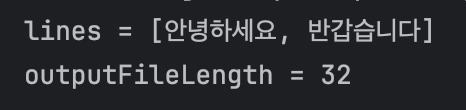
- 스트림이 아닌 byte배열을 이용해 csv파일을 만들었습니다. 스트림을 재사용하려 하지 않았기 때문에 문제가 발생하지 않습니다.
2. BufferedInputStream.reset() 활용하기
public class BufferedInputStreamExample {
    public static void main(String[] args) {
        File file = new File("/Users/qwerty1434/Desktop/input.txt");

        try (BufferedInputStream bufferedInputStream = new BufferedInputStream(new FileInputStream(file))) {

            // 0. mark() 호출
            bufferedInputStream.mark((int) file.length() + 1);

            // 1. InputStream → byte[]
            byte[] fileBytes = toByteArray(bufferedInputStream);

            // 2. byte[] → List<String>
            List<String> lines = byteArrayToLines(fileBytes);
            System.out.println("lines = " + lines);

            // 3. reset() 호출로 스트림 재사용 가능하게 함
            bufferedInputStream.reset();

            // 4. 스트림을 다시 사용해 CSV 파일 생성
            File outputFile = makeCsv(bufferedInputStream);
            System.out.println("outputFileLength = " + outputFile.length());

        } catch (Exception e) {
            e.printStackTrace();
        }
    }

    public static byte[] toByteArray(InputStream inputStream) throws Exception {
        ByteArrayOutputStream buffer = new ByteArrayOutputStream();
        byte[] data = new byte[1024];
        int bytesRead;

        while ((bytesRead = inputStream.read(data, 0, data.length)) != -1) {
            buffer.write(data, 0, bytesRead);
        }

        return buffer.toByteArray();
    }

    public static List<String> byteArrayToLines(byte[] bytes) throws Exception {
        List<String> lines = new ArrayList<>();
        try (BufferedReader reader = new BufferedReader(new InputStreamReader(new ByteArrayInputStream(bytes), StandardCharsets.UTF_8))) {
            String line;
            while ((line = reader.readLine()) != null) {
                lines.add(line);
            }
        }
        return lines;
    }

    public static File makeCsv(InputStream inputStream) throws Exception {
        File outputCsv = new File("/Users/qwerty1434/Desktop/output.csv");
        try (BufferedReader reader = new BufferedReader(new InputStreamReader(inputStream));
             BufferedWriter writer = new BufferedWriter(new FileWriter(outputCsv))) {

            String line;
            while ((line = reader.readLine()) != null) {
                writer.write(line);
                writer.newLine();
            }
        }
        return outputCsv;
    }
}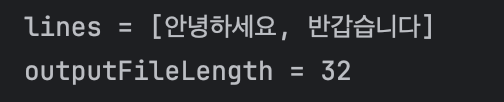
- BufferedInputStream을 이용하면 스트림을 재사용 할 수 있습니다. mark()메서드는 현재 위치를 표시(마킹)하고, reset()메서드를 통해 마지막으로 마킹한 위치로 스트림을 되돌릴 수 있습니다.
개인적으로 BufferedInputStream을 이용해 스트림을 재사용하는 것보단 바이트 배열로 파일을 만드는게 더 안전하단 생각이 들었습니다. BufferedInputStream의 mark()메서드를 여러 로직에서 사용하다 보면 원치 않은 곳으로 스트림이 되돌아갈 위험이 있어 보이고, 스트림 자체가 재사용보다 무한한 입력을 위한 것이라 생각됐기 때문입니다.

기록하고 정리하는 걸 좋아하는 백엔드 개발자입니다.