서론
필자는 pdf 기반으로 텍스트를 임베딩하여 챗봇을 생성하려고 한다. 그래서 벡터 임베딩을 위해 weaviate를 사용중이고 즉 rag를 이용해서 챗봇을 구현하려고 한다.
Generative search (RAG)
RAG가 뭔디
우선 generative search란 무엇일까?
생성형 검색은 task 프롬프트와 함께 대규모 언어 모델(LLM)에 컨텍스트로 제공하기 위해 관련 데이터를 검색하는 강력한 기술이다. 검색 증강 생성(RAG) 또는 경우에 따라
in-context learning으로도 불린다.
그래서 이것을 왜 사용해야되는걸까? chatgpt로도 충분하잖슴~~ 왜냐면 LLM은 강력하나 크게 두가지 한계가 존재한다.
- 부정확하거나
outdated한 정보 (hallucination이라고도 함)을 자신있게 생성한다. - 사용자가 필요한 정보에 대해서 학습할 수 없다.
그래서 이를 해결하기 위해 생성검색은 2단계 프로세스를 통해 이 문제를 해결한다.
- 쿼리를 통해 관련 데이터를 검색한다.
- 검색된 데이터와 사용자가 제공한 쿼리를 조합해 LLM에 메시지를 표시한다.
이렇게 한다면 LLM이 상황에 맞는 학습을 할 수 있어 환각된 결과물에 의존하지 않고 관련성 있는 최신 데이터를 사용할 수 있다.
Weaviate에서 제공하는 생성형 검색
weaviate에서 제공하는 검색기능은 유사도, 키워드 및 하이브리드 검색과 필터링 기능을 사용할 수 있다.
또한 생성 검색 기능이 통합되어 검색과 생성단계가 하나의 쿼리로 결합된다.
그래서 애플리케이션에서 생성 검색 워크 플로를 더 쉽고 빠르게 효율적으로 구현할 수 있다고 한다.
사용해보기
python v4에서는 아래와 같이 client를 생성해야된다.
import weaviate
from weaviate.auth import AuthApiKey
import os

client = weaviate.connect_to_wcs(
    cluster_url=os.getenv("WCD_DEMO_URL"),
    auth_credentials=AuthApiKey(api_key=os.getenv("WCD_DEMO_RO_KEY")),
    headers={
        "X-OpenAI-Api-Key": os.getenv("OPENAI_APIKEY")  # <-- Replace with your API key
    }
)
자신의 키를 등록하자!
공식문서 에서는 Pro Git의 책을 저장해서 테스트를 해보았다.
collection_name = "GitBookChunk"

chunks = client.collections.get(collection_name)
response = chunks.query.near_text(query="history of git", limit=3)
텍스트를 생성하기 전에 관련 데이터를 검색해야 한다. 그래서 semantic search를 통해 git의 역사와 가장 유사한 구절을 세개 검색해볼 수 있다. 그래서 이 코드를 약간만 수정하면 생성 검색을 사용해 이 결과 집합을 새로운 텍스트로 변환할 수 있다.
collection_name = "GitBookChunk"

chunks = client.collections.get(collection_name)
response = chunks.generate.near_text(
    query="history of git",
    limit=3,
    grouped_task="Summarize the key information here in bullet points"
)

print(response.generated)
이렇게 grouped_task를 사용해 이 정보를 요약할 수 있다.
즉 흐름은 아래와 같다.
history of git의 의미와 가장 유사한 구절 세개를 검색한다.- 그런 다음 검색된 결과와 유저가 제공한 프롬프트인
Summarize the key information here in bullet points를 결합해 생성한다.
생성된 텍스트는 LLM 동작이 randomness하기에 변동성이 있을 수 있다.
개별 개체 변환하는 방법
이 방법은 전체 결과 집합이 아닌 각 개체에 대한 텍스트를 개별적으로 생성하려는 경우에 유용하다.
collection_name = "WineReview"

reviews = client.collections.get(collection_name)
response = reviews.generate.near_text(
    query="fruity white wine",
    limit=3,
    single_prompt="""
        Translate this review into French, using emojis:
        ===== Country of origin: {country}, Title: {title}, Review body: {review_body}
    """
)
그래서 이 예제는 모델에 이모티콘을 사용하여 개별 와인 리뷰를 프랑스어로 번역하라는 메시지를 표시한다. 그래서 전체 결과 집합이 아닌 각 개체에 대해 개별적으로 LLM에 프롬프트가 표시된다.
청크 데이터 구조
from typing import List


def download_and_chunk(src_url: str, chunk_size: int, overlap_size: int) -> List[str]:
    import requests
    import re

    response = requests.get(src_url)  # Retrieve source text
    source_text = re.sub(r"\s+", " ", response.text)  # Remove multiple whitespaces
    text_words = re.split(r"\s", source_text)  # Split text by single whitespace

    chunks = []
    for i in range(0, len(text_words), chunk_size):  # Iterate through & chunk data
        chunk = " ".join(text_words[max(i - overlap_size, 0): i + chunk_size])  # Join a set of words into a string
        chunks.append(chunk)
    return chunks


pro_git_chapter_url = "https://raw.githubusercontent.com/progit/progit2/main/book/01-introduction/sections/what-is-git.asc"
chunked_text = download_and_chunk(pro_git_chapter_url, 150, 25)
이 예시는 청크 길이를 150단어로 하고 25단어 중첩을 사용하는 것이다. 이렇게 하면 챕터에서 텍스트를 다운로드하고 앞에 25단어 겹침이 추가된 150단어 청크의 문자열 목록/ 배열을 반환한다.
첫 번째 청크: 단어 0 ~ 149
두 번째 청크: 단어 125 ~ 274
세 번째 청크: 단어 250 ~ 399
이렇게 청크로 분할하게 되는 경우 일정 부분 겹침을 가져서 컨텍스트를 유지하는데 도움이 된다.
청크 데이터 저장
import weaviate.classes as wvc


collection_name = "GitBookChunk"

if client.collections.exists(collection_name):  # In case we've created this collection before
    client.collections.delete(collection_name)  # THIS WILL DELETE ALL DATA IN THE COLLECTION

chunks = client.collections.create(
    name=collection_name,
    properties=[
        wvc.config.Property(
            name="chunk",
            data_type=wvc.config.DataType.TEXT
        ),
        wvc.config.Property(
            name="chapter_title",
            data_type=wvc.config.DataType.TEXT
        ),
        wvc.config.Property(
            name="chunk_index",
            data_type=wvc.config.DataType.INT
        ),
    ],
    vectorizer_config=wvc.config.Configure.Vectorizer.text2vec_openai(),  # Use `text2vec-openai` as the vectorizer
    generative_config=wvc.config.Configure.Generative.openai(),  # Use `generative-openai` with default parameters
)


chunks_list = list()
for i, chunk in enumerate(chunked_text):
    data_properties = {
        "chapter_title": "What is Git",
        "chunk": chunk,
        "chunk_index": i
    }
    data_object = wvc.data.DataObject(properties=data_properties)
    chunks_list.append(data_object)
chunks.data.insert_many(chunks_list)

response = chunks.aggregate.over_all(total_count=True)
print(response.total_count)
위 코드는 청크에 대한 컬렉션 정의를 만들고 청크된 데이터를 저장한다. 그런다음 간단한 집계함수를 사용해 잘 저장이 됐는지 확인할 수 있다.
생성형 검색
response = chunks.generate.fetch_objects(
    limit=2,
    single_prompt="Write the following as a haiku: ===== {chunk} "
)

for o in response.objects:
    print(f"\n===== Object index: [{o.properties['chunk_index']}] =====")
    print(o.generated)
그럼 컬렉션에 데이터가 저장되었으니 해당 정보를 토대로 생성형 검색을 해보자. 이 예제에서는 두개의 객체를 검색하고 각 청크의 텍스트를 기반으로 하이쿠를 작성하도록 LLM 에 전달한다.
response = chunks.generate.fetch_objects(
    limit=2,
    grouped_task="Write a trivia tweet based on this text. Use emojis and make it succinct and cute."
)

print(response.generated)
이건 그룹화된 작업인데 이를 통해 소스 문서나 관련 구절과 같은 전체 검색 결과 집합을 LLM에 프롬프트를 전달할 수 있다. 그래서 이 예제에서는 언어 모델에 결과를 기반으로 트윗을 작성하라는 메시지를 표시한다.
response = chunks.generate.near_text(
    query="states of git",
    limit=2,
    grouped_task="Write a trivia tweet based on this text. Use emojis and make it succinct and cute."
)

print(response.generated)
이렇게 검색한 후 텍스트를 생성하는 기능을 사용할 수 있다. 이전 예제와 마찬가지의 결과이다.
모범사례
이 청크에 대한 자세한 모범사례는 공식문서를 참고하자
해당 링크에서는 semantic markers 를 통해 청크를 분할하거나 텍스트의 길이를 기준으로 청크를 처리하거나 이 두개를 혼합하는 전략도 있다. 또다른 고려사항은 예를 들어 청크 객체에 책 제목, 챕터 정보 등을 생각할 수 있다.
그리고 chain-of-thought prompting 이라는 기법도 존재한다. 이건 모델이 중간 추론 단계를 생성하도록 유도해 답변의 품질을 향상시킬 수 있다.
def generate_prompt(chunks: List[Dict[str, str]], query: str) -> str:
    prompt = f"Answer the following question based on the provided text chunks:\n\n"
    for chunk in chunks:
        prompt += f"Chunk {chunk['chunk_number']} from {chunk['source_url']}:\n{chunk['chunk_text']}\n\n"
    prompt += f"Question: {query}\nAnswer:"
    return prompt

query = "What is Git?"
prompt = generate_prompt(chunked_text, query)
print(prompt)
이 소스코드의 경우 청크 데이터를 활용해 프롬프트를 구성할 때 메타데이터를 포함해 모델에 더 많은 문맥을 제공할 수 있다. 청크번호와 소스 문서의 제목을 함께 제공해 모델이 문맥을 더 잘 이해할 수 있게 도와준다.
더 알아보기
Named vectors를 통해서 검색에 대상 벡터 이름을 포함할 수 있다.
from weaviate.classes.query import MetadataQuery

reviews = client.collections.get("WineReviewNV")
response = reviews.generate.near_text(
    query="a sweet German white wine",
    limit=2,
    target_vector="title_country",  # Specify the target vector for named vector collections
    single_prompt="Translate this into German: {review_body}",
    grouped_task="Summarize these review",
    return_metadata=MetadataQuery(distance=True)
)

print(response.generated)
for o in response.objects:
    print(o.properties)
    print(o.generated)
그래서 첫번재 호출은 리뷰 본문을 독일어로 번역하고 두번재 호출은 번역된 리뷰들을 요약한다.
prompt = "Convert this quiz question: {question} and answer: {answer} into a trivia tweet."

jeopardy = client.collections.get("JeopardyQuestion")
response = jeopardy.generate.near_text(
    query="World history",
    limit=2,
    single_prompt=prompt
)

# print source properties and generated responses
for o in response.objects:
    print(o.properties)
    print(o.generated)
이건 이제 컬렉션에 존재하는 속성값을 토대로 생성형 답변을 얻어내는 것이다.
task = "What do these animals have in common, if anything?"

jeopardy = client.collections.get("JeopardyQuestion")
response = jeopardy.generate.near_text(
    query="Australian animals",
    limit=3,
    grouped_task=task,
    grouped_properties=["answer", "question"]
)

# print the generated response
print(response.generated)
그리고 이건 다른 방식으로 프롬프트에서 사용할 개체 속성을 정의한다. 그래서 프롬프트에 표시되는 정보가 제한되고 프롬프트의 길이를 줄일 수 있다.
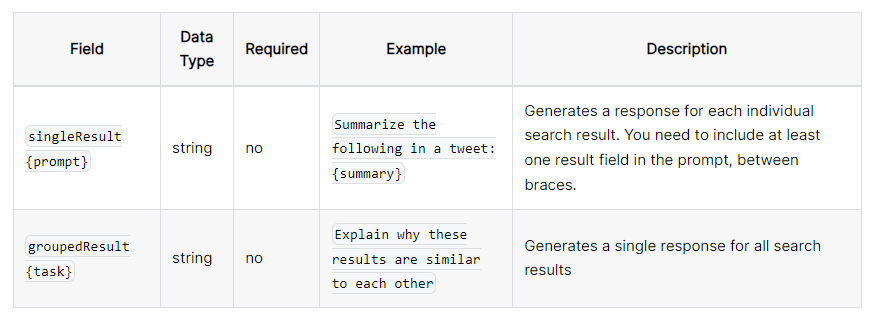
이렇게 단일 결과를 사용할 수 있고 모든 검색 결과에 대한 단일 응답을 생성할 수 있다.
openai로 사용하는 경우
아래와 같은 모델을 사용할 수 있다.
gpt-3.5-turbo (default)
gpt-3.5-turbo-16k
gpt-3.5-turbo-1106
gpt-4
gpt-4-1106-preview
gpt-4-32k
(레거시 모델도 지원하나 권장되지 않음)
davinci 002
davinci 003